当前位置:网站首页>[automation operation and maintenance novice village] flask-2 certification
[automation operation and maintenance novice village] flask-2 certification
2022-07-03 22:17:00 【EthanYue1024】
【 Abstract 】
stay Flask In the previous chapter of the topic , Mainly for Web Applied routing , Exception handling and interface return are explained further , Although the code is more robust , But it is still the most critical step away from being used in the production environment , That's it authentication .
Authentication is a very important step in any Interaction scenario .
【 authentication 】
You need to have a concept first , That's it Authentication is actually two operations :
- Identity Authentication
- Access control
Generally speaking, it means :
- First verify whether the user is legal , stay Web The illegal user in the application is
401(Unauthorized) - Then judge whether the user has the permission to operate , stay Web The prompt that there is no permission in the application is
403(Forbidden).
【Flask application 】
Identity Authentication
AK/SK
The simplest way for identity authentication , Is to give the caller a fixed access_key and secret_key, Also known as AK/SK, This is very common in scenarios where the system is called by a third party .
The code implementation is also very simple , as follows :
@app.route("/index")
def index():
    ak = request.headers.get("access_key", "")
    sk = request.headers.get("secret_key", "")
    if ak != "admin" or sk != "admin_secret":
         return " Authentication failed ", 401
    #  Specific business logic
    pass
In the above code , Suppose the caller will AK/SK On the requested Headers in , And our back-end application only allows admin This is a user call , If AK/SK Not in conformity with , Then return to authentication failure , If successful, specific business logic can be executed .
I believe some friends should have an idea , That is to write the logic code of authentication in the routing function , Isn't it that every routing function has to write duplicate authentication code ? If you don't have this question, you need to reflect , You can read more about the previous chapters .
It is obviously unreasonable for each routing function to write duplicate authentication logic , So how to optimize ?
Maybe some friends will feel , That abstracts the authentication logic into a separate function , Just call it every time , as follows :
from flask import Flask

def permission():
    ak = request.headers.get("access_key", "")
    sk = request.headers.get("secret_key", "")
    if ak == "admin" and sk == "admin_secret":
         return True
    return False

@app.route("/index")
def index():
    if not permission():
          return " Authentication failed ", 401
    #  Specific business logic
    pass
Although the above code looks much simpler on the surface , However, the fact that authentication logic is coupled with business logic has not changed .
Here you can change your thinking , If a routing function represents a business logic , If you need to authenticate before executing business logic , Is that equivalent to authentication before calling the routing function ?
In this way, the essence of the problem becomes , Before calling a function , Do a series of operations , Call this function if it is legal , If it is illegal, do not call . It sounds like it's completely Decorator The function of ( If you don't know about decorators , It is strongly recommended to read first 【 Automation operation and maintenance 】- Python Decorator ). The code is modified as follows :
from functools import wraps
from flask import Flask, request

app = Flask(__name__)

def permission(func):
    @wraps(func)
    def inner():
        ak = request.headers.get("access_key", "")
    		sk = request.headers.get("secret_key", "")
    		if ak == "admin" and sk == "admin_secret":
            return " Authentication failed ", 401
        return func()
    return inner

@app.route("/index")
@permission
def index():
    #  Specific business logic
    pass
register
It is now possible to fix AK/SK To verify , The next step is to consider whether users can achieve self-service access through registration AK/SK, In fact, it is equivalent to the function of registration , The function of registration is realized through user name and password .
But at present, the back-end application has not been introduced into the database , So we can pass for the time being JSON File to record user information , When the user calls the registration interface , Record the delivered username/password To JSON In file , You can retrieve the file next time , Judge whether the user is legal . The code is as follows :
import os
import json
from functools import wraps
from hashlib import md5
from flask import Flask, request

app = Flask(__name__)
ACCOUNTS_FILE = os.path.join(os.path.dirname(os.path.abspath(__file__)), "accounts.json")


def permission(func):
    @wraps(func)
    def inner():
        username = request.form.get("username")
        password = request.form.get("password")
        with open("accounts.json", "r+") as f:
            accounts = json.load(f)
        usernames = [account["username"] for account in accounts]
        if username not in usernames:  #  Determine whether the user already exists
            return {
    "data": None, "status_code": "NotFound", "message": "username is not exists"}
        for account in accounts:
            if account["username"] == username:
                if md5(password.encode()).hexdigest() != account["password"]:  #  Determine whether the user name and password are consistent
                    return {
    "data": None, "status_code": "Unauthorized", "message": "password is not correct"}
                return func()
    return inner


@app.route("/register", methods=["POST"])
def register():
    """ Register user information """
    username = request.form.get("username")
    password = request.form.get("password")
    if not username or not password:  #  Judge the parameters entered by the user
        return {
    "data": None, "status_code": "InvalidParams", "message": "must have username and password"}
    if not os.path.exists(ACCOUNTS_FILE):  #  Determine whether the specified file exists
        return {
    "data": None, "status_code": "NotFound", "message": "not found accounts file"}
    with open("accounts.json", "r+") as f:
        accounts = json.load(f)
    for account in accounts:
        if account["username"] == username:  #  Determine whether the user already exists
            return {
    "data": None, "status_code": "Duplicated", "message": "username is already exists"}
    accounts.append({
    "username": username, "password": md5(password.encode()).hexdigest()})
    with open("accounts.json", "w") as f:
        json.dump(accounts, f)
    return {
    "data": username, "status_code": "OK", "message": "register username successfully"}


@app.route("/index")
@permission
def index():
    #  Specific business logic
    return "success"


if __name__ == '__main__':
    app.run()
The above code specifies a file for storing user information accounts.json, You need to initialize its contents first , If you do not initialize the file , So it's going on json.load() It will throw exceptions , Prompt that the content of the file is not legal json, The initialization is as follows :
// accounts.json  file
[]
Through the first os.path.abspath(__file__) Get the absolute path where the current startup file is located , Re pass os.path.dirname(os.path.abspath(__file__)) Get the directory of the absolute path , Finally through os.path.join() Compare the directory with account.json File names are grouped together , You get the absolute path of the file .
Here, our user information is stored in an array , The approximate model is as follows :
[
  {
    "username": "", "password": ""},
  {
    "username": "", "password": ""}
]
At first glance, the registration function is relatively simple , However, there are still many abnormal judgments that need to be made in practice , A variety of predictable exceptions are handled in advance in the routing function of registered users , And return the error message . And in the save password phase , Special treatment , Because in principle, even the application party has no right to know the user's real password , So you need to save user information , Hash the password , as follows :
accounts.append({
    "username": username, "password": md5(password.encode()).hexdigest()})
And the hash of the password is also used for comparison during verification , as follows :
if md5(password.encode()).hexdigest() != account["password"]
Finally through postman The calling interface is as follows :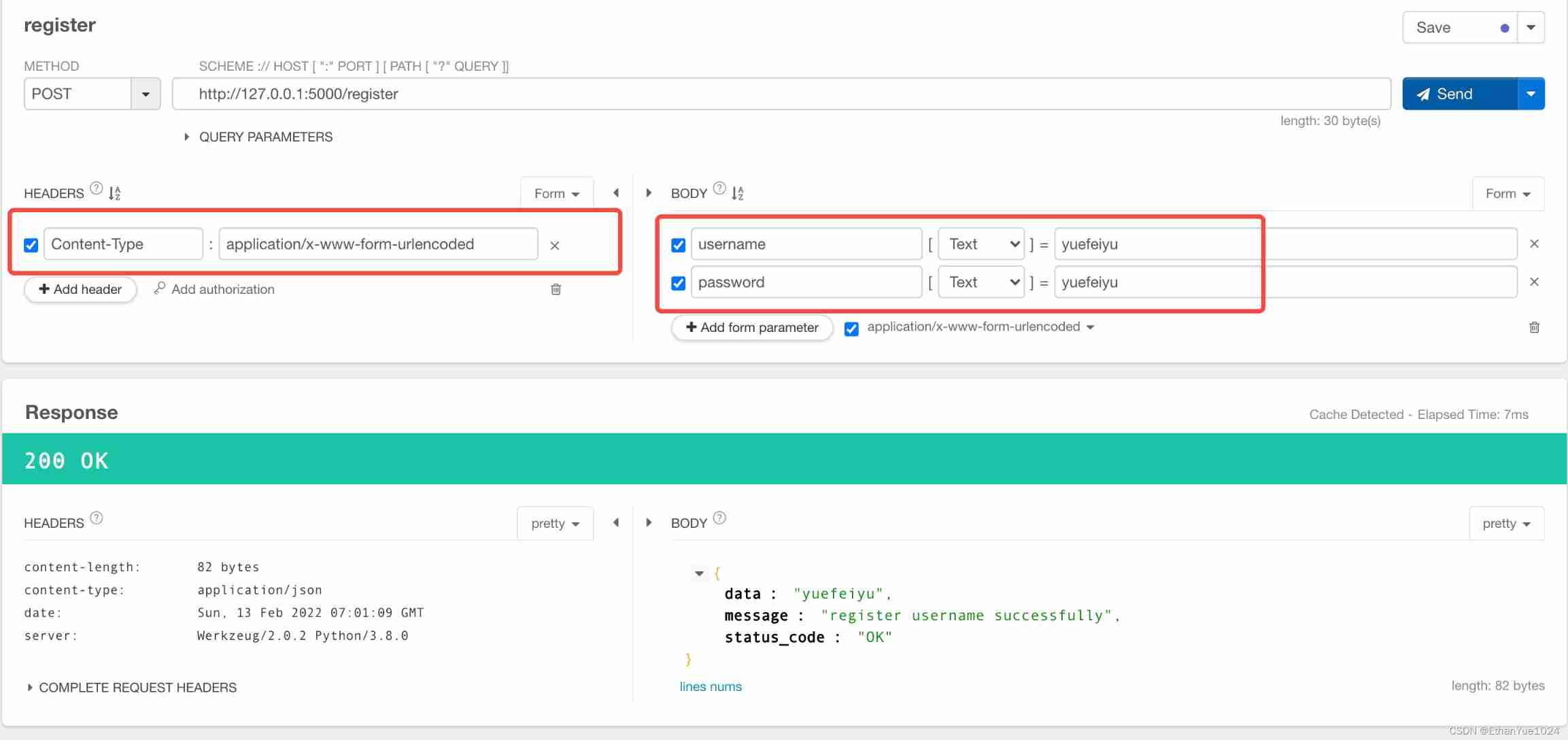
Sign in
Now users can register , Save your user name and password in the backend Application , In this way, the user name and password information carried in the request can pass the authentication .
But if user login can be realized , Users can log in only once , Within the valid time of login , Can make normal request access , And there is no need to pass the user name and password every request .
So the code needs to be modified as follows :
1. The registration logic remains unchanged .
2. New global constant LOGIN_TIMEOUT, Set a fixed login validity .
3. New global variables SESSION_IDS Used to record the information of logged in users , And the user's login time .
4. New login routing function , Verify that the user is registered , If the user name and password of the registered user are correct, the login is successful , Record the login information of the user , And return the generated session_id.
5. Modify decorator function , Get the session_id Field , Judge whether the user has logged in and is within the validity period , If the expiration date is exceeded, the login information of the user will be changed from SESSION_IDS Remove , The login timestamp is updated every time the request is initiated and the authentication is passed , To extend the login validity
The code is as follows :
import os
import time
import json
from hashlib import md5
from functools import wraps
from flask import Flask, request

app = Flask(__name__)

ACCOUNTS_FILE = os.path.join(os.path.dirname(os.path.abspath(__file__)), "accounts.json")

SESSION_IDS = {
    }

LOGIN_TIMEOUT = 60 * 60 * 24

def permission(func):
    @wraps(func)
    def inner():
        session_id = request.headers.get("session_id", "")
        global SESSION_IDS
        if session_id not in SESSION_IDS:  #  Whether there is conversational confidence
            return {
    "data": None, "status_code": "FORBIDDEN", "message": "username not login"}
        if SESSION_IDS[session_id]["timestamp"] - time.time() > LOGIN_TIMEOUT:  #  Whether the session is still valid
            SESSION_IDS.pop(session_id)  #  If it fails, remove the session information
            return {
    "data": None, "status_code": "FORBIDDEN", "message": "username login timeout"}
        SESSION_IDS[session_id] = time.time()  #  Update session time
        return func()
    return inner


@app.route("/register", methods=["POST"])
def register():
    """ Register user information """
    username = request.form.get("username")
    password = request.form.get("password")
    if not username or not password:  #  Judge the parameters entered by the user
        return {
    "data": None, "status_code": "InvalidParams", "message": "must have username and password"}
    if not os.path.exists(ACCOUNTS_FILE):  #  Determine whether the specified file exists
        return {
    "data": None, "status_code": "NotFound", "message": "not found accounts file"}
    with open("accounts.json", "r+") as f:
        accounts = json.load(f)
    for account in accounts:
        if account["username"] == username:  #  Determine whether the user already exists
            return {
    "data": None, "status_code": "Duplicated", "message": "username is already exists"}
    accounts.append({
    "username": username, "password": md5(password.encode()).hexdigest()})
    with open("accounts.json", "w") as f:
        json.dump(accounts, f)
    return {
    "data": username, "status_code": "OK", "message": "register username successfully"}


@app.route("/login", methods=["POST"])
def login():
    """ The user login """
    username = request.form.get("username")
    password = request.form.get("password")
    if not os.path.exists(ACCOUNTS_FILE):  #  Whether there is a user information file
        return {
    "data": None, "status_code": "NotFound", "message": "not found accounts file"}
    with open("accounts.json", "r+") as f:
        accounts = json.load(f)
    usernames = [account["username"] for account in accounts]
    if username not in usernames:  #  Whether the user is registered
        return {
    "data": None, "status_code": "NotFound", "message": "username is not exists"}
    current_user = None
    for account in accounts:
        if account["username"] == username:
            current_user = account
            if md5(password.encode()).hexdigest() != account["password"]:  #  Whether the user name and password are correct
                return {
    "data": None, "status_code": "Unauthorized", "message": "password is not correct"}
            session_id = md5((password + str(time.time())).encode()).hexdigest()  #  Generative session ID
            global SESSION_IDS
            SESSION_IDS[session_id] = {
    "user_info": current_user, "timestamp": time.time()}  #  Record session information
            return {
    "data": {
    "session_id": session_id}, "status_code": "OK", "message": "login successfully"}


@app.route("/cmdb", methods=["POST"])
@permission
def index():
    pass
    return "success"


if __name__ == "__main__":
    app.run(host="127.0.0.1", port=5000, debug=True)
adopt Postman Launch the login request as follows :


Complete code
import os
import time
import json
from hashlib import md5
from functools import wraps
from flask import Flask, request

app = Flask(__name__)

ACCOUNTS_FILE = os.path.join(os.path.dirname(os.path.abspath(__file__)), "accounts.json")

SESSION_IDS = {
    }

LOGIN_TIMEOUT = 60 * 60 * 24

def permission(func):
    @wraps(func)
    def inner():
        session_id = request.headers.get("session_id", "")
        global SESSION_IDS
        if session_id not in SESSION_IDS:
            return {
    "data": None, "status_code": "FORBIDDEN", "message": "username not login"}
        if SESSION_IDS[session_id]["timestamp"] - time.time() > LOGIN_TIMEOUT:
            SESSION_IDS.pop(session_id)
            return {
    "data": None, "status_code": "FORBIDDEN", "message": "username login timeout"}
        SESSION_IDS[session_id] = time.time()
        return func()
    return inner


@app.route("/register", methods=["POST"])
def register():
    """  Register user information  """
    username = request.form.get("username")
    password = request.form.get("password")
    if not username or not password:
        return {
    "data": None, "status_code": "InvalidParams", "message": "must have username and password"}
    if not os.path.exists(ACCOUNTS_FILE):
        return {
    "data": None, "status_code": "NotFound", "message": "not found accounts file"}
    with open("accounts.json", "r+") as f:
        accounts = json.load(f)
    for account in accounts:
        if account["username"] == username:
            return {
    "data": None, "status_code": "Duplicated", "message": "username is already exists"}
    accounts.append({
    "username": username, "password": md5(password.encode()).hexdigest()})
    with open("accounts.json", "w") as f:
        json.dump(accounts, f)
    return {
    "data": username, "status_code": "OK", "message": "register username successfully"}


@app.route("/login", methods=["POST"])
def login():
    """ The user login """
    username = request.form.get("username")
    password = request.form.get("password")
    if not os.path.exists(ACCOUNTS_FILE):
        return {
    "data": None, "status_code": "NotFound", "message": "not found accounts file"}
    with open("accounts.json", "r+") as f:
        accounts = json.load(f)
    usernames = [account["username"] for account in accounts]
    if username not in usernames:
        return {
    "data": None, "status_code": "NotFound", "message": "username is not exists"}
    current_user = None
    for account in accounts:
        if account["username"] == username:
            current_user = account
            if md5(password.encode()).hexdigest() != account["password"]:
                return {
    "data": None, "status_code": "Unauthorized", "message": "password is not correct"}
            session_id = md5((password + str(time.time())).encode()).hexdigest()
            global SESSION_IDS
            SESSION_IDS[session_id] = {
    "user_info": current_user, "timestamp": time.time()}
            return {
    "data": {
    "session_id": session_id}, "status_code": "OK", "message": "login successfully"}


@app.route("/index", methods=["GET"])
@permission
def index():
    pass
    return "success"


if __name__ == "__main__":
    app.run(host="127.0.0.1", port=5000, debug=True)
【 summary 】
This chapter mainly explains the principle and specific implementation of user identity authentication , The next chapter will introduce permission verification in detail .
Real time Flask There are also third-party plug-ins that can log in , be called flask-login, Interested students can understand , But our main purpose is to understand the specific logic of identity authentication , Instead of being a “ Transfer hero ”.
besides , One thing we need to think about carefully is , Programming is facing the computer , Therefore, the logic of rigor and exception handling , Need to be very careful , Usually, when realizing a function, it is not through positive thinking , Just translate the specific logic of this function into code ; Instead, we should fully consider the various boundary conditions involved in the process of this function .
Finally, let's leave a question for consideration , If you can think about various boundary conditions carefully , You will find that there is a concurrency problem in the final code :
When many people request to register at the same time , Whether it will lead to write conflict in the file , If it will , How can the application solve it ?
Welcome to add my official account. 【Python Play with automated operation and maintenance 】 Join the audience , Get more dry content
边栏推荐
- China's coal industry investment strategic planning future production and marketing demand forecast report Ⓘ 2022 ~ 2028
- Dahua series books
- Buuctf, web:[geek challenge 2019] buyflag
- How PHP adds two numbers
- [sg function]split game (2020 Jiangxi university student programming competition)
- BUUCTF,Misc:LSB
- How to store null value on the disk of yyds dry inventory?
- Mysql database - Advanced SQL statement (I)
- Is it safe and reliable to open an account and register for stock speculation? Is there any risk?
- Minio deployment
猜你喜欢

Teach you to easily learn the type of data stored in the database (a must see for getting started with the database)

gslb(global server load balance)技術的一點理解
使用dnSpy對無源碼EXE或DLL進行反編譯並且修改
![Intimacy communication -- [repair relationship] - use communication to heal injuries](/img/c2/f10405e3caf570dc6bd124d65b2e93.jpg)
Intimacy communication -- [repair relationship] - use communication to heal injuries

Covariance

Blue Bridge Cup Guoxin Changtian MCU -- program download (III)

Go Technology Daily (2022-02-13) - Summary of experience in database storage selection

Buuctf, misc: n solutions
pivot ROP Emporium

On my first day at work, this API timeout optimization put me down!
随机推荐
WiFi 2.4g/5g/6g channel distribution
How does sentinel, a traffic management artifact, make it easy for business parties to access?
Blue Bridge Cup Guoxin Changtian single chip microcomputer -- software environment (II)
Dynamic research and future planning analysis report of China's urban water supply industry Ⓝ 2022 ~ 2028
Blue Bridge Cup Guoxin Changtian single chip microcomputer -- led lamp module (V)
string
Collection | pytoch common loss function disassembly
Cognitive fallacy: what is dimensional curse
DR-NAS26-Qualcomm-Atheros-AR9582-2T-2R-MIMO-802.11-N-5GHz-high-power-Mini-PCIe-Wi-Fi-Module
6.2 normalization 6.2.5 third normal form (3NF)
Ansible common usage scenarios
2022 G3 boiler water treatment registration examination and G3 boiler water treatment examination papers
Covariance
AST (Abstract Syntax Tree)
UC Berkeley proposes a multitask framework slip
[sg function]split game (2020 Jiangxi university student programming competition)
LeetCode 540. A single element in an ordered array
Buuctf, misc: sniffed traffic
Implementation principle of inheritance, encapsulation and polymorphism
Remember the experience of automatically jumping to spinach station when the home page was tampered with