当前位置:网站首页>Shell array
Shell array
2022-06-25 13:59:00 【Resounding through heaven】
1 Introduce
Shell Support array (Array), An array is a collection of data , Each piece of data is called an element of an array . Only one-dimensional arrays are supported , Multidimensional arrays are not supported .
2 grammar
stay Shell in , Parenthesis ( ) To represent an array , Array elements are separated by spaces . The grammar is :
array_name=(item1  item2 ...)  #  The way 1
array_name=([ Index subscript 1]=item1  [ Index subscript 2]=item2  ...)  #  The way 2
3 Get array
1 Get the element value by subscript ,index from 0 Start
${arr[index]}
2 . Get the value and copy it to other variables
item=${arr[index]}
3 Use @ or * You can get all the elements in the array
${arr[@]}
${arr[*]}
4 Get the length or number of arrays
${#arr[@]}
${#arr[*]}
5 Gets the character length of the specified element of the array
${#arr[ Indexes ]}
demo:
#!/bin/bash
array=(1 2 3 4 5 6 "hello world" 38)


echo "array All elements are : ${array[*]}"
echo "array The length is : ${#array[*]}"


echo "index Subscript to be 0 Value : ${array[0]}"
echo "index Subscript to be 6 Value : ${array[6]}"

echo "index Subscript to be 6 The length of the string is :${#array[6]}"

4 Array splicing
4.1 Introduce
So-called Shell Array splicing ( Array merge ), Is to join two arrays into an array
4.2 grammar
Use @ and * Get all the elements of the array and splice them
array_new=(${array1[@]} ${array2[@]} ...)
array_new=(${array1[*]} ${array2[*]} ...)
4.3 demonstration
#!/bin/bash
array1=(1 2 3)
array2=(4 5 6)

array3=(${
    array1[*]} ${
    array2[*]})


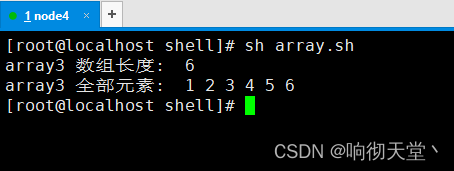
echo "array3  The length of the array : ${#array3[*]}"
echo "array3  All elements : ${array3[*]}"
5 Array deletion
5.1 Introduce
Delete array specifies the element data and deletes the entire array data
5.2 grammar
# Delete array specified element data
unset array_name[index]

# Delete the entire array
unset array_name
5.3 demo
#!/bin/bash
array1=(1 2 3)
array2=(4 5 6)


echo "array1: ${array1[*]}"
echo " Delete array array1"
unset array1
echo "array1: ${array1[*]}"


echo "array2: ${array2[*]}"
echo " Delete array1 Subscript to be 0 The elements of "
unset array2[0]
echo " After deleting  array1: ${array2[*]}"

边栏推荐
- golang项目依赖管理工具go vendor,go mod
- Cold migration and resize of Nova component source code analysis
- Knowledge of initial C language 2.0
- How to configure aliases for typescript + vite projects
- Qt内存映射
- Rust,程序員創業的最佳選擇?
- 国信证券股票开户是安全的吗?
- VGA display of de2-115 FPGA development board
- 腾讯云搭建Socks5多IP代理服务器实现游戏单窗口单IP完美搭建教程附带工具「建议收藏」
- 多臺雲服務器的 Kubernetes 集群搭建
猜你喜欢



随机推荐
shell 字符串变量
Sigmoid function sigmoid derivation
哈希錶、哈希沖突
Installation and removal of MySQL under Windows
Problems encountered in debugging botu TCP connection with debugging tool
Getting started with numpy Library
golang项目依赖管理工具go vendor,go mod
QT memory mapping
NR-ARFCN和信道栅格、同步栅格和GSCN
用NumPy实现神经网络(Mysteries of Neural Networks Part III)
[open source Hongmeng system display] the rk3568 development board is equipped with openharmony 3.1 release
shell 内置命令
Realization of neural networks with numpy
K-line diagram 24 classic diagrams (shadow)
Openstack learning notes -nova component insight
VGA display of de2-115 FPGA development board
权益NFT开创者Hash Eagle如何重新定义NFT,用权益赋能长续价值?
BACnet gateway bl103 for building automation
[proteus simulation] 51 MCU +ds1302+lcd1602 display
Kubernetes cluster construction of multiple ECS