当前位置:网站首页>小程序手持弹幕的原理及实现(uni-app)
小程序手持弹幕的原理及实现(uni-app)
2022-06-30 09:32:00 【静的小白菜】
手持弹幕前言
通过本篇的文章,可以使用HBuilder写一个手持弹幕,一步一步编写出来。
如果想直接运行,发布到自己小程序,在我的资源中有手持弹幕的资源,这不是免费的。手持弹幕
先来效果展示(小程序)
一、思路
思考手持弹幕的实现:让文字横屏,然后匀速运动,当文字尾部到达屏幕的一半的时候,手机屏幕的底部再出来和之前一样的文字实现循环,最后用户可以控制文字大小,速度的快慢,文字的颜色等。
二、代码实现
1.文字横向展示
首先需要有个盒子,将盒子设置为和手机屏幕一样的宽高,通过transform属性旋转90度旋转中心点为屏幕的中心
——旋转盒子内容会变吗?
盒子旋转后里面的内容也会跟着改变
旋转后发现文字实现了横向,但是文字位于右上角,需要文字水平居中。给文字的外盒子一个高度百分之百垂直居中。
——这里有个小坑,为啥是高度不是宽度?
原因是盒子旋转了┐( ̄ー ̄)┌
为了看着比较好看点给文字加上filter属性
// template标签
	<view class="barrage-box">
		<view class="bulletB">
			<text>文字横向</text>
		</view>
	</view>

// style标签
	page {

		background: #010101;
	}
	.barrage-box{

		width: 100vh;
		height: 100vw;
		transform-origin: 50vw 50vw;
		transform: rotate(90deg);
		background-color: #010101;
		overflow: hidden;
	}
	.bulletB{

		display: flex;
		align-items: center;
		height: 100%;
		color: #fff;
		font-size: 200rpx;
	}
	.bulletB text {

		filter: drop-shadow(4px 2px 2px #cd2068);
	}
效果图:
2.让文字滚动起来
这一步就有点复杂,不仅要考虑到那种方式滚动起来更加合理,还要考虑到如何实现连续滚动。
滚动方式采用css动画属性来实现滚动,连续滚动肯定要有两个一样的元素,首先第一个动画文字从屏幕底部滚动到顶部,第二个动画接上第一个动画的结尾,第二个text文字滚动到和顶部一致的时候循环。
——为啥滚动的动画不放到类为bulletB的标签上?
效果不理想,可以试试**(~ ̄▽ ̄)~**
——为啥要用两个动画?
我只能想到用两个动画去实现,如果有更好的方法,指点我一下**(*ω*)**
之前没有修改的代码就不显示,新增代码如下:
// template标签
	<view class="bulletB">
		<text :class="rollClass">文字横向~</text>
		<text :class="rollClass">文字横向~</text>
	</view>

// script标签
		data() {

			return {

				rollClass:'',
			}
		},
		onShow() {

			this.roll()
			this.rollClass = 'roll'
		},
		methods: {

			roll(){

			// 这里的2000时间是由于动画执行2s,如果动画时间改变,这个也应该改变
				setTimeout(() => {

					this.roll()
					this.rollClass = 'rollCycle'
				},2000)
			}
		}

// style标签
	.bulletB text {

		padding-right: 300px;
		white-space: nowrap;
		filter: drop-shadow(4px 2px 2px #cd2068);
		animation-duration:2s;
	}

	.roll {

		animation-name: rollScreen;
		animation-timing-function: linear
	}

	.rollCycle {

		animation-name: roll;
		animation-timing-function: linear;
		animation-iteration-count: infinite;
	}

	@keyframes rollScreen {

		0% {

			transform: translateX(100vh);
		}

		100% {

			transform: translateX(0px);
		}
	}

	@keyframes roll {

		0% {

			transform: translateX(0px);
		}

		100% {

			transform: translateX(-100%);
		}
	}
运行界面: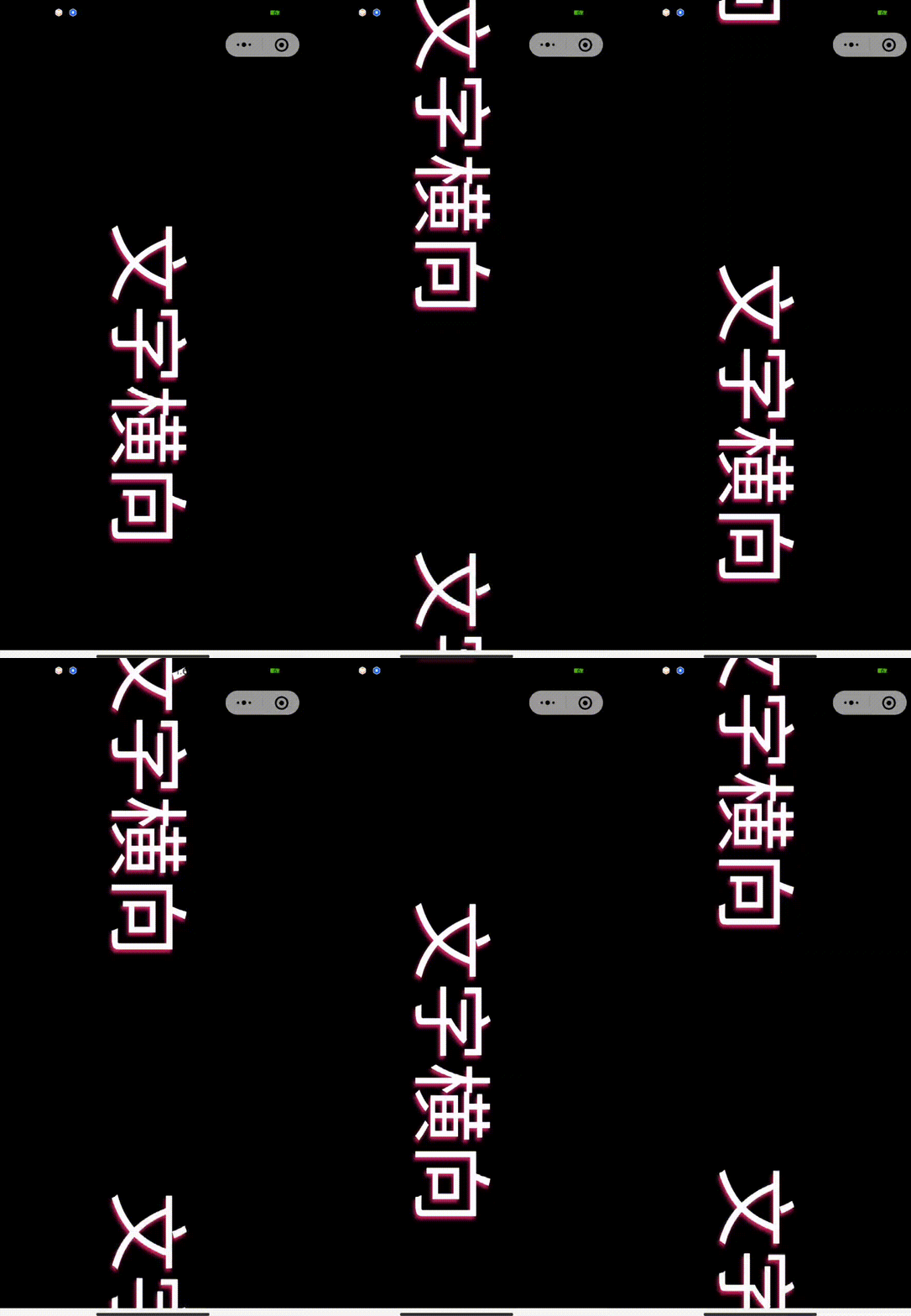
3.用户可以控制文字
一个输入框用于用户输入,当用户输入完成后,要根据文字的长度去计算出动画所需的时间,重新执行动画。
思路有了开始实现。
之前没有修改的代码就不显示,新增代码如下:
// template标签
		<view v-show="isShow && !isSetup" class="foot">
			<view class="footUp">
				<view class="footUpLeft">
					<input v-model="newRollTxt" type="text" placeholder="请输入内容"/>
					<text @click="setTxt()" class="btn">发送</text>
				</view>
				<!-- <view @click="Setup()" class="footIcon">
					<uni-icons type="settings-filled" size="30" color="#FFFFFF"></uni-icons>
				</view> -->
			</view>
		</view>

		<view @click="setShow"  class="barrage-box">
			<view class="bulletB">
				<text :class="rollClass" class="text" :style="{'animation-duration': rollTime}">{
    {
    rollTxt}}</text>
				<text :class="rollClass" :style="{'animation-duration': rollTime}">{
    {
    rollTxt}}</text>
			</view>
		</view>


// script标签
		data() {

			return {

				rollClass:'',
				rollTxt:'手持弹幕~',
				rollTime:'',
				newRollTxt:'',
				isShow: true, // 底部是否显示
				screenHeight: '', // 屏幕高度
				speed: 300, // 动画速度的比值
				timerName:'' // 定时器
			}
		},
		onReady() {

			uni.getSystemInfo({

				success: (res) => {

					this.screenHeight = res.screenHeight
					this.setTime()
				}
			})
		},
		methods: {

			setShow(){

				this.isShow = !this.isShow
			},
			// 发送弹幕
			setTxt() {

				this.rollTxt = this.newRollTxt
				this.newRollTxt = ''
				// 清除定时器,防止第一次东湖没有执行完,又重新输入了。
				clearTimeout(this.timerName);
				this.setTime()
			},
			// 计算出时间
			setTime() {

				this.$nextTick(() => {

					let txtView = uni.createSelectorQuery().in(this).select(".text");
					txtView.boundingClientRect(
						data => {

							this.rollClass = this.rollClass == 'rollTwo' ? 'roll' : 'rollTwo'
							// 屏幕高度除以动画比值得出第一个动画需要的时间
							let rollSpeed = (this.screenHeight / this.speed).toFixed(1)
							this.rollTime = rollSpeed + 's'
							// 滚动文字长度除以动画比值得出第二循环动画需要的时间
							let rollSpeedTxt = (rollSpeed * (data.height / this.screenHeight)).toFixed(1)
							// 设置一个计时器,当第一个动画结束的时候执行第二个动画
							this.timerName = setTimeout(() => {

								this.rollClass = 'rollCycle'
								this.rollTime = rollSpeedTxt + 's'
							}, rollSpeed * 1000)
						}).exec();
				})
			}
		}


// style标签

	.foot {

		position: fixed;
		bottom: 0rpx;
		z-index: 10;
	}

	.footUp {

		padding-left: 30rpx;
		display: flex;
		align-items: center;
		margin-bottom: 20rpx;
	}

	.footUpLeft {

		width: 640rpx;
		display: flex;
		align-items: center;
		justify-content: center;
		height: 80rpx;
		padding: 0 30rpx;
		background: #212427;
		color: #FFFFFF;
		border-radius: 10rpx;
	}

	.footUpLeft input {

		flex: 1;
	}

	.footUpLeft .btn {

		margin-left: 20rpx;
	}

	.rollTwo {

		animation-name: rollAgain;
		animation-timing-function: linear;
	}

	@keyframes rollAgain {

		0% {

			transform: translateX(100vh);
		}

		100% {

			transform: translateX(0px);
		}
	}
总结
别的小朋友有的我也要有ᕦ(・ㅂ・)ᕤ过程中遇到不少问题,幸运的是都不算是太难。
可能该手持弹幕还有一些问题存在比如文字过短的时候会导致第二个字不是从屏幕最底下出现的,加个文本长度和屏幕长度的对比就好了。
原本还想吧那个修改颜色,速度,大小写上去。明天放假**(~ ̄▽ ̄)~** 就这吧。
边栏推荐
- Wechat development tool (applet)
- Function simplification principle: save if you can
- Do you want the dialog box that pops up from the click?
- Opencv learning notes-day14 drawing of image geometry (rect class rotatedrect class, rectangle drawing rectangle circle drawing circular function line drawing line function ellipse drawing elliptic fu
- Opencv learning notes -day3 (mat object and creation related operations mat:: clone(), mat:: copyto(), mat:: zeros(), mat:: ones(), scalar()...)
- Rew acoustic test (III): generate test signal
- Opencv learning notes-day9 opencv's own color table operation (colormap coloraptypes enumeration data types and applycolormap() pseudo color function)
- Handwriting sorter component
- Terminal -- Zsh of terminal three swordsmen
- Use V-IF with V-for
猜你喜欢

Opencv learning notes -day 11 (split() channel separation function and merge() channel merge function)
![[shutter] solve failed assertion: line 5142 POS 12: '_ debugLocked‘: is not true.](/img/77/eb66ec83b34c251e732d495fbaa951.jpg)
[shutter] solve failed assertion: line 5142 POS 12: '_ debugLocked‘: is not true.

Baidu map JS browsing terminal

Opencv learning notes -day3 (mat object and creation related operations mat:: clone(), mat:: copyto(), mat:: zeros(), mat:: ones(), scalar()...)

Implementing custom drawer component in quick application

4. use ibinder interface flexibly for short-range communication

Numpy (time date and time increment)

Express の post request

Opencv learning notes -day8 (keyboard typing (waitkey()); Wait for typing) action: triggers some action when the appropriate character is typed using the keyboard)

What kind of experience is it to develop a "grandson" who will call himself "Grandpa"?
随机推荐
Opencv learning notes -day1 (image reading display imread, imshow, namedwindow)
Guilin robust medical acquired 100% equity of Guilin Latex to fill the blank of latex product line
Sort (simple description)
Applet learning path 2 - event binding
Raspberry pie 4B no screen installation system and networking using VNC wireless projection function
Deep Learning with Pytorch- A 60 Minute Blitz
Abstract factory pattern
100 lines of code and a voice conversation assistant
Rew acoustic test (III): generate test signal
Express file upload
Design specification for smart speakers v1.0
Set, map and modularity
Installation, use and explanation of vulnerability scanning tool OpenVAS
Anchorgenerator for mmdet line by line interpretation
Torchvision loads the weight of RESNET except the full connection layer
Idea setting automatic package Guide
Esp32 (6): Bluetooth and WiFi functions for function development
Differences between the notify(), notifyall(), notifydatasetchanged(), notifydatasetinvalidated() methods in the adapter
Startup of MySQL green edition in Windows system
7. know JNI and NDK