当前位置:网站首页>Opencv learning notes -day3 (mat object and creation related operations mat:: clone(), mat:: copyto(), mat:: zeros(), mat:: ones(), scalar()...)
Opencv learning notes -day3 (mat object and creation related operations mat:: clone(), mat:: copyto(), mat:: zeros(), mat:: ones(), scalar()...)
2022-06-30 08:47:00 【Chasing foot dream】
OpenCV Learning notes
day3-Mat Object and creation
Mat The basic operation of class
Mat class :Mat::clone(),Mat::copyTo(),Mat::zeros(),Mat::ones(),Scalar()
One , Copy
function :
Shallow copy - Do not copy data but create matrix headers , Data sharing
example 1
Mat a = imread("1.jpg");
clone It's a complete deep copy , Apply for new space in memory
// Definition
Mat Mat::clone() const
{

    Mat m;
    copyTo(m);
    return m;
}
example 2
Mat m1 = image.clone();
//clone  It's a complete deep copy , Apply for new space in memory , And image Independent
// Definition
void GpuMat::copyTo(OutputArray dst, InputArray mask) const
{

    copyTo(dst, mask, Stream::Null());
}
OpenCV in image.copyTo() There are two forms :
1、image.copyTo(imageROI), The effect is to turn image Paste your content into imageROI;
2、image.copyTo(imageROI,mask), The effect is to turn mask and image After overlapping, put mask The pixel value in is 0(black) The point corresponding to image The point in the becomes transparent , And keep other points .
mask: The mask . The mask is made by 0 and 1 Make up a binary image . When a mask is applied to a function ,1 Value area is processed , Shielded 0 The value area is not included in the calculation . By the specified data value 、 Data range 、 Finite or infinite value 、 Region of interest and annotation file to define image mask , Any combination of the above options can also be used as input to establish a mask .
example 3
image.copyTo(m2);// hold image Copy the contents of to m2 in
Two , Create a blank image
function :
Mat::zeros() Returns an array of zeros of the specified size and type
Mat::ones() Returns the specified size and type 1 Array of
// Definition
static MatExpr zeros(Size size, int type);
static MatExpr ones(Size size, int type);
type Can be any predefined type , The structure of the predefined types is as follows :
CV_<bit_depth>(S|U|F)C<number_of_channels>
1)bit_depth— Number of bits — representative 8bite,16bites,32bites,64bites— Let's give you an example – for instance , Such as
If you create a store now – Grayscale image of Mat object , The size of this image is wide 100, high 100, that , Now this grayscale image has 10000 Pixels , The memory space occupied by each pixel is 8bite,8 position – So it corresponds to CV_8
2)S|U|F
S– representative —signed int— There's symbolic plastic
U– representative –unsigned int– Unsigned shaping
F– representative –float--------- Single precision floating point
3)C<number_of_channels>
representative — The number of channels in a picture , such as :
1– Grayscale picture –grayImg— yes – Single channel image
2–RGB Color images --------- yes –3 Channel image
3– belt Alph The tunnel RGB Images – yes --4 Channel image
example 4
Mat m3 = Mat::zeros(Size(8, 8), CV_8UC1);
// Create a matrix ;CV_8UC1 8-bit unsigned single channel  CV_8UC1 single channel
// Initialize to 1  At this time, only single channel can be selected
//if Use 3 If the channel looks at the complete results below, there will be errors - Only the first channel is initialized to 1
Mat m3 = Mat::ones(Size(8, 8), CV_8UC1);//8*8 8 Bit unsigned single channel
// Initialize to 1, Use 3 passageway
Mat m3 = Mat::ones(Size(8, 8), CV_8UC3);//8*8 8 Bit unsigned 3 passageway
example 5
std::cout << "width: " << m3.cols << std::endl;// Output width
	std::cout << "height: " <<m3.rows << std::endl;// Output width
	std::cout << "channels: " << m3.channels()<< std::endl;// Number of output channels
Code
quickopencv.h
#pragma once

#include <opencv2\highgui.hpp>

#include <opencv2\imgproc.hpp>

using namespace cv;
// Defining classes
class QuickDemo{

public:
	void colorSpace_Demo(Mat &image);// Color space conversion function 2021-12-24
	void mat_creation_demo(Mat &image);//Mat Object and creation 2021-12-27
};
OpencvTest.cpp
#include <iostream>
#include <opencv2\highgui.hpp>
#include <opencv2\imgproc.hpp>
#include<quickopencv.h>

using namespace cv;
using namespace std;


int main()
{

	Mat scr = imread("D:\\ Study \\OpenCV Study \\pictures\\image\\1.jpg");// Open a picture
	if (!scr.data == 1)// Sentenced to empty
		return -1;
	namedWindow(" window 1", WINDOW_NORMAL);// establish  WINDOW_FREERATIO window
	imshow(" window 1",scr);// Show in the created window
	QuickDemo qd;
	//qd.colorSpace_Demo(scr);// Color conversion
	//waitKey(0);// Time delay  0-> Constant delay  1-> Time delay 1ms
	qd.mat_creation_demo(scr);//Mat Class
	waitKey(0);
	return 0;
QuickDemo.cpp
#include <opencv2\highgui.hpp>

#include <opencv2\imgproc.hpp>

#include<quickopencv.h>

#include <iostream>
//  The name of the function :void QuickDemo::mat_creation_demo(Mat &image)
//  Functional specifications :Mat Object and creation
//  Parameter description :Mat &image
//  The function returns : nothing
//  Modification time :2021 year 12 month 29 Japan
//  To prepare   notes :
void QuickDemo::mat_creation_demo(Mat &image)
{

	// Create a blank image
	//8*8 8 Bit unsigned 1 passageway   All initialized to 0
	Mat m3 = Mat::zeros(Size(8, 8), CV_8UC1);// matrix ;size:8*8 CV_8UC1: 8-bit unsigned single channel   Initialize to 0--- Show results 1
	//Mat m3 = Mat::zeros(Size(8, 8), CV_8UC3);//CV_8UC3 Octet unsigned 3 passageway -- Show results 2

	// Initialize to 1  At this time, only single channel can be selected  if Use 3 The channel will have errors in the following results
	//Mat m3 = Mat::ones(Size(8, 8), CV_8UC1);//szie:8*8 CV_8UC1:8 Bit unsigned single channel   Initialize to 0-- Show results 3
	//Mat m3 = Mat::ones(Size(8, 8), CV_8UC3);//size:8*8 CV_8UC3:8 Bit unsigned 3 passageway   Initialize to 1-- Show results 4  Only the first channel can be initialized
	std::cout << "width: " << m3.cols << std::endl;// Output width
	std::cout << "height: " <<m3.rows << std::endl;// Output width
	std::cout << "channels: " << m3.channels()<< std::endl;// Number of output channels
	std::cout << m3 << std::endl;// Output m3
}
Show results 1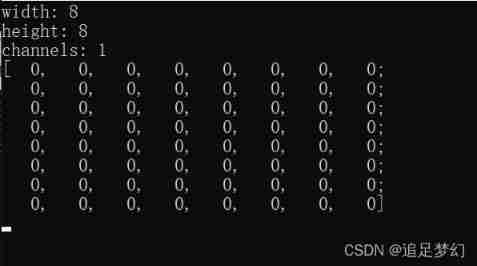
Show results 2
Show results 3
Show results 4- Only the first channel can be initialized 
3、 ... and , Assignment operation
function :
// Definition
Scalar_<_Tp>::Scalar_(_Tp v0, _Tp v1, _Tp v2, _Tp v3)
{

    this->val[0] = v0;
    this->val[1] = v1;
    this->val[2] = v2;
    this->val[3] = v3;
}
example 6
m4 = Scalar(127,127,127);// to 3 Each channel is assigned a value   grayscale
//127 Is the grayscale value
m4 = Scalar(255, 0, 0);
//300*300 3 The grayscale of the channel (127,127,127),
// Blue (255,0,0), green (0,255,0), yellow (0,0,255)
Code
quickopencv.h
#pragma once

#include <opencv2\highgui.hpp>

#include <opencv2\imgproc.hpp>

using namespace cv;
// Defining classes
class QuickDemo{

public:
	void colorSpace_Demo(Mat &image);// Color space conversion function 2021-12-24
	void mat_creation_demo(Mat &image);//Mat Object and creation 2021-12-27
};
OpencvTest.cpp
#include <iostream>
#include <opencv2\highgui.hpp>
#include <opencv2\imgproc.hpp>
#include<quickopencv.h>

using namespace cv;
using namespace std;


int main()
{

	Mat scr = imread("D:\\ Study \\OpenCV Study \\pictures\\image\\1.jpg");// Open a picture
	if (!scr.data == 1)// Sentenced to empty
		return -1;
	namedWindow(" window 1", WINDOW_NORMAL);// establish  WINDOW_FREERATIO window
	imshow(" window 1",scr);// Show in the created window
	QuickDemo qd;
	//qd.colorSpace_Demo(scr);// Color conversion
	//waitKey(0);// Time delay  0-> Constant delay  1-> Time delay 1ms
	qd.mat_creation_demo(scr);//Mat Class
	waitKey(0);
	return 0;
QuickDemo.cpp
void QuickDemo::mat_creation_demo(Mat &image)
{

	// Assignment operation
	Mat m4=Mat::zeros(Size(300,300),CV_8UC3);
	//m4 = 127;// Only the first channel can be assigned at this time  127 It's grayscale
	//-- Show results 5
	//Scalar() function
	m4 = Scalar(127,127,127);// to 3 Each channel is assigned a value   grayscale -- result 6
	//m4 = Scalar(255, 0, 0);//300*300 3 The grayscale of the channel (127,127,127), Blue (255,0,0), green (0,255,0), yellow (0,0,255)-- Show results 7
	imshow("m4", m4);// It can be used imshow The output shows

	//Mat m5 = m4;//m5 Yes m4 //***
	//m5 = Scalar(0, 255, 255);// At this time, the m4 The color of is yellow
	//imshow("m4",m4);//m4 The output is displayed in yellow -- Show results 8

	std::cout << "width: " << m4.cols << std::endl;// Output width
	std::cout << "height: " <<m4.rows << std::endl;// Output width
	std::cout << "channels: " << m4.channels()<< std::endl;// Number of output channels
	std::cout << m4 << std::endl;// Output m
}
result 5– Only the first channel is assigned 
result 6.1– Use Scalar(),3 Each channel is assigned a value 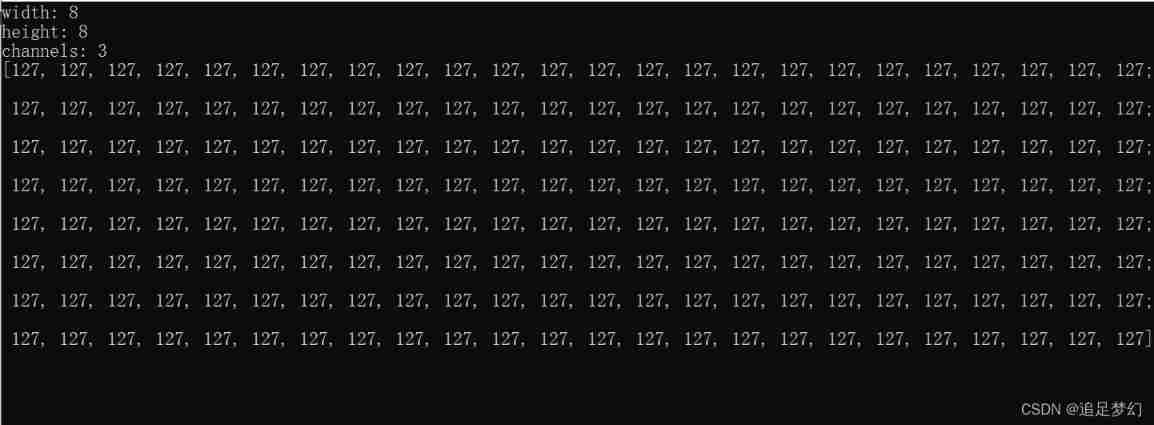
result 6.2–300*300 3 Grayscale image of the channel 
Show results 7.1
Show results 7.2
Show results 7.3
Show results 8
边栏推荐
- [untitled]
- Enhance the add / delete operation of for loop & iterator delete collection elements
- Flink SQL custom connector
- File upload component on success event, add custom parameters
- Flink Sql -- toAppendStream doesn‘t support consuming update and delete changes which
- Interference source current spectrum test of current probe
- Flink 数据偶尔数据积压导致checkpoint失败
- Gilbert Strang's course notes on linear algebra - Lesson 3
- 挖财开户安全吗?怎么有人说不靠谱。
- C # listbox how to get the selected content (search many invalid articles)
猜你喜欢

Based on svelte3 X desktop UI component library svelte UI

Pytorch BERT

Redis design and Implementation (VI) | cluster (sharding)

Flink Exception -- No ExecutorFactory found to execute the application

Rew acoustic test (I): microphone calibration

A troubleshooting of CPU bottom falling
Pytorch BERT

Redis设计与实现(四)| 主从复制

Gilbert Strang's course notes on linear algebra - Lesson 2

云服务器上部署仿牛客网项目
随机推荐
[untitled]
Mmcv expanding CUDA operator beginner level chapter
127.0.0.1、0.0.0.0和localhost
Is it safe to open an account? How can anyone say that it is not reliable.
MIME type Encyclopedia
【kotlin 协程】万字协程 一篇完成kotlin 协程进阶
Alcohol tester scheme: what principle does the alcohol tester measure alcohol solubility based on?
Evaluation standard for audio signal quality of intelligent speakers
php api获取二维码、组合生成图片
增强for循环的增删操作 & 迭代器删除集合元素
Introduction to MySQL basics day3 power node [Lao Du] class notes
[paid promotion] collection of frequently asked questions, FAQ of recommended list
Understanding society at the age of 14 - reading notes on "happiness at work"
Redis设计与实现(一)| 数据结构 & 对象
【NVMe2.0b 14-3】Doorbell Buffer Config command、Device Self-test command
Flink 数据偶尔数据积压导致checkpoint失败
vim 从嫌弃到依赖(21)——跨文件搜索
QT connection to Shentong database
Detectron2 source code reading 4-- registrar construction model
使用华为性能管理服务,按需配置采样率