当前位置:网站首页>Dynamics 365: explain virtual entity from 0 to 1
Dynamics 365: explain virtual entity from 0 to 1
2022-07-24 15:40:00 【Stone-hdj】
from Dynamics 365 for Customer Engagement 9.0 Start , Virtual entities pass through Dynamics 365 Customer Engagement Seamlessly represent data as entities in , It realizes the data integration in the external system . It does not require data replication , There is usually no need for custom coding .
Virtual entities have the following limitations , But in addition to the following limitations , It is no different from other custom entities :
- The data is read-only . Virtual entity attribute is not supported in Dynamics 365 in CE The changes are being pushed back to the external system
- Only organization level permissions of entities are supported . Field level security is not supported
- For external data , Need to be abstractly modeled as D365 Those fields supported by , For example, you want to get the name of a record in the external system , Gender , Age field , So in a virtual entity , You need to create and name , Field types that match the gender and age fields , such as text, number, optionset, date, image, and lookup type
- The record of external data must have a GUID The primary key of the format is associated with the primary key in the virtual entity
- Cannot use calculated field , If you need to calculate , Need to be done in an external system or in data provider Intermediate processing .
- You cannot filter or sort the values of a column
- I won't support it Audit History
- Not for queue Enable virtual entities
- Virtual entities do not support BPF
- Once a virtual entity is created, it cannot be changed to an ordinary entity
1. Create a plug-in and register
This plug-in will implement Retrieve and Retrieve Multiple, The sample code is connected to another organization D365 in , obtain Account Record in the entity and display it .
Will these hardcode Writing to your plug-in is not a good way , I do this mainly to make it easier for you to see how it works , You need to properly handle these configuration information when writing your own code
For how to use the configuration information in the following code, see Azure Where can I find , You can refer to this blog below
Retrieve:
using Microsoft.Xrm.Sdk;
using Newtonsoft.Json;
using System;
using System.IO;
using System.Net;

namespace VirtualEntityODataProvider
{
    public class Retrieve : IPlugin
    {
        //set these values for your D365 instance, user credentials and Azure AD clientid/token endpoint
        string crmorg = "https://orgeXXXX.crm5.dynamics.com";
        string clientid = "b004872a-XXXX-XXXX-XXXX-4a21868c04db";
        string username = "[email protected]";
        string userpassword = "XXXX";
        string tokenendpoint = "https://login.microsoftonline.com/594a2057-XXXX-XXXX-XXXX-0bc293dfb025/oauth2/token";
        string clientsecret = "mTQ8Q~2bc84~fMK5Z0qc123456XXXdaG";

        //relative path to web api endpoint
        string crmwebapi = "/api/data/v9.2";

        string crmwebapipath = "/accounts({Id})?$select=name,accountid";

        public void Execute(IServiceProvider serviceProvider)
        {
            //basic plugin set-up stuff
            IPluginExecutionContext context = (IPluginExecutionContext)serviceProvider.GetService(typeof(IPluginExecutionContext));
            IOrganizationServiceFactory servicefactory = XXXX(IOrganizationServiceFactory)serviceProvider.GetService(typeof(IOrganizationServiceFactory));
            IOrganizationService service = servicefactory.CreateOrganizationService(context.UserId);
            ITracingService tracingService = (ITracingService)serviceProvider.GetService(typeof(ITracingService));

            tracingService.Trace($"Starting Tracing!");

            try
            {
                EntityReference target = (EntityReference)context.InputParameters["Target"];

                //build the authorization request for Azure AD
                var reqstring = "client_id=" + clientid;
                reqstring += "&client_secret=" + clientsecret;
                reqstring += "&resource=" + Uri.EscapeUriString(crmorg);
                reqstring += "&username=" + Uri.EscapeUriString(username);
                reqstring += "&password=" + Uri.EscapeUriString(userpassword);
                reqstring += "&grant_type=password";

                //make the Azure AD authentication request
                WebRequest req = WebRequest.Create(tokenendpoint);
                req.ContentType = "application/x-www-form-urlencoded";
                req.Method = "POST";
                byte[] bytes = System.Text.Encoding.ASCII.GetBytes(reqstring);
                req.ContentLength = bytes.Length;
                System.IO.Stream os = req.GetRequestStream();
                os.Write(bytes, 0, bytes.Length);
                os.Close();

                tracingService.Trace($"Request token completed");
                HttpWebResponse resp = (HttpWebResponse)req.GetResponse();
                StreamReader tokenreader = new StreamReader(resp.GetResponseStream());
                string responseBody = tokenreader.ReadToEnd();
                tokenreader.Close();

                tracingService.Trace($"Parsing token response");
                //deserialize the Azure AD token response and get the access token to supply with the web api query
                var tokenresponse = JsonConvert.DeserializeObject<Newtonsoft.Json.Linq.JObject>(responseBody);
                var token = tokenresponse["access_token"];
                tracingService.Trace($"token:{token}");
                //make the web api query
                WebRequest crmreq = WebRequest.Create(crmorg + crmwebapi + crmwebapipath.Replace("{Id}", target.Id.ToString()));
                crmreq.Headers = new WebHeaderCollection();

                //use the access token from earlier as the authorization header bearer value
                crmreq.Headers.Add("Authorization", "Bearer " + token);
                crmreq.Headers.Add("OData-MaxVersion", "4.0");
                crmreq.Headers.Add("OData-Version", "4.0");
                crmreq.Headers.Add("Prefer", "odata.maxpagesize=500");
                crmreq.Headers.Add("Prefer", "odata.include-annotations=OData.Community.Display.V1.FormattedValue");
                crmreq.ContentType = "application/json; charset=utf-8";
                crmreq.Method = "GET";

                HttpWebResponse crmresp = (HttpWebResponse)crmreq.GetResponse();
                StreamReader crmreader = new StreamReader(crmresp.GetResponseStream());
                string crmresponseBody = crmreader.ReadToEnd();
                crmreader.Close();
                tracingService.Trace($"Retrieve completed");
                //deserialize the response
                var crmresponseobj = JsonConvert.DeserializeObject<Newtonsoft.Json.Linq.JObject>(crmresponseBody);


                tracingService.Trace($"Retrieve result completed, crmresponseobj = {crmresponseobj}");
                Entity verow = new Entity("cr8e0_otheraccount");
                verow["cr8e0_otheraccountid"] = (Guid)crmresponseobj["accountid"];
                verow["cr8e0_name"] = (string)crmresponseobj["name"];

                //return a result
                context.OutputParameters["BusinessEntity"] = verow;
            }
            catch (Exception e)
            {
                tracingService.Trace($"{e.Message} {e.StackTrace}");
                if (e.InnerException != null)
                    tracingService.Trace($"{e.InnerException.Message} {e.InnerException.StackTrace}");

                throw new InvalidPluginExecutionException(e.Message);
            }
        }
    }
}
Retrieve Multiple:
using Microsoft.Xrm.Sdk;
using Newtonsoft.Json;
using System;
using System.IO;
using System.Net;

namespace VirtualEntityODataProvider
{
    public class RetrieveMultiple : IPlugin
    {
        //set these values for your D365 instance, user credentials and Azure AD clientid/token endpoint
        string crmorg = "https://orgeXXXX.crm5.dynamics.com";
        string clientid = "b004872a-XXXX-XXXX-XXXX-4a21868c04db";
        string username = "[email protected]";
        string userpassword = "XXXX";
        string tokenendpoint = "https://login.microsoftonline.com/594a2057-XXXX-XXXX-XXXX-0bc293dfb025/oauth2/token";
        string clientsecret = "mTQ8Q~2bc84~fMK5Z0qc123456XXXdaG";

        //relative path to web api endpoint
        string crmwebapi = "/api/data/v9.2";

        //web api query to execute - in this case all accounts that start with "A"
        string crmwebapipath = "/accounts?$select=name,accountid&$filter=startswith(name,'A')";

        public void Execute(IServiceProvider serviceProvider)
        {

            //basic plugin set-up stuff
            IPluginExecutionContext context = (IPluginExecutionContext)serviceProvider.GetService(typeof(IPluginExecutionContext));
            IOrganizationServiceFactory servicefactory = (IOrganizationServiceFactory)serviceProvider.GetService(typeof(IOrganizationServiceFactory));
            IOrganizationService service = servicefactory.CreateOrganizationService(context.UserId);
            ITracingService tracingService = (ITracingService)serviceProvider.GetService(typeof(ITracingService));

            tracingService.Trace($"Starting Tracing!");

            try
            {
                EntityCollection results = new EntityCollection();

                //build the authorization request for Azure AD
                var reqstring = "client_id=" + clientid;
                reqstring += "&client_secret=" + clientsecret;
                reqstring += "&resource=" + Uri.EscapeUriString(crmorg);
                reqstring += "&username=" + Uri.EscapeUriString(username);
                reqstring += "&password=" + Uri.EscapeUriString(userpassword);
                reqstring += "&grant_type=password";

                //make the Azure AD authentication request
                WebRequest req = WebRequest.Create(tokenendpoint);
                req.ContentType = "application/x-www-form-urlencoded";
                req.Method = "POST";
                byte[] bytes = System.Text.Encoding.ASCII.GetBytes(reqstring);
                req.ContentLength = bytes.Length;
                System.IO.Stream os = req.GetRequestStream();
                os.Write(bytes, 0, bytes.Length);
                os.Close();

                tracingService.Trace($"Request token completed");
                HttpWebResponse resp = (HttpWebResponse)req.GetResponse();
                StreamReader tokenreader = new StreamReader(resp.GetResponseStream());
                string responseBody = tokenreader.ReadToEnd();
                tokenreader.Close();

                tracingService.Trace($"Parsing token response");
                //deserialize the Azure AD token response and get the access token to supply with the web api query
                var tokenresponse = JsonConvert.DeserializeObject<Newtonsoft.Json.Linq.JObject>(responseBody);
                var token = tokenresponse["access_token"];
                tracingService.Trace($"token:{token}");
                //make the web api query
                WebRequest crmreq = WebRequest.Create(crmorg + crmwebapi + crmwebapipath);
                crmreq.Headers = new WebHeaderCollection();

                //use the access token from earlier as the authorization header bearer value
                crmreq.Headers.Add("Authorization", "Bearer " + token);
                crmreq.Headers.Add("OData-MaxVersion", "4.0");
                crmreq.Headers.Add("OData-Version", "4.0");
                crmreq.Headers.Add("Prefer", "odata.maxpagesize=500");
                crmreq.Headers.Add("Prefer", "odata.include-annotations=OData.Community.Display.V1.FormattedValue");
                crmreq.ContentType = "application/json; charset=utf-8";
                crmreq.Method = "GET";

                HttpWebResponse crmresp = (HttpWebResponse)crmreq.GetResponse();
                StreamReader crmreader = new StreamReader(crmresp.GetResponseStream());
                string crmresponseBody = crmreader.ReadToEnd();
                crmreader.Close();
                tracingService.Trace($"Retrieve multiple completed");
                //deserialize the response
                var crmresponseobj = JsonConvert.DeserializeObject<Newtonsoft.Json.Linq.JObject>(crmresponseBody);

                //loop through the response values
                foreach (var row in crmresponseobj["value"].Children())
                {
                    //create a new virtual entity of type lpa_demove
                    Entity verow = new Entity("cr8e0_otheraccount");
                    verow["cr8e0_otheraccountid"] = (Guid)row["accountid"];
                    verow["cr8e0_name"] = (string)row["name"];

                    //add it to the collection
                    results.Entities.Add(verow);
                }

                tracingService.Trace($"Retrieve results completed, there are {results.Entities.Count} items!");
                //return the results
                context.OutputParameters["BusinessEntityCollection"] = results;
            }
            catch (Exception e)
            {
                tracingService.Trace($"{e.Message} {e.StackTrace}");
                if (e.InnerException != null)
                    tracingService.Trace($"{e.InnerException.Message} {e.InnerException.StackTrace}");

                throw new InvalidPluginExecutionException(e.Message);
            }
        }
    }
}
Note that the code above uses Newtonsoft This third party Nuget package , So we need to use ILMerge perhaps Costura.Fody To pack it into a dll.
Register plug-ins ( No need to register step, Follow up creation Data Provider It will be automatically added when MainOperation This step)

2. register Data Provider
Plugin Registeration Tool: Register -> Register New Data Provider


Solution: Here we choose to create a new solution, It will be filled in by us Data Source Entity( Virtual entity )
Data Source Entity: Choose to create a new data source
Assembly: Select the plug-in we just registered
Retrieve and Retrieve Multiple: Also choose what we just created
After registration, we will see , In the first step, the plug-in we created will be automatically filled in

And we found that the steps inside are not editable

3. Newly created in the system Data Source
Setting -> Administration -> Virtual Entity Data Sources

Select the... We created in step 2 above Data Provider

Fill in Name And save 
4. Create virtual entities
The entity needs to put Virtual Entity Choose ,Data Source Select the data source we just created
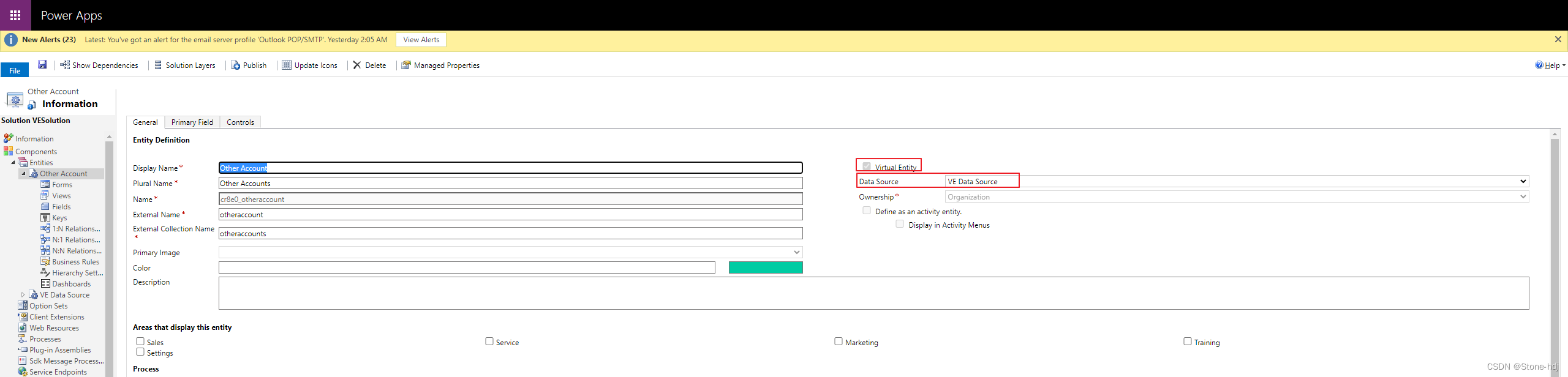
Note: The fields in this step should correspond to those in the above code , Here's the picture

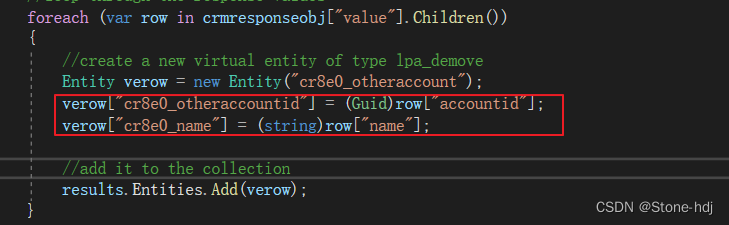
5. effect
Let's use advanced search to test , Advanced lookup will call Retrieve Multiple
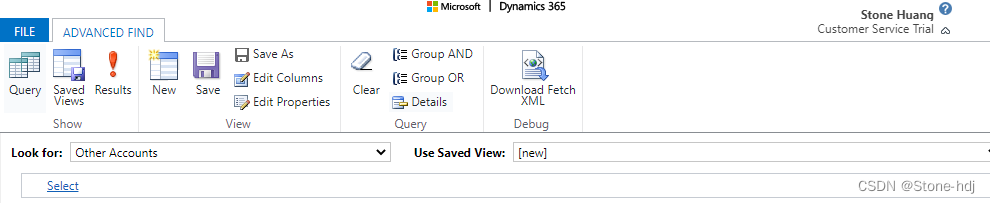
Because we do filtering in the code , Extract only A At the beginning Account
When we click on one of the records to open , It will be called Retrieve

Reference link :
Get started with virtual entities (Developer Guide for Dynamics 365 Customer Engagement) | Microsoft Docs https://docs.microsoft.com/en-us/dynamics365/customerengagement/on-premises/developer/virtual-entities/get-started-ve?view=op-9-1#limitations-of-virtual-entities Configure virtual entities using custom data sources - Microsoft MVP(15-18) Luo Yong - Blog Garden (cnblogs.com)https://www.cnblogs.com/luoyong0201/p/Dynamics_365_Develop_Virtual_Entity_with_Custom_Data_Provider.htmlUsing Dynamics 365 virtual entities to show data from an external organization (alexanderdevelopment.net)https://alexanderdevelopment.net/post/2018/05/28/using-dynamics-365-virtual-entities-to-show-data-from-an-external-organization/
边栏推荐
- Join parameter processing and @param
- 2022 RoboCom 世界机器人开发者大赛-本科组(省赛)-- 第五题 树与二分图 (已完结)
- JUC源码学习笔记3——AQS等待队列和CyclicBarrier,BlockingQueue
- [TA frost wolf \u may - hundred people plan] Figure 3.4 introduction to delayed rendering pipeline
- 报错【项目报错】
- Is it safe for Huatai Securities to open a mobile account and will it be leaked
- MySQL learning notes (summary)
- Arduino ide esp32 firmware installation and upgrade tutorial
- Varnish4.0 cache agent configuration
- VAE(变分自编码器)的一些难点分析
猜你喜欢

You are only one SQL statement away from the tdengine Developer Conference!
![[quantitative test]](/img/df/f2d8b252169213af340f3e535bddef.png)
[quantitative test]

被攻击怎么解决?DDoS高防IP防护策略
云开发单机版图片九宫格流量主源码

Automatic derivation of pytorch
2022 RoboCom 世界机器人开发者大赛-本科组(省赛)-- 第五题 树与二分图 (已完结)

【SWT】自定义数据表格

降噪蓝牙耳机哪个好?性价比最高的降噪蓝牙耳机排行
【量化测试】
Do you understand the working principle of gyroscope?
随机推荐
有了这个机器学习画图神器,论文、博客都可以事半功倍了!
Database learning – select (multi table joint query) [easy to understand]
被攻击怎么解决?DDoS高防IP防护策略
Lsyncd 实时同步
Netease email (126/163): authorization code acquisition strategy
Five principles of solid are indispensable for good architecture design
[tkinter beautification] window out of system style (common to three systems)
3、 Set foundation ArrayList set and simple student management system
Lsyncd搭建同步镜像-用Lsyncd实现本地和远程服务器之间实时同步
【tf.keras】:版本从1.x升级到2.x遇到的一个问题:InvalidArgumentError: Cannot assign a device for operation embedding_
JMeter - call the interface for uploading files or pictures
From which dimensions can we judge the quality of code? How to have the ability to write high-quality code?
Which is a good noise reduction Bluetooth headset? Ranking of the most cost-effective noise reduction Bluetooth headsets
kubernetes多网卡方案之Multus_CNI部署和基本使用
mysql源码分析——索引的数据结构
R语言可视化分面图、多变量分组嵌套多水平t检验、并指定参考水平、可视化多变量分组嵌套多水平分面箱图(faceting boxplot)并添加显著性水平、指定显著性参考水平
Memorythrashing: Tiktok live broadcast to solve memory dithering practice
[Luogu] p1908 reverse sequence pair
Is it safe for Huatai Securities to open a mobile account and will it be leaked
C# SQLite Database Locked exception