当前位置:网站首页>Dat.gui control custom placement and dragging
Dat.gui control custom placement and dragging
2022-07-27 13:45:00 【mmm_ morning】
In the use of vue3-cesium When developing some functions , Parameters need to be adjusted . although cesium Bring with you cesium.knockout Control is used to adjust parameters , But because the author is right cesium Not familiar enough , It's a little difficult to use , Plus previous studies Three.js Used in dat.gui plug-in unit , It's very convenient , It replaces .
dat.gui Adjust the parameters, which will not be repeated here , There are many online materials .
My current requirement is to drag and drop controls . The idea is simple :
1. obtain dat.gui Of dom
2. Change its position when dragging
But in the process , There are still some problems that need attention , It is hereby recorded that .
1. obtain dat.gui Of dom
const datGUI = new dat.GUI()
  // datGUI Style adjustment
  datGUI.domElement.style = 'position:absolute;top:10px;left:10px;'
The above code creates a dat.GUI object , And pass datGUI.domElement Get the corresponding dom, Here I modified its location attribute , Place it in the upper left corner from the default top right .
What needs to be noted here is , If the dat.GUI Object is added to a dom, By controlling this dom To indirectly control dat.GUI, The following methods should be adopted :
const datGUI = new dat.GUI({
     autoPlace: false })
const guiContainer = document.getElementById('guiContainer')
guiContainer.appendChild(datGUI.domElement)
That is, it needs to be set autoPlace attribute , If you directly control , You don't need to , If it is set, the control will not be displayed .
2. Change its position when dragging
I believe everyone knows the process of dragging general objects , I won't go into details here , Just say dat.gui Control .
There is a conflict between the functions of drag control and drag bar for adjusting parameters of numeric type 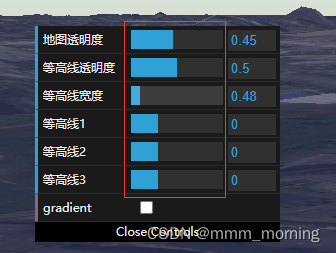
Just imagine , When you want to drag the progress bar to adjust parameters , The whole control also moves , Is the experience very bad ?
therefore , Here, you need to separate the drag control from the event of dragging the progress bar .
Train of thought : By preventing progress bar dragging events from bubbling . But this is obviously troublesome , Just imagine , Many people work together to complete a project , When summarizing, you have to modify the summary file . The actual effect has not been verified , Interested partners can try
So this idea was abandoned by me .
Train of thought two : By judging whether the current trigger event object is the specified object
First , Will the whole dat.gui Control output , Observe its structure , Look for the difference .
console.log(datGUI.domElement)
The output is as follows 
here ,ul Under the li Is the parameter we added , Expand discovery , Can identify each part , There are class names and tpye
At first, my idea was to limit the drag bar , But the result is not very good , Because the input box can also be dragged , I also want to limit the input box , But it feels too troublesome , Let me show you the conditions , Is it too much trouble .
if (event.target.className !== 'slider-fg' && event.target.className !== 'slider' && event.target.getAttribute('Type') !== 'text')
Later, it was directly restricted , Only in the left part of the control , That is, drag the parameter name part , To drag
if (Event.target.className === 'property-name')
It's much clearer at once . Then drag the progress bar or input box , It is the normal control effect without the whole control running .
but , By this time , The effect is not very good , Because there is text on the control , The default event of the browser will be triggered when dragging , Make the dragging effect of the control abnormal . At this time, you need to onmousedown Add the following code to :
Event.preventDefault()
perhaps
return false
here , The effect is relatively nice 了
The drag function is as follows :
 datGUI.domElement.onmousedown = function (Event) {

    Event = Event || window.Event
    //console.log(datGUI.domElement)
    // console.log(Event.target)
    // console.log(Event.currentTarget)

    //  Gets the slider offset
    var left = Event.clientX - datGUI.domElement.offsetLeft
    var top = Event.clientY - datGUI.domElement.offsetTop
    if (Event.target.className === 'property-name') {

      document.onmousemove = function (event) {

        event = event || window.event
        datGUI.domElement.style.left = event.clientX - left + 'px'
        datGUI.domElement.style.top = event.clientY - top + 'px'
      }
    }
    document.onmouseup = function () {

      document.onmousemove = null
      document.onmouseup = null
    }
    Event.preventDefault()
    // return false
  }
边栏推荐
- [introduction to C language] zzulioj 1021-1025
- 面试官常问:如何手撸一个“消息队列”和“延迟消息队列”?
- Jianzhi offer 07 rebuild binary tree -- construct binary tree from middle order and post order traversal sequence
- The role of Clearfix
- Insert sort, positive order, reverse order
- Qt剪切板QClipboard 复制粘贴自定义数据
- Install the wireless network card driver
- Go语言系列:如何搭建Go语言开发环境?
- 以科技传递温度,vivo亮相数字中国建设峰会
- C# FTP增、删、改、查、创建多级目录、自动重连、切换目录
猜你喜欢

Data enhancement in image processing

期货手续费标准和保证金比例
滑环设备怎么进行维护
Interface testing practical tutorial 01: interface testing environment construction

Getting started for beginners: build your own blog with WordPress

Tencent cloud and the China Federation of industry released the research results of industrial AI quality inspection standardization to accelerate the intelligent transformation of manufacturing indus

js基础知识整理之 —— 数组

Egg swagger doc graphic verification code solution

Seata's landing practice in ant International Banking
![[300 + selected interview questions from big companies continued to share] big data operation and maintenance sharp knife interview question column (IX)](/img/cf/44b3983dd5d5f7b92d90d918215908.png)
[300 + selected interview questions from big companies continued to share] big data operation and maintenance sharp knife interview question column (IX)
随机推荐
滑环设备怎么进行维护
利用eBPF探测Rootkit漏洞
Dichotomy queries values in an array
Vertical and horizontal shooting range - the mystery of the picture
Futures Commission Standard and margin ratio
浏览器内核模块组成
看看有没有你,各赛区入围名单
52:第五章:开发admin管理服务:5:开发【分页查询admin账号列表,接口】;(Swagger的@ApiParam(),对方法参数进行注释;PageHelper分页插件;拦截器拦截检查登录状态)
opencv图像的缩放平移及旋转
Data enhancement in image processing
【C进阶】指针数组 VS 数组指针
v-show
SwiftUI 地图大全之 使用 MapKit 进行搜索
Keras深度学习实战——推荐系统数据编码
使用RecyclerView,实现列表左滑菜单
JS divides the array into two-dimensional arrays according to the specified attribute values
Install the wireless network card driver
SCI thesis writing
Leetcode error reporting and its solution
Icon Font