当前位置:网站首页>使用RecyclerView,实现列表左滑菜单
使用RecyclerView,实现列表左滑菜单
2022-07-27 12:52:00 【Beacon0423】
代码编辑版本环境
AndroidStudio: 版本2021.2.1,Gradle: gradle-7.3.3-bin.zip gradle plugins版本: 7.2.1
语言:Java
本来想用kotlin写的,但是公司要求使用Java进行编写,所以我又很 开心 地拿起了Java。
虽然Kotlin很优秀,我很喜欢,但是谁会和钱过不去呢?
继承RecycylerView的工具类
package com.example.sliderecycylerview;

import android.content.Context;
import android.graphics.Rect;
import android.util.AttributeSet;
import android.view.MotionEvent;
import android.view.VelocityTracker;
import android.view.View;
import android.view.ViewConfiguration;
import android.view.ViewGroup;
import android.widget.Scroller;

import androidx.annotation.NonNull;
import androidx.recyclerview.widget.LinearLayoutManager;
import androidx.recyclerview.widget.RecyclerView;

/** * 支持侧滑的RecyclerView */
public class SlideRecyclerView extends RecyclerView {


    private static final int INVALID_POSITION = -1;     // 触摸到的点不在子View范围内
    private static final int INVALID_CHILD_WIDTH = -1;  // 子ItemView不含两个子View
    private static final int SNAP_VELOCITY = 600;       // 最小滑动速度

    private VelocityTracker mVelocityTracker;           // 速度追踪器
    private int mTouchSlop;                             // 认为是滑动的最小距离(一般由系统提供)
    private Rect mTouchFrame;                           // 子View所在的矩形范围
    private Scroller mScroller;
    private float mLastX;                               // 滑动过程中记录上次触碰点X
    private float mFirstX, mFirstY;                     // 首次触碰范围
    private boolean mIsSlide;                           // 是否滑动子View
    private ViewGroup mFlingView;                       // 触碰的子View
    private int mPosition;                              // 触碰的view的位置
    private int mMenuViewWidth;                         // 菜单按钮宽度

    private boolean canSlide = true;                    // 是否可以滑动子View


    public SlideRecyclerView(@NonNull Context context) {

        this(context, null);
    }


    public SlideRecyclerView(@NonNull Context context, @NonNull AttributeSet attrs, int defStyleAttr) {

        super(context, attrs, defStyleAttr);
        mTouchSlop = ViewConfiguration.get(context).getScaledTouchSlop();
        mScroller = new Scroller(context);
    }


    public SlideRecyclerView(@NonNull Context context, AttributeSet attrs) {

        this(context, attrs, 0);
    }

    @Override
    public boolean onInterceptTouchEvent(MotionEvent e) {

        int x = (int) e.getX();
        int y = (int) e.getY();
        obtainVelocity(e);
        switch (e.getAction()) {

            case MotionEvent.ACTION_DOWN:
                if (!mScroller.isFinished()) {
              // 如果动画还没停止,则立即终止动画
                    mScroller.abortAnimation();
                }
                mFirstX = mLastX = x;
                mFirstY = y;
                mPosition = pointToPosition(x, y);      // 获取触碰点所在的position
                if (mPosition != INVALID_POSITION) {

                    View view = mFlingView;
                    // 获取触碰点所在的view
                    mFlingView = (ViewGroup) getChildAt(mPosition - ((LinearLayoutManager) getLayoutManager()).findFirstVisibleItemPosition());
                    // 这里判断一下如果之前触碰的view已经打开,而当前碰到的view不是那个view则立即关闭之前的view,此处并不需要担动画没完成冲突,因为之前已经abortAnimation
                    if (view != null && mFlingView != view && view.getScrollX() != 0) {

                        view.scrollTo(0, 0);
                    }
                    // 这里进行了强制的要求,RecyclerView的子ViewGroup必须要有2个子view,这样菜单按钮才会有值,
                    // 需要注意的是:如果不定制RecyclerView的子View,则要求子View必须要有固定的width。
                    // 比如使用LinearLayout作为根布局,而content部分width已经是match_parent,此时如果菜单view用的是wrap_content,menu的宽度就会为0。
                    if (mFlingView.getChildCount() == 2) {

                        mMenuViewWidth = mFlingView.getChildAt(1).getWidth();
                    } else {

                        mMenuViewWidth = INVALID_CHILD_WIDTH;
                    }
                }
                break;
            case MotionEvent.ACTION_MOVE:
                mVelocityTracker.computeCurrentVelocity(1000);
                // 此处有俩判断,满足其一则认为是侧滑:
                // 1.如果x方向速度大于y方向速度,且大于最小速度限制;
                // 2.如果x方向的侧滑距离大于y方向滑动距离,且x方向达到最小滑动距离;
                float xVelocity = mVelocityTracker.getXVelocity();
                float yVelocity = mVelocityTracker.getYVelocity();
                if (Math.abs(xVelocity) > SNAP_VELOCITY && Math.abs(xVelocity) > Math.abs(yVelocity) || Math.abs(x - mFirstX) >= mTouchSlop && Math.abs(x - mFirstX) > Math.abs(y - mFirstY)) {

                    if (canSlide) {

                        mIsSlide = true;
                    } else {

                        mIsSlide = false;
                    }
                    return true;
                }
                break;
            case MotionEvent.ACTION_UP:
                releaseVelocity();
                break;
        }
        return super.onInterceptTouchEvent(e);
    }

    @Override
    public boolean onTouchEvent(MotionEvent e) {

        if (mIsSlide && mPosition != INVALID_POSITION) {

            float x = e.getX();
            obtainVelocity(e);
            switch (e.getAction()) {

                case MotionEvent.ACTION_DOWN:   // 因为没有拦截,所以不会被调用到
                    break;
                case MotionEvent.ACTION_MOVE:
                    // 随手指滑动
                    if (mMenuViewWidth != INVALID_CHILD_WIDTH) {

                        float dx = mLastX - x;
                        if (mFlingView.getScrollX() + dx <= mMenuViewWidth
                                && mFlingView.getScrollX() + dx > 0) {

                            mFlingView.scrollBy((int) dx, 0);
                        }
                        mLastX = x;
                    }
                    break;
                case MotionEvent.ACTION_UP:
                    if (mMenuViewWidth != INVALID_CHILD_WIDTH) {

                        int scrollX = mFlingView.getScrollX();
                        mVelocityTracker.computeCurrentVelocity(1000);
                        // 此处有两个原因决定是否打开菜单:
                        // 1.菜单被拉出宽度大于菜单宽度一半;
                        // 2.横向滑动速度大于最小滑动速度;
                        // 注意:之所以要小于负值,是因为向左滑则速度为负值
                        if (mVelocityTracker.getXVelocity() < -SNAP_VELOCITY) {
        // 向左侧滑达到侧滑最低速度,则打开
                            mScroller.startScroll(scrollX, 0, mMenuViewWidth - scrollX, 0, Math.abs(mMenuViewWidth - scrollX));
                        } else if (mVelocityTracker.getXVelocity() >= SNAP_VELOCITY) {
      // 向右侧滑达到侧滑最低速度,则关闭
                            mScroller.startScroll(scrollX, 0, -scrollX, 0, Math.abs(scrollX));
                        } else if (scrollX >= mMenuViewWidth / 2) {
     // 如果超过删除按钮一半,则打开
                            mScroller.startScroll(scrollX, 0, mMenuViewWidth - scrollX, 0, Math.abs(mMenuViewWidth - scrollX));
                        } else {
        // 其他情况则关闭
                            mScroller.startScroll(scrollX, 0, -scrollX, 0, Math.abs(scrollX));
                        }
                        invalidate();
                    }
                    mMenuViewWidth = INVALID_CHILD_WIDTH;
                    mIsSlide = false;
                    mPosition = INVALID_POSITION;
                    releaseVelocity();  // 这里之所以会调用,是因为如果前面拦截了,就不会执行ACTION_UP,需要在这里释放追踪
                    break;
            }
            return true;
        } else {

            // 此处防止RecyclerView正常滑动时,还有菜单未关闭
            closeMenu();
            // Velocity,这里的释放是防止RecyclerView正常拦截了,但是在onTouchEvent中却没有被释放;
            // 有三种情况:
            // 1.onInterceptTouchEvent并未拦截,在onInterceptTouchEvent方法中,DOWN和UP一对获取和释放;
            // 2.onInterceptTouchEvent拦截,DOWN获取,但事件不是被侧滑处理,需要在这里进行释放;
            // 3.onInterceptTouchEvent拦截,DOWN获取,事件被侧滑处理,则在onTouchEvent的UP中释放。
            releaseVelocity();
        }
        return super.onTouchEvent(e);
    }

    private void releaseVelocity() {

        if (mVelocityTracker != null) {

            mVelocityTracker.clear();
            mVelocityTracker.recycle();
            mVelocityTracker = null;
        }
    }

    private void obtainVelocity(MotionEvent event) {

        if (mVelocityTracker == null) {

            mVelocityTracker = VelocityTracker.obtain();
        }
        mVelocityTracker.addMovement(event);
    }

    public int pointToPosition(int x, int y) {

        if (null == getLayoutManager()) return INVALID_POSITION;
        int firstPosition = ((LinearLayoutManager) getLayoutManager()).findFirstVisibleItemPosition();
        Rect frame = mTouchFrame;
        if (frame == null) {

            mTouchFrame = new Rect();
            frame = mTouchFrame;
        }

        final int count = getChildCount();
        for (int i = count - 1; i >= 0; i--) {

            final View child = getChildAt(i);
            if (child.getVisibility() == View.VISIBLE) {

                child.getHitRect(frame);
                if (frame.contains(x, y)) {

                    return firstPosition + i;
                }
            }
        }
        return INVALID_POSITION;
    }

    @Override
    public void computeScroll() {

        if (mScroller.computeScrollOffset()) {

            mFlingView.scrollTo(mScroller.getCurrX(), mScroller.getCurrY());
            invalidate();
        }
    }

    /** * 将显示子菜单的子view关闭 * 这里本身是要自己来实现的,但是由于不定制item,因此不好监听器点击事件,因此需要调用者手动的关闭 */
    public void closeMenu() {

        if (mFlingView != null && mFlingView.getScrollX() != 0) {

            mFlingView.scrollTo(0, 0);
        }
    }

    /** * 是否可以滑动,默认为可以 */
    public void setSlide(Boolean slide) {

        canSlide = slide;
    }
}
可以直接添加依赖使用

主界面布局
<?xml version="1.0" encoding="utf-8"?>
<LinearLayout xmlns:android="http://schemas.android.com/apk/res/android" xmlns:tools="http://schemas.android.com/tools" android:layout_width="match_parent" android:layout_height="match_parent" tools:context=".MainActivity">
    <com.example.sliderecycylerview.SlideRecyclerView android:id="@+id/slide" android:layout_width="match_parent" android:layout_height="match_parent"/>

</LinearLayout>
主界面代码
import androidx.appcompat.app.AppCompatActivity;
import androidx.recyclerview.widget.LinearLayoutManager;

import android.os.Bundle;
import android.util.Log;

import com.example.swiptest.adapter.RecyclerAdapter;
import com.example.swiptest.adapter.SwipeAdapter;
import com.example.swiptest.databinding.ActivityMainBinding;
import com.example.swiptest.javabean.Test;

import java.util.ArrayList;
import java.util.List;

public class MainActivity extends AppCompatActivity {


    private ActivityMainBinding binding;
/* private SwipeAdapter adapter; private SwipeAdapter.ClickListener listener;*/

    @Override
    protected void onCreate(Bundle savedInstanceState) {

        super.onCreate(savedInstanceState);
        binding = ActivityMainBinding.inflate(getLayoutInflater());
        setContentView(binding.getRoot());
        setAdapter();
    }

    private void setAdapter(){

        List<Object> list = new ArrayList<>();
/* list.add(new Test(1, "第一个")); list.add(new Test(2, "第二个"));*/
        LinearLayoutManager manager = new LinearLayoutManager(this);
        manager.setOrientation(LinearLayoutManager.VERTICAL);
        binding.slide.setLayoutManager(manager);
        RecyclerAdapter adapter = new RecyclerAdapter(this);
        adapter.setList(list);
        binding.slide.setAdapter(adapter);
/* listener = new SwipeAdapter.ClickListener() { @Override public void itemClick(int pos) { Log.e("TAG", "itemClick: "+pos); } @Override public void itemSwipe(int pos) { Log.e("TAG", "itemSwipe: "+pos); } }; adapter = new SwipeAdapter(this, list); adapter.setListener(listener); binding.listview.setAdapter(adapter);*/
    }
Item项的布局
<?xml version="1.0" encoding="utf-8"?>
<LinearLayout xmlns:android="http://schemas.android.com/apk/res/android" android:id="@+id/item" android:orientation="horizontal" android:layout_width="match_parent" android:clickable="true" android:layout_height="80dp">
    <LinearLayout android:layout_width="match_parent" android:layout_height="match_parent" android:orientation="vertical">
    <TextView android:id="@+id/tv_id" android:layout_width="wrap_content" android:layout_height="wrap_content" android:text="textview" android:textSize="18sp" android:layout_gravity="center"/>
    <TextView android:id="@+id/tv_content" android:layout_width="wrap_content" android:layout_height="wrap_content" android:layout_gravity="center" android:layout_marginTop="20dp" android:text="123" android:textSize="16sp" />
    </LinearLayout>
    <LinearLayout android:layout_width="80dp" android:layout_height="80dp" android:background="@color/purple_200" android:orientation="horizontal">
        <TextView android:id="@+id/tv_show" android:layout_width="match_parent" android:layout_height="match_parent" android:text="你好" android:textSize="20sp" android:gravity="center"/>
    </LinearLayout>

</LinearLayout>
Adapter
import android.content.Context;
import android.util.Log;
import android.view.LayoutInflater;
import android.view.View;
import android.view.ViewGroup;
import android.widget.LinearLayout;
import android.widget.TextView;

import androidx.annotation.NonNull;
import androidx.recyclerview.widget.RecyclerView;

import com.example.swiptest.R;

import java.util.List;

public class RecyclerAdapter extends RecyclerView.Adapter<RecyclerAdapter.ItemHold> {


    private Context context;
    private List<Object> list;

    public RecyclerAdapter(Context context) {

        this.context = context;
    }

    public void setList(List<Object> list) {

        this.list = list;
    }


    @NonNull
    @Override
    public ItemHold onCreateViewHolder(@NonNull ViewGroup parent, int viewType) {

        View view = LayoutInflater.from(context).inflate(R.layout.listview_item, parent, false);
        return new ItemHold(view);
    }

    @Override
    public void onBindViewHolder(@NonNull ItemHold holder, int position) {

        holder.hide.setOnClickListener(v -> {

            Log.e("TAG", "Click Hide" );
        });

    }


    @Override
    public int getItemCount() {

        return list.size();
    }


    public class ItemHold extends RecyclerView.ViewHolder {


        private LinearLayout item;
        private TextView id;
        private TextView content;
        private TextView hide;

        public ItemHold(@NonNull View itemView) {

            super(itemView);
            item = itemView.findViewById(R.id.item);
            id = itemView.findViewById(R.id.tv_id);
            content = itemView.findViewById(R.id.tv_content);
            hide = itemView.findViewById(R.id.tv_show);
        }
    }
}
效果图

参考文章 Android Recyclerview 左滑删除
作者声明:这是篇半原创blog
demo地址 GitHubGitee
边栏推荐
猜你喜欢

如何调试JNI程序
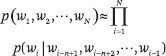
Li Hang, director of ByteDance AI Lab: past, present and future of language model

eBPF/Ftrace

W3school navigation bar exercise
How to debug JNI program

V-on basic instruction

初探基于OSG+OCC的CAD之任意多个子模型进行netgen以及gmsh网格划分
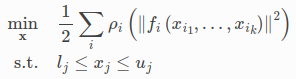
3D laser slam:aloam---ceres optimization part and code analysis

JS basic knowledge collation - array
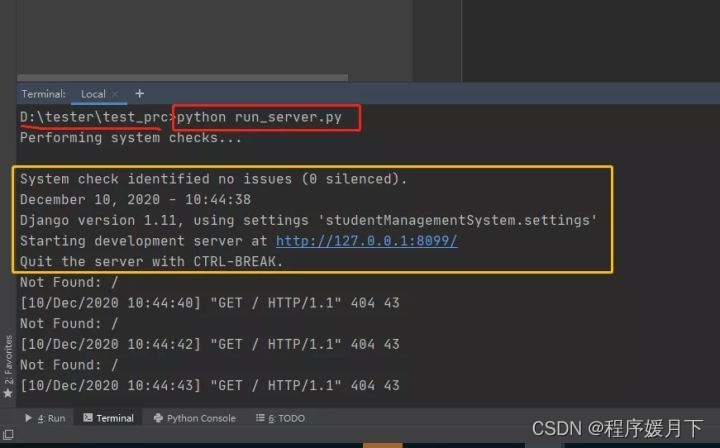
Interface testing practical tutorial 01: interface testing environment construction
随机推荐
Echart line chart displays the last point and vertical dotted line by default
Amd adrenalin 22.7.1 driver update: double the performance of OpenGL and support Microsoft win11 22h2 system
Training in the second week of summer vacation on July 24, 2022
网络异常流量分析系统设计
v-show
Seata 在蚂蚁国际银行业务的落地实践
产品经理经验谈100篇(十一)-策略产品经理:模型与方法论
Perfect guide | how to use ODBC for agent free Oracle database monitoring?
V-on basic instruction
How to maintain slip ring equipment
绝对定位
Hierarchy of elements
初学者入门:使用WordPress搭建一个专属自己的博客
使用putty设置基于 SSH 密钥的身份验证
Classification and application of slip rings
四大线程池简析
Realize the disk partition and file system mount of the newly added hard disk
How to pass parameters in JNI program
实现新增加硬盘的磁盘分区和文件系统挂载
What are the precautions for using carbon brushes