当前位置:网站首页>Fabric.js 橡皮擦的用法(包含恢复功能)
Fabric.js 橡皮擦的用法(包含恢复功能)
2022-07-02 11:08:00 【德育处主任】
本文简介
点赞 + 关注 + 收藏 = 学会了
<br>
本文介绍 Fabric.js 的橡皮擦功能。
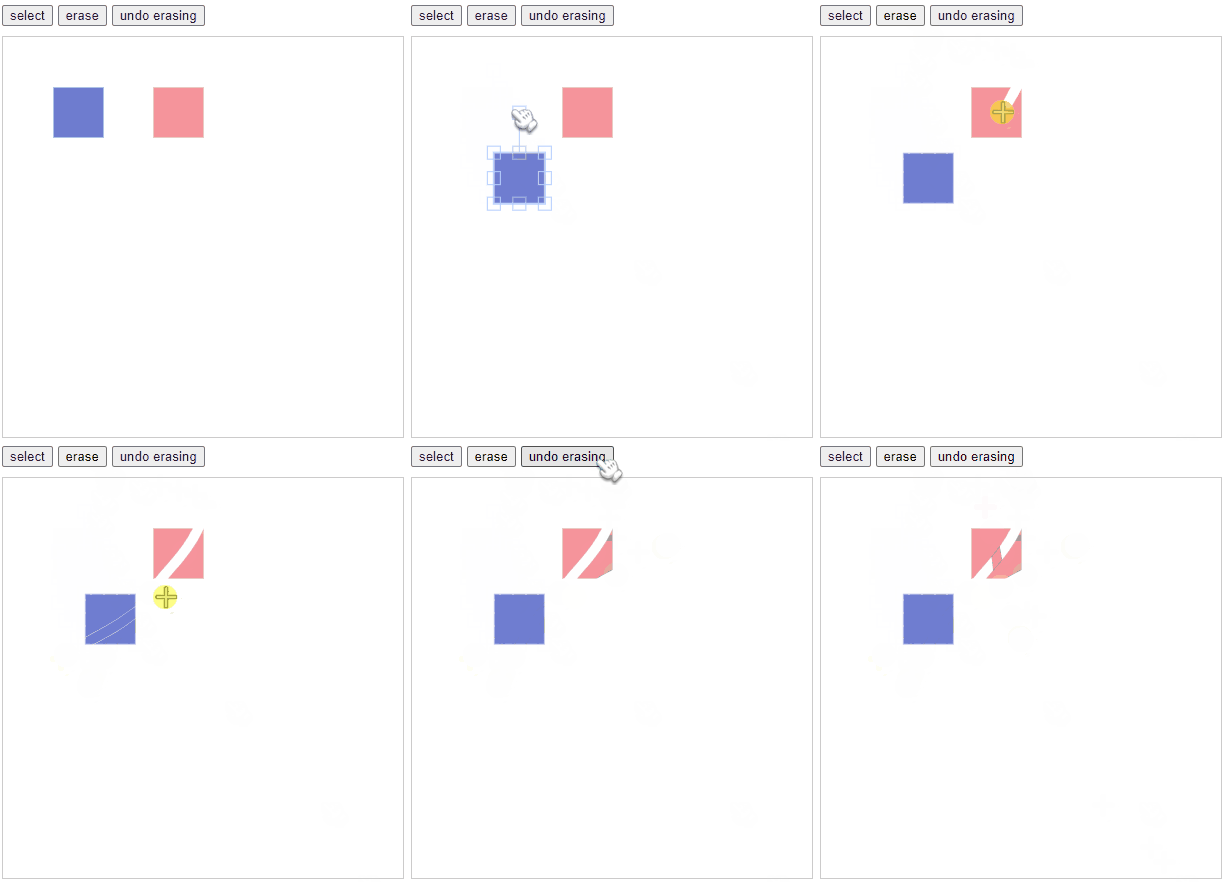
Fabric.js 的基础包并没有包含橡皮擦模块,如果你的项目需要使用橡皮擦,要使用定制版的 Fabric.js 。
<br>
本文需要有 Fabric.js 基础知识。
如果你还不清楚什么是 Fabric.js ,我墙裂建议你点赞 《Fabric.js 从入门到目中无人》。
同时最好了解基础画笔的用法 《Fabric.js 基础画笔的用法 BaseBrush》。
本文使用的是 Fabric 5.2 版本。
<br>
<br>
敲敲代码
本文使用原生三件套的方式进行开发。同时也会提供包含橡皮擦的 npm 下载方式。
<br>
定制 Fabric.js
基础版的 Fabric.js 不包含橡皮擦功能,如果你的项目需要使用橡皮擦功能,需要到 FabricJS builder 里进行定制。
CDN

选中 Erasing ,然后滑动到页面底部,根据你项目所需下载开发版或者压缩版

以上是 CDN 的做法,在 <script> 标签里,使用 src 引用即可。
<br>
npm
npm 上也有人打包了一份带橡皮擦功能的 Fabric.js 包。
可以使用命令下载到你项目中
npm i fabric-with-erasing<br>
需要注意的是,fabric-with-erasing 是在基础版的 fabric 中添加了橡皮擦功能,使用 fabric-with-erasing 时无需再下载 Fabric 。
在写本文时,fabric-with-erasing 中所使用的 Fabric 版本是 5.2 。
console.log(fabric.version)<br>
编码
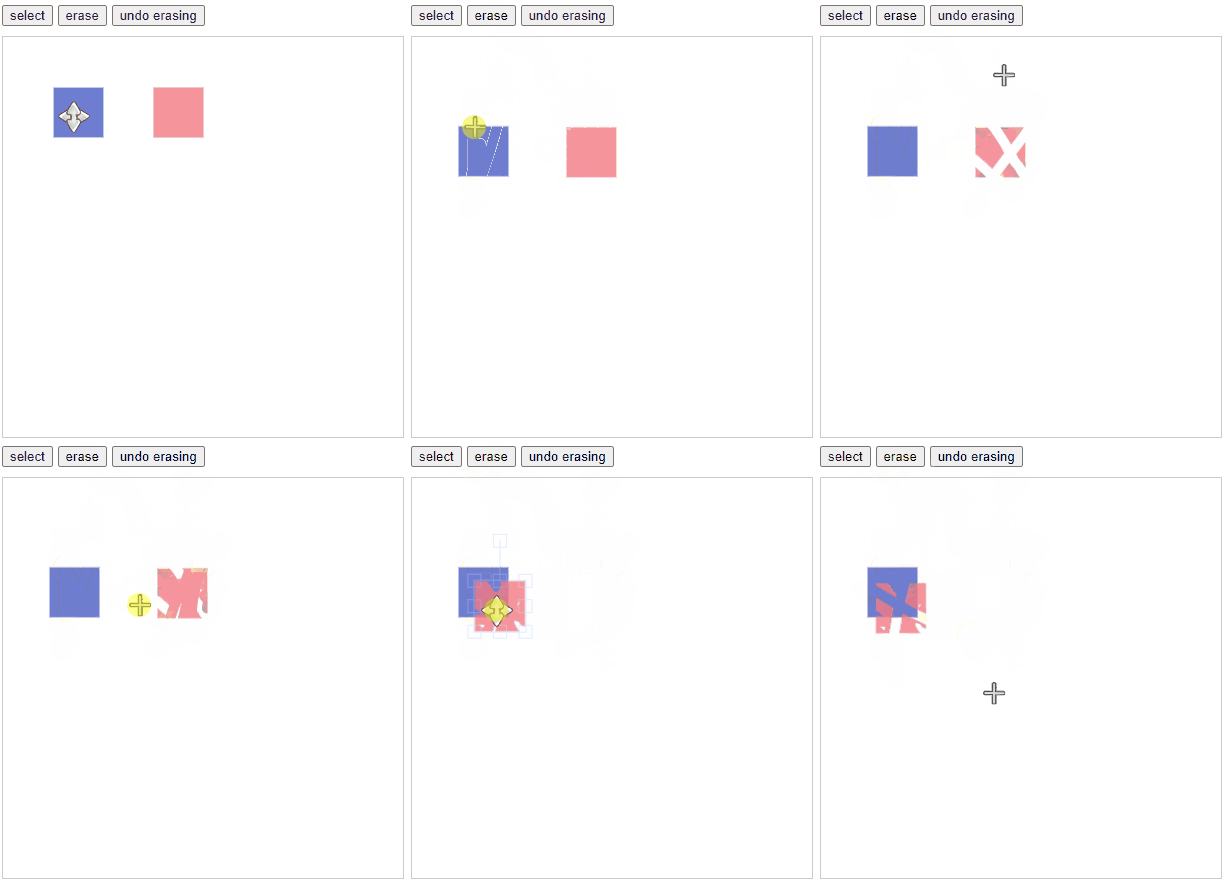
本例要实现的功能:
- 可更改画布模式(框选、擦拭)
- 宝蓝色的正方形不可擦拭
- 被擦拭的地方可以恢复
<br>
<!-- 修改画布模式的按钮 --><div style="margin-bottom: 10px;"> <button id="select" type="button" onclick="changeAction('select')">select</button> <button id="erase" type="button" onclick="changeAction('erase')">erase</button> <button id="erase" type="button" onclick="changeAction('undoErasing')">undo erasing</button></div><!-- 画布 --><canvas id="c" width="400" height="400" style="border: 1px solid #ccc;"></canvas><!-- 引入定制好的 fabric --><script src="./fabric.js"></script><script> // 初始化画布 const canvas = this.__canvas = new fabric.Canvas('c') // 在画布中添加图形(本例添加2个正方形) canvas.add( // 第一个正方形(宝蓝色) new fabric.Rect({ top: 50, left: 50, width: 50, height: 50, fill: "#4b5cc4", opacity: 0.8, erasable: false // 不允许擦拭 }), // 第二个正方形(桃红色) new fabric.Rect({ top: 50, left: 150, width: 50, height: 50, fill: "#f47983", opacity: 0.8 }) ) // 修改画板行为模式 function changeAction(mode) { switch (mode) { case "select": canvas.isDrawingMode = false // 不允许绘画(返回普通框选模式) break case "erase": canvas.isDrawingMode = true // 进入绘画模式 canvas.freeDrawingBrush = new fabric.EraserBrush(canvas) // 使用橡皮擦画笔 canvas.freeDrawingBrush.width = 10 // 设置画笔粗细为 10 break case 'undoErasing': canvas.isDrawingMode = true canvas.freeDrawingBrush = new fabric.EraserBrush(canvas) canvas.freeDrawingBrush.width = 10 canvas.freeDrawingBrush.inverted = true // 恢复被擦拭的地方 default: break } }</script><br>
- 要使用橡皮擦,首先需要将
isDrawingMode设为true。 new fabric.EraserBrush里需要传入画布本身,在初始化画布时的那个对象const canvas = this.__canvas = new fabric.Canvas('c')。- 将
canvas.freeDrawingBrush.inverted设为true就能恢复被擦拭的地方。
<br>
<br>
代码仓库
<br>
<br>
推荐阅读
| 文章 | 简介 |
|---|---|
| 《Fabric.js 基础画笔的用法 BaseBrush》 | 在阅读本文前我强烈建议你先了解一下基础画笔的用法,因为橡皮擦其实也是个画笔 |
| 《Fabric.js 自由绘制圆形》 | 将“框选”动作改造成自由绘制圆形 |
| 《Fabric.js 3个api设置画布宽高》 | 宽高设置并不是在初始化是才能进行的,本文介绍3种方法设置画布宽高,让你的画布更容易适配不同的使用场景 |
| 《Fabric.js 更换图片的3种方法(包括更换分组内的图片,以及存在缓存的情况)》 | 如果你的项目需要动态更换画布上的图片,那我也给你总结了3中方法 |
| 《Fabric.js 摆正元素的4种方法(带过渡动画)》 | 一键摆正被你旋转过的元素 |
| 《Fabric.js 将本地图像上传到画布背景》 | 除了在初始化时设置画布背景外,我还做了本地上传背景的功能,让画布在运行时也能修改背景图 |
| 《在 Vue3中使用Fabric.js实现渐变(Gradient)效果,包括径向渐变radial》 | 官方入门教程也只有线性渐变,以至于某些文章说 Fabric.js 只支持线性渐变。但其实径向渐变也完全支持 |
| 《Fabric.js 从入门到目中无人》 | Fabric.js 入门指南,学完能应付简单业务 |
| 《Fabric.js 右键菜单》 | Fabric.js 暂时还没右键事件,如果你想实现右键菜单的功能,可直接复制该文章的代码~ |
点赞 + 关注 + 收藏 = 学会了
边栏推荐
- Design and implementation of car query system based on php+mysql
- Selenium, element operation and browser operation methods
- Basic knowledge of QT original code
- [deep learning] simple implementation of neural network forward propagation
- MySQL 45 lecture - learning the actual battle of MySQL in Geek time 45 Lecture Notes - 05 | easy to understand index (Part 2)
- The global special paper revenue in 2021 was about $27 million, and it is expected to reach $35 million in 2028. From 2022 to 2028, the CAGR was 3.8%
- 没有从远程服务器‘‘映射到本地用户‘(null)/sa‘的远程用户‘sa‘及服务主密码解密错误的解决办法
- Chaos engineering platform chaosblade box new heavy release
- Getting started with QT - making a simple calculator
- Essential elements of science fiction 3D scenes - City
猜你喜欢

抓包工具fiddler学习

没有从远程服务器‘‘映射到本地用户‘(null)/sa‘的远程用户‘sa‘及服务主密码解密错误的解决办法
瀏覽器驅動的下載
Fabric.js 上划线、中划线(删除线)、下划线

2022 home projector preferred! Dangbei F5 brings the ultimate audio-visual experience with its powerful audio-visual effect
MySQL 45 lecture - learning the actual battle of MySQL in Geek time 45 Lecture Notes - 05 | easy to understand index (Part 2)

Essential elements of science fiction 3D scenes - City

Origin plots thermogravimetric TG and differential thermogravimetric DTG curves
selenium 元素定位方法
![[deep learning] simple implementation of neural network forward propagation](/img/a6/9b4896c62e9b77f9d528c3c9efc58f.jpg)
[deep learning] simple implementation of neural network forward propagation
随机推荐
【虹科技术分享】如何测试 DNS 服务器:DNS 性能和响应时间测试
HMS core machine learning service helps zaful users to shop conveniently
数据湖(十一):Iceberg表数据组织与查询
How many knowledge points can a callable interface have?
博睿数据一体化智能可观测平台入选中国信通院2022年“云原生产品名录”
Qt原代码基本知识
卷积神经网络(入门)
TeamTalk源码分析之win-client
docker mysql
2022家用投影仪首选!当贝F5强悍音画效果带来极致视听体验
Penetrate the remote connection database through the Intranet
Adhere to the foundation of 20 minutes go every day II
联合搜索:搜索中的所有需求
Multi rotor aircraft control using PID and LQR controllers
抓包工具fiddler学习
How kaggle uses utility script
selenium 元素定位方法
P1908 逆序对
[deep learning] simple implementation of neural network forward propagation
c# 水晶报表打印