当前位置:网站首页>Shell script text three swordsman awk
Shell script text three swordsman awk
2022-07-27 11:52:00 【Brother frog who doesn't look back】
Catalog
1.2 awk Common built-in variables ( Can be directly used )
2.2.1 Fuzzy matching , use ~ Means to contain ,!~ Does not include
2.2.2 About the comparison between numeric value and string
2.2.3 Logical operations &&( And )、||( or )
2.2.4 Usage of other built-in variables
1 awk Tool is introduced
- AWK Is a language for processing text files , Is a powerful text analysis tool
- Complex text manipulation can be realized in non interactive mode
- Compare with sed It is often used for the processing of an entire line ,awk It is more likely to be divided into several fields in a row , because awk Quite suitable for small text data .
1.1 working principle
When you read the first line , Matching condition , Then perform the specified action , Then read the second line of data processing , No default output . If no matching criteria are defined, the default is to match all data rows ,awk Implicit loop , The action will be executed as many times as the condition matches .
Read the text line by line , The default is space or tab Key to separate the separator , Save the separated fields to the built-in variables , And execute the edit command according to the mode or condition .
sed Commands are often used for a whole line of processing , and awk They tend to divide a line into multiple " Field " And then deal with it .awk Information is also read line by line , The execution result can be obtained through print To print and display field data .
In the use of awk In the course of the order , You can use logical operators “&&” Express “ And ”、“||” Express “ or ”、“!” Express “ Not ”; You can also do simple mathematical operations , Such as +、-、*、/、%、^ Respectively means plus 、 reduce 、 ride 、 except 、 The remainder and the power .
Command format :
- awk [ Options ] ‘ Mode conditions { operation }’ file 1 file 2...
- awk -f|-v Script files file 1 file .....
1.2 awk Common built-in variables ( Can be directly used )
- FS∶ Column separator . Specify the field separator for each line of text , Default to space or tab stop . And "-F" The same effect
- NF∶ Number of fields in the row currently processed .
- NR∶ Line number of the currently processed line ( Ordinal number ).
- $0∶ The entire contents of the currently processed row .
- $n∶ Of the current processing line n A field ( The first n Column ).
- FILENAME∶ File name processed .
- RS∶ Line separator .awk When reading from a file , Based on the RS The definition of cut data into many records , and awk Read only one record at a time , To deal with . The default is ’\n’. Jane said as : Data record separation , The default is \n, One record for each action
2 example
2.1 Print text content
example


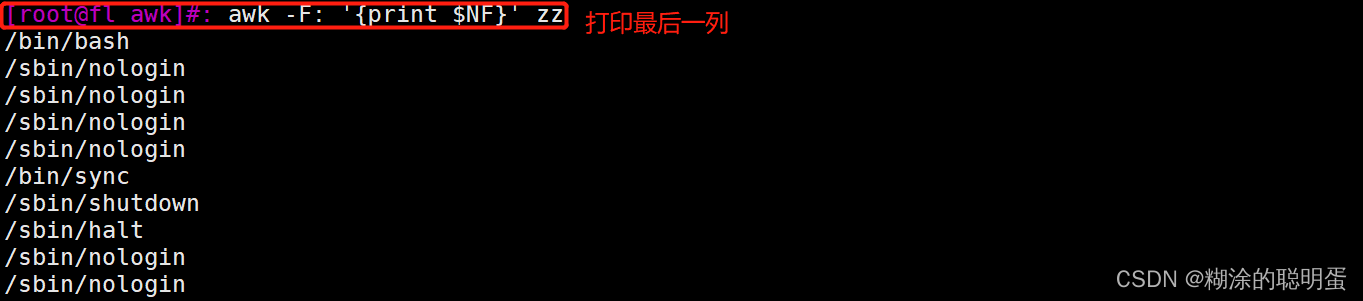

Expand production : NIC ip、 Traffic

2.2 awk Arithmetic
Line by line what tasks to perform before starting , What tasks will be performed after the end of , use BEGIN、END
BEGIN Generally used for initialization , Read the data only once before
END It is generally used for summary operation , Execute only once after reading the data record

example


2.2.1 Fuzzy matching , use ~ Means to contain ,!~ Does not include


2.2.2 About the comparison between numeric value and string
Comparative symbols :== != <= >= < >

2.2.3 Logical operations &&( And )、||( or )


 2.2.4 Usage of other built-in variables
- FS: Enter the delimiter of the field Default is space
- OFS: Separator for output field The default is also a space
- NR∶ Line number of the currently processed line ( Ordinal number )
- FNR: Number of records read from the file ( Line number ), from 1 Start , The new file is redone 1 Start counting
- RS: Enter the line separator The default is line break
- ORS: Output line separator The default is line feed
example


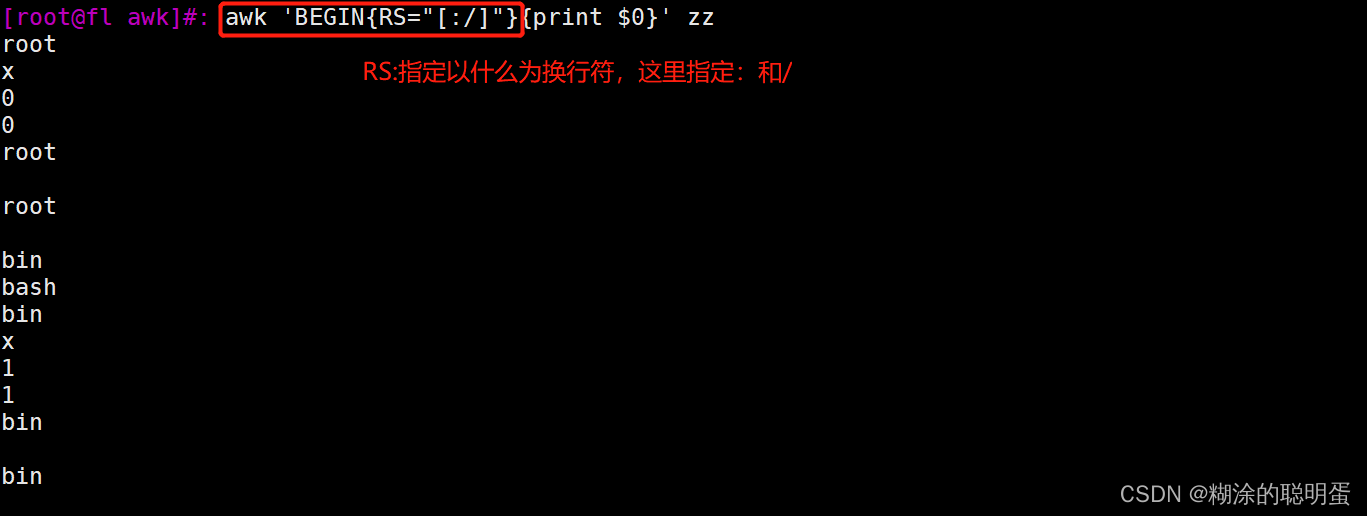

3 awk Advanced usage

Call function getline, When reading a row of data, you do not get the current row, but the next row of the current row
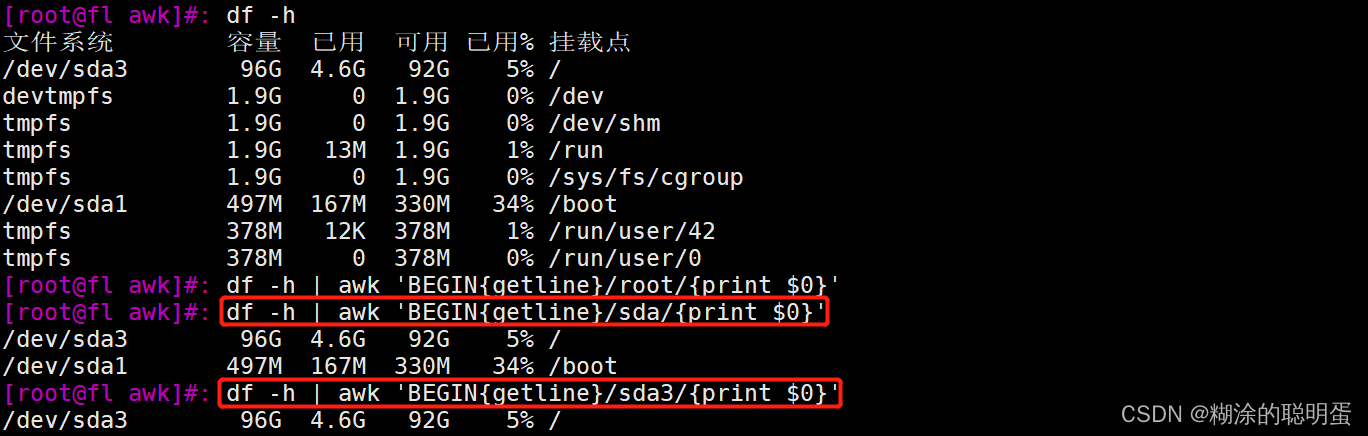


边栏推荐
- LAN SDN hard core technology insider 25 looking forward to the future - RDMA (Part 2)
- 局域网SDN硬核技术内幕 23 展望未来——RDMA(上)
- 剑指 Offer 笔记: T45. 把数组排成最小的数
- Matlab S-function详解
- npm踩坑
- Idea: can't use subversion command line client: SVN solution
- 【机器学习-白板推导系列】学习笔记---支持向量机和主成分分析法
- zabbix自定义监控项
- Adobe audit prompts that the sampling rate of audio input does not match the output device - problem solving
- Sword finger offer notes: T53 - ii Missing numbers from 0 to n-1
猜你喜欢

Could not load dynamic library ‘libcudnn.so.8‘;

Beyond compare 3 next difference segment / down search arrow not found

解决@OneToMany查询陷入循环引用问题

Tlc549proteus simulation &sallen key filter &ad736vrms to DC conversion &proteus view 51 register value

Principle of control system based on feedback rate
iptables防火墙

NPM step pit

Keil MDK compilation appears..\user\stm32f10x H (428): error: # 67: expected a "}" wrong solution

箱型图介绍

暂用 Solo,博客选择困难
随机推荐
PWM的原理和PWM波的产生
SQL statement learning and the use of pymysql
Database cli tool docker image
解决方案:Can not issue executeUpdate() or executeLargeUpdate() for SELECTs
LeetCode 04: T26. 删除排序数组中的重复项(简单); 剑指 Offer 67. 把字符串转换成整数(中等); 面试题 01.08. 零矩阵 (简单)
MySQL数据库主从复制集群原理概念以及搭建流程
Shell脚本文本三剑客之awk
Could not load dynamic library ‘libcudnn.so.8‘;
How to make a graph? Multiple subgraphs in a graph are histogram (or other graphs)
STM32 compilation error: l6235e: more than one section matches selector - cannot all be first/l
Pytorch shows the summary like tensorflow
意外收获史诗级分布式资源,从基础到进阶都干货满满,大佬就是强!
剑指 Offer 笔记: T57 - I. 和为 s 的两个数字
数据库 cli 工具 docker 镜像
开源flink有写holo的Datastream connector或者flink sql conn
VSCode复制代码时去掉样式/语法高亮/代码高亮/黑色背景
Synchronous use reference of the new version of data warehouse (for beginners)
Open source Flink has datastream connector written with holo or Flink SQL Conn
LAN SDN hard core technology insider 25 looking forward to the future - RDMA (Part 2)
Difference quotient approximation of wechat quotient