当前位置:网站首页>Huawei equipment is configured to access the virtual private network through GRE
Huawei equipment is configured to access the virtual private network through GRE
2022-06-11 04:51:00 【Tony_ long7483】

To configure IP Address
[CE1-GigabitEthernet0/0/0]ip add 20.1.1.1 24
[CE1-GigabitEthernet0/0/1]ip add 10.1.1.1 24
[AR2-GigabitEthernet0/0/0]ip add 20.1.1.2 24
[AR2-GigabitEthernet0/0/1]ip add 30.1.1.2 24
[PE1-GigabitEthernet0/0/0]ip add 30.1.1.3 24
[PE1-GigabitEthernet0/0/1]ip add 40.1.1.3 24
[PE1-LoopBack0]ip add 3.3.3.3 32
[PE2-GigabitEthernet0/0/0]ip add 40.1.1.4 24
[PE2-GigabitEthernet0/0/1]ip add 11.1.1.4 24
[PE2-LoopBack0]ip add 4.4.4.4 32
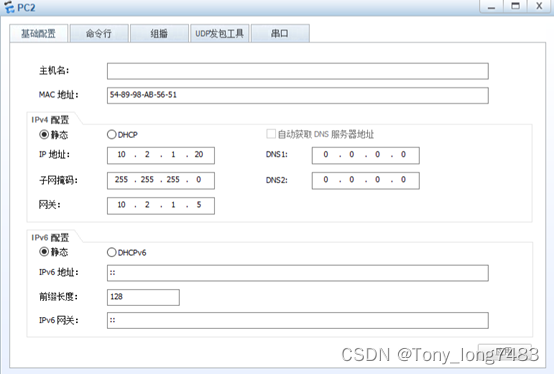
[CE2-GigabitEthernet0/0/0]ip add 11.1.1.5 24
[CE2-GigabitEthernet0/0/1]ip add 10.2.1.5 24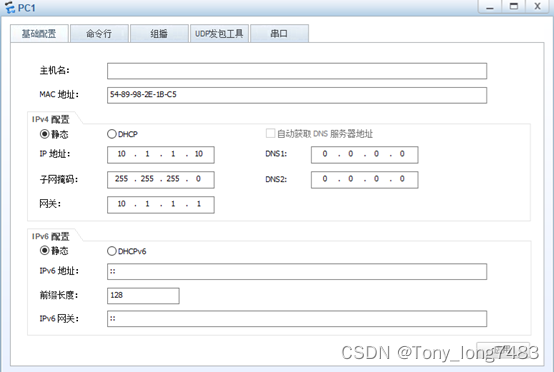
To configure PE Routing and MPLS
[PE1]mpls lsr-id 3.3.3.3
[PE1]mpls
[PE1-mpls]lsp-trigger all
[PE1]mpls ldp
[PE1]ospf 1
[PE1-ospf-1]area 0
[PE1-ospf-1-area-0.0.0.0]network 3.3.3.3 0.0.0.0
[PE1-ospf-1-area-0.0.0.0]network 40.1.1.0 0.0.0.255
[PE1-GigabitEthernet0/0/1]mpls
[PE1-GigabitEthernet0/0/1]mpls ldp
[PE2]mpls lsr-id 4.4.4.4
[PE2]mpls
[PE2-mpls]lsp-trigger all
[PE2]mpls ldp
[PE2]ospf 1
[PE2-ospf-1]area 0
[PE2-ospf-1-area-0.0.0.0]network 4.4.4.4 0.0.0.0
[PE2-ospf-1-area-0.0.0.0]network 40.1.1.0 0.0.0.255
[PE2-GigabitEthernet0/0/0]mpls
[PE2-GigabitEthernet0/0/0]mpls ldpstay PE1 establish VPN example vpn1 And with GRE Tunnel binding
[PE1]ip vpn-instance vpn1
[PE1-vpn-instance-vpn1]route-distinguisher 100:1
[PE1-vpn-instance-vpn1-af-ipv4]vpn-target 111:1 export-extcommunity
[PE1-vpn-instance-vpn1-af-ipv4]vpn-target 111:1 import-extcommunity
[PE1]int Tunnel 0/0/1
[PE1-Tunnel0/0/1]ip binding vpn-instance vpn1
[PE1-Tunnel0/0/1]ip add 2.2.2.3 24stay PE2 establish VPN example vpn1 And with PC Side interface binding
[PE2]ip vpn-instance vpn1
[PE2-vpn-instance-vpn1]route-distinguisher 200:1
[PE2-vpn-instance-vpn1-af-ipv4]vpn-target 111:1 export-extcommunity
[PE2-vpn-instance-vpn1-af-ipv4]vpn-target 111:1 import-extcommunity
[PE2-GigabitEthernet0/0/1]ip binding vpn-instance vpn1
[PE2-GigabitEthernet0/0/1]ip add 11.1.1.4 24To configure GRE Of the tunnel Tunnel Interface
[CE1]int Tunnel 0/0/1
[CE1-Tunnel0/0/1]tunnel-protocol gre
[CE1-Tunnel0/0/1]source 20.1.1.1
[CE1-Tunnel0/0/1]destination 30.1.1.3
[CE1-Tunnel0/0/1]ip add 2.2.2.1 24
[PE1]int Tunnel 0/0/1
[PE1-Tunnel0/0/1]tunnel-protocol gre
[PE1-Tunnel0/0/1]source 30.1.1.3
[PE1-Tunnel0/0/1]destination 20.1.1.1To configure CE1、AR2 and PE1 Routing protocol between
[CE1]ospf 2
[CE1-ospf-2]area 0
[CE1-ospf-2-area-0.0.0.0]network 20.1.1.0 0.0.0.255
[AR2]ospf 2
[AR2-ospf-2]area 0
[AR2-ospf-2-area-0.0.0.0]network 20.1.1.0 0.0.0.255
[AR2-ospf-2-area-0.0.0.0]network 30.1.1.0 0.0.0.255
[PE1]ospf 2
[PE1-ospf-2]area 0
[PE1-ospf-2-area-0.0.0.0]network 30.1.1.0 0.0.0.255To configure CE1 And PE1 Between IS-IS route
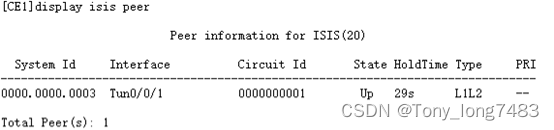
[CE1]isis 20
[CE1-isis-20]network-entity 20.0000.0000.0001.00
[CE1-GigabitEthernet0/0/0]isis enable 20
[CE1-Tunnel0/0/1]isis enable 20
[PE1]isis 20 vpn-instance vpn1
[PE1-isis-20]network-entity 20.0000.0000.0003.00
[PE1]int Tunnel 0/0/1
[PE1-Tunnel0/0/1]isis enable 20To configure CE2 And PE2 Between IS-IS route
[CE2]isis 20
[CE2-isis-20]network-entity 20.0000.0000.0005.00
[CE2-GigabitEthernet0/0/0]isis enable 20
[CE2-GigabitEthernet0/0/1]isis enable 20
[PE2]isis 20 vpn-instance vpn1
[PE2-isis-20]network-entity 20.0000.0000.0004.00
[PE2-GigabitEthernet0/0/1]isis enable 20stay PE Establish between MP-IBGP peers
[PE1]bgp 100
[PE1-bgp]peer 4.4.4.4 as-number 100
[PE1-bgp]peer 4.4.4.4 connect-interface LoopBack 0
[PE1-bgp]ipv4-family vpnv4
[PE1-bgp-af-vpnv4]peer 4.4.4.4 enable
[PE1-bgp]ipv4-family vpn-instance vpn1 // Get into BGP Of vpn1 example
[PE1-bgp-vpn1]import-route isis 20 // introduce IS-IS route
[PE2]bgp 100
[PE2-bgp]peer 3.3.3.3 as-number 100
[PE2-bgp]peer 3.3.3.3 connect-interface LoopBack 0
[PE2-bgp]ipv4-family vpnv4
[PE2-bgp-af-vpnv4]peer 3.3.3.3 enable
[PE2-bgp]ipv4-family vpnv4
[PE2-bgp]ipv4-family vpn-instance vpn1
[PE2-bgp-vpn1]import-route isis 20stay IS-IS Introduction in BGP route
[PE1]isis 20
[PE1-isis-20]import-route bgp
[PE2]isis 20
[PE2-isis-20]import-route bgpCheck the configuration

边栏推荐
- Acts: how to hide defects?
- Yolact paper reading and analysis
- What is the difference between a wired network card and a wireless network card?
- Unzip Imagenet after downloading
- KD-Tree and LSH
- The first master account of Chia Tai International till autumn
- 如何快速寻找STM32系列单片机官方例程
- go MPG
- 精益产品开发体系最佳实践及原则
- Parametric contractual learning: comparative learning in long tail problems
猜你喜欢

Acts: how to hide defects?

Cartographer learning record: cartographer Map 3D visualization configuration (self recording dataset version)

New UI learning method subtraction professional version 34235 question bank learning method subtraction professional version applet source code

Codesys get System Time

PostgreSQL数据库复制——后台一等公民进程WalReceiver 收发逻辑
Crmeb/v4.4 Standard Version open version mall source code applet official account h5+app mall source code

PCB地线设计_单点接地_底线加粗

华为设备配置BGP/MPLS IP 虚拟专用网地址空间重叠

exness:流動性系列-訂單塊、不平衡(二)

碳路先行,华为数字能源为广西绿色发展注入新动能
随机推荐
lower_ bound,upper_ Bound, two points
PostgreSQL database replication - background first-class citizen process walreceiver receiving and sending logic
Let me tell you how to choose a 10 Gigabit network card
Leetcode question brushing series - mode 2 (datastructure linked list) - 19:remove nth node from end of list (medium) delete the penultimate node in the linked list
ACTS:高效的测试设计(并赠送一个优秀的测试设计工具)
Learning summary 01- machine learning
Detailed decomposition of the shortest path problem in Figure
Leetcode question brushing series - mode 2 (datastructure linked list) - 21:merge two sorted lists merge two ordered linked lists
lower_bound,upper_bound,二分
[Transformer]MViTv1:Multiscale Vision Transformers
博途仿真时出现“没有针对此地址组态任何硬件,无法进行修改”解决办法
C语言试题三(程序选择题进阶_含知识点详解)
Sorting out relevant programming contents of renderfeature of unity's URP
如何快速寻找STM32系列单片机官方例程
Chia Tai International: anyone who really invests in qihuo should know
福州化工实验室建设注意隐患分析
Holiday Homework
Mindmanager22 professional mind mapping tool
Differences between the four MQ
梅州植物组培实验室建设资料整理