当前位置:网站首页>PyQt5快速开发与实战 4.11 拖曳与剪贴板
PyQt5快速开发与实战 4.11 拖曳与剪贴板
2022-07-28 10:23:00 【Ding Jiaxiong】
PyQt5快速开发与实战
4. 第4章 PyQt5 基本窗口控件
4.11 拖曳与剪贴板
4.11.1 Drag与Drop
为用户提供的拖曳功能很直观,在很多桌面应用程序中,复制或移动对象都可以通过拖曳来完成。
基于MIME 类型的拖曳数据传输是基于QDrag类的。QMimeData对象将关联的数据与其对应的 MIME 类型相关联。
MIME:多用途互联网邮件扩展类型。是设定某种扩展名的文件用一种应用程序来打开的方式类型,当该扩展名文件被访问时,浏览器会自动使用指定的应用程序来打开,多用于指定一些客户端自定义的文件名,以及一些媒体文件打开方式。
MIME类型的数据可以简单理解为互联网上的各种资源,比如文本、音频和视频资源等,互联网上的每一种资源都属于一种 MIME类型的数据。
MimeData类函数允许检测和使用方便的MIME类型
| 判断函数 | 设置函数 | 获取函数 | MIME类型 |
|---|---|---|---|
| hasText() | text() | setText() | text/plain |
| hasHtml() | html() | setHtml() | text/html |
| hasUrls() | urls() | setUrls() | text/uri-list |
| hasImage() | imageData() | setImageData() | image/* |
| hasColor() | colorData() | setColorData() | application/x-color |
许多QWidget对象都支持拖曳动作,允许拖曳数据的控件必须设置QWidget.setDragEnabled()为 True。另外,控件应该响应拖曳事件,以便存储所拖曳的数据。
常用的拖曳事件
| 事件 | 描述 |
|---|---|
| DragEnterEvent | 当执行一个拖曳控件操作,并且鼠标指针进入该控件时,这个事件将被触发。在这个事件中可以获得被操作的窗口控件,还可以有条件地接受或拒绝该拖曳操作 |
| DragMoveEvent | 在拖曳操作进行时会触发该事件 |
| DragLeaveEvent | 当执行一个拖曳控件操作,并且鼠标指针离开该控件时,这个事件将被触发 |
| DropEvent | 当拖曳操作在目标控件上被释放时,这个事件将被触发 |
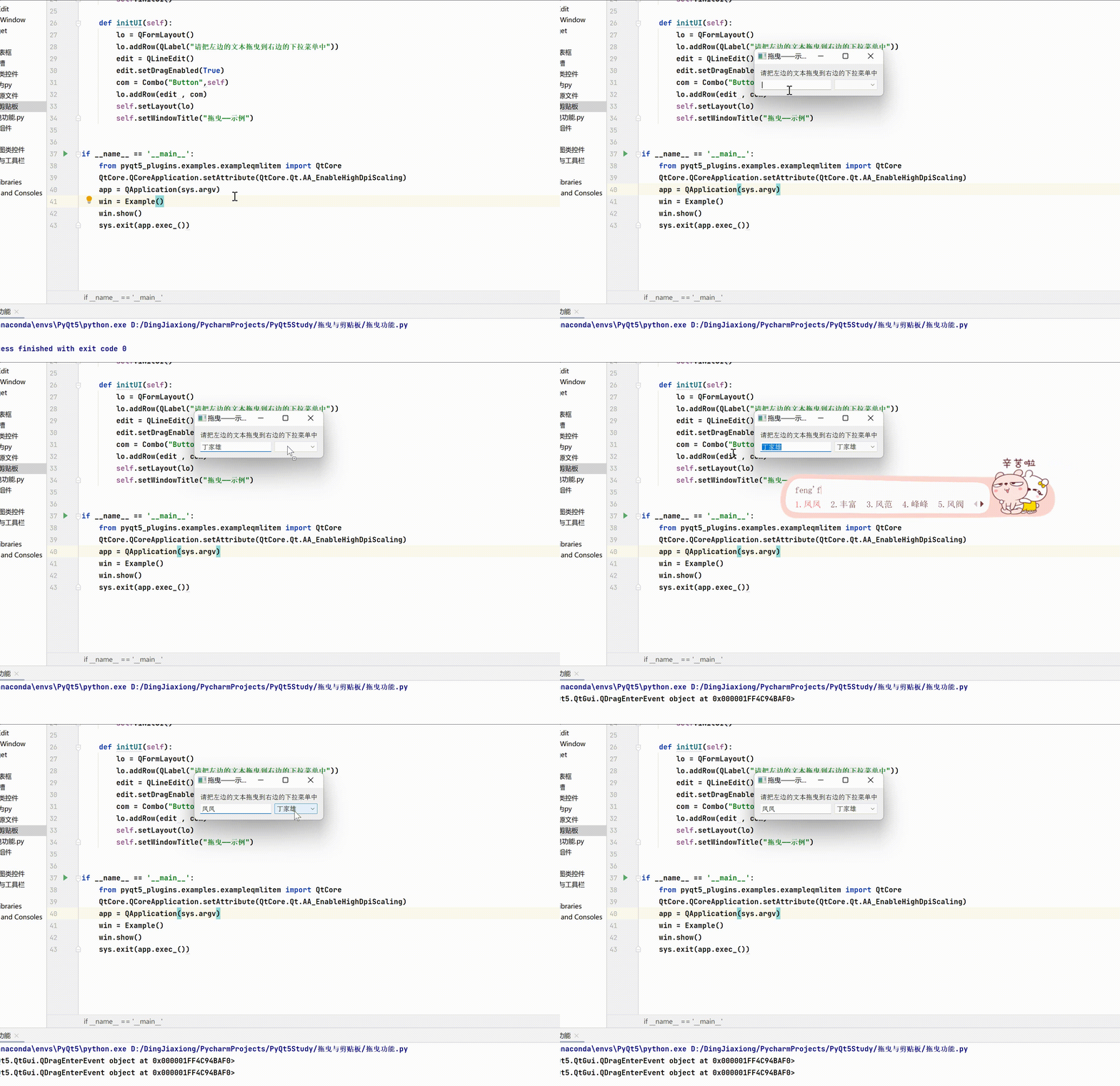
拖曳功能 —— 案例
import sys
from PyQt5.QtCore import *
from PyQt5.QtGui import *
from PyQt5.QtWidgets import *

class Combo(QComboBox):
    def __init__(self , title , parent):
        super(Combo, self).__init__(parent)
        self.setAcceptDrops(True)

    def dragEnterEvent(self , e):
        print(e)
        if e.mimeData().hasText():
            e.accept()
        else:
            e.ignore()

    def dropEvent(self,e):
        self.addItem(e.mimeData().text())

class Example(QWidget):
    def __init__(self):
        super(Example, self).__init__()
        self.initUI()

    def initUI(self):
        lo = QFormLayout()
        lo.addRow(QLabel("请把左边的文本拖曳到右边的下拉菜单中"))
        edit = QLineEdit()
        edit.setDragEnabled(True)
        com = Combo("Button",self)
        lo.addRow(edit , com)
        self.setLayout(lo)
        self.setWindowTitle("拖曳——示例")


if __name__ == '__main__':
    from pyqt5_plugins.examples.exampleqmlitem import QtCore
    QtCore.QCoreApplication.setAttribute(QtCore.Qt.AA_EnableHighDpiScaling)
    app = QApplication(sys.argv)
    win = Example()
    win.show()
    sys.exit(app.exec_())
4.11.2 QClipboard
QClipboard 类提供了对系统剪贴板的访问,可以在应用程序之间复制和粘贴数据。它的操作类似于QDrag类,并使用类似的数据类型。
QApplication类有一个静态方法clipboard(),它返回对剪贴板对象的引用。任何类型的MimeData都可以从剪贴板复制或粘贴。
QClipboard类中的常用方法
| 方法 | 描述 |
|---|---|
| clear() | 清除剪贴板的内容 |
| setImage() | 将QImage对象复制到剪贴板中 |
| setMimeData() | 将MIME数据设置为剪贴板 |
| setPixmap() | 从剪贴板中复制Pixmap对象 |
| setText() | 从剪贴板中复制文本 |
| text() | 从剪贴板中检索文本 |
QClipboard类中的常用信号
| 信号 | 含义 |
|---|---|
| dataChanged | 当剪贴板内容发生变化时,这个信号被发射 |
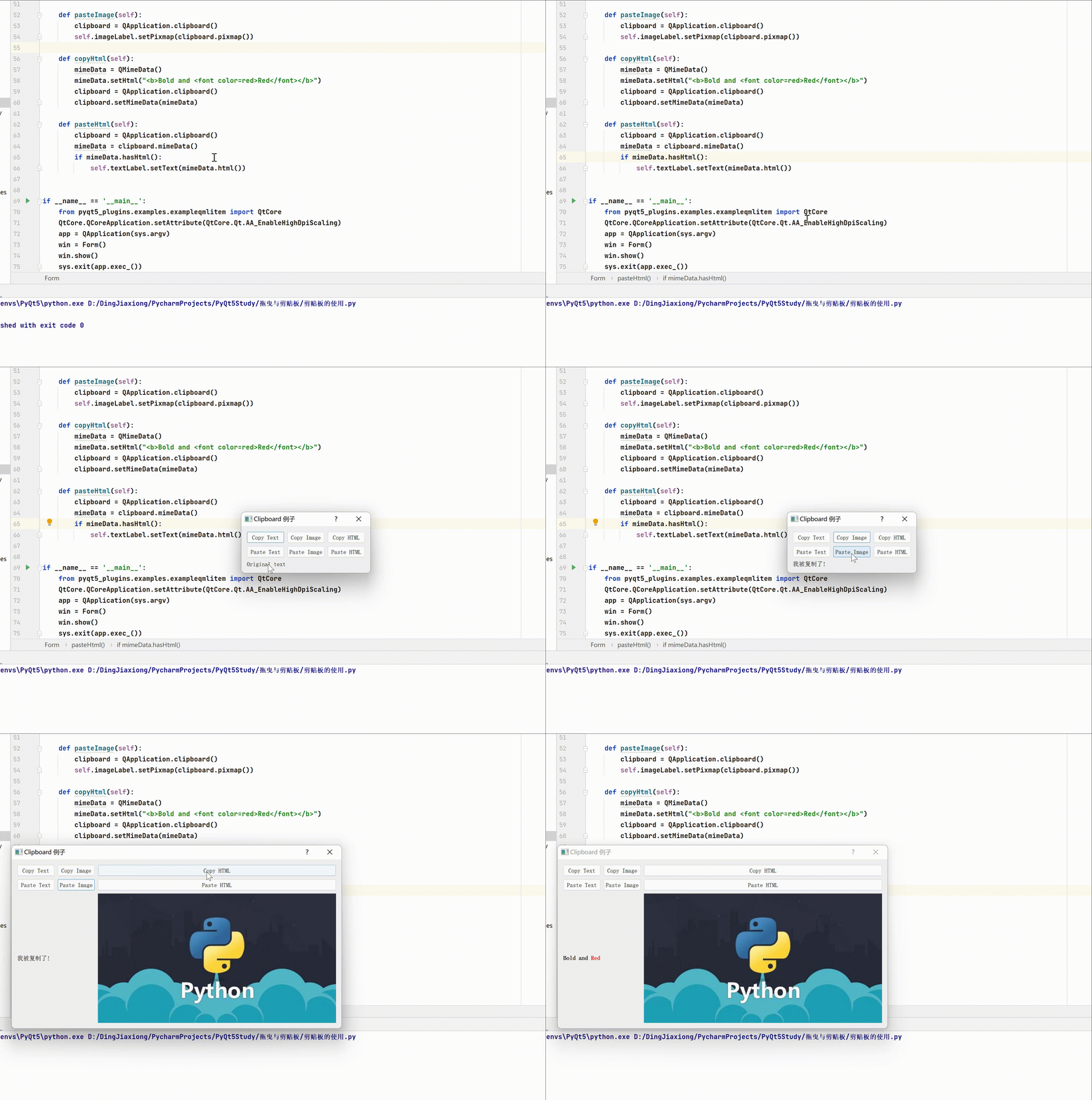
QClipboard的使用——案例
import os
import sys
from PyQt5.QtCore import QMimeData
from PyQt5.QtWidgets import (QApplication,QDialog,QGridLayout,QLabel,QPushButton)
from PyQt5.QtGui import QPixmap


class Form(QDialog):
    def __init__(self, parent=None):
        super(Form, self).__init__(parent)
        textCopyButton = QPushButton("&Copy Text")
        textPasteButton = QPushButton("Paste &Text")
        htmlCopyButton = QPushButton("C&opy HTML")
        htmlPasteButton = QPushButton("Paste &HTML")
        imageCopyButton = QPushButton("Co&py Image")
        imagePasteButton = QPushButton("Paste &Image")
        self.textLabel = QLabel("Original text")
        self.imageLabel = QLabel()
        self.imageLabel.setPixmap(QPixmap(os.path.join(
            os.path.dirname(__file__), "images/clock.png")))
        layout = QGridLayout()
        layout.addWidget(textCopyButton, 0, 0)
        layout.addWidget(imageCopyButton, 0, 1)
        layout.addWidget(htmlCopyButton, 0, 2)
        layout.addWidget(textPasteButton, 1, 0)
        layout.addWidget(imagePasteButton, 1, 1)
        layout.addWidget(htmlPasteButton, 1, 2)
        layout.addWidget(self.textLabel, 2, 0, 1, 2)
        layout.addWidget(self.imageLabel, 2, 2)
        self.setLayout(layout)
        textCopyButton.clicked.connect(self.copyText)
        textPasteButton.clicked.connect(self.pasteText)
        htmlCopyButton.clicked.connect(self.copyHtml)
        htmlPasteButton.clicked.connect(self.pasteHtml)
        imageCopyButton.clicked.connect(self.copyImage)
        imagePasteButton.clicked.connect(self.pasteImage)
        self.setWindowTitle("Clipboard 例子")

    def copyText(self):
        clipboard = QApplication.clipboard()
        clipboard.setText("我被复制了!")

    def pasteText(self):
        clipboard = QApplication.clipboard()
        self.textLabel.setText(clipboard.text())

    def copyImage(self):
        clipboard = QApplication.clipboard()
        clipboard.setPixmap(QPixmap(os.path.join(
            os.path.dirname(__file__), "../打包资源文件/pic/python.jpg")))

    def pasteImage(self):
        clipboard = QApplication.clipboard()
        self.imageLabel.setPixmap(clipboard.pixmap())

    def copyHtml(self):
        mimeData = QMimeData()
        mimeData.setHtml("<b>Bold and <font color=red>Red</font></b>")
        clipboard = QApplication.clipboard()
        clipboard.setMimeData(mimeData)

    def pasteHtml(self):
        clipboard = QApplication.clipboard()
        mimeData = clipboard.mimeData()
        if mimeData.hasHtml():
            self.textLabel.setText(mimeData.html())


if __name__ == '__main__':
    from pyqt5_plugins.examples.exampleqmlitem import QtCore
    QtCore.QCoreApplication.setAttribute(QtCore.Qt.AA_EnableHighDpiScaling)
    app = QApplication(sys.argv)
    win = Form()
    win.show()
    sys.exit(app.exec_())
边栏推荐
- GKRandomSource
- string matching
- 20200217训练赛 L1 - 7 2019来了 (20分)
- Inside story of Wu xiongang being dismissed by arm: did the establishment of a private investment company harm the interests of shareholders?
- ACM寒假集训#6
- Andorid 开发三 (Intent)
- Ueeditor v1.4.3 control file compression
- 20200229 training match L1 - 2 delete the substring in the string (20 points)
- 在mt6735中添加新的开机logo与开\关机动画
- Inverse element & combinatorial number & fast power
猜你喜欢
![Database security - create login user + configure permissions [notes]](/img/02/0c3eb542593e8e0a3a62db75c52850.png)
Database security - create login user + configure permissions [notes]

Batch Normlization

Idea packages jar packages and runs jar package commands

ACM winter vacation training 5

最短路专题

SQL Server 2016 学习记录 --- 集合查询

Excel word 简单 技巧 整理(持续更新 大概~)

逆元&组合数&快速幂

django-celery-redis异步发邮件

SQL Server 2016 learning record - nested query
随机推荐
Install mysql5.7 under centos7
IDEA打包jar包及运行jar包命令
AP AUTOSAR platform design 1-2 introduction, technical scope and method
C language input string with spaces
SQL Server 2016 learning record - nested query
SQL Server 2016 learning records - set query
Machine learning -- handwritten English alphabet 1 -- classification process
ACM winter vacation training 4
SQL Server 2016 learning records - View
Inside story of Wu xiongang being dismissed by arm: did the establishment of a private investment company harm the interests of shareholders?
Sword finger offer
11_ue4进阶_男性角色换成女性角色,并修改动画
ACM寒假集训#7
[application of stack] - infix expression to suffix expression
Huawei takes a 10% stake in fullerene technology, a graphene material manufacturer
读写分离备机备份报错
SDUT 2446 最终排名
markdown转成word或者pdf
爱可可AI前沿推介(7.28)
ACM寒假集训#5