当前位置:网站首页>一、excel转pdf格式jacob.jar
一、excel转pdf格式jacob.jar
2022-07-31 10:44:00 【HJHO】
1.下载jacob.jar包
jacob资料
2.将jacob-1.17-M2-x64.dll 存放在jdk/bin目录下

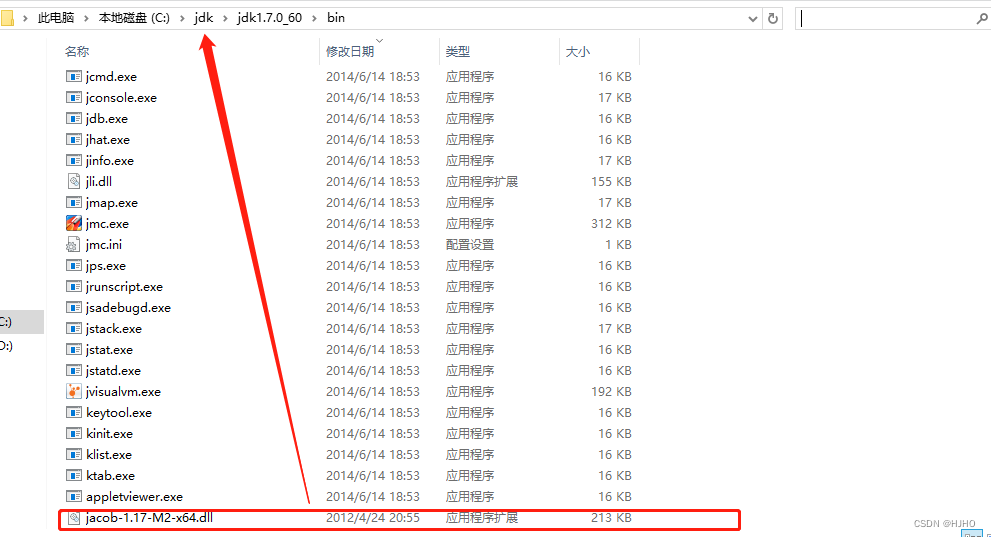
3.导入本地依赖
<dependency>
     <groupId>com.jacob</groupId>
     <artifactId>jacob</artifactId>
     <version>1.19</version>
     <scope>system</scope>
     <!--本地的jacob.jar的路径-->
     <systemPath>D:\jacob-1.17-M2\jacob.jar</systemPath>
</dependency>
4.直接传入输入的excel和输出的pdf路径
示例代码:
package com.ysb.zy.util.pdf;

import com.jacob.activeX.ActiveXComponent;
import com.jacob.com.ComThread;
import com.jacob.com.Dispatch;
import com.jacob.com.Variant;

public class Utils {
    /**
     * 将excel到pdf文件
     * @param inputFilePath
     * @param outputFilePath
     */
    public static void jacobExcelToPDFs(String inputFilePath, String outputFilePath) {
        ActiveXComponent ax = null;
        Dispatch excel = null;

        try {
            ComThread.InitSTA();
            ax = new ActiveXComponent("Excel.Application");
            ax.setProperty("Visible", new Variant(false));
            //禁用宏
            ax.setProperty("AutomationSecurity", new Variant(3));

            Dispatch excels = ax.getProperty("Workbooks").toDispatch();

            Object[] obj = {
                    inputFilePath,
                    new Variant(false),
                    new Variant(false)
            };
            excel = Dispatch.invoke(excels, "Open", Dispatch.Method, obj, new int[9]).toDispatch();

            //获取到sheets的集合对象
            Dispatch sheets = Dispatch.get(excel, "sheets").toDispatch();
            //获取到总表数
            int count = Dispatch.get(sheets, "count").changeType(Variant.VariantInt).getInt();
            for (int i = 1; i <= count; i++) {
                //获取到sheet页
                Dispatch sheet = Dispatch.invoke(sheets, "Item", Dispatch.Get, new Object[]{1}, new int[1]).toDispatch();
                Dispatch page = Dispatch.get(sheet, "PageSetup").toDispatch();
                //设置横向打印还是纵向打印
                Dispatch.put(page, "Orientation", 2);
                //设置缩放,值为100或false
                Dispatch.put(page, "Zoom", false);
                //所有行为一页
                Dispatch.put(page, "FitToPagesTall", false);
                //所有列为一页(1或false)
                Dispatch.put(page, "FitToPagesWide", 1);
            }
            //转换格式
            Object[] obj2 = {
                    //PDF格式等于0
                    new Variant(0),
                    outputFilePath,
                    //0=标准(生成的PDF图片不会模糊),1=最小的文件
                    new Variant(0)
            };
            Dispatch.invoke(excel, "ExportAsFixedFormat", Dispatch.Method, obj2, new int[1]);

        } catch (Exception e) {
            e.printStackTrace();
            throw e;
        } finally {
            if (excel != null) {
                Dispatch.call(excel, "Close", new Variant(false));
            }
            if (ax != null) {
                ax.invoke("Quit", new Variant[]{});
                ax = null;
            }
            ComThread.Release();
        }
    }
    public static void main(String[] args) {
//        D:\test
        jacobExcelToPDFs("D:\\test\\test.xlsx","D:\\test\\test.pdf");
    }
}
边栏推荐
猜你喜欢






随机推荐
Implement the popup component
Redis缓冲穿透和缓冲击穿工具类的封装
sql中 exists的用法
Sql优化总结!详细!(2021最新面试必问)
WSL2安装.NET 6
SQL存储过程详解
【LeetCode】242. 有效的字母异位词
unity-shader-2
GCD简单了解
SQL study notes - REGEXP operator
因存在自燃安全隐患,宝马7系和5系紧急召回,合计超过5.7万辆
2022/7/30
odoo14 | 附件上传功能及实际使用
Qt 编译错误:C2228: “.key”的左边必须有类/结构/联合
梅科尔工作室--鸿蒙十四天开发培训笔记(八)
darknet 源码阅读笔记-01-activation_kernels.cu
Detailed explanation of SQL stored procedures
【GORM】存取数组/自定义类型数据
CoCube群机器人预览→资讯剧透←
单点登录原理及实现方式