当前位置:网站首页>AI-理论-知识图谱1-基础
AI-理论-知识图谱1-基础
2022-07-26 12:58:00 【yxyibb】
AI-理论-知识图谱1-基础
(AI算法系列)
文章目录
1知识点
- 简介
- 构建
- 存储
- Neo4J简介
- Neo4J实战
- Python操作Neo4J
- csv导入图数据
2具体内容
2.1简介

- 知识图谱本质上是语义网络(Semantic Network)的知识库
- 多关系图(Multi-relational Graph)
- 图(Graph):多类型节点(Vertex)+多类型边(Edge)
- 节点:实体
- 边:关系
- Schema:加入知识图谱数据的格式
- 规范结构化数据的表达,一条数据必须满足Schema预先定义好的实体对象及类型才可更新到图谱。一图胜千言
- AI-知识工程-知识表示-知识图谱
2.2构建
2.2.1数据来源
需要把数据从不同数据源抽取:
- 业务数据,数据库表以结构化方式存储,简单预处理
- 网络公开、抓取数据,以网页非结构化存储,需要nlp等提取结构化信息
2.2.2信息抽取难点
处理非结构化数据:从非结构化英文文本中抽取实体和关系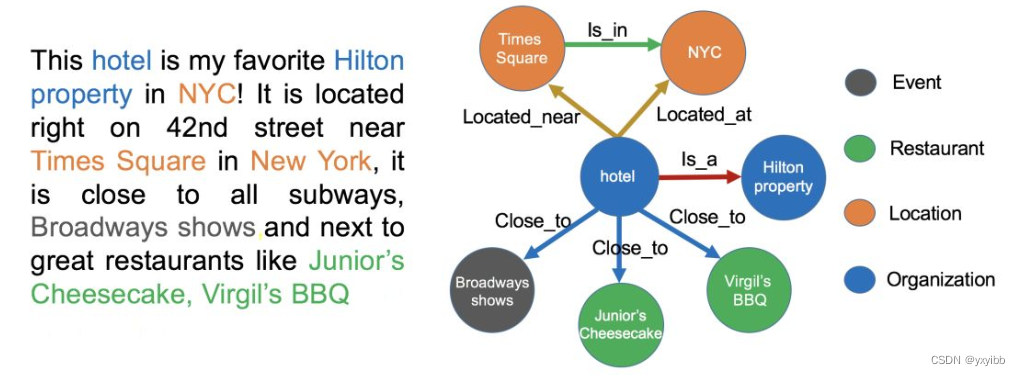
2.2.3构建技术
- 1实体命名识别NER
- Named Entity Recognition
- 从文本里提取出实体并对每个实体做分类/打标签
- 2关系抽取RE
- Relation Extraction
- 通过关系抽取,把实体间的关系从文本中提取出来
- 3实体统一ER
- Entity Resolution
- 不同写法实体统一
- 减少实体的种类,也可以降低图谱的稀疏性(Sparsity);
- 4指代消解
- Disambiguation
- “it”, “he”, “she”这些词到底指向哪个实体
2.3存储
1.基于 RDF
- 易发布及共享
- Triple存储三元组,不包含属性信息
- Jena,OrientDB、JanusGraph
2.基于图数据库
- 高效图查询、搜索
- 属性图,节点和关系可包含属性,易实现现实业务场景
- Neo4j,社区活跃,查询效率高
- 不支持分布式

2.4Neo4J简介
最常见的图数据库(Graph Databases)
#linux
bin/neo4j start
#w
neo4j.bat console
- 页面:打开浏览器,输入http://127.0.0.1:7474/browser/
- Cypher查询语言
- 用户不必编写图像结构的遍历代码,对图形数据进行高效查询
- 类似SQL,适合于开发者以及在数据库上做点对点模式(ad-hoc)查询的专业操作人员。
- 其具备的能力包括:1) 创建、更新、删除节点和关系 ;2)通过模式匹配来查询和修改节点和关系 - 管理索引和约束等
2.5Neo4J实战
- 手把手教你快速入门知识图谱 - Neo4J教程
- 创建节点
- 创建关系
- 查询(match)
- 删除(remove)、修改(set)
2.6Python操作Neo4J
1.执行CQL语句
  # step 1:导入 Neo4j 驱动包
  from neo4j import GraphDatabase
  # step 2:连接 Neo4j 图数据库
  driver = GraphDatabase.driver("bolt://localhost:7687", auth=("neo4j", "password"))
  # 添加 关系 函数
  def add_friend(tx, name, friend_name):
      tx.run("MERGE (a:Person {name: $name}) "
            "MERGE (a)-[:KNOWS]->(friend:Person {name: $friend_name})",
            name=name, friend_name=friend_name)
  # 定义 关系函数
  def print_friends(tx, name):
      for record in tx.run("MATCH (a:Person)-[:KNOWS]->(friend) WHERE a.name = $name "
                          "RETURN friend.name ORDER BY friend.name", name=name):
          print(record["friend.name"])
  # step 3:运行
  with driver.session() as session:
      session.write_transaction(add_friend, "Arthur", "Guinevere")
      session.write_transaction(add_friend, "Arthur", "Lancelot")
      session.write_transaction(add_friend, "Arthur", "Merlin")
      session.read_transaction(print_friends, "Arthur")

neo4j.GraphDatabase.driver(xxxx).session().write_transaction(函数(含tx.run(CQL语句)))
#or
neo4j.GraphDatabase.driver(xxxx).session().begin_transaction.run(CQL语句)
2.操作python变量操作neo4j
# step 1:导包
  from py2neo import Graph, Node, Relationship
  # step 2:构建图
  g = Graph()
  # step 3:创建节点
  tx = g.begin()
  a = Node("Person", name="Alice")
  tx.create(a)
  b = Node("Person", name="Bob")
  # step 4:创建边
  ab = Relationship(a, "KNOWS", b)
  # step 5:运行
  tx.create(ab)
  tx.commit()
2.7csv导入图数据
- Neo4j之导入数据
- 使用neo4j-admin import命令导入,适合部署在docker环境下的neo4j:csv分为两个nodes.csv和relations.csv,注意关系里的起始节点必须是在nodes.csv里能找到
  # nodes.csv需要指定唯一ID和nam,
  headers = [
  'unique_id:ID', # 图数据库中节点存储的唯一标识
  'name', # 节点展示的名称
  'node_type:LABEL', # 节点的类型,比如Person和Location
  'property' # 节点的其他属性
  ]

 # relations.csv
  headers = [
  'unique_id', # 图数据库中关系存储的唯一标识
  'begin_node_id:START_ID', # begin_node和end_node的值来自于nodes.csv中节点
  'end_node_id:END_ID',
  'begin_node_name',
  'end_node_name',
  'begin_node_type',
  'end_node_type',
  'relation_type:TYPE', # 关系的类型,比如Friends和Married
  'property' # 关系的其他属性
  ]
- 两个文件nodes.csv ,relas.csv放在 neo4j安装绝对路径/import
- 导入到图数据库mygraph.db
 neo4j bin/neo4j-admin import --nodes=/var/lib/neo4j/import/nodes.csv --relationships=/var/lib/neo4j/import/relas.csv   --delimiter=^ --database=xinfang*.db
 #delimiter=^ 指的是csv的分隔符
- 指定neo4j使用哪个数据库
修改 /root/neo4j/conf/neo4j.conf 文件中的 dbms.default_database=mygraph.db
- 重启neo4j
3待补充
无
4Q&A
无
5code
无
6参考
- https://github.com/datawhalechina/team-learning-nlp/tree/master/KnowledgeGraph_Basic
- 干货 | 从零到一学习知识图谱的技术与应用
- 手把手教你快速入门知识图谱 - Neo4J教程
- python操作图数据库neo4j的两种方式
- Neo4j之导入数据
- schema 介绍
- 知识图谱Schema
- 美团大脑:知识图谱的建模方法及其应用
- 肖仰华. 知识图谱:概念与技术.北京:电子工业出版社, 2020.2-39.
边栏推荐
- Kubernetes apiserver current limiting strategy
- Use positioning to realize left, middle and right layout, and the middle content is adaptive
- 为什么要做“密评”?
- Version of NDK matched the requested version 21.0.6113669. versions available locally: 2
- Use float to realize left, middle and right layout, and the middle content is adaptive
- Shutter background graying effect, how transparency, gray mask
- Detailed explanation of redis's single login
- 【上位机教程】CANopen通信下一体化步进电机与台达PLC(AS228T)的应用
- 12-GuliMall 后台管理中商品系统的品牌管理
- Guys, how can CDC Oracle set the reading from the specified SCN number, or how to set the read-only full archive, not to read fast
猜你喜欢

Code error reporting and problem solving experience II: test error reporting in yolov5

The best engineer was "forced" away by you like this!
![[applet] why can't the onreachbottom event be triggered? (one second)](/img/da/3641040c63f6db4d227dcf2ff89919.png)
[applet] why can't the onreachbottom event be triggered? (one second)

A super easy-to-use artifact apifox, throw swagger a few streets... (glory Collection Edition)
Huawei ultra fusion fusioncube solution notes

Kubernetes apiserver current limiting strategy

After being fined "paid leave" for one month, Google fired him who "loves" AI

jvm:类加载子系统干什么的?由什么组成?需要记住哪些八股文?

Kubernetes----PV和PVC的生命周期简介

高通再次「押宝」中科创达,挑战智能驾驶软硬件全栈方案
随机推荐
Kubernetes APIServer 限流策略
Router. Push(), router. Reply(), router. Go()
Detailed explanation of redis's single login
Create EOS account action
Use grid to realize left, middle and right layout, and the middle content is adaptive
Interviewer: how to deal with high concurrency?
Azure Synapse Analytics 性能优化指南(2)——使用具体化视图优化性能(上)
Display inline+calc realizes left, middle and right layout, and the middle is adaptive
C#把Type当做泛型T,来作为方法的泛型进行使用
[5g] what are Cu and Du in 5g?
Mysql数据目录(1)---数据库结构(二十四)
Notes....
Kubernetes----PV和PVC的生命周期简介
Use flex to realize left middle right layout and middle adaptation
基于Locust框架进行文件上传下载性能测试
食品安全 | 这些常见食物小心有毒!速查自家餐桌
食品安全 | 随便果可以”随便“吃吗?
最好的工程师,就是这样被你“逼”走的!
[typescript] typescript common types (Part 2)
0 basic programming resources (collect first ~ read slowly ~)