当前位置:网站首页>Yolov3 pytoch code and principle analysis (I): runthrough code
Yolov3 pytoch code and principle analysis (I): runthrough code
2022-06-11 19:28:00 【Autumn mountain and snow】
Catalog
1. Preface
YOLOv3 Pytorch Code and principle analysis ( One ): Run through code
YOLOv3 Pytorch Code and principle analysis ( Two ): Network structure and Loss Calculation
Source code address :https://github.com/ultralytics/yolov3
The official tutorial :https://github.com/ultralytics/yolov3/wiki/Train-Custom-Data
Target detection data set
PASCAL Visual Object Classes Official website :http://host.robots.ox.ac.uk/pascal/VOC/voc2012/index.html
COCO Official website :https://cocodataset.org/
Personal Baidu cloud :https://pan.baidu.com/s/1M2g0mmpivnfRG6-7zA0c6Q
Extraction code :agm1
Updated date :2020.7.22
Network parameters
official Google Drive:https://drive.google.com/open?id=1LezFG5g3BCW6iYaV89B2i64cqEUZD7e0
Personal Baidu cloud :https://pan.baidu.com/s/1lS6LkbBE4DxAAWcCCsuY-A
Extraction code :sf18
Updated date :2020.7.27
System :Win10
Editor :Jupyter Notebook( Installation tutorial )
Environment and Libraries : Basically, they are commonly used , Good luck never pays off module Related mistakes don't matter , If you have any questions, you can look at the requirements.txt, There are relevant guidelines in the official website tutorial
This article goes through detect.py、test.py、train.py Three files , Later, we will analyze the network based on the code , Learn more details
The main task is to process the data set as required
run COCO Data sets basically do not need to change the code ,VOC The dataset needs some modification , It is equivalent to running a custom data set
2. detect.py
First , take yolov3-spp-ultralytics.pt Put in …/yolov3-master/weights Under the table of contents ;
secondly , open …/yolov3-master/tutorial.ipynb, There are some official tutorials and running results , But it may not be able to get through directly , It is recommended to create a new one under the same directory .ipynb
Run code
%run detect.py
Namely, in accordance with the detect.py Run with the default parameters of
Network structure : …/yolov3-master/cfg/yolov3-spp.cfg
Network parameters :…/yolov3-master/weights/yolov3-spp-ultralytics.pt
The detection image is …/yolov3-master/data/samples Two images in the directory
The output is saved in …/yolov3-master/output Under the table of contents 

%run detect.py --source 0
take source Set to 0 You can call the computer camera for real-time detection
3. Dataset processing
Images and labels
The downloaded data set cannot be directly used for network training and testing , There are the following requirements in the official tutorial :
- With Darknet Format tag data
- One goal per line
- The tag format is class x_center y_center width height
- coordinate xywh It needs to be normalized
- class Index from 0 Start
- The path of the image label can be set by adding the /images/*.jpg Replace with /labels/*.txt obtain
for example :( Because the data is not placed under the code path, the absolute path is used )
D:/learning/object detection/data/COCO2014/train2014/images/COCO_train2014_000000000009.jpg
D:/learning/object detection/data/COCO2014/train2014/labels/COCO_train2014_000000000009.txt
reason :
…/yolov3-master/utils/datasets.py 292 That's ok
        self.label_files = [x.replace('images', 'labels').replace(os.path.splitext(x)[-1], '.txt')
                            for x in self.img_files]
data and txt file
When training or testing the network , The information of the data used is passed through data File transfer , Open the example with Notepad …/yolov3-master/data/coco1.data
classes=80
train=data/coco1.txt
valid=data/coco1.txt
names=data/coco.names
classes For the number of categories ,train For training data ,valid For test data ,names Is the category name
Continue to open …/yolov3-master/data/coco1.txt
../coco/images/train2017/000000109622.jpg
It can be learned that train and valid The next path txt Contains the path of the images used for training and testing
Summarize the data set requirements
Ensure that the following paths and files are accurate
(1)data file
(2)data In file train、valid and names The next path txt and names file
(3)train and valid Two txt Image path in file
(4) In the image path /images/*.jpg Replace with /labels/*.txt You can get the image label
3.1 COCO2014、2017
(1) according to COCO Data sets json The label file generates a qualified txt Label file
from pycocotools.coco import COCO
import numpy as np
import tqdm
import argparse
import os

# /COCO2014/annotations/instances_train2014.json
# /COCO2014/annotations/instances_val2014.json
# /COCO2017/annotations/instances_train2017.json
# /COCO2017/annotations/instances_val2017.json
annotation_path = 'D:/learning/object detection/data/COCO2017/annotations/instances_val2017.json'
save_base_path = 'D:/learning/object detection/data/COCO2017/val2017/labels/'

data_source = COCO(annotation_file = annotation_path)
catIds = data_source.getCatIds()
categories = data_source.loadCats(catIds)
categories.sort(key = lambda x: x['id'])
classes = {
    }
coco_labels = {
    }
coco_labels_inverse = {
    }
for c in categories:
    coco_labels[len(classes)] = c['id']
    coco_labels_inverse[c['id']] = len(classes)
    classes[c['name']] = len(classes)

img_ids = data_source.getImgIds()
for index, img_id in tqdm.tqdm(enumerate(img_ids), desc='change .json file to .txt file'):
    img_info = data_source.loadImgs(img_id)[0]
    file_name = img_info['file_name'].split('.')[0]
    height = img_info['height']
    width = img_info['width']

    if not os.path.exists(save_base_path):
        os.makedirs(save_base_path)
    save_path = save_base_path + file_name + '.txt'
    with open(save_path, mode='w') as fp:
        annotation_id = data_source.getAnnIds(img_id)
        boxes = np.zeros((0, 5))
        if len(annotation_id) == 0:
            fp.write('')
            continue
        annotations = data_source.loadAnns(annotation_id)
        lines = ''
        for annotation in annotations:
            box = annotation['bbox']
            # some annotations have basically no width / height, skip them
            if box[2] < 1 or box[3] < 1:
                continue
            #top_x,top_y,width,height---->cen_x,cen_y,width,height
            box[0] = round((box[0] + box[2] / 2) / width, 6)
            box[1] = round((box[1] + box[3] / 2) / height, 6)
            box[2] = round(box[2] / width, 6)
            box[3] = round(box[3] / height, 6)
            label = coco_labels_inverse[annotation['category_id']]
            lines = lines + str(label)
            for i in box:
                lines += ' ' + str(i)
            lines += '\n'
        fp.writelines(lines)
print('finish')
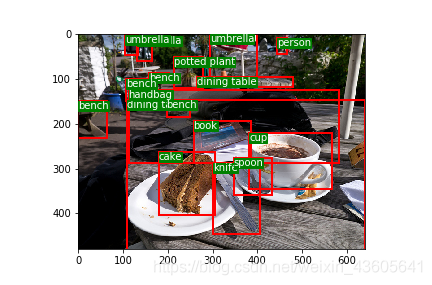
(2) You can verify the generated by the following code txt Label file
This code sometimes turns off the first time the image flashes , Run it again and it will be normal .
from PIL import Image
import matplotlib
import matplotlib.pyplot as plt
from  matplotlib import patches
matplotlib.use('Qt5Agg')

def load_classes(path):
    # Loads *.names file at 'path'
    with open(path, 'r') as f:
        names = f.read().split('\n')
    return list(filter(None, names))  # filter removes empty strings (such as last line)

class_path = 'D:/learning/object detection/data/COCO2017/coco.names'
class_list = load_classes(class_path)
img_path = 'D:/learning/object detection/data/COCO2017/train2017/images/000000000127.jpg'
img = np.array(Image.open(img_path))
H, W, C = img.shape
label_path = 'D:/learning/object detection/data/COCO2017/train2017/labels/000000000127.txt'
boxes = np.loadtxt(label_path, dtype=np.float).reshape(-1, 5)
# xywh to xxyy
boxes[:, 1] = (boxes[:, 1] - boxes[:, 3] / 2) * W
boxes[:, 2] = (boxes[:, 2] - boxes[:, 4] / 2) * H
boxes[:, 3] *= W
boxes[:, 4] *= H
fig = plt.figure()
ax = fig.subplots(1)
for box in boxes:
    bbox = patches.Rectangle((box[1], box[2]), box[3], box[4], linewidth=2,
                            edgecolor='r', facecolor="none")
    label = class_list[int(box[0])]
    # Add the bbox to the plot
    ax.add_patch(bbox)
    # Add label
    plt.text(box[1], box[2], s=label,
             color="white",
             verticalalignment="top",
             bbox={
    "color": 'g', "pad": 0},
            )
    ax.imshow(img)
plt.show()
(3) Modify or create your own data file
My own coco2014.data
classes=80
train=D:/learning/object detection/data/COCO2014/train.txt
valid=D:/learning/object detection/data/COCO2014/val.txt
names=D:/learning/object detection/data/COCO2014/coco.names
(4) Generate data In the document train.txt and val.txt
import os

txtsavepath = 'D:/learning/object detection/data/COCO2014'
flist = ['train', 'val', 'test']
version = '2014'
for i in flist:
    total_f = os.listdir(txtsavepath + '/' + i + version + '/' + 'images')
    f = open(txtsavepath + '/' + i + '.txt', 'w')
    for j in total_f:
        name = txtsavepath + '/' + i + version + '/' + 'images' + '/' + j + '\n'
        f.write(name)
    f.close()
(5) It might be more intuitive to list my file directories
- D:/learning/object detection
- data
- COCO2014
- annotations
- test2017
- train2017
- images
- COCO_train2014_000000000009.jpg
- labels
- COCO_train2014_000000000009.txt
- images
- val2017
- coco.names
- test.txt
- train.txt
- val.txt
- COCO2014
- yolov3-master
- data
- coco2014.data
- data
- data
3.2 VOC2007、2012
(1) according to VOC Data sets xml The label file generates a qualified txt Label file
import os
import xml.etree.ElementTree as ET
import tqdm

annotation_path = 'D:/learning/object detection/data/VOC2012/VOC2012_test/Annotations/'
save_base_path = 'D:/learning/object detection/data/VOC2012/VOC2012_test/labels/'

classes = ['person','bird','cat','cow','dog','horse','sheep','aeroplane','bicycle','boat','bus','car',
           'motorbike','train','bottle','chair','diningtable','pottedplant','sofa','tvmonitor']

if not os.path.exists(save_base_path):
    os.makedirs(save_base_path)

xml_list = os.listdir(annotation_path)
for index, i in tqdm.tqdm(enumerate(xml_list), desc='change .xml file to .txt file'):
    xml_file = open(annotation_path+i)
    tree = ET.parse(xml_file)
    root = tree.getroot()
    size = root.find('size')
    w = int(size.find('width').text)
    h = int(size.find('height').text)
    lines = ''
    with open(save_base_path+i[:-3]+'txt', 'w') as fp:
        for obj in root.iter('object'):
            difficult = obj.find('difficult')
            cls = obj.find('name').text
            if difficult == None:
                difficult = '0'
            else:
                difficult = obj.find('difficult').text
            if cls not in classes or int(difficult) == 1:
                continue
            label = classes.index(cls)
            bndbox = obj.find('bndbox')
            xmin = float(bndbox.find('xmin').text)
            xmax = float(bndbox.find('xmax').text)
            ymin = float(bndbox.find('ymin').text)
            ymax = float(bndbox.find('ymax').text)
            box = [0]*4
            box[0] = round((xmax+xmin)/2/w, 6)
            box[1] = round((ymax+ymin)/2/h, 6)
            box[2] = round((xmax-xmin)/w, 6)
            box[3] = round((ymax-ymin)/h, 6)
            lines = lines + str(label)
            for j in box:
                lines += ' ' + str(j)
            lines += '\n'
        fp.writelines(lines)
print('finish')
(2) Can also be COCO The code in the second step verifies the generated txt Label file
(3) Modify or create your own data file
My own VOC2012.data
classes=20
train=D:/learning/object detection/data/VOC2012/train.txt
valid=D:/learning/object detection/data/VOC2012/val.txt
names=D:/learning/object detection/data/VOC2012/voc2012.names
(4) According to the dataset ImageSets/Main/ Under the path train.txt、val.txt、trainval.txt or test.txt File division of data generation data Files used in
import os

imgpath = 'D:/learning/object detection/data/VOC2012/VOC2012_trainval/images/'
txtbasepath = 'D:/learning/object detection/data/VOC2012/VOC2012_trainval/ImageSets/Main/'
txtsavepath = 'D:/learning/object detection/data/VOC2012/'
# flist = ['test']
flist = ['train', 'val', 'trainval']
for i in flist:
    img_ids = open(txtbasepath+'%s.txt' %(i)).read().strip().split()
    f = open(txtsavepath + i + '.txt', 'w')
    for img_id in img_ids:
        name = imgpath + img_id + '.jpg' + '\n'
        f.write(name)
    f.close()
(5) It might be more intuitive to list my file directories
- D:/learning/object detection
- data
- VOC2012
- VOC2012_test
- VOC2012_trainval
- Annotations
- 2007_000027.xml
- images
- 2007_000027.jpg
- labels
- 2007_000027.txt
- ImageSets
- Main
- train.txt
- trainval.txt
- val.txt
- Main
- Annotations
- test.txt
- train.txt
- trainval.txt
- val.txt
- voc2012.names
- VOC2012
- data
3.3 Some problems about data sets
| COCO2014 | COCO2017 | ||
|---|---|---|---|
| train | label | 82783 | 118287 |
| Images | 82783 | 118287 | |
| val | label | 40504 | 5000 |
| Images | 40504 | 5000 | |
| test | label | / | / |
| Images | 40775 | 40670 |
| VOC2007 | VOC2012 | ||
|---|---|---|---|
| trainval | label | 5011 | 17125 |
| Images | 5011 | 17125 | |
| train.txt | 2501 | 5717 | |
| val.txt | 2510 | 5823 | |
| trainval.txt | 5011 | 11540 | |
| test | label | 4952 | 5138 |
| Images | 4952 | 16135 | |
| test.txt | 4952 | 10991 |
Question 1 :VOC2012 Of trainval.txt The number of images used in is less than the total number of images and the total number of labels .
Question two :VOC2012 Of test.txt The number of images used in is greater than the number of labels , Less than the total number of images .
Question 3 : stay VOC The label of has difficult a , The query indicates the detection difficulty ,0 Represents simplicity ,1 Representation difficulty , Because the reference code puts difficult=1 I skipped my goal , But in VOC2012_test Some of the targets in the tags in the do not difficult This indicator , For the time being, there is no difficult Press difficult=0 Handle .
Question 4 : In the verification of VOC2012_test When labeling , Stumble upon an image 2012_004187.jpg Zhongmingmingyou 2 individual person, But there are only 1 individual ; Another discovery VOC2012_test Of txt In the tag class All are 0, I simply checked several xml label name All of them are person, Seems to be VOC2012 Only person A category .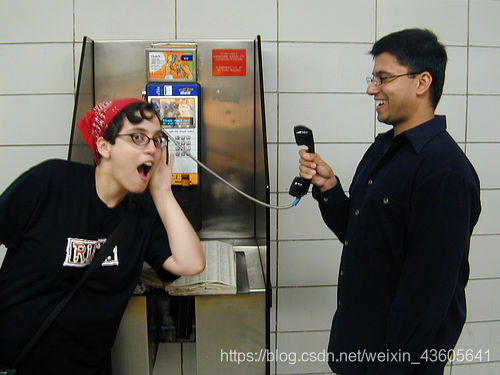
<annotation>
	<filename>2012_004187.jpg</filename>
	<folder>VOC2012</folder>
	<object>
		<name>person</name>
		<bndbox>
			<xmax>483</xmax>
			<xmin>299</xmin>
			<ymax>375</ymax>
			<ymin>28</ymin>
		</bndbox>
		<difficult>0</difficult>
		<pose>Unspecified</pose>
		<point>
			<x>404</x>
			<y>227</y>
		</point>
	</object>
	<segmented>0</segmented>
	<size>
		<depth>3</depth>
		<height>375</height>
		<width>500</width>
	</size>
	<source>
		<annotation>PASCAL VOC2012</annotation>
		<database>The VOC2012 Database</database>
		<image>flickr</image>
	</source>
</annotation>
3.4 Some target detection papers on the application of data sets
For the division and quantity of data sets , Many classic target detection papers have been queried for verification (R-CNN series 、YOLO series 、SSD、FPN、R-FCN etc. )
stay SSD in :
3.1 On this dataset, we compare against Fast R-CNN [6] and Faster R-CNN [2] on VOC2007 test (4952 images).
3.3 We use the same settings as those used for our basic VOC2007 experiments above, except that we use VOC2012 trainval and VOC2007 trainval and test (21503 images) for training, and test on VOC2012 test (10991 images).
Training :VOC07 trainval+ test+VOC12 trainval(5011+4952+11540=21503)
test :VOC2012 test (10991)stay FPN in :(SSD Also used trainval35k)
5 We perform experiments on the 80 category COCO detection dataset [21]. We train using the union of 80k train images and a 35k subset of val images (trainval35k [2]), and report ablations on a 5k subset of val images (minival). We also report final results on the standard test set (test-std) [21] which has no disclosed labels.
Training :train 80k + val in 35k Subset
verification :val In the rest of the 5k Subset as minival
test :test-stdstay Faster R-CNN、R-FCN Targeted at MS COCO:
Training :train 80k
verification :val 40k
test :test-dev 20k( There are... In the label image_info_test-dev2015.json It's probably this )
4. train.py(COCO)
Because the code was originally in COCO Training on data sets , So use COCO Data sets can be trained and tested without modifying the code .
%run train.py --epochs 10 --batch-size 4 --data data/coco2014.data --img-size 416 --nosave
epochs、batch-size、img-size It can be adjusted according to demand and video memory
The network structure uses the default cfg/yolov3-spp.cfg
The pre training model uses the default weights/yolov3-spp-ultralytics.pt
After running, you will get :
yolov3-master/results.txt Record each epoch Output
yolov3-master/results.png Images drawn by various evaluation indexes during training
yolov3-master/weights/last.pt Model parameters after training ( There should be another one best.pt It could be mine epochs Too small )
COCO The data set is relatively large 10 individual epochs It was also interrupted in advance for a long time , The following figure shows some results 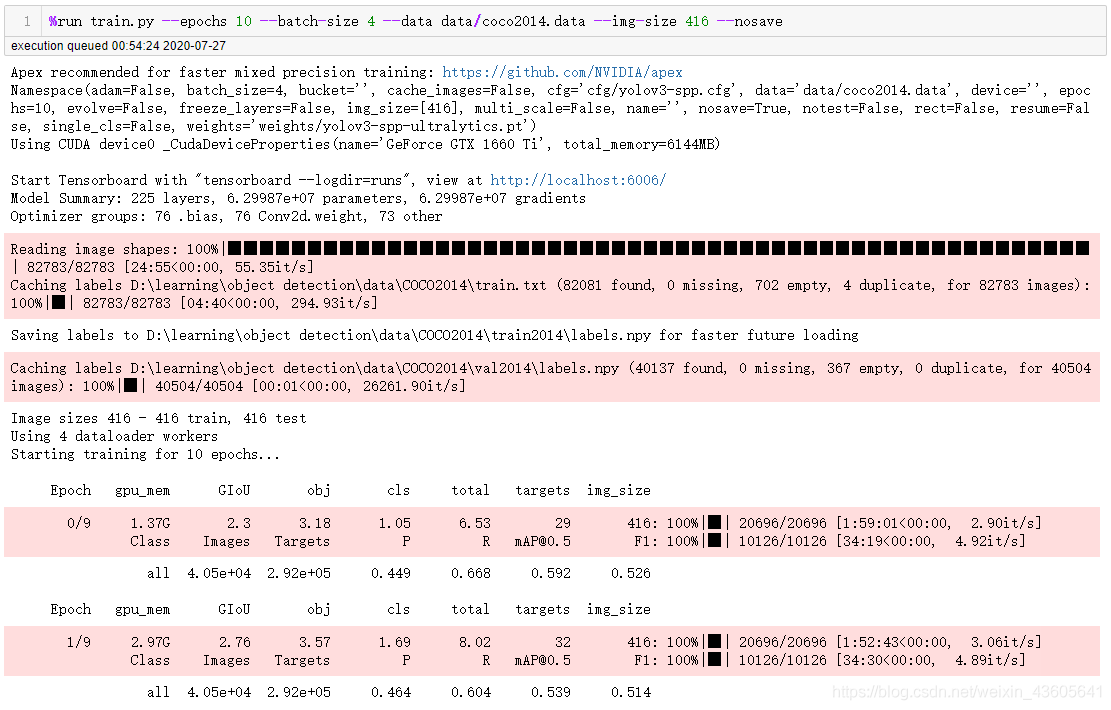
5. test.py(COCO)
Here we still use the downloaded parameters to test weights/yolov3-spp-ultralytics.pt
%run test.py --batch-size 4 --data data/coco2014.data --img-size 416

This last warning Installed 1.17 Of numpy There are still , I don't understand for the time being

6. train.py(VOC)
because VOC The dataset is 20 Categories , Right cfg/yolov3-spp.cfg Make changes
take yolo Layer classes Of 80 Change it to 20
take yolo The previous layer convolutional Layer filters Of 255 Change it to 75
255 = 3 ∗ ( 80 + 5 ) 255=3*(80+5) 255=3∗(80+5)
75 = 3 ∗ ( 20 + 5 ) 75=3*(20+5) 75=3∗(20+5)
common 3 individual yolo Layer and the convolutional layer , The modification positions are respectively at 636、643、722、729、809、816 That's ok 
%run train.py --epochs 10 --batch-size 4 --data data/voc2012.data --img-size 416 --nosave

7. test.py(VOC)
%run test.py --batch-size 4 --data data/voc2012.data --img-size 416 --weights weights/last.pt
weights/yolov3-spp-ultralytics.pt It can be used as a pre training but cannot be tested , You can only use your own training parameters when testing , Or it can be downloaded to VOC Parameter file obtained from training

8. Some reports are wrong
(1)module ‘main’ has no attribute ‘spec’
The solution is in the implementation file if name == ‘main’: Add one of two codes under , Seems to be able to solve the problem of error reporting , however jupyter notebook When printing out ( Such as progress bar ) It may be output on a new line ( Normal is to overwrite the original output ), Results in a long output ...
In addition, there is sometimes no error in this report , General restart jupyter notebook Can also be solved
if __name__ == '__main__':
    # __spec__ = "ModuleSpec(name='builtins', loader=<class '_frozen_importlib.BuiltinImporter'>)"
    # __spec__ = None
(2)Error(s) in loading state_dict for Darknet:
It is usually used for testing weights Document and cfg The documents are inconsistent , That is, the model parameters do not match the structure of the model
(3)CUDA out of memory
Insufficient memory , Money is not in place , The small batch-size、img-size
It is also possible that other errors are reported in the middle of the code , But the video memory is not released , Simply restart kernel( Existing variables will be lost )
(4) Various size relevant
It's usually because of data file 、cfg file 、weights In the file because classes After the quantity changes Relevant parameters are not modified uniformly
边栏推荐
- Internet_ Business Analysis Overview
- ASEMI的MOS管25N120在不同应用场景的表现
- leetcode:926. 将字符串翻转到单调递增【前缀和 + 模拟分析】
- CMU 15-445 数据库课程第五课文字版 - 缓冲池
- 2022 coming of age ceremony, to every college entrance examination student
- 【视频去噪】基于SALT实现视频去噪附Matlab代码
- Visual slam lecture notes-10-1
- PyMySQL利用游标操作数据库方法封装!!!
- cf:G. Count the Trains【sortedset + bisect + 模拟维持严格递减序列】
- An adaptive chat site - anonymous online chat room PHP source code
猜你喜欢
CMU 15-445 database course lesson 5 text version - buffer pool
![[image segmentation] image segmentation based on Markov random field with matlab code](/img/62/874b0ac3e1cbb7cad9c3a77da391d7.png)
[image segmentation] image segmentation based on Markov random field with matlab code

司空见惯 - 会议室名称
![cf:A. Print a Pedestal (Codeforces logo?) [simple traversal simulation]](/img/5e/0acd39d572954e5ecb936f49511d94.png)
cf:A. Print a Pedestal (Codeforces logo?) [simple traversal simulation]
![[Lao Wang's fallacy of brain science] Why do blind people](/img/7c/98f27bb55a1a3b74c0ed8fd7fd2cc5.jpg)
[Lao Wang's fallacy of brain science] Why do blind people "seem" to be more "sensitive" than normal people?

【信号去噪】基于FFT和FIR实现信号去噪附matlab代码

"Case sharing" based on am57x+ artix-7 FPGA development board - detailed explanation of Pru Development Manual

Flask CKEditor 富文本编译器实现文章的图片上传以及回显,解决路径出错的问题

cf:G. Count the Trains【sortedset + bisect + 模拟维持严格递减序列】

The 2023 MBA (Part-time) of Beijing University of Posts and telecommunications has been launched

随机推荐
[video denoising] video denoising based on salt with matlab code
Introduction to go language (VI) -- loop statement
Cf:g. count the trains [sortedset + bisect + simulation maintaining strict decreasing sequence]
我不太想在网上开户,网上股票开户安全吗?
LDPC 7 - simple example of decoding
构建Web应用程序
求数据库设计毕业信息管理
PIL pilot image processing [1] - installation and creation
Kubernetes binary installation (v1.20.15) (IX) closeout: deploy several dashboards
Leetcode: sword finger offer 56 - ii Number of occurrences of numbers in the array II [simple sort]
Teach you how to learn the first set and follow set!!!! Hematemesis collection!! Nanny level explanation!!!
"Case sharing" based on am57x+ artix-7 FPGA development board - detailed explanation of Pru Development Manual
Raki's notes on reading paper: learning fast, learning slow: a general continuous learning method
Automated test requirements analysis
Visual slam lecture notes-10-2
司空见惯 - 会议室名称
Flink CDC 在大健云仓的实践
Introduction to go language (V) -- branch statement
Database design graduation information management
leetcode:926. 将字符串翻转到单调递增【前缀和 + 模拟分析】