当前位置:网站首页>Dark horse notes - common date API
Dark horse notes - common date API
2022-06-30 12:47:00 【Xiaofu knocks the code】
Catalog
2.1 summary ,LocalTime / LocalDate / LocalDateTime
2.4Duration / Period(LocalDateTime / LocalDate)
1. Date and time
1.1Date
Date Class Overview :Date Class represents the date and time information of the current system .
Date Constructor

Date The common method of


Case study : Please calculate the current time and go back 1 Hours 121 What is the time after seconds .
public class DateDemo1 {
    public static void main(String[] args) {
        // 1、 Create a Date Class object : Represents the current date and time object of the system
        Date d = new Date();
        System.out.println(d);

        // 2、 Gets the value of the time in milliseconds
        long time = d.getTime();
        System.out.println(time);
//        long time1 = System.currentTimeMillis();
//        System.out.println(time1);

        System.out.println("----------------------------");
        // 1、 Get the current time
        Date d1 = new Date();
        System.out.println(d1);

        // 2、 Go back at the current time  1 Hours   121s
        long time2 = System.currentTimeMillis();
        time2 += (60 * 60 + 121) * 1000;

        // 3、 Convert the time millisecond value into the corresponding date object .
        // Date d2 = new Date(time2);
        // System.out.println(d2);

        Date d3 = new Date();
        d3.setTime(time2);
        System.out.println(d3);

    }
}
summary :
1、 How date objects are created , How to get the value of time in milliseconds ?
public Date();
public long getTime();
2、 How to restore the time millisecond value to the date object ?
public Date(long time);
public void setTime(long time);
1.2SimpleDateFormat
SimpleDateFormat Class action : You can complete the formatting operation of date and time .
Constructors

formatting method

import java.text.SimpleDateFormat;
import java.util.Date;

/**
     The goal is :SimpleDateFormat Use of simple date formatting class
     Format time
     Parsing time

 */
public class SimpleDateFormatDemo01 {
    public static void main(String[] args) {
        // 1、 Date object
        Date d = new Date();
        System.out.println(d);

        // 2、 Format this date object  ( Specify the final format )
        SimpleDateFormat sdf = new SimpleDateFormat("yyyy year MM month dd Japan  HH:mm:ss EEE a");
        // 3、 Start formatting the date object into your favorite string form
        String rs = sdf.format(d);
        System.out.println(rs);

        System.out.println("----------------------------");

        // 4、 Format time in milliseconds
        //  demand : Excuse me, 121 What's the time in seconds
        long time1 = System.currentTimeMillis() + 121 * 1000;
        String rs2 = sdf.format(time1);
        System.out.println(rs2);

        System.out.println("------------ Parse string time , Next code ---------------");
    }
}
analytic method

The common pattern correspondence of formatted time form is as follows :

Case study : Please calculate 2021 year 08 month 06 Japan 11 spot 11 branch 11 second , turn back and proceed 2 God 14 Hours 49 branch 06 What's the time in seconds .
import javax.xml.crypto.Data;
import java.text.ParseException;
import java.text.SimpleDateFormat;
import java.util.Date;

public class SimpleDateFormatDemo2 {
    public static void main(String[] args) throws ParseException {
        //  The goal is :  Learn how to use SimpleDateFormat Parse the string time to become a date object .
        //  There is a time  2021 year 08 month 06 Japan  11:11:11  Back up  2 God  14 Hours  49 branch  06 What's the time in seconds .
        // 1、 Get the string time into the program
        String dateStr = "2021 year 08 month 06 Japan  11:11:11";

        // 2、 Parse the time string into a date object ( The point of this section ): The form must be exactly the same as the form of the parsed time , Otherwise, an error is reported during runtime parsing !
        SimpleDateFormat sdf = new SimpleDateFormat("yyyy year MM month dd Japan  HH:mm:ss");
        Date d = sdf.parse(dateStr);

        // 3、 turn back and proceed 2 God  14 Hours  49 branch  06 second
        long time = d.getTime() + (2L*24*60*60 + 14*60*60 + 49*60 + 6) * 1000;

        // 4、 Formatting this time in milliseconds is the result
        System.out.println(sdf.format(time));
    }
}
summary :
1、SimleDateFormat What time forms can be formatted ?
Date Date object , Time in milliseconds .
2、SimpleDateFormat How to parse string time ?
Through a way : public Date parse(String source).
Get a string time , call SimpleDateFormat Constructor where the time format must be exactly the same as that of the parsed string , Finally using public final String format(Date date) Format time .
1.3Calendar
Calendar summary
Calendar Represents the calendar object corresponding to the current date of the system .
Calendar Is an abstract class , You can't create objects directly .
Calendar Method of calendar class to create calendar object :

Calendar Common methods

Be careful :calendar Is a variable Date object , Once modified, the time represented by its object itself will change .
import javax.xml.crypto.Data;
import java.util.Calendar;
import java.util.Date;

/**
     The goal is : Calendar class Calendar Use , You can get more information .

    Calendar Represents the calendar object corresponding to the current date of the system .
    Calendar Is an abstract class , You can't create objects directly .
    Calendar Syntax for calendar class to create calendar objects :
        Calendar rightNow = Calendar.getInstance();
    Calendar Methods :
        1.public static Calendar getInstance():  Return an object of calendar class .
        2.public int get(int field): Get the information of a field in the date .
        3.public void set(int field,int value): Modify a field information of the calendar .
        4.public void add(int field,int amount): Add... To a field / Decrease the specified value
        5.public final Date getTime():  Get the current date object .
        6.public long getTimeInMillis():  Get the current time in milliseconds
     Summary :
         remember .
 */
public class CalendarDemo{
    public static void main(String[] args) {
        // 1、 Get the calendar object of the system at the moment
        Calendar cal = Calendar.getInstance();
        System.out.println(cal);

        // 2、 Get calendar information :public int get(int field): Get the information of a field in the date .
        int year = cal.get(Calendar.YEAR);
        System.out.println(year);

        int mm = cal.get(Calendar.MONTH) + 1;
        System.out.println(mm);

        int days = cal.get(Calendar.DAY_OF_YEAR) ;
        System.out.println(days);

        // 3、public void set(int field,int value): Modify a field information of the calendar .
        // cal.set(Calendar.HOUR , 12);
        // System.out.println(cal);

        // 4.public void add(int field,int amount): Add... To a field / Decrease the specified value
        //  Excuse me, 64 What time is the day after
        cal.add(Calendar.DAY_OF_YEAR , 64);
        cal.add(Calendar.MINUTE , 59);

        //  5.public final Date getTime():  Get the current date object .
        Date d = cal.getTime();
        System.out.println(d);

        //  6.public long getTimeInMillis():  Get the current time in milliseconds
        long time = cal.getTimeInMillis();
        System.out.println(time);

    }
}
2.JDK8 Add date class
2.1 summary ,LocalTime / LocalDate / LocalDateTime
summary : from Java 8 Start ,java.time The package provides a new date and time API, The main types involved are :

Newly added API Strictly distinguish the time 、 Local date 、 Local time , also , It is more convenient to calculate the date and time .
secondly , new API Almost all types of are invariant types ( and String The use of is similar to ), You can use it safely without worrying about being modified .
LocalDate、LocalTime、LocalDateTime:
They indicate the date , Time , Date time object , Instances of their classes are immutable objects .
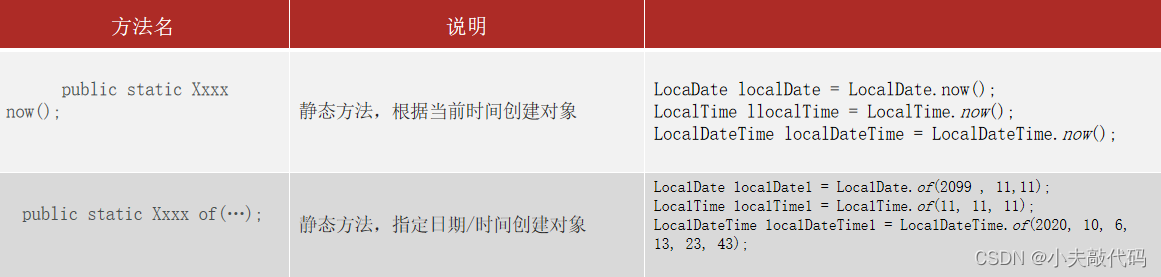
The three of them build objects and API It's all universal .
The way to build objects is as follows :
LocalDate、LocalTime、LocalDateTime Access to information API:

import java.time.LocalDate;
import java.time.Month;

public class Demo01LocalDate {
    public static void main(String[] args) {
        // 1、 Get local date object .
        LocalDate nowDate = LocalDate.now();
        System.out.println(" Today's date :" + nowDate);// Today's date :

        int year = nowDate.getYear();
        System.out.println("year:" + year);


        int month = nowDate.getMonthValue();
        System.out.println("month:" + month);

        int day = nowDate.getDayOfMonth();
        System.out.println("day:" + day);

        // The day of the year
        int dayOfYear = nowDate.getDayOfYear();
        System.out.println("dayOfYear:" + dayOfYear);

        // week
        System.out.println(nowDate.getDayOfWeek());
        System.out.println(nowDate.getDayOfWeek().getValue());

        // month
        System.out.println(nowDate.getMonth());//AUGUST
        System.out.println(nowDate.getMonth().getValue());//8

        System.out.println("------------------------");
        LocalDate bt = LocalDate.of(1991, 11, 11);
        System.out.println(bt);// Directly input the corresponding month, year and day
        System.out.println(LocalDate.of(1991, Month.NOVEMBER, 11));// In contrast, the above only replaced the month with the enumeration
    }
}
Modify the relevant API:
LocalDateTime A combination of LocalDate and LocalTime The method inside , So here's just LocalDate and LocalTime For example .
These methods return a new instance reference , because LocalDateTime 、LocalDate 、LocalTime It's all immutable .

import java.time.LocalDate;
import java.time.LocalTime;
import java.time.MonthDay;

public class Demo04UpdateTime {
    public static void main(String[] args) {
        LocalTime nowTime = LocalTime.now();
        System.out.println(nowTime);// current time
        System.out.println(nowTime.minusHours(1));// An hour ago
        System.out.println(nowTime.minusMinutes(1));// A minute ago
        System.out.println(nowTime.minusSeconds(1));// A second ago
        System.out.println(nowTime.minusNanos(1));// A nanosecond ago

        System.out.println("----------------");

        System.out.println(nowTime.plusHours(1));// An hour later
        System.out.println(nowTime.plusMinutes(1));// A minute later
        System.out.println(nowTime.plusSeconds(1));// In a second
        System.out.println(nowTime.plusNanos(1));// In a nanosecond

        System.out.println("------------------");
        //  Immutable object , Each modification produces a new object !
        System.out.println(nowTime);

        System.out.println("---------------");
        LocalDate myDate = LocalDate.of(2018, 9, 5);
        LocalDate nowDate = LocalDate.now();

        System.out.println(" It's today 2018-09-06 Do you ? " + nowDate.equals(myDate));// It's today 2018-09-06 Do you ? false
        System.out.println(myDate + " Whether in " + nowDate + " Before ? " + myDate.isBefore(nowDate));//2018-09-05 Whether in 2018-09-06 Before ? true
        System.out.println(myDate + " Whether in " + nowDate + " after ? " + myDate.isAfter(nowDate));//2018-09-05 Whether in 2018-09-06 after ? false

        System.out.println("---------------------------");
        //  Judge whether today is your birthday
        LocalDate birDate = LocalDate.of(1996, 8, 5);
        LocalDate nowDate1 = LocalDate.now();

        MonthDay birMd = MonthDay.of(birDate.getMonthValue(), birDate.getDayOfMonth());
        MonthDay nowMd = MonthDay.from(nowDate1);

        System.out.println(" Is today your birthday ? " + birMd.equals(nowMd));// Is today your birthday ? false
    }
}
2.2Instant
Instant Time stamp :JDK8 Getting timestamps is very simple , More functions .Instant Class consists of a static factory method now() You can return the current timestamp .
A timestamp is a time stamp that contains a date and time , And java.util.Date Is very similar , in fact Instant Just like that. JDK8 Former Date
Instant and Date These two classes can be converted .
import java.time.Instant;
import java.time.LocalDate;
import java.time.ZoneId;
import java.util.Date;

public class Demo05Instant {
    public static void main(String[] args) {
        // 1、 Get one Instant Timestamp object
        Instant instant = Instant.now();
        System.out.println(instant);

        // 2、 What about the timestamp of the system at the moment ?
        Instant instant1 = Instant.now();
        System.out.println(instant1.atZone(ZoneId.systemDefault()));

        // 3、 How to return Date object
        Date date = Date.from(instant);
        System.out.println(date);

        Instant i2 = date.toInstant();
        System.out.println(i2);
    }
}
2.3DateTimeFormatter
DateTimeFormatter: stay JDK8 in , Introduced a new date and time formatter DateTimeFormatter.
Both positive and negative can call format Method .
import java.time.LocalDateTime;
import java.time.format.DateTimeFormatter;
public class Demo06DateTimeFormat {
    public static void main(String[] args) {
        //  Local moment    Date time   object
        LocalDateTime ldt = LocalDateTime.now();
        System.out.println(ldt);

        //  analysis / formatter
        DateTimeFormatter dtf = DateTimeFormatter.ofPattern("yyyy-MM-dd HH:mm:ss EEE a");
        //  Forward formatting
        System.out.println(dtf.format(ldt));
        //  Reverse formatting
        System.out.println(ldt.format(dtf));

        //  Parse string time
        DateTimeFormatter dtf1 = DateTimeFormatter.ofPattern("yyyy-MM-dd HH:mm:ss");
        //  Parse the current string time to become a local date time object
        LocalDateTime ldt1 = LocalDateTime.parse("2019-11-11 11:11:11" ,  dtf1);
        System.out.println(ldt1);
        System.out.println(ldt1.getDayOfYear());
    }
}
2.4Duration / Period(LocalDateTime / LocalDate)
Period:
stay Java8 in , We can use the following classes to calculate the date interval difference :java.time.Period
Mainly Period Class method getYears(),getMonths() and getDays() To calculate , It can only be accurate to date .
be used for LocalDate Comparison between .
import java.time.LocalDate;
import java.time.Period;

public class Demo07Period {
    public static void main(String[] args) {
        //  Current local   Specific date
        LocalDate today = LocalDate.now();
        System.out.println(today);//

        //  For your birthday   Specific date
        LocalDate birthDate = LocalDate.of(1998, 10, 13);
        System.out.println(birthDate);

        Period period = Period.between(birthDate, today);// The second parameter minus the first parameter

        System.out.println(period.getYears());
        System.out.println(period.getMonths());
        System.out.println(period.getDays());
    }
}
Duration:
stay Java8 in , We can use the following classes to calculate the time interval difference :java.time.Duration.
A method of measuring the amount of time using time-based values is provided .
be used for LocalDateTime Comparison between . It can also be used for Instant Comparison between .
import java.time.Duration;
import java.time.LocalDateTime;

public class Demo08Duration {
    public static void main(String[] args) {
        //  Local date time object .
        LocalDateTime today = LocalDateTime.now();
        System.out.println(today);

        //  Date and time of birth object
        LocalDateTime birthDate = LocalDateTime.of(2021,8
                ,06,01,00,00);

        System.out.println(birthDate);

        Duration duration = Duration.between(  birthDate , today);// The second parameter minus the first parameter

        System.out.println(duration.toDays());// The number of days between two times
        System.out.println(duration.toHours());// Hours of difference between two times
        System.out.println(duration.toMinutes());// The number of minutes between two times
        System.out.println(duration.toMillis());// The number of milliseconds between two time differences
        System.out.println(duration.toNanos());// Nanoseconds of two time differences
    }
}
summary :
1、 Duration: Used to calculate two “ Time ” interval .
2、 Period: Used to calculate two “ date ” interval .
2.5ChronoUnit
java.time.temporal.ChronoUnit
ChronoUnit Class can be used to measure a period of time in a single unit of time , This tool class is the most complete , Can be used to compare all time units .
import java.time.LocalDateTime;
import java.time.temporal.ChronoUnit;

public class Demo09ChronoUnit {
    public static void main(String[] args) {
        //  Local date time object : At the moment
        LocalDateTime today = LocalDateTime.now();
        System.out.println(today);

        //  Birthday time
        LocalDateTime birthDate = LocalDateTime.of(1990,10,1,
                10,50,59);
        System.out.println(birthDate);

        System.out.println(" Years of difference :" + ChronoUnit.YEARS.between(birthDate, today));
        System.out.println(" The difference in the number of months :" + ChronoUnit.MONTHS.between(birthDate, today));
        System.out.println(" The number of weeks of difference :" + ChronoUnit.WEEKS.between(birthDate, today));
        System.out.println(" Days of difference :" + ChronoUnit.DAYS.between(birthDate, today));
        System.out.println(" The difference in hours :" + ChronoUnit.HOURS.between(birthDate, today));
        System.out.println(" The difference in scores :" + ChronoUnit.MINUTES.between(birthDate, today));
        System.out.println(" The number of seconds apart :" + ChronoUnit.SECONDS.between(birthDate, today));
        System.out.println(" Millisecond difference :" + ChronoUnit.MILLIS.between(birthDate, today));
        System.out.println(" Microseconds of difference :" + ChronoUnit.MICROS.between(birthDate, today));
        System.out.println(" The nanosecond difference :" + ChronoUnit.NANOS.between(birthDate, today));
        System.out.println(" The difference of half a day :" + ChronoUnit.HALF_DAYS.between(birthDate, today));
        System.out.println(" The difference of ten years :" + ChronoUnit.DECADES.between(birthDate, today));
        System.out.println(" A century apart ( a hundred years ) Count :" + ChronoUnit.CENTURIES.between(birthDate, today));
        System.out.println(" The number of millennia :" + ChronoUnit.MILLENNIA.between(birthDate, today));
        System.out.println(" The number of different eras :" + ChronoUnit.ERAS.between(birthDate, today));
    }
}
边栏推荐
- When MySQL judges that the execution condition is null, it returns 0. Correct parameter count in the call to native function 'isnull',
- How to select an OLAP database engine?
- Dataworks synchronizes maxcomputer to sqlserver. Chinese characters become garbled. How can I solve it
- Introduction to new features of ES6
- FFMpeg AVBufferPool 的理解与掌握
- 黑马笔记---List系列集合与泛型
- 【OpenGL】OpenGL Examples
- Two batches of pure milk are unqualified? Michael responded that he was conducting a large-scale screening and sampling inspection of products
- Q-learning notes
- Android development interview real question advanced version (with answer analysis)
猜你喜欢

Redis installation on Linux system

Qt中的数据库使用

FlinkSQL自定义UDTF使用的四种方式
Basic interview questions for Software Test Engineers (required for fresh students and test dishes) the most basic interview questions

Inner join and outer join of MySQL tables

Flinksql customizes udatf to implement topn

【300+精选大厂面试题持续分享】大数据运维尖刀面试题专栏(二)

"Xiaodeng" user personal data management in operation and maintenance

Visual Studio配置Qt并通过NSIS实现项目打包

90. (cesium chapter) cesium high level listening events
随机推荐
Instructions for legend use in SuperMap iclient3d 11i for cesium 3D scene
Visual Studio配置Qt并通过NSIS实现项目打包
【驚了】迅雷下載速度竟然比不上虛擬機中的下載速度
Tronapi-波场接口-PHP版本--附接口文档-基于ThinkPHP5封装-源码无加密-可二开-作者详细指导-2022年6月28日11:49:56
“\“id\“ contains an invalid value“
Wechat launched the picture big bang function; Apple's self-developed 5g chip may have failed; Microsoft solves the bug that causes edge to stop responding | geek headlines
[surprised] the download speed of Xunlei is not as fast as that of the virtual machine
Four ways for flinksql to customize udtf
Basic interview questions for Software Test Engineers (required for fresh students and test dishes) the most basic interview questions
kubeedge的核心理念
【一天学awk】数组的使用
【C语言深度解剖】float变量在内存中存储原理&&指针变量与“零值”比较
LeetCode_栈_中等_227.基本计算器 II(不含括号)
Sqlserver query code is 936 simplified Chinese GBK. Should I write 936 or GBK?
Unity脚本的基础语法(3)-访问游戏对象组件
Substrate 源码追新导读: Call调用索引化, 存储层事物化全面完成
【300+精选大厂面试题持续分享】大数据运维尖刀面试题专栏(二)
Shell编程概述
Tencent cloud Database Engineer competency certification was launched, and people from all walks of life talked about talent training problems
Joplin implements style changes