当前位置:网站首页>Wechat applet sub components transfer values to the page (communication between parent and child components) with source code
Wechat applet sub components transfer values to the page (communication between parent and child components) with source code
2022-06-29 09:17:00 【swag_ Special actor】
Many students may know how to call the internal methods of sub components on the page , But how can the values in the component be transferred to the page ?
Quick use event trigger !
The main points of :
- In any function of the component , you 're right , Whatever , It can be a life cycle such as
attached, It can also be a click functionbindtap, See business requirements , Create a triggertriggerEvent - The component referenced on the page needs to bind this event , Because you created the event trigger , Only when you bind this event can it be triggered !
How to create triggers ?
Official wechat documents
https://developers.weixin.qq.com/miniprogram/dev/framework/custom-component/events.html

Use... On the page

** Because this event trigger is in attached** When all the created components enter the node tree, they are triggered 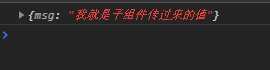
Practical cases ( Component form values are passed to the page )
Page original state 
When the component input field loses focus, the value is transferred to the page 
Call component internal methods ( You can also pass the values inside the component to the page )
- First, get the component instance on the page , So the components should be assigned to the page id
- Then you can get the data inside the component
See the effect 
Get the component instance , Print out , Can I get the internal data of the component ?

Call component internal methods 
Use component instances directly . Just call it 
Source code
Components
<template>
  <view>
    <input type="text" bindblur="getVal" placeholder=" Please enter " />
  </view>
</template>
<script> import {
      createComponent } from '@mpxjs/core' createComponent({
      data: {
      communicate: ' I am the value passed from the subcomponent ', a: ' For viewing ', b: ' For example, it looks a little more ', c: 'example' }, methods: {
      //  Create an event trigger when the input field loses focus and pass the form value  getVal(e) {
      // console.log(e.detail.value) this.triggerEvent( 'customevent', {
      msg: e.detail.value }, {
      bubbles: true } ) }, //  Component internal methods  _inner() {
      console.log(' Called the component internal method ') } } }) </script>
page
<template>
  <view class="container">
    <view class="result">{
   {msg}}</view>
    <son-component id="my" bind:customevent="onTap" />
    <button bindtap="inner"> Call component internal methods </button>
  </view>
</template>
<script> import {
      createPage } from '@mpxjs/core' createPage({
      data: {
      msg: ' I haven't been changed yet ' }, methods: {
      onTap(e) {
      console.log(e.detail) this.msg = e.detail.msg }, inner() {
      const myComponent = this.selectComponent('#my') // console.log(myComponent) // this.msg = myComponent.__data__.c myComponent._inner() } } }) </script>
<style lang="stylus" scoped> .container width 100% height 300px box-sizing border-box overflow hidden .result line-height 50px height 50px font-size 16px font-weight 600 text-align center </style>
<script type="application/json"> {
      "navigationBarTitleText": " Component communication ", "usingComponents": {
      "son-component": "../components/event" } } </script>
边栏推荐
猜你喜欢




随机推荐
JS to obtain basic information about the width and height of an image or Base64
Professional structure record
Mqtt second session -- emqx high availability cluster implementation
pytorch学习总结—运算的内存开销
Let's make a summary
Picture format -webp
H5软键盘问题
Open3D 最远点采样(FPS)
H5 soft keyboard problem
记微信小程序分享代码片段
一般乘法器设计,verilog code
cokkie和session的区别
Handwriting Redux thunk
AugFPN:改进多尺度特征学习用于目标检测
train_on_batch保存一下loss函数变化的图像
General multiplier design, verilog code
【To .NET】C#数据模型,从Entity Framework Core到LINQ
Debug H5 page -vconsole
微信小程序最新canvas2d手写签名
Verilog 数据类型