当前位置:网站首页>Debian 10 NTP 服务配置
Debian 10 NTP 服务配置
2022-08-02 03:20:00 【活加梦】
目录
一、题目要求
NTP
安装 ntp(使用其他 ntp 软件,以下功能均不得分);
在 AppSrv 和 StorageSrv 上创建 CRON 计划任务;
使用 ntpdate 指令,每隔五分钟进行一次时间同步;
二、配置过程
IspSrv
1.下载ntp服务
[email protected]:~# apt -y install ntp2.进入ntp配置文件
[email protected]:~# vim /etc/ntp.conf 3.修改ntp配置文件
 23 #pool 0.debian.pool.ntp.org iburst                #注释,关闭从网络上同步
 24 #pool 1.debian.pool.ntp.org iburst
 25 #pool 2.debian.pool.ntp.org iburst
 26 #pool 3.debian.pool.ntp.org iburst
 27 server 127.127.1.0                                #server指定ntp服务器的地址 将当前主机作为时间服务器
 28 fudge 127.127.1.0  stratum 5                     #fudge设置时间服务器的层级 stratum 0~15  ,0:表示顶级 , 10:通常用于给局域网主机提供时间服务
                                                      #注意:fudge必须和server一块用, 而且是在server的下一行

41 #restrict -4 default kod notrap nomodify nopeer no query limited        #注释
42 #restrict -6 default kod notrap nomodify nopeer no query limited

46 restrict 81.6.63.0 mask 255.255.255.0           #允许哪些网段来我这里同步时间
4.重启ntp服务
[email protected]:~# systemctl restart ntp.service5.放开防火墙端口
[email protected]:~# iptables -A INPUT -p udp --dport 123 -j ACCEPT
[email protected]:~# iptables -A OUTPUT -p udp --sport 123 -j ACCEPT
6.保存规则
[email protected]:~# netfilter-persistent saveRouterSrv
1.放开iptables上对应端口
[email protected]:~# iptables -A FORWARD -p udp --dport 123 -j ACCEPT2.保存规则
[email protected]:~# netfilter-persistent saveAppSrv
1.安装ntpdate指令
[email protected]:~# apt -y install ntpdate2.进入CRON服务配置文件
[email protected]:~# vim /etc/crontab 3.创建 CRON 计划任务,每5分钟自动同步4.
*/5 * * * * root /usr/sbin/ntpdate 81.6.63.100 #每5分钟到81.6.63.100自动同步时间4.重新启动下CRON计划任务
[email protected]:~# systemctl restart cron.service5.打开防火墙对应的端口
[email protected]:~# iptables -A INPUT -p udp --sport 123 -j ACCEPT
[email protected]:~# netfilter-persistent save
StorageSrv
1.安装ntpdate指令
[email protected]:~# apt -y install ntpdate2.进入CRON服务配置文件
[email protected]:~# vim /etc/crontab 3.创建 CRON 计划任务,每5分钟自动同步4.
*/5 * * * * root /usr/sbin/ntpdate 81.6.63.100 #每5分钟到81.6.63.100自动同步时间4.重新启动下CRON计划任务
[email protected]:~# systemctl restart cron.service5.打开防火墙对应的端口
[email protected]:~# iptables -A INPUT -p udp --sport 123 -j ACCEPT
[email protected]:~# netfilter-persistent save
三、测试截图与评分要求
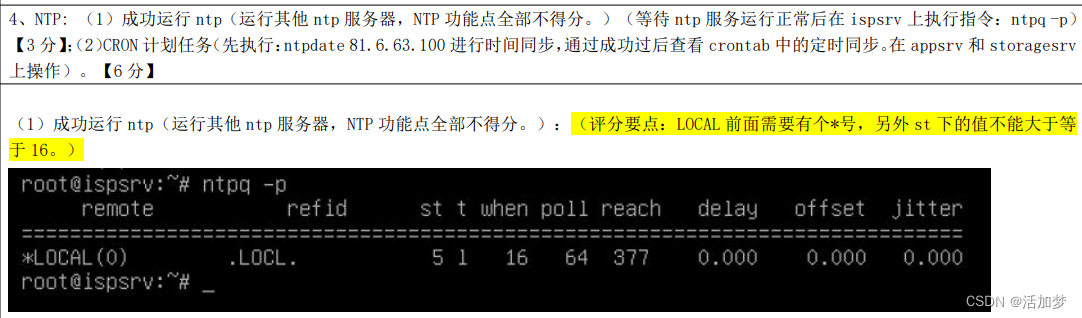
测试:IspSrv

评分细则:
测试:AppSrv与StorageSrv


评分细则:

边栏推荐
猜你喜欢
小程序(开发必备常识)1

黑马案例--实现 clock 时钟的web服务器

Webshell upload method

Kubernetes 基本概念
![[详解C语言]一文带你玩转C语言小游戏---扫雷](/img/9f/3979ef063f10bd641111aa4f4d8b4e.png)
[详解C语言]一文带你玩转C语言小游戏---扫雷

SSM网上商城购物系统(前台+后台)

MySQL分库分表

@Autowired与@Resource区别

Daily practice------There are n integers, so that the previous numbers are moved back m positions in order, and the last m numbers become the first m numbers
@Configuration详解
随机推荐
MySQL常见的索引
支付通道对接常见的问题有哪些?
深度学习:目标检测入门知识
多个el-select下拉框无法选中相同内容
STM32——LCD—TFTLCD原理与配置介绍
MySQL两阶段提交串讲
代码随想录笔记_哈希_383赎金信
5. Hezhou Air32F103_LCD_key
脚手架安装
Day34 LeetCode
「PHP基础知识」空值(null)的使用
小程序组件总结
腾讯50题
DSPE-PEG-PDP,DSPE-PEG-OPSS,磷脂-聚乙二醇-巯基吡啶供应,MW:5000
Keil开发环境安装教程
Redis安装,基本命令,持久化方式,集群
Double Strings (别总忘记substr)
分布式领域最重要的一篇论文,到底讲了什么?
LeetCode:第304场周赛【总结】
磷脂-聚乙二醇-叠氮,DSPE-PEG-Azide,DSPE-PEG-N3,MW:5000