当前位置:网站首页>JS floating point multiplication and division method can not accurately calculate the problem
JS floating point multiplication and division method can not accurately calculate the problem
2022-06-25 14:18:00 【jason_ renyu】
JS The problem of accurate calculation is a pain point for some people to do finance or some calculation functions , for example :
//  Add
0.1 + 0.2 = 0.30000000000000004
0.1 + 0.7 = 0.7999999999999999
0.2 + 0.4 = 0.6000000000000001

//  Subtraction
0.3 - 0.2 = 0.09999999999999998
1.5 - 1.2 = 0.30000000000000004

//  Multiplication
0.8 * 3 = 2.4000000000000004
19.9 * 100 = 1989.9999999999998

//  division
0.3 / 0.1 = 2.9999999999999996
0.69 / 10 = 0.06899999999999999

//  Compare
0.1 + 0.2 === 0.3 // false
(0.3 - 0.2) === (0.2 - 0.1) // false
Common solutions use math.js, If in vue or react In the project ( Below with vue For example ) Will use the corresponding mathjs.
Official website : http://mathjs.org/
cdn Address :https://cdnjs.cloudflare.com/ajax/libs/mathjs/5.0.0/math.js
JS Application examples in :
<html>
<head>
<script src="https://cdnjs.cloudflare.com/ajax/libs/mathjs/5.0.0/math.js"></script>
<script type="text/javascript"> function fn_click(p){
       var a , b; a=0.7; b=0.1; if(p==1){
       alert(a+b); }else if(p==2){
       alert(eval("a+b")); }else if(p==3){
       math.config({
       number: 'BigNumber' }); var result = math.parser().eval(a + "+" + b) alert(result); } } </script>
</head>
<body>
  <input type="button" value="0.7+0.1" onclick="fn_click(1);" />
  <input type="button" value="eval(0.7+0.1)" onclick="fn_click(2);" />
  <input type="button" value="mathjs(0.7+0.1)" onclick="fn_click(3);" />
</body>
</html>
stay Vue Application examples in :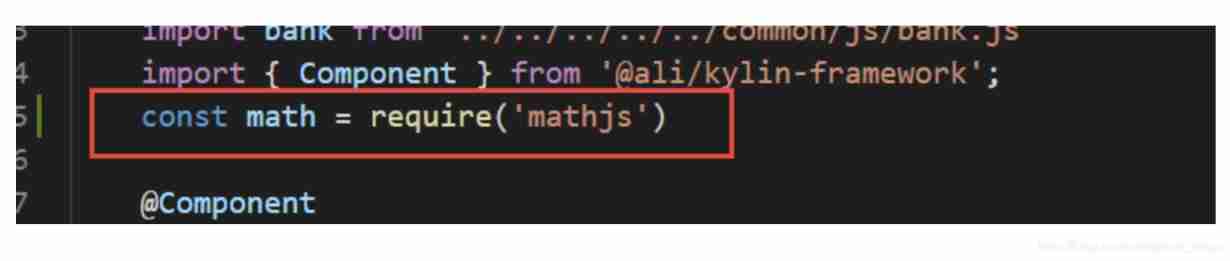

however , Use this way mathjs There will be many problems with large numbers , Below we use native js To encapsulate a solution to such a problem
Multiplication
const NumberMul = function(arg1, arg2) {

    var m = 0;
    var s1 = arg1.toString();
    var s2 = arg2.toString();
    try {

        m += s1.split(".")[1].length;
    } catch (e) {
    }
    try {

        m += s2.split(".")[1].length;
    } catch (e) {
    }

    return Number(s1.replace(".", "")) * Number(s2.replace(".", "")) / Math.pow(10, m);
}
Add
const NumberAdd = function(arg1, arg2) {

    var r1, r2, m, n;
    try {

        r1 = arg1.toString().split(".")[1].length
    } catch (e) {

        r1 = 0
    }
    try {

        r2 = arg2.toString().split(".")[1].length
    } catch (e) {

        r2 = 0
    }
    m = Math.pow(10, Math.max(r1, r2))
    n = (r1 >= r2) ? r1 : r2;
    return ((arg1 * m + arg2 * m) / m).toFixed(n);
}
Subtraction
const NumberSub = function(arg1, arg2) {

    var re1, re2, m, n;
    try {

        re1 = arg1.toString().split(".")[1].length;
    } catch (e) {

    re1 = 0;
    }
    try {

        re2 = arg2.toString().split(".")[1].length;
    } catch (e) {

        re2 = 0;
    }
    m = Math.pow(10, Math.max(re1, re2));
    n = (re1 >= re2) ? re1 : re2;
    return ((arg1 * m - arg2 * m) / m).toFixed(n);
}
division
//  Divisor , Divisor ,  The number of decimal places reserved
const NumberDiv = function (arg1,arg2,digit){

    var t1=0,t2=0,r1,r2;
    try{
    t1=arg1.toString().split(".")[1].length}catch(e){
    }
    try{
    t2=arg2.toString().split(".")[1].length}catch(e){
    }
    r1=Number(arg1.toString().replace(".",""))
    r2=Number(arg2.toString().replace(".",""))
    // Get calculated value after decimal point
   var result= ((r1/r2)*Math.pow(10,t2-t1)).toString()
    var result2=result.split(".")[1];
    result2=result2.substring(0,digit>result2.length?result2.length:digit);

    return Number(result.split(".")[0]+"."+result2);
}
Be careful : Divisor arg2 Not for 0, There is no judgment here , Attention, little friend
Usage mode ( Take multiplication as an example )
console.log(NumberMul(0.0058,100))
If in vue Used in , You can also put methods into the global , You can also use a single application in a page
for example ( Take the global approach as an example )
Vue.prototype.NumberMul = function(arg1, arg2) {

    var m = 0;
    var s1 = arg1.toString();
    var s2 = arg2.toString();
    try {

        m += s1.split(".")[1].length;
    } catch (e) {
    }
    try {

        m += s2.split(".")[1].length;
    } catch (e) {
    }

    return Number(s1.replace(".", "")) * Number(s2.replace(".", "")) / Math.pow(10, m);
}
If this article is of great use to you, please like it !
In this paper, the reference :https://www.cnblogs.com/bushui/p/12150947.html
边栏推荐
- 电脑必须打开的设置
- 算力&NFT交易平台F3.xyz旗下独家权益NFT项目Hash Eagle将盛大发行
- 腾讯云搭建Socks5多IP代理服务器实现游戏单窗口单IP完美搭建教程附带工具「建议收藏」
- VGA display of de2-115 FPGA development board
- JVM 用工具分析OOM经典案例
- As a software testing engineer, how do you think to ensure software quality?
- How to choose a technology stack for web applications in 2022
- 程序员为什么要软一点?
- k线图24种经典图解(影线篇)
- Pourquoi les programmeurs devraient - ils être plus doux?
猜你喜欢

Partager les points techniques de code et l'utilisation de logiciels pour la communication Multi - clients socket que vous utilisez habituellement

JVM uses tools to analyze classic cases of OOM

As a software testing engineer, how do you think to ensure software quality?

shell 数组

'NVIDIA SMI' is not an internal or external command, nor is it a runnable program or batch file

Why should programmers be softer?
Nine parts of speech and nine tenses in English
【Proteus仿真】51单片机+DS1302+lcd1602显示

Shell built-in commands

Shell string variable
随机推荐
Les neuf caractéristiques de la parole et les neuf temps en anglais
Gorm---- Association query
深入理解深度神经网络背后的数学(Mysteries of Neural Networks Part I)
Beego--- notes
[proteus simulation] 51 MCU +ds1302+lcd1602 display
Does stream even have application advanced learning? As a programmer, you know what
As a software testing engineer, how do you think to ensure software quality?
Cool assembly tutorial - concise x86 assembly language tutorial (1)
多台云服务器的 Kubernetes 集群搭建
NVM installation and use tutorial
Two methods to rollback the code in pycharm to the specified version (with screenshot)
一次性总结:64个数据分析常用术语!
Getting started with numpy Library
Golang project dependency management tool go vendor, go Mod
Discriminative v.s.Generative
【世界历史】第一集——石器时代的人们
sigmoid函数sigmoid求导
中国电池技术取得重大突破,日韩美都落后了,中国巩固了领先优势
完整详细的汇编实验报告
Shell array