当前位置:网站首页>Learn Tai Chi Maker - mqtt (VI) esp8266 releases mqtt message
Learn Tai Chi Maker - mqtt (VI) esp8266 releases mqtt message
2022-06-27 02:14:00 【xuechanba】
Video link :https://www.bilibili.com/video/BV1Xy4y1z7Mm/?spm_id_from=autoNext&vd_source=b91967c499b23106586d7aa35af46413
The data link :http://www.taichi-maker.com/homepage/esp8266-nodemcu-iot/iot-tuttorial/mqtt-tutorial/esp8266-publish-mqtt/
ESP8266 towards MQTT Server publishing information
/**********************************************************************  Project name /Project :  Zero basic introduction to the Internet of things   Program name /Program name : publish_ranye_url  The team /Team :  Taiji maker team  / Taichi-Maker (www.taichi-maker.com)  author /Author : CYNO Shuo   date /Date(YYYYMMDD) : 20200813  Purpose of procedure /Purpose :  The purpose of this program is to demonstrate how to use PubSubClient Library usage ESP8266 towards MQTT Server publishing information . -----------------------------------------------------------------------  This sample program is made by Taiji maker team 《 Zero basic introduction to the Internet of things 》 Sample program in .  This tutorial is designed and produced by friends who are interested in the development of the Internet of things . For more information about this tutorial , Please refer to the following pages : http://www.taichi-maker.com/homepage/esp8266-nodemcu-iot/iot-c/esp8266-nodemcu-web-client/http-request/ ***********************************************************************/
#include <ESP8266WiFi.h>
#include <PubSubClient.h>
#include <Ticker.h>

//  Set up wifi Access information ( Please according to your WiFi Modify the information )
const char* ssid = "taichi-maker";
const char* password = "12345678";
const char* mqttServer = "test.ranye-iot.net";

//  As above MQTT The server cannot connect normally , Please go to the following page to find a solution
// http://www.taichi-maker.com/public-mqtt-broker/

Ticker ticker;
WiFiClient wifiClient;
PubSubClient mqttClient(wifiClient);

int count;    // Ticker Variable for counting

void setup() {

  Serial.begin(9600);

  // Set up ESP8266 The working mode is wireless terminal mode
  WiFi.mode(WIFI_STA);

  //  Connect WiFi
  connectWifi();

  //  Set up MQTT Server and port number
  mqttClient.setServer(mqttServer, 1883);

  //  Connect MQTT The server
  connectMQTTServer();

  // Ticker Timing object
  ticker.attach(1, tickerCount);
}

void loop() {

  if (mqttClient.connected()) {
     //  If the development board successfully connects to the server
    //  every other 3 One message per second
    if (count >= 3){

      pubMQTTmsg();
      count = 0;
    }
    //  Keep your heart beating
    mqttClient.loop();
  } else {
                      //  If the development board fails to connect to the server
    connectMQTTServer();    //  Then try to connect to the server
  }
}

void tickerCount(){

  count++;
}

void connectMQTTServer(){

  //  according to ESP8266 Of MAC Address generation client ID( Avoid contact with other ESP8266 The client of ID The nuptial )
  String clientId = "esp8266-" + WiFi.macAddress();

  //  Connect MQTT The server
  if (mqttClient.connect(clientId.c_str())) {

    Serial.println("MQTT Server Connected.");
    Serial.println("Server Address: ");
    Serial.println(mqttServer);
    Serial.println("ClientId:");
    Serial.println(clientId);
  } else {

    Serial.print("MQTT Server Connect Failed. Client State:");
    Serial.println(mqttClient.state());
    delay(3000);
  }
}

//  Publish the information
void pubMQTTmsg(){

  static int value; //  The client publishes information in numbers

  //  Create a publishing theme . The title of the topic is Taichi-Maker- The prefix , The device is added later MAC Address .
  //  This is done to ensure that different users MQTT When information is released ,ESP8266 Client names vary ,
  String topicString = "Taichi-Maker-Pub-" + WiFi.macAddress();
  char publishTopic[topicString.length() + 1];
  strcpy(publishTopic, topicString.c_str());

  //  Establish and release information . The information content is in Hello World As the starting point , Add the number of releases later .
  String messageString = "Hello World " + String(value++);
  char publishMsg[messageString.length() + 1];
  strcpy(publishMsg, messageString.c_str());

  //  Realization ESP8266 Post information to the subject
  if(mqttClient.publish(publishTopic, publishMsg)){

    Serial.println("Publish Topic:");Serial.println(publishTopic);
    Serial.println("Publish message:");Serial.println(publishMsg);
  } else {

    Serial.println("Message Publish Failed.");
  }
}

// ESP8266 Connect wifi
void connectWifi(){


  WiFi.begin(ssid, password);

  // wait for WiFi Connect , Output success information after successful connection
  while (WiFi.status() != WL_CONNECTED) {

    delay(1000);
    Serial.print(".");
  }
  Serial.println("");
  Serial.println("WiFi Connected!");
  Serial.println("");
}
See how it works , as follows :
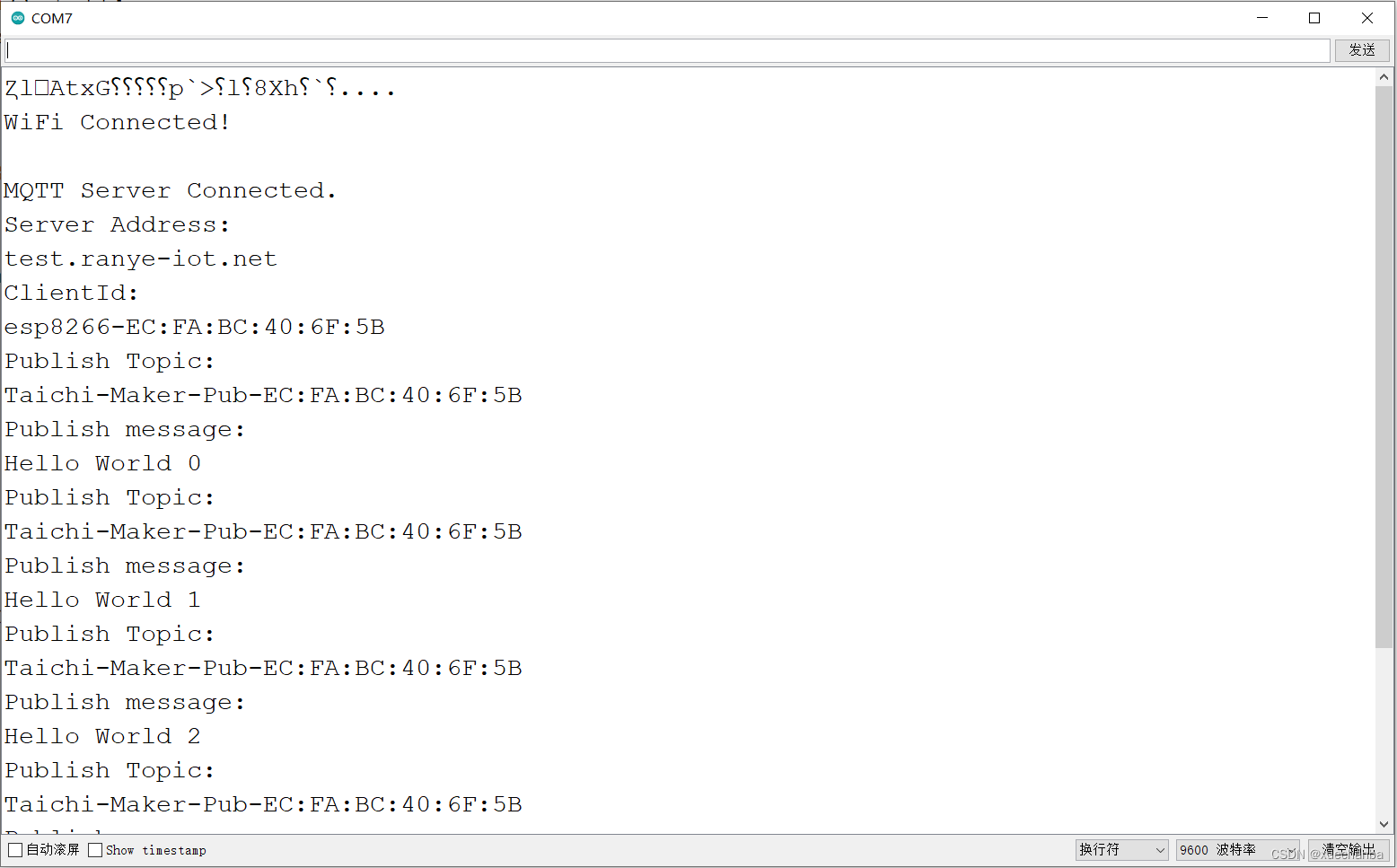
In the example above ,ESP8266 Every interval 3 Seconds to ( Taichi-Maker- The prefix , The device is added later MAC Address , namely Taichi-Maker-Pub-EC:FA:BC:40:6F:5B ) The subject of a news release , The message is ( Hello World As the starting point , Add the number of releases later ).
We copied the topic to MQTT.fx In this software , Then subscribe to .

Next, I will explain the contents of the program carefully .
//  Publish the information
void pubMQTTmsg(){

  static int value; //  The client publishes information in numbers

  //  Create a publishing theme . The title of the topic is Taichi-Maker- The prefix , The device is added later MAC Address .
  //  This is done to ensure that different users MQTT When information is released ,ESP8266 Client names vary ,
  String topicString = "Taichi-Maker-Pub-" + WiFi.macAddress();
  char publishTopic[topicString.length() + 1];
  strcpy(publishTopic, topicString.c_str());

  //  Establish and release information . The information content is in Hello World As the starting point , Add the number of releases later .
  String messageString = "Hello World " + String(value++);
  char publishMsg[messageString.length() + 1];
  strcpy(publishMsg, messageString.c_str());

  //  Realization ESP8266 Post information to the subject
  if(mqttClient.publish(publishTopic, publishMsg)){

    Serial.println("Publish Topic:");Serial.println(publishTopic);
    Serial.println("Publish message:");Serial.println(publishMsg);
  } else {

    Serial.println("Message Publish Failed.");
  }
}
1、 Why convert to a character array ?
It's because it's executing mqttClient.publish When this function , The parameters it can accept must be of character array type . After execution mqttClient.publish There will be a return value after , Successfully returns 1 .
2、 After successfully publishing the message , And maintain the heartbeat mechanism .
 //  Keep your heart beating
 mqttClient.loop();
边栏推荐
猜你喜欢

Enterprise digital transformation: informatization and digitalization

"All majors are persuading them to quit." is it actually the most friendly to college students?

Sample development of WiFi IOT Hongmeng development kit
学习太极创客 — MQTT 第二章(二)ESP8266 QoS 应用

lottie.js创意开关按钮动物头像

参数估计——《概率论及其数理统计》第七章学习报告(点估计)

按键控制LED状态翻转

three. JS domino JS special effect
CVPR2022 | PointDistiller:面向高效紧凑3D检测的结构化知识蒸馏

谷歌开始卷自己,AI架构Pathways加持,推出200亿生成模型
随机推荐
Cvpr2022 | pointdistiller: structured knowledge distillation for efficient and compact 3D detection
h5液体动画js特效代码
Shell脚本系列篇(1) 入门
Flink learning 3: data processing mode (stream batch)
Microsoft365 developer request
Memcached basics 11
SQLite reader plug-in tests SQLite syntax
Oracle/PLSQL: Substr Function
docker部署redis集群
YaLM 100B:来自俄罗斯Yandex的1000亿参数开源大模型,允许商业用途
P5.js death planet
Summer planning for the long river
“所有专业都在劝退”,对大学生最友好的竟然是它?
Oracle/PLSQL: VSize Function
paddlepaddle 20 指数移动平均(ExponentialMovingAverage,EMA)的实现与使用(支持静态图与动态图)
Parameter estimation -- Chapter 7 study report of probability theory and mathematical statistics (point estimation)
Flink learning 2: application scenarios
lottie. JS creative switch button animal head
Oracle/PLSQL: Rpad Function
perl语言中 fork()、exec()、waitpid() 、 $? >> 8 组合