当前位置:网站首页>3 strings, containers, and arrays
3 strings, containers, and arrays
2022-06-12 06:40:00 【A building climbing pig】
3 character string 、 Containers and arrays
1 character string string
Standard library type string Represents a variable length sequence of characters , Be careful , It is different from string literals .
Tips: character string string Examples different from string literals : For example, in string splicing (+) When
s1+s2When using , Make sure at least one side is string type .string s1 = "hello" + "world"// error , Both sides are string literals , String splicing cannot be realized !!!
1.1 character string string Some operations of
1、 initialization :
Mode one : Copy initialization (copy initialization): Use equal sign = Copy an existing object to the object being created . for example string str1 = str2 perhaps string str = "1234" etc. .
Mode two : Direct initialization (direct initialization): Assign values to objects through parentheses . for example string str(s1) perhaps string str("value") etc. .
    string str2 = "i_am_second";
    string str2a = str2;
    str2a[0] = 'h';

    string str2b = "i_am_test";
    string str2c = " ";
    str2b = str2c;

    cout<<"------------The using of = in string--------------"<<endl;
    cout<<"str2 is: "<<str2<<endl<<"str2a is: "<<str2a<<endl;
    cout<<"str2b is: "<<str2b<<endl<<"str2c is: "<<str2c<<endl<<endl;
The output is :------------The using of = in string--------------
str2 is: i_am_second
str2a is: h_am_second
str2b is:
str2c is:
2、 Find the length : use str.size() perhaps str.length().
    string str1 = "i_am_first";

    // string The length of the type ;( use str.size() perhaps str.length())
    int len  = str1.size();cout<<"the size of str1 is: "<<len<<endl;
    int leng = str1.length();cout<<"the length of str1 is: "<<leng<<endl<<endl;
The output is :the size of str1 is: 10 and the length of str1 is: 10.
3、 String splicing : Directly through the operator +, It is worth noting that ,+ At least one of the two objects of No. must be string Type of .
    cout<<"------------The using of + in string--------------"<<endl;
    string str3 = "i_am_";
    string str3a = "third";
    string str3b = str3 + str3a ;
    cout<<"str3 is: "<<str3<<endl<<"str3a is: "<<str3a<<endl<<"str3b is: "<<str3b<<endl<<endl;
The output is :------------The using of + in string--------------
str3 is: i_am_
str3a is: third
str3b is: i_am_third
4、 String slice :substr( Location , length )
    string str4 = "i_am_forth";
    string str4a = str4.substr(5,5);
    cout<<"------------slice of string type--------------"<<endl;
    cout<<"str4 is: "<<str4<<endl<<"str4a is: "<<str4a<<endl<<endl;
The output is :------------slice of string type--------------
str4 is: i_am_forth
str4a is: forth
5、 Other operating :

1.2 Yes string Character operations in objects

/* //---------------------------- Handle string The characters in -------------------------- */
    string str5 = "I_a m _5(fifth)";

    //  Determine whether the character is a number
    bool isnum = isdigit(str5[7]);
    cout<<"------------Process the characters of the string--------------"<<endl;
    cout<<"5 in str5 is digit(1=true,0=false): "<<isnum<<endl;

    //  Determine whether the character is a letter
    bool isalp = isalpha(str5[1]);
    cout<<"i in str5 is alpha(1=true,0=false): "<<isalp<<endl;

    //  Determine whether the character is uppercase
    bool isup = isupper(str5[0]);
    cout<<"i in str5 is alpha(1=true,0=false): "<<isup<<endl;

    //  Determine whether the characters are lowercase
    bool islo = islower(str5[2]);
    cout<<"i in str5 is alpha(1=true,0=false): "<<islo<<endl;

    //  Determine whether the characters are spaces and other symbols
    bool isspa = isspace(str5[3]);
    cout<<"i in str5 is alpha(1=true,0=false): "<<isspa<<endl;
The output is :------------Process the characters of the string--------------
5 in str5 is digit(1=true,0=false): 1
i in str5 is alpha(1=true,0=false): 0
i in str5 is alpha(1=true,0=false): 1
i in str5 is alpha(1=true,0=false): 1
i in str5 is alpha(1=true,0=false): 1
1.3 Example
Example 1: The string str5a Delete all spaces in the string of , Such as str5 = “i am str5a”; The final output "iamstr5"
Their thinking :
1、 Press the subscript i Judge ,
2、 Record space subscripts i, Split it into two characters (0–i and i+1–end) String recombining ;
3、 The subscript in the space will be reset to... In the next traversal (i-1)
    for(int i = 0; i < str5a.size(); i++)
    {

        if(isspace(str5a[i]))
        {

            string str5b = str5a.substr(0,i);
            string str5c = str5a.substr(i+1);
            str5a = str5b + str5c;
            i--;
        }
    }
    cout<<"Example1--to delet the space in (i am str5a): "<<str5a<<endl<<endl;
The output is :Example1–to delet the space in (i am str5a): iamstr5a
2 Containers vector And iterators
2.1 Containers
1、 initialization : It is worth noting that , The element length of the container can be different vector<string> str = {"1","12","123"};
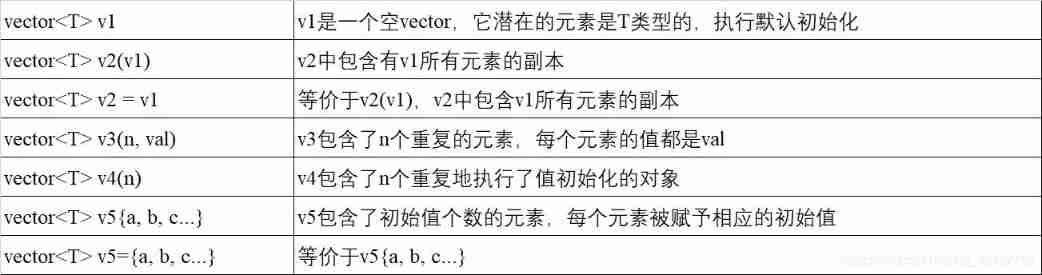
    // Define initialization , You can define elements of different lengths in a container
    vector<string> str1 = {
    "1","12","123"};
    cout<<"---------------to init the vector type data--------------"<<endl;
    cout<<"str1={a,ab,abc} the str[1] is: "<<str1[1]<<endl<<endl;
The output is ---------------to init the vector type data--------------
str1={1,12,123} the 1 number is: 12
2、 Additive elements :v.push_back(e) Add elements to the tail .
    //  Add elements to the end
    str1.push_back("1234");
    cout<<"---------------add data in the end of vector --------------"<<endl;
    cout<<"str1={1,12,123,1234} the str1[3] is: "<<str1[3]<<endl<<endl;
The output is ---------------add data in the end of vector --------------
str1={1,12,123,1234} the 3 number is: 1234
3、 Other operating :
Be careful :vector object ( as well as string object ) Of Subscript operator [i], Subscript operations can only be performed on elements that are known to exist , Cannot be used to add elements . Both of the following are false !!!
    string a = "";
    vector<int> b;

    for(int i = 0; i < 2; i++)
    {

        a[i] = char(i);
    }
    for(int i = 0; i < 2; i++)
    {

        b[i] = i;
    }
2.2 iterator
1、 Get the header and footer elements : Head element direct *str.begin() that will do ; The tail element needs to move the tail iterator back one bit , Otherwise, a null pointer is passed , That is, the tail element *--str.end()
    //  Get the first and last elements of the iterator ; The tail element needs to be *--str.end(), Directly *str.end() It is usually a null pointer
    string str2 = "hello_iterator";
    vector<string> str3 = {
    "abc","ab","a"};
    auto str2a = str2.begin();

    cout<<"-----------get the begin and end mumber in vector and string ----------"<<endl;
    cout<<"the str2={hello_iterator} first number is: "<<*str2a<<endl;

    auto str3a = str3.end();

    cout<<"the str3={abc,ab,a} end number[*--str3.end()] is: "<<*--str3a<<endl<<endl;
The output is :-----------get the begin and end mumber in vector and string ----------
the str2={hello_iterator} first number is: h
the str3={abc,ab,a} end number[*–str3.end()] is: a
2、 Get the data in the container : For example, in vector<string> str = {"abc","ab","a"};iter = str.begin() Be careful *iter[2] and (*iter)[2] The difference between , The former *iter[2]==str[0+2]; the latter (*iter)[2]==str[0][2].
    //  Some operations on iteration pointer
    //  Get the elements in the string
    auto str3b = str3.begin();
    cout<<"-----------get the data in iterator ----------"<<endl;
    cout<<"in str3={abc,ab,a} the str3c is: "<<*str3b<<endl;
    cout<<"in str3={abc,ab,a} the str3c[1] is(==str3[2]): "<<str3b[2]<<endl;
    cout<<"in str3c={abc} the (*str3c)[2] is(==str3[0][2]): "<<(*str3b)[2]<<endl;
The output is :-----------get the data in iterator ----------
in str3={abc,ab,a} the str3c is: abc
in str3={abc,ab,a} the str3c[1] is(==str3[2]): a
in str3c={abc} the (*str3c)[2] is(==str3[0][2]): c
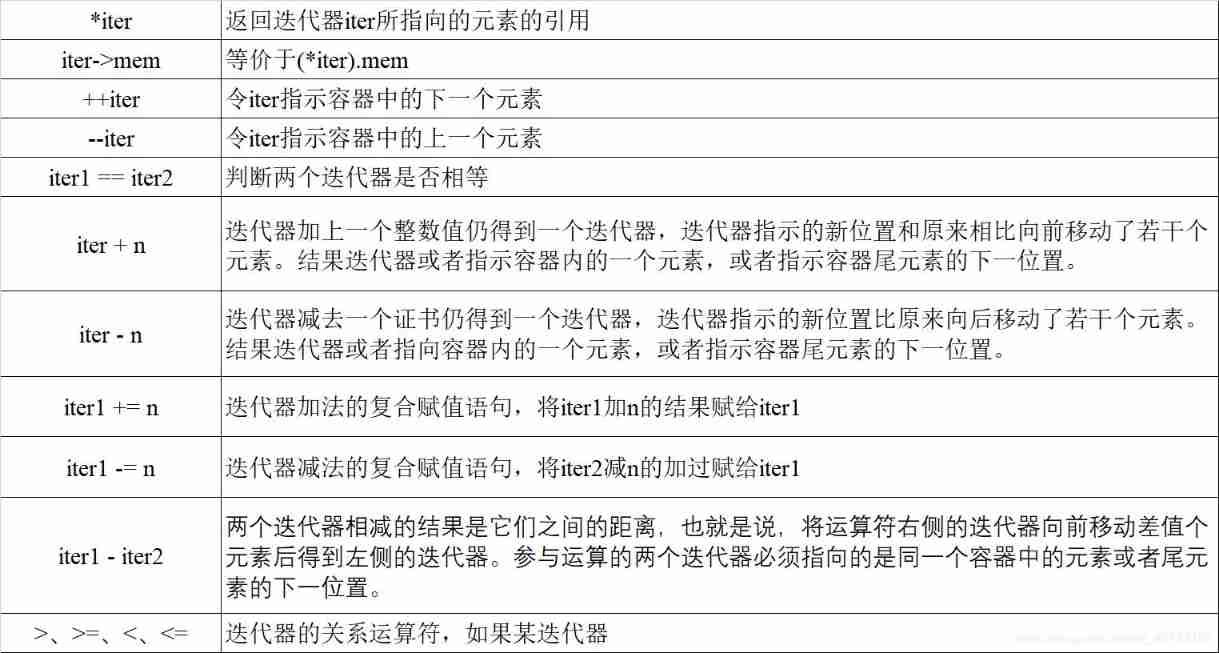
3、 Other operating :
3.3 Array
1、 The length of the array must be const expression , Or don't write .
2、 Array does not allow direct assignment to another array .
int a[] = {
    1,2,3};
int b[] = a; // error
int c[];
c = a;// error
3.3.1 Complex array
1、 Array of pointer types ( Pointer array ), keyword <type>* <var_name>, for example int *arrp[10], Express 10 individual int* Pointer array of type .
2、 Pointer to array ( Array pointer ), keyword <type> (*<var_name>), for example int (*parr)[10] To point to 10 Pointer to an integer array .
Operator priority : Assignment operator < Logical operators < Relational operator < Arithmetic operator < Brackets
int arr[10] = {
    1,2,3,4,5,6,7,8,9,0};
int *arrp[10];  //int An array of type pointers
int (*parr)[10];    // Point to 10 Pointer to an array of integer elements
// arrp = &arr; // error !
parr = &arr;
cout<<parr<<endl;   // Output the first address of the array
cout<<parr[0]<<endl;   // Output the first address of the array
cout<<*parr[2]<<endl;   // Not the value of the output array , It's the decimal number of the address of the array , It is not recommended at all
cout<<(*parr)[2]<<endl;   // The value of the output array
3、 References to arrays , keyword <type> (&<var_name>), for example int (&refarr)[10] = arr Express 10 A reference to an integer array . Cannot define an array whose data type is a reference .
3.3.2 C Style string
1、 from C Inherited string , Use empty characters (\0) end .
2、 The relevant operation :
①strlen(p)------ return p The length of , Empty characters are not counted ;
②strcmp(p1, p2)------ Compare p1 and p2 Equality of . If p1==p2, return 0; If p1>p2, Returns a positive value ; If p1<p2, Returns a negative value ;
③strcat(p1, p2)------ take p2 Attach to p1 after , return p1;
④strcpy(p1, p2)------ take p2 Copy to p1, return p1.
3.3.3 Arrays and pointers
arr[j] == *(&arr[0]+j) == *(arr+j) == *(j+arr) == j[arr]
边栏推荐
- Are you still using like+% for MySQL fuzzy query?
- torch在高版本训练的模型在低版本中使用报错
- Video summary with long short term memory
- 六月集训 第九日——位运算
- Codeforces Round #793 (Div. 2) A B C
- Leetcode: Sword finger offer 63 Maximum profit of stock [record prefix minimum and or no brain segment tree]
- VSCode常用插件
- LeetCode-1405. Longest happy string
- Multithreading (2) -- pipeline (4) -- Park and unpark
- LeetCode-997. Find the town judge
猜你喜欢

Leetcode January 13 daily question 747 At least twice the maximum number of other numbers

PHP read / write cookie

Throw away the ugly toast. The movable toast is more interesting

leetcode:剑指 Offer 60. n个骰子的点数【数学 + 层次dp + 累计贡献】

Opencv_100问_第五章 (21-25)

Solution: unsatisfieddependencyexception: error creating bean with name 'authaspect':

Deep and detailed analysis of PHP one sentence Trojan horse

2021 robocom world robot developer competition - undergraduate group (Preliminary)

Modifying theme styles in typora
Vscode Common plug - in
随机推荐
LeetCode-1587. Bank account summary II
LeetCode-1189. Maximum number of balloons
leetcode 704. Binary search
PHP read / write cookie
Throw away the ugly toast. The movable toast is more interesting
Leetcode: offer 60 Points of N dice [math + level DP + cumulative contribution]
Modifying theme styles in typora
Multithreading (2) -- pipeline (4) -- Park and unpark
LeetCode-2034. Stock price fluctuation
Apache POI import export excel file
SQL injection - Union query
Zhang Chi: is process a panacea?
Redis distributed lock
MySQL group query to obtain the latest data date function of each group
Redis problem (I) -- cache penetration, breakdown, avalanche
C language pointer
QT--实现TCP通信
Leetcode: Sword finger offer 66 Build product array [application of pre and post infix]
Process when solving vagrant up_ builder. rb:43:in `join‘: incompatible character encodings: GBK and UTF-8
使用 ms17-010 永恒之蓝漏洞对 win7 进行渗透及建立永久后门