当前位置:网站首页>Overview of Baidu map technology, and application development of basic API and webapi
Overview of Baidu map technology, and application development of basic API and webapi
2022-07-27 18:50:00 【Fantasia of the cat】
Overview of map technology :

Map application scenario :
Online car Hailing industry :

Smart wearable products :
Intelligent logistics network industry :
Intelligent scenic spot industry :
Internet of vehicles industry :
Comparison of common map manufacturers in China :

Baidu map basic API application :
Baidu map provides various platforms SDK, Address :https://lbsyunbaidu.com/ as follows :

Set the application name and type of the test :
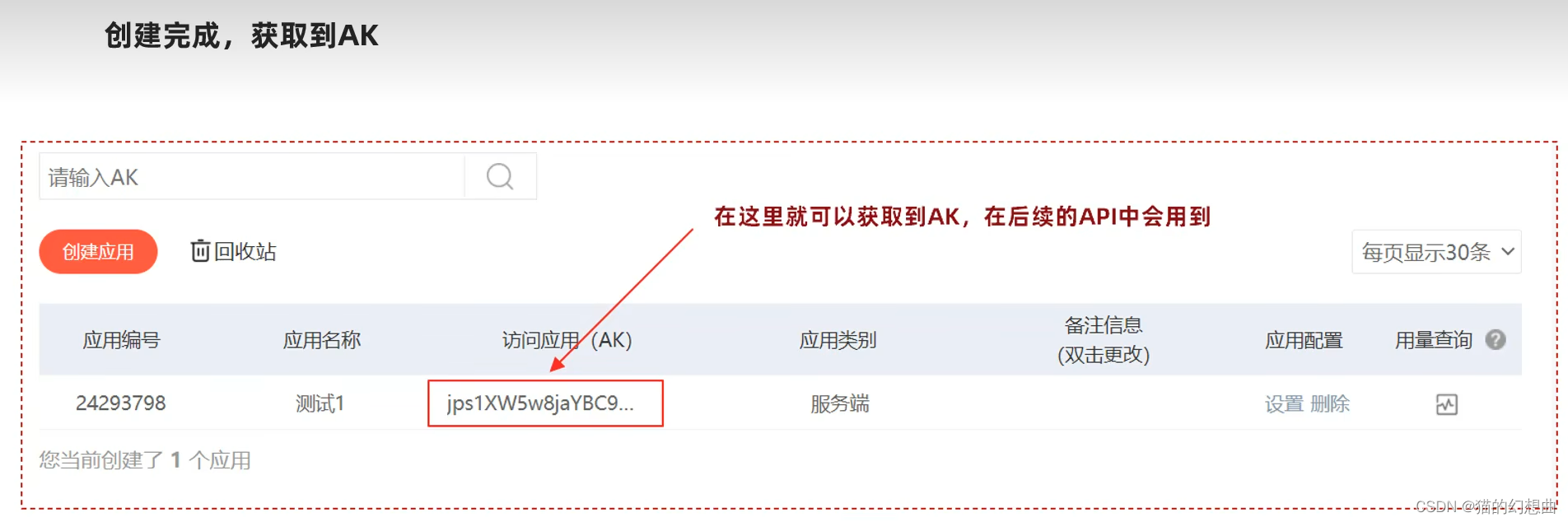
1. Create map :
The basic steps of creating a map are as follows :
- To write HTML The basic code of the page
- Introduce Baidu map API file
- Initialize map logic and set various parameters
Refer to official documentation :https://lbsyun.baidu.com/index.php?title=jspopularGL/guide/show
2. add controls :
Control is responsible for interacting with the map UI Elements , Baidu Maps API Support scale 、 The zoom 、 location 、 City selection list 、 Copyright , And custom controls .
file :https://lbsyun.baidu.com/index.php?title=jspopularGL/guide/widget

<!DOCTYPE html>
<html>
<head>
  <meta name="viewport" content="initial-scale=1.0, user-scalable=no" />
  <meta http-equiv="Content-Type" content="text/html; charset=utf-8" />
  <title>Baidu Map </title>
  <style type="text/css">
    html{height:100%}
    body{height:100%;margin:0px;padding:0px}
    #container{height:100%}
  </style>
  <script type="text/javascript" src="https://api.map.baidu.com/api?v=1.0&type=webgl&ak= Their own ak value "></script>
</head>
<body>
<div id="container"></div>
<script type="text/javascript">
  var map = new BMapGL.Map("container");          //  Create a map instance
  var point = new BMapGL.Point(116.404, 39.915);  //  Create point coordinates
  map.centerAndZoom(point, 15);                 //  Initialize map , Set center point coordinates and map level
  map.enableScrollWheelZoom(true);     // Turn on mouse wheel zoom
  map.setHeading(64.5);   // Set the map rotation angle
  map.setTilt(70);       // Set the tilt angle of the map

  var scaleCtrl = new BMapGL.ScaleControl();  //  Add scale bar control
  map.addControl(scaleCtrl);
  var zoomCtrl = new BMapGL.ZoomControl();  //  Add a zoom control
  map.addControl(zoomCtrl);
  var cityCtrl = new BMapGL.CityListControl();  //  Add city list control
  map.addControl(cityCtrl);
</script>
</body>
</html>
3. Add cover :
All the content superimposed or overlaid on the map , We collectively call it map coverage . The cover has its own geographic coordinates , When you drag or zoom the map , They move accordingly . at present JSAPI GL The overlay supported by the version is mainly basic graphics .
file :https://lbsyun.baidu.com/index.php?title=jspopularGL/guide/addOverlay

<!DOCTYPE html>
<html>
<head>
  <meta name="viewport" content="initial-scale=1.0, user-scalable=no" />
  <meta http-equiv="Content-Type" content="text/html; charset=utf-8" />
  <title>Baidu Map -  mulch </title>
  <style type="text/css">
    html{height:100%}
    body{height:100%;margin:0px;padding:0px}
    #container{height:100%}
  </style>
  <script type="text/javascript" src="https://api.map.baidu.com/api?v=1.0&type=webgl&ak= Their own ak value "></script>
</head>
<body>
<div id="container"></div>
<script type="text/javascript">
  var map = new BMapGL.Map("container");          //  Create a map instance
  var point = new BMapGL.Point(116.404, 39.915);  //  Create point coordinates
  map.centerAndZoom(point, 15);                 //  Initialize map , Set center point coordinates and map level
  map.enableScrollWheelZoom(true);     // Turn on mouse wheel zoom

  // var marker = new BMapGL.Marker(point);        //  Create annotations
  // map.addOverlay(marker);                     //  Add annotations to the map

  var myIcon = new BMapGL.Icon("logo.png", new BMapGL.Size(180, 53), {
    //  Specify the positioning position .
    //  When labels are displayed on the map , The geographical location it points to is at the top left of the distance icon
    //  Angular offset 10 Pixels and 25 Pixels . You can see that in this case, the location is
    //  The sharp corner at the lower end of the center of the icon .
    anchor: new BMapGL.Size(10, 25),
    //  Set picture offset .
    //  When you need to capture a part from a larger picture as a label icon , you
    //  You need to specify the offset position of the large drawing , This practice is similar to css sprites Technology is similar .
    imageOffset: new BMapGL.Size(0, 0 - 25)   //  Set picture offset
  });
  //  Create dimension objects and add them to the map
  var marker = new BMapGL.Marker(point, {icon: myIcon});
  map.addOverlay(marker);

  marker.addEventListener("click", function(){
    alert(" You clicked the label ");
  });

  // Broken line
  var polyline = new BMapGL.Polyline([
    new BMapGL.Point(116.399, 39.910),
    new BMapGL.Point(116.405, 39.920),
    new BMapGL.Point(116.425, 39.900)
  ], {strokeColor:"blue", strokeWeight:2, strokeOpacity:0.5});
  map.addOverlay(polyline);

  // polygon
  var polygon = new BMapGL.Polygon([
    new BMapGL.Point(116.387112,39.920977),
    new BMapGL.Point(116.385243,39.913063),
    new BMapGL.Point(116.394226,39.917988),
    new BMapGL.Point(116.401772,39.921364),
    new BMapGL.Point(116.41248,39.927893)
  ], {strokeColor:"blue", strokeWeight:2, strokeOpacity:0.5});
  map.addOverlay(polygon);

  // circular
  var circle = new BMapGL.Circle(point,1000,{
      strokeColor:"red",
      strokeOpacity:0.8,
      strokeWeight:3
  });
  map.addOverlay(circle);
</script>
</body>
</html>
4. Map Events :
Baidu Maps API Have your own event model , Programmers can monitor maps API Object , Usage and DOM Similar events . But please pay attention to API Events are independent , With the standard DOM Different events .
file :https://lbsyun.baidu.com/index.php?title=jspopularGL/guide/event

<!DOCTYPE html>
<html>
<head>
  <meta name="viewport" content="initial-scale=1.0, user-scalable=no" />
  <meta http-equiv="Content-Type" content="text/html; charset=utf-8" />
  <title>Baidu Map -  event </title>
  <style type="text/css">
    html{height:100%}
    body{height:100%;margin:0px;padding:0px}
    #container{height:100%}
  </style>
  <script type="text/javascript" src="https://api.map.baidu.com/api?v=1.0&type=webgl&ak= Their own ak value "></script>
</head>
<body>
<div id="container"></div>
<script type="text/javascript">
  var map = new BMapGL.Map("container");          //  Create a map instance
  var point = new BMapGL.Point(116.404, 39.915);  //  Create point coordinates
  map.centerAndZoom(point, 15);                 //  Initialize map , Set center point coordinates and map level
  map.enableScrollWheelZoom(true);     // Turn on mouse wheel zoom

  // map.addEventListener('click', function(e) {
  //   alert('click!')
  // });

  map.addEventListener('click', function(e) {
    alert(' Click the latitude and longitude :' + e.latlng.lng + ', ' + e.latlng.lat);
    var mercator = map.lnglatToMercator(e.latlng.lng, e.latlng.lat);
    alert(' Mercator coordinates of points :' + mercator[0] + ', ' + mercator[1]);
  });
</script>
</body>
</html>
5. Map style :
Baidu map supports setting map styles , For example, set the map to earth mode ,
file :https://lbsyun.baidu.com/index.php?title=jspopularGL/guide/maptype

<!DOCTYPE html>
<html>
<head>
  <meta name="viewport" content="initial-scale=1.0, user-scalable=no" />
  <meta http-equiv="Content-Type" content="text/html; charset=utf-8" />
  <title>Baidu Map -  style </title>
  <style type="text/css">
    html{height:100%}
    body{height:100%;margin:0px;padding:0px}
    #container{height:100%}
  </style>
  <script type="text/javascript" src="https://api.map.baidu.com/api?v=1.0&type=webgl&ak= Their own ak value "></script>
</head>
<body>
<div id="container"></div>
<script type="text/javascript">
  var map = new BMapGL.Map("container");          //  Create a map instance
  var point = new BMapGL.Point(116.404, 39.915);  //  Create point coordinates
  map.centerAndZoom(point, 15);                 //  Initialize map , Set center point coordinates and map level
  map.enableScrollWheelZoom(true);     // Turn on mouse wheel zoom

  map.setMapType(BMAP_EARTH_MAP);      //  Set the map type to earth mode
</script>
</body>
</html>
6. Map Retrieval :
Baidu map supports the search service of interest points in the map , Example :
https://lbsyun.baidu.com/jsdemohtm#localSearchKey

<!DOCTYPE html>
<html>
<head>
  <meta name="viewport" content="initial-scale=1.0, user-scalable=no" />
  <meta http-equiv="Content-Type" content="text/html; charset=utf-8" />
  <title>Baidu Map -  Search for </title>
  <style type="text/css">
    html{height:100%}
    body{height:100%;margin:0px;padding:0px}
    #container{height:100%}
  </style>
  <script type="text/javascript" src="https://api.map.baidu.com/api?v=1.0&type=webgl&ak= Their own ak value "></script>
</head>
<body>
<div id="container"></div>
<script type="text/javascript">
  var map = new BMapGL.Map("container");          //  Create a map instance
  var point = new BMapGL.Point(116.404, 39.915);  //  Create point coordinates
  map.centerAndZoom(point, 15);                 //  Initialize map , Set center point coordinates and map level
  map.enableScrollWheelZoom(true);     // Turn on mouse wheel zoom

  var circle = new BMapGL.Circle(point,1000,{fillColor:"blue", strokeWeight: 1 ,fillOpacity: 0.3, strokeOpacity: 0.3});
  map.addOverlay(circle);
  var local =  new BMapGL.LocalSearch(map, {renderOptions: {map: map, autoViewport: false}});
  local.searchNearby(' Scenic spot ',point,1000);
</script>
</body>
</html>
7. Data visualization :
MapVGL, It's based on WebGL Geographic information visualization library , Can be used to show a large number of 3D Geographic information point, line and surface data .
file :https://lbsyun.baidu.com/solutions/mapvdata


Baidu Maps web API application :
Baidu Maps Web service API For developers http/https Interface , That is to say, developers use http/https Form to initiate a search request , Get back to json or xml Format of the retrieval data . Users can develop based on this JavaScript、C#、C++、Java Map application in other languages .
Address :https://lbsyun.baidu.com/index.php?title=webapi
 |  |  |
establish web Type application :

1. Coordinate transformation
At present, China mainly has the following three coordinate systems :
- WGS84: For a geodetic coordinate system , It is also widely used at present GPS The coordinate system used by GPS
- GCJ02: It is the coordinate system of geographic information system formulated by the State Bureau of Surveying and mapping of China , from WGS84 The encrypted coordinate system
- BD09: For Baidu coordinate system , stay GCJ02 The coordinate system is encrypted again , among bd09ll Indicates Baidu latitude coordinates ,bd09mc Represents Baidu Mercator metric coordinates
Web api Provides an interface service for converting non Baidu coordinates into Baidu coordinate system .
file :https://lbsyun.baidu.com/index.php?title=webapi/guide/changeposition
private String ak = " Your own ak value ";

/**
 *  Test coordinate conversion service
 */
@Test
public void testGeoconv(){

    String url = "https://api.map.baidu.com/geoconv/v1/?coords=114.21892734521,29.575429778924&from=1&to=5&ak={} ";
    url = StrUtil.format(url,ak);

    // launch get request
    String body = HttpRequest.get(url).execute().body();
    System.out.println(body);
}
2.IP Location services :
Ordinary ip Positioning is a set of HTTP/HTTPS Form of lightweight positioning interface , Users can use this service , according to IP Locate to get the approximate position .
file :https://lbsyun.baidu.com/index.php?title=webapi/ip-api

/**
 *  test ip location
 */
@Test
public void testLocation(){
    String url = "https://api.map.baidu.com/location/ip?ak={}&ip=140.206.149.83&coor=bd09ll ";
    url = StrUtil.format(url,ak);

    // launch get request
    String body = HttpRequest.get(url).execute().body();
    System.out.println(body);
} 
3. Place input prompt service :
Users can use this service , The recommended list of places that match the keywords entered by the user .
file :https://lbsyun.baidu.com/index.php?title=webapi/place-suggestion-api

/**
* Test location input prompt service
*/
@Test
public void testSuggestion(){
String url = "https://api.map.baidu.com/place/v2/suggestion?query= Tsinghua University ®ion= Beijing &city_limit=true&output=json&ak={}";
url = StrUtil.format(url,ak);
// launch get request
String body = HttpRequest.get(url).execute().body();
System.out.println(body);
}4. Route planning :
Route planning services ( also called Direction API) It's a set REST Style Web service API, With HTTP/HTTPS Form provides route planning services , at present ,Direction API Support public transport 、 Riding 、 Driving route planning ,Direction API Support Chinese Mainland .
file :https://lbsyun.baidu.com/index.php?title=webapi/direction-api-v2
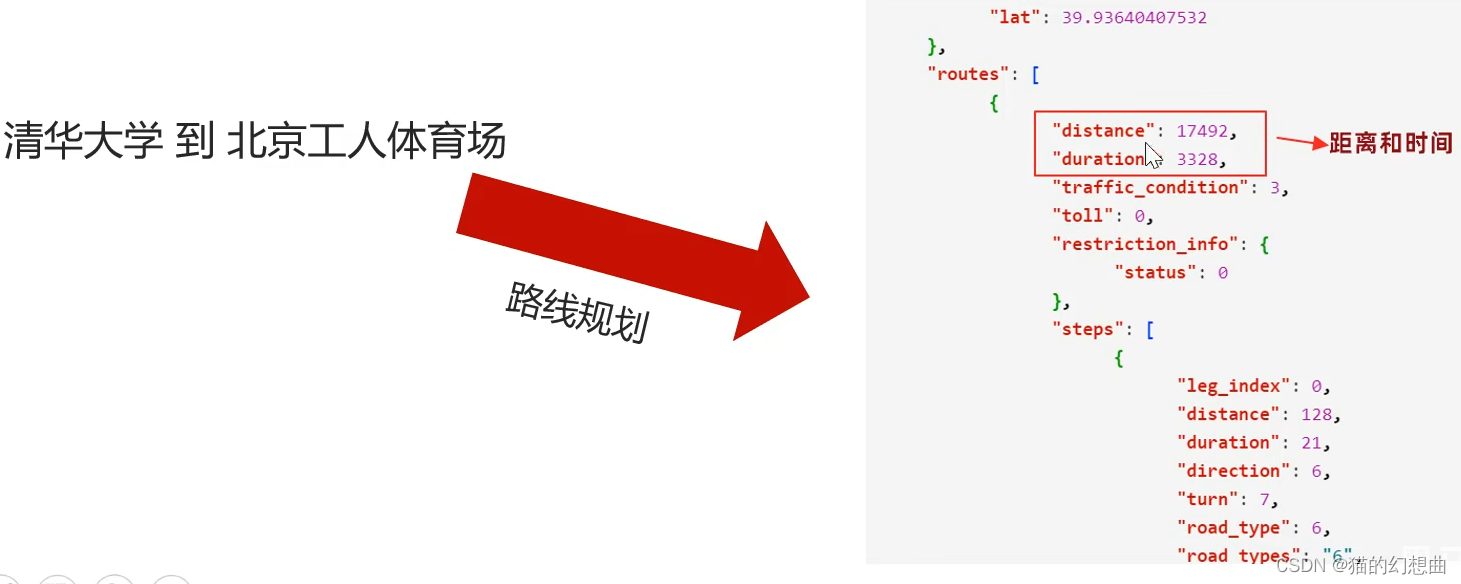
/**
 *  Test route planning
 */
@Test
public void testDriving(){
    String url = "https://api.map.baidu.com/direction/v2/driving?alternatives=0&origin=40.009645,116.333374&destination=39.937016,116.453576&ak={}";
    url = StrUtil.format(url,ak);

    // launch get request
    String body = HttpRequest.get(url).execute().body();
    System.out.println(body);
}
Basic of Baidu map API Use and WebApi Application example .
documentation , And for reference .
边栏推荐
- LED学习护眼台灯触摸芯片-DLT8T10S-杰力科创
- ridis命令笔记
- Infrared hyperspectral survey
- 订单超时取消 及 按类别查询商品
- 微信支付及支付回调
- was not registered for synchronization because synchronization is not active[已解决]
- ValueError: Found input variables with inconsistent numbers of samples: [80019456, 26673152]【报错】
- Knowledge map pyhanlp realizes named body recognition (with named body recognition code)
- Login page tablelayout
- Visual studio code installation tutorial (super detailed)
猜你喜欢

Commodity comment information and comment information classification

Using Jieba and pyhanlp tools to extract keyword words and sentences

知识图谱 — pyhanlp实现命名体识别(附命名体识别代码)

全身多功能按摩仪芯片-DLTAP602SD
百度地图技术概述,及基本API与WebApi的应用开发

Idea 2020.1 Community Edition download experience

2021.7.13 note sub query

怎么会不喜欢呢,CI/CD中轻松发送邮件
How to realize the full-text content retrieval of word, PDF and txt files?
使用jieba、pyhanlp工具实现关键字词句的提取
随机推荐
What if MySQL database forgets its password???
What should I do if MySQL master-slave replication data is inconsistent?
was not registered for synchronization because synchronization is not active[已解决]
Modify placeholder style in input
20000 words + 30 pictures | what's the use of chatting about MySQL undo log, redo log and binlog?
家用静音驱蚊灯芯片-DLTAP703SD-杰力科创
pandas的to_sql函数使用
使用jieba、pyhanlp工具实现关键字词句的提取
The combination of text and words perfectly explains the implementation process of MySQL logical backup
Uni app traversal array rendering data vertical rendering
Aircraft battle with enemy aircraft
Generate PDM file from Navicat export table
Class not found: "the com.parkmanagement.dao.daotest test cannot find the test class
图文结合,完美解释MySQL逻辑备份的实现流程
JDBC learning day1:jdbc
XML learning Day1: XML / jsup parser / selector /xpath selector
Jianmu continuous integration platform v2.5.2 release
文件的上传和下载
全自动吸奶器芯片-DLTAP703SD
INSUFFICIENT_ ACCESS_ ON_ CROSS_ REFERENCE_ ENTITY APEX / SALESFORCE