当前位置:网站首页>Airflow2.x distributed deployment DAG execution failure log cannot be obtained normally
Airflow2.x distributed deployment DAG execution failure log cannot be obtained normally
2022-06-28 07:47:00 【New objects first】
In the last blog post , I summarized the use of Airflow Pit stepped in the process . And some solutions ,
Links are as follows :
Airflow2.1.1 Summary of the pits trampled in actual combat !!
And the limit of the length , Put the blog's page 11 The questions are sorted out separately
11. Distributed deployment scenario ,dag Execution failure , The log cannot be viewed normally
List of articles
One . The problem is detailed
1.1 Airflow Necessary environmental information
Airflow edition :2.1.1
 Deployment way :  Distributed (worker Deployed under multiple virtual machines )
python edition :3.7.5
executor :celery
dag Execution status : failed
1.2 Error reporting performance
When dag When execution fails , Partial failure dag The log reports an error as follows
The following figure dag give an example , You can see :, The execution status is failed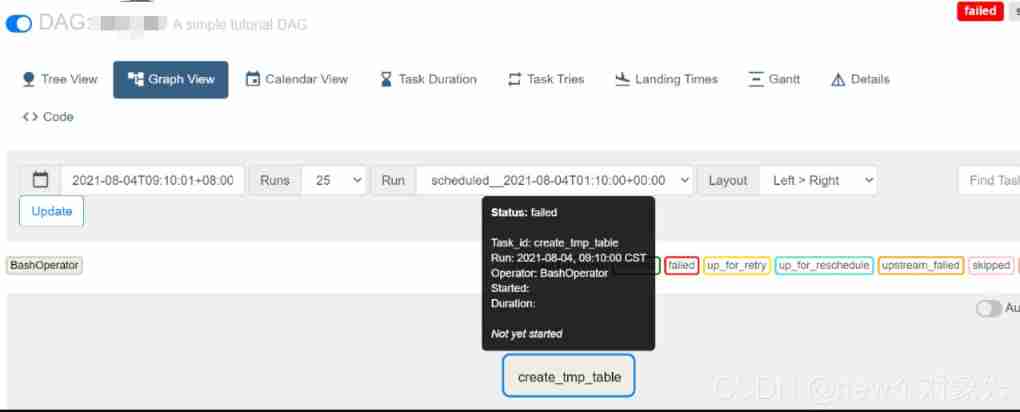
adopt webui Check the error information as follows :
*** Log file does not exist: /opt/modules/airflow/logs/***/***/2021-08-04T01:10:00+00:00/1.log
*** Fetching from: http://:8793/log/dw_job/create_tmp_table/2021-08-04T01:10:00+00:00/1.log
*** Failed to fetch log file from worker. The request to ':///' is missing either an 'http://'                         or 'https://' protocol.
Two . Troubleshooting and handling of problems
2.1 Preliminary analysis of source code , Approximate positioning problem
When something goes wrong , It is a long process of troubleshooting and handling problems :
First, according to the key information of error reporting Failed to fetch log file from worker, Go to the source code airflow/utils/log/file_task_handler.py file _read Method
Through reading the source code analysis to :
Roughly due to ti(task_instance An object instance of ) Of hostname Property cannot be obtained , Lead to response Throw an exception when , Then throw the above error report
See the following figure for the core code of this part :
From the source code of this method , On a single machine or at this time task Just by and webserver Deployed under the same virtual machine or container worker Execution and executor by KubernetesExecutor This problem will not occur 
Here's why :
next step , Continue analysis , Why? ti Of hostname Property cannot be obtained ,
Along _read Call to Check the source code layer by layer , The details are not repeated here , Finally, it is oriented to airflow/api_connexion/endpoints/log_endpoint.py file get_log
ad locum , We can find task_instance example ti The original source of

I got it through the database . Go to the database corresponding table to view relevant data ,
Only found dag stay webserver When the node is executing , The database has storage hostname information
The database information is as follows :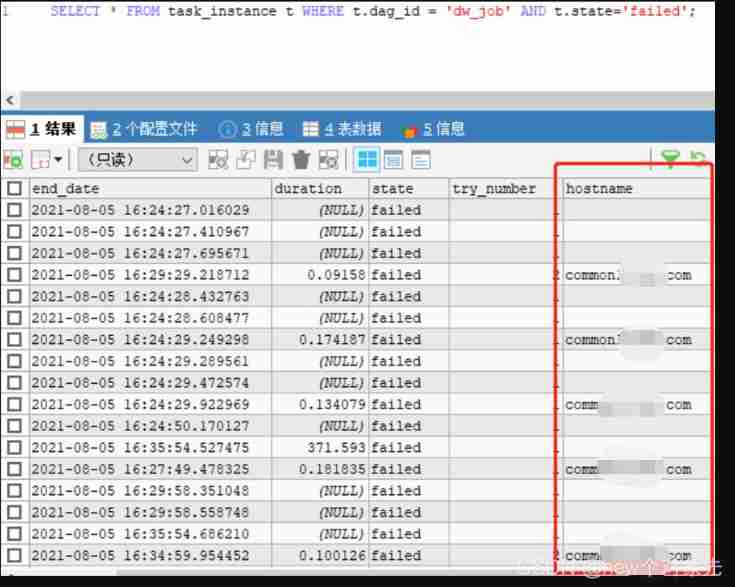
This proves , Write data to at first ti When I read this form , Some necessary information is missing
Read more about the source code , We have come to this conclusion
at present Airflow Commit the hostname to the back-end database after the task is completed, not before or during .
If the task breaks down seriously or is interrupted in other ways , Then the database will never get the hostname and we cannot get the logs .
therefore , The essence of solving this problem is , Even if the task crashes or is otherwise interrupted , We can also view logs
2.2 Determine the solution direction
From the above analysis , I think there are two ways to solve this problem :
- change
airflowThe logic of submitting data to the back-end database , Instead, submit before or during the task , Look at the source code , It is found that this method will change a lot , It could affect other logic - Try another way to get the hostname
From the perspective of cost and capability , I chose the second way to verify ,
namely : Change the host name acquisition logic
therefore , Began to airflow Database tables for analysis , Found out log Table in extra This json Chuanli , There is storage under certain conditions hostname Information
Through all kinds of sql Statement debugging , The following relationships are determined :
  log.dag_id == ti.dag_id,
  log.task_id == ti.task_id,
  log.execution_date == ti.execution_date,
  log.event == 'cli_task_run'
In this way , If you can get it right, you can get it right hostname Database data of information
At this stage , Find out github above , There is a discussion about this problem , quite a lot airflow Users have encountered
[AIRFLOW-4922]Fix task get log by Web UI #6722
meanwhile , There are developers trying to solve this problem , I looked at the code , It is consistent with my thinking .
therefore , Refer to his code , stay airflow/utils/log/file_task_handler.py The following methods have been added to the file :query_task_hostname, The code is as follows :
 @provide_session
    def query_task_hostname(self, ti, try_number, session=None):
        """ Get task log hostname by log table and try_number :param ti: task instance record :param try_number: current try_number to read log from :param session: database session :type session: sqlalchemy.orm.session.Session :return: log message hostname """
        from airflow import models
        res_log = session.query(models.Log).filter(
            models.Log.dag_id == ti.dag_id,
            models.Log.task_id == ti.task_id,
            models.Log.execution_date == ti.execution_date,

            models.Log.event == 'cli_task_run'
        ).order_by(models.Log.id).limit(1).first()

        if res_log is not None:
            hostname = json.loads(res_log.extra)["host_name"]
        else:
            hostname = ti.hostname

        return hostname
meanwhile , Revised _read Methods about hostname How to get ,
The code is shown in the figure below , I'm here for debugging , Added some additional log printing 
After the source code is modified , heavy airflow, It is found that the host name can be obtained correctly , But there is still no log when the task fails ,
Here's the picture :
You can see from the circle , The hostname is correctly obtained :
But not as we expected
here , Go to each node and query the day after tomorrow , No log directory found
Prove that the node log has not been dropped .
In the scene of no drop , No matter how you pull it, you can't pull it , This proves that our initial speculation may be problematic , More tests are needed to verify
2.3 Single node versus distributed execution
First , Question :
The above problems are found , The log has not been dropped at all , Since the log is not written , Logically speaking , No matter which reading method is used , They can't be pulled
therefore , The control variable method is required , Compare local and distributed execution
Distributed execution results :
features :
1. worker Deployed on multiple nodes
2. dag Scheduling failed
3. The log cannot be obtained normally 
Single node execution results :
features :
1. worker and webserver,scheduler Deployed on the same node
2. dag Scheduling failed
3. Logs can be obtained normally 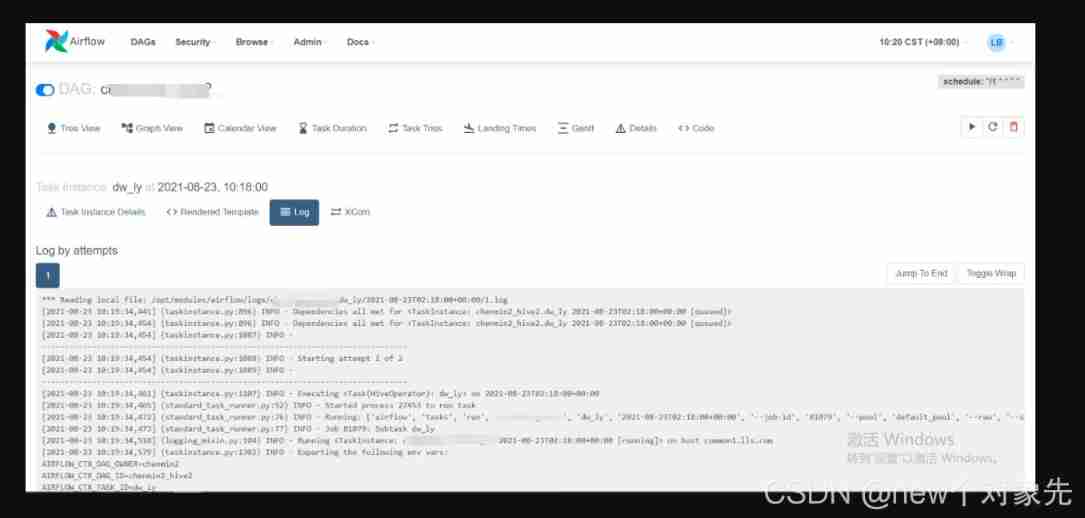
Compare the database data and find ,task_instance This watch is missing start_time,duration,hostname,pid Etc 
Based on the fact that many people are github The above feedback on this problem , I firmly believe that he is airflow A pending bug
and , Through the current performance , At the code level , The log should be able to be loaded normally in any case
As one can imagine , This change is huge
that , Think again , There are no other ways to avoid this problem ?
One thing to consider is , Since local storage failed , Will this problem occur in remote storage ?
So I thought of using s3 Configure remote storage , This is not the focus of this blog .
For configuration methods, refer to stackoverflow The following answer
setting up s3 for logs in airflow
After the remote storage configuration is successful , Restart airflow perform dag, The discovery still fails to get dag Log !
It's already a little difficult at this time …
Modifying the source code in large quantities is an arduous road , In addition to implementation , Consider the impact of your changes on existing features ,
Probably solved a problem bug, It triggered countless bug, The cost is on the high side .
3、 ... and . Further troubleshooting and testing
To analyze scheduler Scheduling log of , The following information was found :
 [^[[34m2021-08-25 09:26:47,686^[[0m] {
    ^[[34mscheduler_job.py:^[[0m1258} ERROR^[[0m - Executor reports task instance <TaskInstance: ***.****
 2021-08-25 01:25:49.429359+00:00 [queued]> finished (failed) although the task says its queued. (Info: None) Was the task killed externally?^[[0m
It looks like Mission They have failed without being scheduled , If this is the case , Logically speaking , It should be reasonable ?
Isn't it airflow Of bug? I began to doubt life …
therefore , I found some relatively complicated dag In a single node , Multi node repeated debugging …
We found a strange phenomenon :
- In a single node, successful dag, Failed to execute on multiple nodes
- In a multi node scenario , Every time dag The places where the scheduling fails are inconsistent
This illustrates the following problems :
1 dag The code itself is OK , Because a single node can execute successfully
2 If you fail at different places every time , That only means that the environment on each node is not completely consistent ?
Is it because of this ?
In this direction , Sure enough, it was found that the wrong part fell on the same node !!!
The node information is as follows :
- There is no synchronization webserver Node dag
- part
logThe subdirectory isrootUser rights , And the task scheduling usesairflowuser , No authority
After modifying these two questions , restart airflow, A surprise discovery ,dag Scenario of execution failure , You can also get the log correctly !!!
Here's the picture :

Of the above two pictures task It's a failure state , But the failure log was completely obtained !
Problem solving !!
Four . Experience and lesson
This is from the pit test to the solution , It took me a week before and after ,
This week , The food doesn't taste good , Not sleeping well …
Last , It was such a simple thing …
remember , There are mainly the following questions :
Thinking solidify
It mainly has the following performances :
- When viewing the database table structure , Find out
dagThe code is serialized and stored indag_codeIn this table ,
therefore , I think , Only needwebserverUnder nodedagsUpload under the directorydagJust OK 了 , No need to pass to other nodes
- At that time in
githubI found this on theissue, I've seen many people give feedback on this problem , Including many practical2.*Version of ,
I firmly believe that , So many people have met , It must be officialbug. You don't pay too much attention to your own problems
Not careful enough
Mainly reflected in the following aspects :
- At that time scp Synchronize data to each node , But I forgot to set the permissions of one of the nodes , Lead to
airflowUsers do not have permission to write logs - The error log was not checked carefully , Missing some key information , The problem was not found in time
Careless work , My two lines of tears !!!
5、 ... and . Make complaints
Make complaints about it. airflow Official documents , It's really a simple one !
Basically, there is only a brief introduction , Even one demo None
It's all written descriptions , No screenshots !!
For people like me who are not smart enough , Undoubtedly, it increases the learning cost , It's easy to detour
meanwhile , Related to the domestic community airflow There is not much quality content …
Everyone copied around , Even typesetting , Mistakes these most basic things are not paid attention to . I feel this kind of influence is quite bad
I still hope you can put your own experience , Share more , Common progress ! Create a harmonious community environment together ~
边栏推荐
- kubernetes集群命令行工具kubectl
- Spark 离线开发框架设计与实现
- 股票炒股注册开户靠谱吗?安全吗?
- Flutter realizes the function of "shake"
- Static resource compression reduces bandwidth pressure and increases access speed
- 挖财注册开户靠谱吗?安全吗?
- Sentinel mechanism of redis cluster
- 7-1 understand everything
- linux下修改mysql用户名root
- [thanos source code analysis series]thanos query component source code analysis
猜你喜欢
![[ thanos源码分析系列 ]thanos query组件源码简析](/img/e4/2a87ef0d5cee0cc1c1e1b91b6fd4af.png)




随机推荐
Llvm and clang
What is EC blower fan?
券商注册开户靠谱吗?安全吗?
ZYNQ_ IIC read / write m24m01 record board status
Alibaba cloud server creates snapshots and rolls back disks
Redis one master multi slave cluster setup
XML serialization backward compatible
HJ21 简单密码
No suspense about the No. 1 Internet company overtime table
Ice, protobuf, thrift -- Notes
Path alias specified in vite2.9
GoLand IDE and delve debug Go programs in kubernetes cluster
MySQL installation and environment variable configuration
Application of XOR. (extract the rightmost 1 in the number, which is often used in interviews)
大型项目中的Commit Message规范化控制实现
flutter 实现摇一摇功能
本周二晚19:00战码先锋第8期直播丨如何多方位参与OpenHarmony开源贡献
R and RGL draw 3D knots
PLC -- Notes
Disposition Flex