当前位置:网站首页>如何制作数据集并基于yolov5训练成模型并部署
如何制作数据集并基于yolov5训练成模型并部署
2022-06-12 04:16:00 【风吹落叶花飘荡】
如何制作数据集并基于yolov5训练成模型
一个正常的视觉AI开发步骤如下:收集和组织图像、标记您感兴趣的对象、训练模型、将其部署到云端/当做一个端口
一、搜集图片
1、下载已有的数据
如果出于学习,或者应用范围比较广泛,对鲁棒性要求较高,可以使用一些
公开的数据集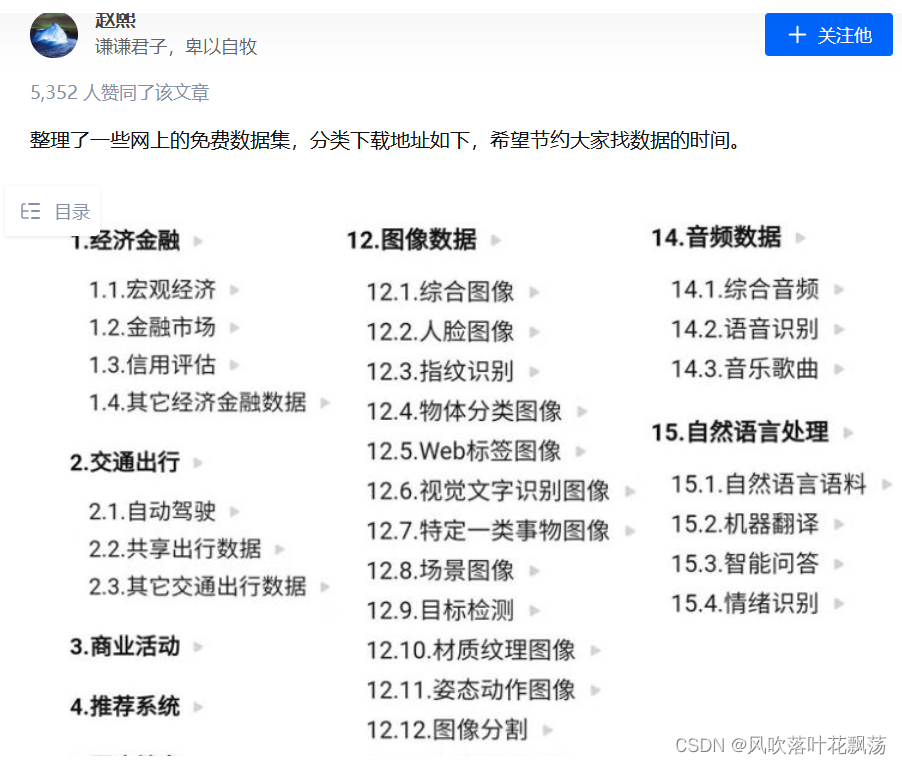
知乎地址:https://zhuanlan.zhihu.com/p/25138563
当然这只是公开数据集的一部分,大家可以继续检索到。
其他搜集的找数据集的网站
1.datafountain
https://www.datafountain.cn/datasets
2.聚数力
http://dataju.cn/Dataju/web/searchDataset
3.中文NLP数据集搜索
https://www.cluebenchmarks.com/dataSet_search.html
4.阿里云天池
https://tianchi.aliyun.com/dataset/?spm=5176.12282016.J_9711814210.24.2c656d92n0Us6s
5.谷歌数据集好像要翻墙
2、使用自己拍/在网站上搜集的图片
自己拍的图片那自然是不需要啥操作,直接用即可
下面是使用爬虫下载图片的代码
import os
import sys
import time
import urllib
import requests
import re
from bs4 import BeautifulSoup
import time

header = {

    'User-Agent':
    'Mozilla/5.0 (Windows NT 10.0; WOW64) AppleWebKit/537.36 (KHTML, like Gecko) Chrome/50.0.2661.102 UBrowser/6.1.2107.204 Safari/537.36'
}
url = "https://cn.bing.com/images/async?q={0}&first={1}&count={2}&scenario=ImageBasicHover&datsrc=N_I&layout=ColumnBased&mmasync=1&dgState=c*9_y*2226s2180s2072s2043s2292s2295s2079s2203s2094_i*71_w*198&IG=0D6AD6CBAF43430EA716510A4754C951&SFX={3}&iid=images.5599"


def getImage(url, count):
    '''从原图url中将原图保存到本地'''
    try:
        time.sleep(0.5)
        urllib.request.urlretrieve(url, './imgs/hat' + str(count + 1) + '.jpg')
    except Exception as e:
        time.sleep(1)
        print("本张图片获取异常,跳过...")
    else:
        print("图片+1,成功保存 " + str(count + 1) + " 张图")


def findImgUrlFromHtml(html, rule, url, key, first, loadNum, sfx, count):
    '''从缩略图列表页中找到原图的url,并返回这一页的图片数量'''
    soup = BeautifulSoup(html, "lxml")
    link_list = soup.find_all("a", class_="iusc")
    url = []
    for link in link_list:
        result = re.search(rule, str(link))
        #将字符串"amp;"删除
        url = result.group(0)
        #组装完整url
        url = url[8:len(url)]
        #打开高清图片网址
        getImage(url, count)
        count += 1
    #完成一页,继续加载下一页
    return count


def getStartHtml(url, key, first, loadNum, sfx):
    '''获取缩略图列表页'''
    page = urllib.request.Request(url.format(key, first, loadNum, sfx),
                                  headers=header)
    html = urllib.request.urlopen(page)
    return html


if __name__ == '__main__':
    name = "戴帽子"    #图片关键词
    path = './imgs/hat'   #图片保存路径
    countNum = 2000  #爬取数量
    key = urllib.parse.quote(name)
    first = 1
    loadNum = 35
    sfx = 1
    count = 0
    rule = re.compile(r"\"murl\"\:\"http\S[^\"]+")
    if not os.path.exists(path):
        os.makedirs(path)
    while count < countNum:
        html = getStartHtml(url, key, first, loadNum, sfx)
        count = findImgUrlFromHtml(html, rule, url, key, first, loadNum, sfx,
                                   count)
        first = count + 1
        sfx += 1
二、标注图片
1、在线标注网站MAKE SENSE
MAKE SENSE
make-sense 是一个被YOLOv5官方推荐使用的图像标注工具。
相比于其他工具,make-sense的上手难度非常低,仅需数分钟,玩家便能熟练掌握工作台中的功能选项,快速地进入工作状态;此外,由于make-sense是一款web应用,各个操作系统的玩家可打破次元壁实现工作协同。
a、创建标签
新建一个名为labels的文件,按照每行为一个标签的原则,依次输入
栗子如下:
b、MAKE SENSE标注网站使用
打开网站
点击放入图片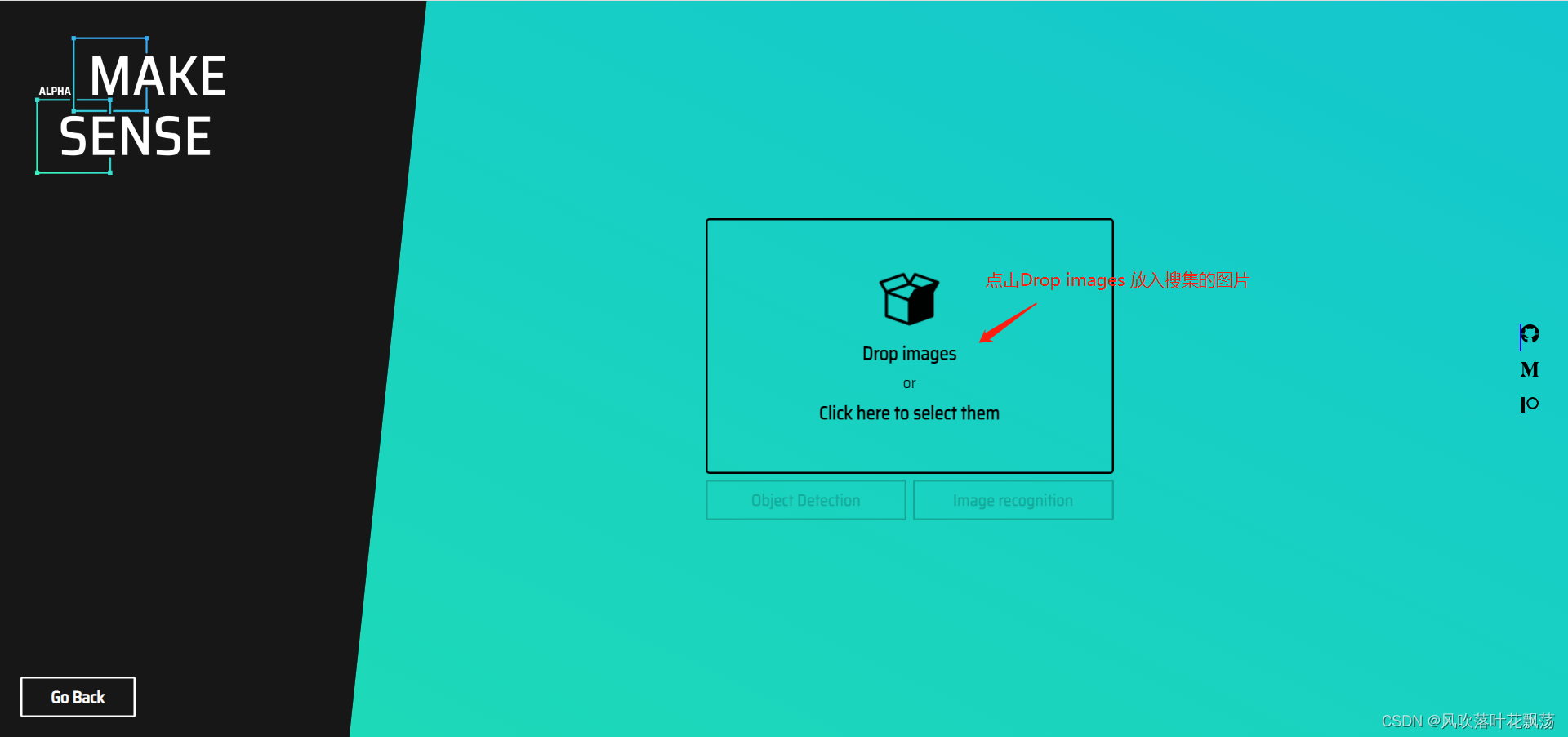
全选搜集到的图片并确认
根据标注需求点击对应的,在这里我们点击物体检测
点击Load labels from file。表示从文件中批量导入标签
放入后点击Create labels list
最后点击开始项目,就可以开始标注了

依次标注每一个图片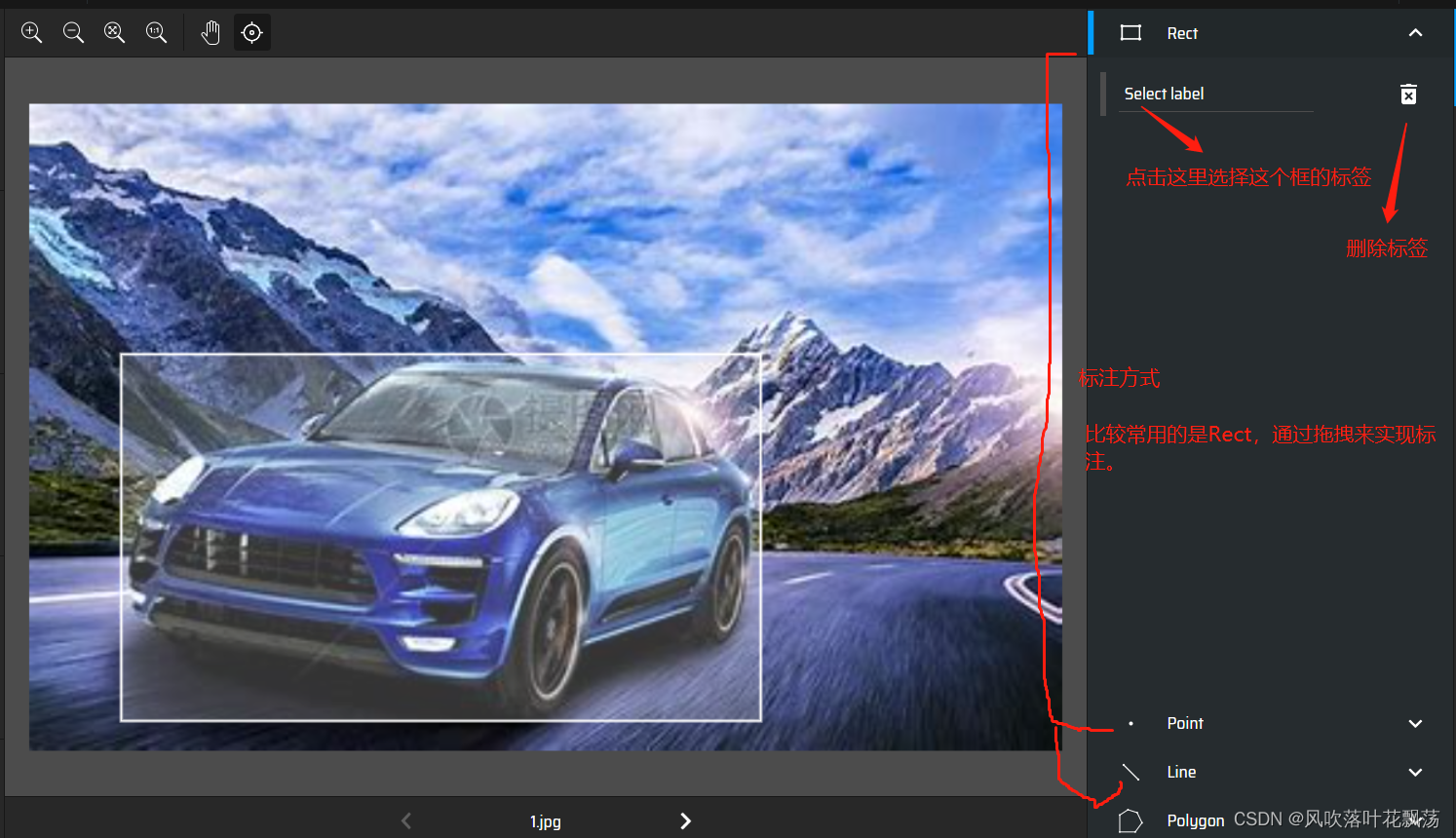
导出标注结果
选择导出格式,并导出

导出压缩包参考如下:
到这里图片与标签就都准备好了,可以准备开始制作数据集
三、制作数据集
1、创建文件夹
创建文件夹mydata
其内部构造如下

2、将之前的图片以及标注数据拷贝进去
test与train集合一般比例为2:8或3:7

3、新建一个mydata.yaml文件,

4、修改train.py中data参数

边栏推荐
- Image mosaic based on transformation matrix
- 【mysql】mysql安装
- 智能面板WiFi联动技术,ESP32无线芯片模组,物联网WiFi通信应用
- Double objective learning materials sorting
- 成功解决:WARNING: There was an error checking the latest version of pip.
- 【FPGA+FFT】基于FPGA的FFT频率计设计与实现
- Mongodb essence summary
- 魏武帝 太祖知不可匡正,遂不复献言
- The solution to the error "xxx.pri has modification time XXXX s in the futrue" in the compilation of domestic Kirin QT
- EN in Spacey_ core_ web_ SM installation problems
猜你喜欢

树莓派4B使用Intel Movidius NCS 2来进行推断加速

19.tornado项目之优化数据库查询

分布式锁介绍

Cloud native overview

Function realization and application of trait

Street lighting IOT technology scheme, esp32-s3 chip communication application, intelligent WiFi remote control

Ebpf series learning (4) learn about libbpf, co-re (compile once – run everywhere) | use go to develop ebpf programs (cloud native tool cilium ebpf)
![Work report of epidemic data analysis platform [6.5] epidemic map](/img/88/1647a38f38f838ac50ca6ae2b2ec7a.png)
Work report of epidemic data analysis platform [6.5] epidemic map

Kill session? This cross domain authentication solution is really elegant!

命令执行漏洞详解
随机推荐
疫情数据分析平台工作报告【2】接口API
Is it safe for Guojin Securities Commission Jinbao to open an account? How should we choose securities companies?
Drop down menu dropdown yyds dry inventory of semantic UI
认真工作对自己到底意味着什么?
The solution to the error "xxx.pri has modification time XXXX s in the futrue" in the compilation of domestic Kirin QT
智能面板WiFi联动技术,ESP32无线芯片模组,物联网WiFi通信应用
Page crash handling method
手动封装一个forEacht和Map
疫情数据分析平台工作报告【6.5】疫情地图
分布式锁介绍
Brief introduction to 44 official cases of vrtk3.3 (combined with steamvr)
Call reminder
[C language] encapsulation interface (addition, subtraction, multiplication and division)
Kotlin协程协程作用域,CoroutineScope MainScope GlobalScope viewModelScope lifecycleScope 分别代表什么
What are the black box test case design methods in software testing methods?
Unity脚本出現missing時的解决方法
LINQ group by and select series - LINQ group by and select collection
根据变换矩阵进行图像拼接
Pat class B 1067 trial password (20 points)
How do I extract files from the software?