当前位置:网站首页>Basic operations and common functions of MySQL table creation
Basic operations and common functions of MySQL table creation
2022-07-26 06:54:00 【Mouth strong programmer】
Catalog
mysql Of comment How to use it?
Explain cascading deletion And modify
Database command
establish
Command format
create database Database name
create database if not exists Database name default charset utf8 collate utf8_general_cs;
The default database encoding set :utf8
collate Indicates that the sorting rule is utf8_general_ci
Common sort types
utf8_general_cs( Case sensitive )
utf8_genera_ci( Case insensitive )
see
show databases
Delete
drop database Database name
Dangerous operation , Backup firstCreate tables and constraints
Build table
Command format
     CREATE TABLE  The name of the table (
         Column name 1  data type  NOT NULL,
         Column name 2  data type ,
         Column name 3  data type ,
        unique( Column name 1[, Column name 2,..., Column name N])
    )
      Example
 create table t_student
                 (
   sid    int not null comment ' Student number ',
   sname  varchar(60) not null comment ' full name ',
   sex    tinyint not null default 1 comment ' Gender :1 male , 2 Woman ',
   age    tinyint not null comment '  Age ',
   icard  varchar(18) not null comment ' Id card , Unique constraint ',
   primary key (sid),
   unique key AK_Key_2 (icard)
) comment ' Student information sheet ';
mysql Of comment How to use it?
stay MySQL In the database , The annotation of a field or column is in the form of an attribute comment To add .
In the script to create a new table ,
You can add... In the field definition script comment Property to add comments .
The sample code is as follows :
1
2
3
create table test(
id int not nulldefault0 comment' user id'
)If it's a built table ,
You can also use the command to modify the field , And then add comment Attribute definitions , You can add comments .
The sample code is as follows :
1
2
alter table test
change column id id int not nulldefault0 comment' The test table id'View the comments of all fields in the existing table ?
You can use the command :show full columns from tablename Check it out. ,
Examples are as follows :
1
show full columns from test;1、 Write comments when creating tables
1
2
3
4
create table test1
(
field_name int comment' Field comments '
)comment=' Notes to table ';2、 Modify the notes of the table
1
alter table test1 comment' Comments on the modified table ';3、 Modify the comment of the field
1
2
alter table test1 modify column field_name int comment' Modified field comments ';
-- Be careful : The field name and field type are just as they are4、 How to view table comments
1
2
3
4
5
-- In the generated SQL Look in the sentence
show create table test1;
-- Look in the metadata table
useinformation_schema;
select * from TABLES where TABLE_SCHEMA='my_db'andTABLE_NAME='test1'\G5、 How to view field comments
1
2
3
4
--show
show full columns from test1;
-- Look in the metadata table
select * from COLUMNS where TABLE_SCHEMA='my_db'andTAB
constraint
Primary key constraint
PRIMARY KEY
Add primary key
ALTER TABLE Table name ADD PRIMARY KEY( Primary key name )
Delete primary key
ALTER TABLE Table name DROP PRIMARY KEY
Non empty constraint
sid INT NOT NULL COMMENT ' Student number ';With the above t_student Establish primary and foreign key relationships
CREATE TABLE t_score
(
   id                   INT NOT NULL COMMENT ' Record serial number ',
   sid                  INT NOT NULL COMMENT ' Student number ',
   cid                  INT NOT NULL COMMENT ' Course ID',
   score                FLOAT COMMENT ' achievement ',
   PRIMARY KEY (id),
   FOREIGN KEY (sid) REFERENCES t_student (sid) ON DELETE RESTRICT ON UPDATE RESTRICT,
   UNIQUE KEY AK_Key_2 (sid, cid)
);
explain : sid Is the foreign key of this table , relation t_student In the table sid Primary key ,ON DELETE RESTRICT ON UPDATE RESTRICT Explain that if there is data in this table , The associated key of the main table cannot be deleted or updated .
Explain cascading deletion And modify
A Tabular id yes B Foreign key
One 、on delete
1. on delete cascade: Delete A Table data when , Corresponding B The data of the table will also be deleted
2. on delete set null: Delete A Table data when , Corresponding B The foreign key field of the table is empty ( The premise is that this field can be empty )
If you don't add the above content when adding foreign keys , Delete A Table data when , If the corresponding B If there is data in the table, an error will be reported
Two 、on update
1. on update cascade: to update A Table data id when , Corresponding B The foreign key fields of the table will also be updated
2. on update set null: to update A Table data id when , Corresponding B The foreign key field of the table is empty ( The premise is that this field can be empty )
If you don't add the above content when adding foreign keys , to update A Tabular id, If the corresponding B If there is data in the table, an error will be reported
Add foreign key statement :alter table user add constraint FK_1 foreign key(role_id) references role(id) on delete cascade on update cascade;
Foreign key constraints
Add foreign key
ALTER TABLE Table name ADD FOREIGN KEY( Name of the foreign key ) REFERENCES Main table name ( Primary key name )
Delete foreign key
ALTER TABLE Table name DROP FOREIGN KEY Constraint nameUnique constraint
UNIQUE KEY Constraint name ( Field )
Create a unique constraint
ALTER TABLE Table name ADD UNIQUE( Column name 1[, Column name 2,..])
create unique index UserNameIndex on 't_user' ('username')
Delete unique constraint
ALTER TABLE Table name DROP INDEX Unique constraint index nameDefault constraint
default

mySql Common functions
( One ) Number function
1、ABS(x) return x The absolute value of
SELECT ABS(-1);
----  return 1
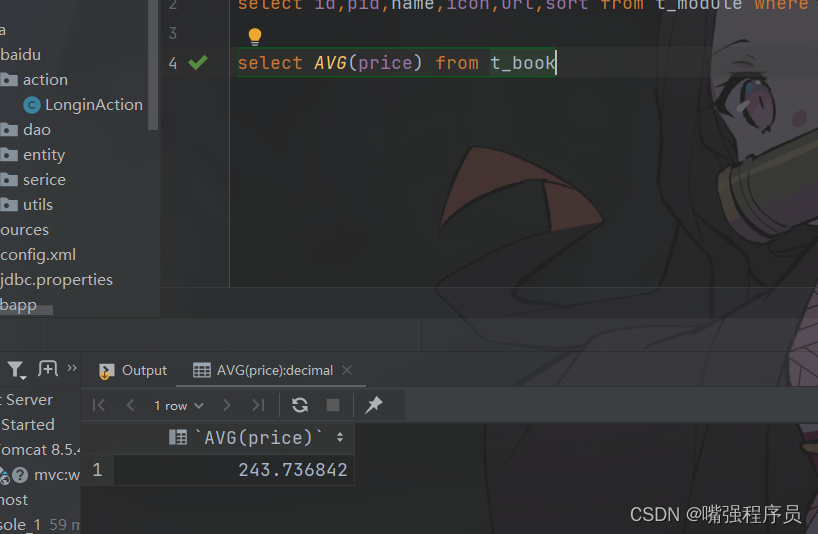
2、AVG(price) Returns the average value of an expression ,price It's a field

SELECT AVG(age) FROM student;
 3、CEIL(x)/CEILING(x) Returns greater than or equal to x Minimum integer of ( Rounding down )
SELECT CEIL(1.5);
SELECT CEILING(1.5);
----  return 2
4、FLOOR(x) Returns less than or equal to x Maximum integer for ( Rounding down )
SELECT FLOOR(1.5);
----  return 1
5、EXP(x) return e Of x Power
SELECT EXP(3);
----  Calculation  e  The third power of , return 20.085536923188
6、GREATEST(expr1, expr2, expr3, …) Returns the maximum value in the list
SELECT GREATEST(3, 12, 34, 8, 25);
----  Returns the maximum value in the following list of numbers 34
7、LEAST(expr1, expr2, expr3, …) Returns the minimum value in the list
SELECT LEAST(3, 12, 34, 8, 25);
----  Returns the minimum value in the following list of numbers 3
8、LN Returns the natural logarithm of a number
SELECT LN(2);
----  return  2  The natural logarithm of :0.6931471805599453
9、LOG(x) Return to the natural logarithm ( With e Log base )
SELECT LOG(20.085536923188);
----  return  3
10、MAX(expression) Return field expression Maximum of
SELECT MAX(age) AS maxAge FROM Student;
---- age Maximum
11、MIN(expression) Return field expression Maximum of
SELECT MIN(age) AS minAge FROM Student;
---- age minimum value
12、POW(x,y)/POWER(x,y) return x Of y Power
SELECT POW(2,3);
SELECT POWER(2,3);
----  return 2  Of  3  Power :8
13、RAND() return 0 To 1 The random number
SELECT RAND();
----  return  0  To  1  The random number , if () There are numbers in it ,RAND(x),x Phase at the same time , Same return value
14、ROUND(x) Return from x The nearest integer ( rounding )
SELECT ROUND(1.23456);
----  return  1
15、SIGN(x) return x The symbol of ,x It's a negative number 、0、 Positive numbers return respectively -1、0 and 1
SELECT SIGN(-10);
----  return  -1
16、SQRT(x) return x The square root of
SELECT SQRT(25);
----  return 5
17、SUM(expression) Returns the sum of the specified fields
SELECT SUM(age) AS totalAage FROM Student;
----  return age The sum of
18、TRUNCATE(x,y) Returns the value x Keep it after the decimal point y The value of a ( And ROUND The biggest difference is that there is no rounding )
SELECT TRUNCATE(1.23456,3);
----  return 1.234
( Two ) String function
1、 Return string s Of the first character of ASCII code
SELECT ASCII('AB');
----  return A Of ASCII Code value :65
2、LENGTH/CHAR_LENGTH(s)/CHARACTER_LENGTH(s) Return string s The number of characters
SELECT LENGTH('1234');
----  return 4
3、CONCAT(s1,s2…sn) character string s1,s2 When multiple strings are merged into a single string
SELECT CONCAT('hel','llo');
----  return hello
4、FIND_IN_SET(s1,s2) Return in string s2 China and s1 The location of the matching string
SELECT FIND_IN_SET("c", "a,b,c,d,e");
----  return 3
5、FORMAT(x,n) The function can change the number to x format “#,###.##”, take x Keep it after the decimal point n position , Round the last one
SELECT FORMAT(250500.5634, 2);
----  return 250,500.56
6、INSERT(s1,x,len,s2) character string s2 Replace s1 Of x The starting length of the position is len String
SELECT INSERT("google.com", 1, 6, "runnob");
----  return runoob.com
7、LOCATE(s1,s) From a string s In order to get s1 The beginning of
SELECT LOCATE('st','myteststring');
----  return 5
8、LCASE(s)/LOWER(s) The string s All of the letters of the are changed into lower case letters
SELECT LOWER('RUNOOB');
----  return runoob
9、UCASE(s)/UPPER(s) The string s All of the letters of the alphabet become capital letters
SELECT UCASE('runoob');
----  return RUNOOB
10、TRIM(s) Remove string s The spaces at the beginning and the end
SELECT TRIM('    RUNOOB    ');
----  return RUNOOB
11、LTRIM(s) Remove string s The space at the beginning
SELECT LTRIM('    RUNOOB    ');
----  return  ’RUNOOB   ‘
12、RTRIM(s) Remove string s Space at the end
SELECT RTRIM('    RUNOOB    ');
----  return  ’    RUNOOB‘
13、SUBSTR(s, start, length) From a string s Of start The position intercept length is length Substring of
SELECT SUBSTR("RUNOOB", 2, 3) AS ExtractString;
----  From a string  RUNOOB  No  2  Location intercepts  3 individual   character , return UNO
14、SUBSTR/SUBSTRING(s, start, length) From a string s Of start The position intercept length is length Substring of
SELECT SUBSTR/SUBSTRING("RUNOOB", 2, 3);
----  From a string  RUNOOB  No  2  Location intercepts  3 individual   character , return UNO
15、POSITION(s1 IN s) From a string s In order to get s1 The beginning of
SELECT POSITION('b' in 'abc');
----  return 2
16、REPEAT(s,n) The string s repeat n Time
SELECT REPEAT('runoob',3);
----  return runoobrunoobrunoob
17、REVERSE(s) The string s In reverse order
SELECT REVERSE('abc');
----  return cba
18、STRCMP(s1,s2) Compare strings s1 and s2, If s1 And s2 Equal return 0 , If s1>s2 return 1, If s1<s2 return -1
SELECT STRCMP("runoob", "runoob");
----  return 0
( 3、 ... and ) Date function
1、CURDATE()/CURRENT_DATE() Return current date
SELECT CURDATE();
SELECT CURRENT_DATE();
----  return 2019-02-19
2、CURRENT_TIME()/CURTIME() Return current time
SELECT CURRENT_TIME();
----  return 11:40:45
3、CURRENT_TIMESTAMP() Returns the current date and time
SELECT CURRENT_TIMESTAMP();
----  return 2019-02-19 11:41:32
4、ADDDATE(d,n) Calculate start date d add n The date of day
SELECT ADDDATE("2017-06-15", INTERVAL 10 DAY);
----  return 2017-06-25
5、ADDTIME(t,n) Time t add n The second time
SELECT ADDTIME('2011-11-11 11:11:11', 5);
----  return 2011-11-11 11:11:16
6、DATE() Extract a date value from a date or datetime expression
SELECT DATE("2017-06-15 11:11:16");
----  return 2017-06-15
7、DAY(d) Returns the date value d The date part of
SELECT DAY("2017-06-15");
----  return 15
8、DATEDIFF(d1,d2) Calculate the date d1->d2 The days between
SELECT DATEDIFF('2001-01-01','2001-02-02');
----  return -32
9、DATE_FORMAT By expression f To display the date d
SELECT DATE_FORMAT('2011.11.11 11:11:11','%Y-%m-%d %r');
----  return 2011-11-11 11:11:11 AM
10、DAYNAME(d) Return date d What day is , Such as Monday,Tuesday
SELECT DAYNAME('2011-11-11 11:11:11');
----  return Friday
11、DAYOFMONTH(d) Calculate the date d It's the day of the month
SELECT DAYOFMONTH('2011-11-11 11:11:11');
----  return 11
12、DAYOFWEEK(d) date d What day is today ,1 Sunday ,2 Monday , And so on
SELECT DAYOFWEEK('2011-11-11 11:11:11');
----  return 6
13、DAYOFYEAR(d) Calculate the date d It's the day of the year
SELECT DAYOFYEAR('2011-11-11 11:11:11');
----  return 315
14、EXTRACT(type FROM d) From the date d Get the specified value from the ,type Specifies the value to be returned
type It can be taken as :
MICROSECOND
SECOND
MINUTE
HOUR
DAY
WEEK
MONTH
QUARTER
YEAR
SECOND_MICROSECOND
MINUTE_MICROSECOND
MINUTE_SECOND
HOUR_MICROSECOND
HOUR_SECOND
HOUR_MINUTE
DAY_MICROSECOND
DAY_SECOND
DAY_MINUTE
DAY_HOUR
YEAR_MONTH
SELECT EXTRACT(MINUTE FROM '2011-12-13 14:15:16');
----  return 15
15、DAYOFWEEK(d) date d What day is today ,1 Sunday ,2 Monday , And so on
SELECT DAYOFWEEK('2011-11-11 11:11:11');
----  return 6
16、UNIX_TIMESTAMP() Get timestamp
SELECT UNIX_TIMESTAMP('2019-2-19');
SELECT UNIX_TIMESTAMP(expression);
----  return 1550505600
17、FROM_UNIXTIME() Time stamp date
SELECT FROM_UNIXTIME(1550505600);
----  return 2019-02-19 00:00:00
SELECT FROM_UNIXTIME(1550505600, '%Y-%m-%d');
----  return 2019-02-19
( Four )MySQL Advanced functions
1、IF(expr,v1,v2) If the expression expr establish , Return results v1; otherwise , Return results v2
SELECT IF(1>0,'yes','no');
----  return yes
2、CONV(x,f1,f2) return f1 The base number becomes f2 Hexadecimal number
SELECT CONV(13,10,2);
----  return 1101
3、CURRENT_USER()/SESSION_USER()/SYSTEM_USER()/USER() Return to current user
4、DATABASE() Returns the current database name
5、VERSION() Return the version number of the database
边栏推荐
- Huffman coding principle
- 10 papers of ant security laboratory were included by ccf-a top meeting to explore the realization of AI credibility from the perspective of algorithm
- MySQL基础篇(二)-- MySQL 基础
- 20000 words will take you from 0 to 1 to build an enterprise level microservice security framework
- 微信小程序 - 从入门到入土
- 源代码加密技术发展阶段
- Multi-objective collaborative decision-making in supply chain
- vulnhub Lampião: 1
- 『牛客|每日一题』 栈的压入、弹出序列
- Problems related to the use of ucharts (components) in uniapp
猜你喜欢

How to solve the crash when the easygbs platform edits the device management group?

针对前面文章的整改思路

Can C use reflection to assign values to read-only attributes?

vulnhub Lampião: 1
Click "Niuke | daily question" to eliminate it
![Esxi 7.0 installation supports mellanox technologies mt26448 [connectx en 10gige, PCIe 2.0 5gt/s] driver, and supports the cheapest 10GB dual fiber network card](/img/51/a5282b657b1dfed2dac476c1efee2d.png)
Esxi 7.0 installation supports mellanox technologies mt26448 [connectx en 10gige, PCIe 2.0 5gt/s] driver, and supports the cheapest 10GB dual fiber network card

Summarize and learn STM32 to create project template

Children's programming electronic society graphical programming level examination scratch level 1 real problem analysis (multiple choice) June 2022

On the difference between Eval and assert

mysql优化之show profile的使用及分析
随机推荐
MySQL check whether the table is locked
openssl: error while loading shared libraries: libssl.so.1.1
Delete ^m from VIM
你了解MySQL都包含哪些“零件“吗?
Can C use reflection to assign values to read-only attributes?
FastDFS-支持双IP、IPV6
[today in history] July 18: Intel was founded; The first photo was posted on the world wide web; EBay spins off PayPal
Proxyman, a native high-performance packet capturing tool, is for you who love learning
2万字带你从0到1搭建一套企业级微服务安全框架
【毕业季_进击的技术er】送别过去两年迷茫的自己。重整旗鼓,大三我来啦
MySQL read / write lock
MySQL table write lock
“蔚来杯“2022牛客暑期多校训练营1补题记录(ACDGIJ)
C#使用log4net插件,输出日志到文件
[graduation season _ advanced technology Er] farewell to yourself who has been confused for the past two years. Regroup, junior I'm coming
Tiktok web s_ v_ web_ Analysis and implementation of ID parameter generation
QT监听socket事件,使用QSocketNotifier类
『牛客|每日一题』点击消除
『HarmonyOS』探索HarmonyOS应用
"Final review" 16/32-bit microprocessor (8086) basic register