当前位置:网站首页>[go practical basis] how to set the route in gin
[go practical basis] how to set the route in gin
2022-07-02 09:08:00 【Novice practice】
Catalog
3、 ... and 、 Rookie actual combat
One 、 brief introduction
Actual combat scene : How to use gin Set the routing
Two 、 Knowledge point
- gin The framework starts
- Basic routing
- http get / post request
- return character string string data
3、 ... and 、 Rookie actual combat
Actual combat scene : Use gin Set the routing
Make arrangements now !
1、 establish go file
/*
 * @Author:  Rookie actual combat
 * @Description: gin  How to set the route
 */

//  Knowledge point :
// # gin  The framework starts
// #  Basic routing
// # http GET / POST  request
// #  return   character string  String  data

package main

//  Import package
import (
	"fmt"
	"github.com/gin-gonic/gin"
	"runtime"
)

//  The main function
func main() {
	//  Print using built-in functions
	println("Hello", " Rookie actual combat ")
	println(" Actual combat scene : ", "gin  How to set the route ")

	//  initialization
	r := gin.Default()

	//  add to  get  Routing and callback
	r.GET("/get", func(c *gin.Context) {
		//  Back to  code  and   String returns
		c.String(200, " This is a  get  Method \n")
	})

	//  add to  post  Routing and callback
	r.POST("/post", func(c *gin.Context) {
		//  Back to  code  and   String returns
		c.String(200, " This is a  post  Method \n")
	})

	//  add to  delete  Routing and callback
	r.Handle("DELETE", "/delete", func(c *gin.Context) {
		//  Back to  code  and   String returns
		c.String(200, " This is a  delete  Method \n")
	})

	//  add to  any  Routing and callback
	r.Any("/any", func(c *gin.Context) {
		//  Back to  code  and   String returns
		c.String(200, " This is a  any  Method \n")
	})

	//  Use package functions to print
	fmt.Printf(" edition : %s \n", runtime.Version())

	//  Start the framework program ,  Default  8080  port
	r.Run()

}

// curl  Verification mode
// curl -X GET "http://127.0.0.1:8080/get"
// curl -X POST "http://127.0.0.1:8080/post"
// curl -X DELETE "http://127.0.0.1:8080/delete"

// curl -X GET "http://127.0.0.1:8080/any"
// curl -X POST "http://127.0.0.1:8080/any"
// curl -X PUT "http://127.0.0.1:8080/any"
2、 Running results
Hello Rookie actual combat
Actual combat scene : gin How to set the route
[GIN-debug] Listening and serving HTTP on :8080
// add to get Routing and callback
// add to post Routing and callback
// add to delete Routing and callback
// add to any Routing and callback
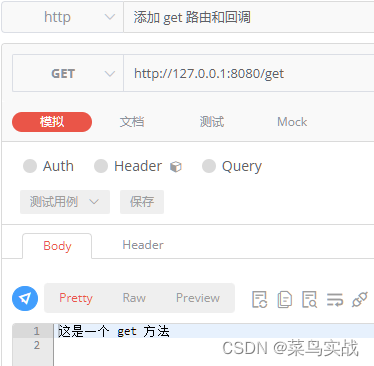


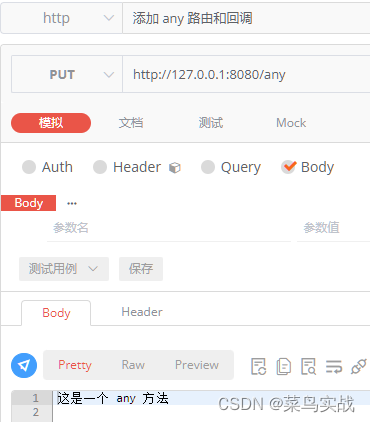
Rookie actual combat , Continuous learning !
边栏推荐
- Dix ans d'expérience dans le développement de programmeurs vous disent quelles compétences de base vous manquez encore?
- Redis zadd导致的一次线上问题排查和处理
- Leetcode sword finger offer brush questions - day 23
- Qt的connect函数和disconnect函数
- Redis sorted set data type API and application scenario analysis
- Gocv boundary fill
- 【Go实战基础】gin 高效神器,如何将参数绑定到结构体
- 2022/2/13 summary
- Introduction to the basic concept of queue and typical application examples
- Openshift container platform community okd 4.10.0 deployment
猜你喜欢

Minecraft plug-in service opening

Installing Oracle database 19C RAC on Linux

远程连接IBM MQ报错AMQ4036解决方法
整理秒杀系统的面试必备!!!

Matplotlib剑客行——没有工具用代码也能画图的造型师

十年開發經驗的程序員告訴你,你還缺少哪些核心競爭力?
![[staff] time mark and note duration (staff time mark | full note rest | half note rest | quarter note rest | eighth note rest | sixteenth note rest | thirty second note rest)](/img/7f/2cd789339237b7a881bfed7b7545a9.jpg)
[staff] time mark and note duration (staff time mark | full note rest | half note rest | quarter note rest | eighth note rest | sixteenth note rest | thirty second note rest)

Avoid breaking changes caused by modifying constructor input parameters
Servlet全解:继承关系、生命周期、容器和请求转发与重定向等
![[blackmail virus data recovery] suffix Rook3 blackmail virus](/img/46/debc848d17767d021f3f41924cccfe.jpg)
[blackmail virus data recovery] suffix Rook3 blackmail virus
随机推荐
gocv opencv exit status 3221225785
使用递归函数求解字符串的逆置问题
【Go实战基础】gin 如何绑定与使用 url 参数
C4D quick start tutorial - C4d mapping
kubernetes部署loki日志系统
寻找链表中值域最小的节点并移到链表的最前面
小米电视不能访问电脑共享文件的解决方案
During MySQL installation, mysqld Exe reports that the application cannot start normally (0xc000007b)`
随笔:RGB图像颜色分离(附代码)
PCL calculates the intersection of three mutually nonparallel planes
Servlet全解:继承关系、生命周期、容器和请求转发与重定向等
Jd.com interviewer asked: what is the difference between using on or where in the left join association table and conditions
C Baidu map, Gaode map, Google map (GPS) longitude and latitude conversion
Kubedm deploys kubernetes v1.23.5 cluster
Kubesphere virtualization KSV installation experience
Finishing the interview essentials of secsha system!!!
我服了,MySQL表500W行,居然有人不做分区?
Don't spend money, spend an hour to build your own blog website
Qt——如何在QWidget中设置阴影效果
Image transformation, transpose