当前位置:网站首页>Nacos download, start and configure MySQL database
Nacos download, start and configure MySQL database
2022-07-02 08:37:00 【Don't understand for a while】
List of articles
Official website : https://nacos.io/zh-cn/docs/quick-start.html
One 、window start-up
1、Nacos download
Nacos Download address :https://github.com/alibaba/nacos/releases
2、nacos To configure MySQL database
- take nacos In the catalog config/nacos-mysql.sql Import to MySQL, The name of the library is arbitrarily specified
- modify config/application.properties File configuration MySQL database
#*************** Config Module Related Configurations ***************#
### If use MySQL as datasource:
spring.datasource.platform=mysql

### Count of DB:
db.num=1

### Connect URL of DB:
db.url.0=jdbc:mysql://127.0.0.1:3306/nacos_config?characterEncoding=utf8&connectTimeout=1000&socketTimeout=3000&autoReconnect=true&useUnicode=true&useSSL=false&serverTimezone=UTC
db.user.0=root
db.password.0=123456
3、 start-up nacos
Turn on nacos
Linux/Unix/Mac
 Start command (standalone Stands for stand-alone mode operation , Non cluster mode ):

sh startup.sh -m standalone

 If you are using ubuntu System , Or run the script to report an error [[ Symbol not found , Try the following operation :

bash startup.sh -m standalone

Windows
 Start command (standalone Stands for stand-alone mode operation , Non cluster mode ):

startup.cmd -m standalone
Access address http://127.0.0.1:8848/nacos , Default login user name and password nacos/nacos, New namespace , The new configuration file is as follows 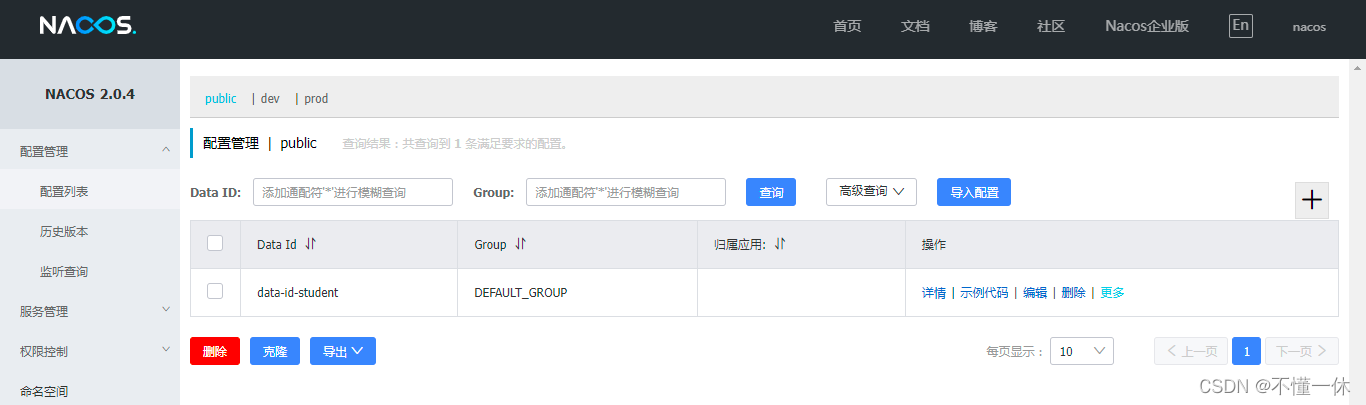
Two 、docker start-up
1、docker Pull nacos Mirror image
DockerHub Download mirroring https://registry.hub.docker.com/r/nacos/nacos-server
docker pull nacos/nacos-server
2、 initialization MySQL Database script
https://github.com/alibaba/nacos/blob/develop/distribution/conf/nacos-mysql.sql
3、docker start-up nacos( To configure MySQL Connect )
docker run -d \
-e PREFER_HOST_MODE=ip \
-e MODE=standalone \
-e SPRING_DATASOURCE_PLATFORM=mysql \
-e MYSQL_SERVICE_HOST=42.0.0.0 \
-e MYSQL_SERVICE_PORT=3306 \
-e MYSQL_SERVICE_DB_NAME=nacos_config \
-e MYSQL_SERVICE_USER=root \
-e MYSQL_SERVICE_PASSWORD=123456 \
-e NACOS_APPLICATION_PORT=8848 \
-p 8848:8848 -p 9848:9848 -p 9849:9849 \
--name nacos \
--restart=always \
--privileged=true \
nacos/nacos-server
Access address : http://42.0.0.0:8848/nacos Default username password : nacos/nacos, New namespace , The new configuration file is as follows
4、 solve the problem
①、Nacos Server did not start because dumpservice bean construction failure : No DataSource set
Ensure that the database connection is correct , Look at the database name 、 Refresh database connection 、 Check user name and password 、 The connection timeout can be extended 、 Set time zone
②、server error: such as timeout. Request nacos server failed
If it is an ECS, it needs to be turned on 8848、 9848 、9849 Otherwise, the port will report an error server error: such as timeout. Request nacos server failed:
Port specification :https://nacos.io/zh-cn/docs/2.0.0-compatibility.html
Nacos2.0 (8848、 9848 、9849 ) Version comparison 1.X (8848) Added gRPC Mode of communication , So we need to increase 2 Ports . The new port is the main port configured (server.port) On the basis of , Automatically generate a certain offset .
| port | Offset from the primary port | describe |
|---|---|---|
| 8848 | nacos Main end slogan | |
| 9848 | 1000 | client gRPC Request server port , It is used to initiate connections and requests from the client to the server |
| 9849 | 1001 | Server side gRPC Request server port , Used for synchronization between services, etc |
3、 ... and 、docker nacos Cluster building
Pull image and initialize nacos The database is the same as the stand-alone mode above , following docker nacos newest 2.0.4 Version deployment succeeded , The ports used under ECS firewall configuration
1、 Start cluster
Pay attention to the need to turn on 7848 port , Default port 8848 subtract 1000, Otherwise it will be reported The Raft Group [naming_persistent_service] did not find the Leader node; or Nacos cluster is running with 1.X mode, can't accept gRPC request temporarily. Please check the server status or close Double write to force open 2.0 mode. Detail https://nacos.io/en-us/docs/2.0.0-upgrading.html. or caused: old raft protocol already stop;
192.168.1.1 The server nacos1
docker run -d\
 -e PREFER_HOST_MODE=ip\
 -e MODE=cluster\
 -e SPRING_DATASOURCE_PLATFORM=mysql\
 -e MYSQL_SERVICE_HOST=192.168.1.10\
 -e MYSQL_SERVICE_PORT=3306\
 -e MYSQL_SERVICE_DB_NAME=nacos_config\
 -e MYSQL_SERVICE_USER=username\
 -e MYSQL_SERVICE_PASSWORD=password\
 -e NACOS_APPLICATION_PORT=8848\
 -e NACOS_SERVERS="192.168.1.1:8848 192.168.1.1:8846 192.168.1.2:8848"\
 -e NACOS_SERVER_IP=192.168.1.1\
 -p 8848:8848 -p 9848:9848 -p 9849:9849 -p 7848:7848\
 --name nacos --restart=always nacos/nacos-server
192.168.1.1 The server nacos 2
docker run -d\
 -e PREFER_HOST_MODE=ip\
 -e MODE=cluster\
 -e SPRING_DATASOURCE_PLATFORM=mysql\
 -e MYSQL_SERVICE_HOST=192.168.1.10\
 -e MYSQL_SERVICE_PORT=3306\
 -e MYSQL_SERVICE_DB_NAME=nacos_config\
 -e MYSQL_SERVICE_USER=username\
 -e MYSQL_SERVICE_PASSWORD=password\
 -e NACOS_APPLICATION_PORT=8846\
 -e NACOS_SERVERS="192.168.1.1:8848 192.168.1.1:8846 192.168.1.2:8848"\
 -e NACOS_SERVER_IP=192.168.1.1\
 -p 8846:8846 -p 9846:9846 -p 9847:9847 -p 7846:7846\
 --name nacos2 --restart=always nacos/nacos-server
192.168.1.2 The server nacos3
docker run -d\
 -e PREFER_HOST_MODE=ip\
 -e MODE=cluster\
 -e SPRING_DATASOURCE_PLATFORM=mysql\
 -e MYSQL_SERVICE_HOST=192.168.1.10\
 -e MYSQL_SERVICE_PORT=3306\
 -e MYSQL_SERVICE_DB_NAME=nacos_config\
 -e MYSQL_SERVICE_USER=username\
 -e MYSQL_SERVICE_PASSWORD=password\
 -e NACOS_APPLICATION_PORT=8848\
 -e NACOS_SERVERS="192.168.1.1:8848 192.168.1.1:8846 192.168.1.2:8848"\
 -e NACOS_SERVER_IP=192.168.1.2\
 -p 8848:8848 -p 9848:9848 -p 9849:9849 -p 7848:7848\
 --name nacos --restart=always nacos/nacos-server
2、 View cluster
here Just enter a service address that will do 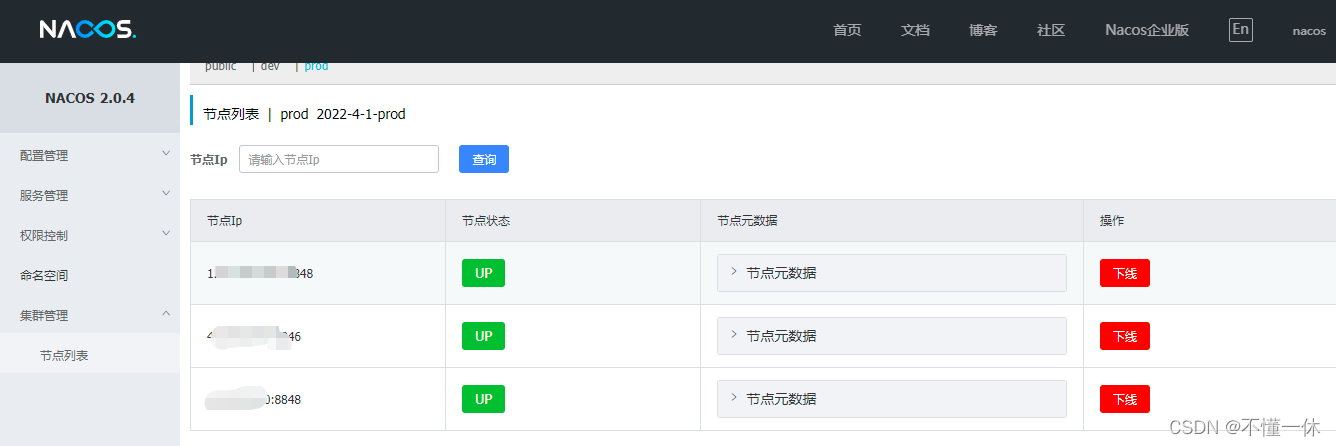
The above states are all up The cluster may not be built successfully , Click the node metadata to check whether it can be selected leader
Or use the interface to get leader
http://192.168.1.1:8080/nacos/v1/ns/raft/leader, more nacos relevant API May refer to https://nacos.io/zh-cn/docs/open-api.html
If you cannot select leader, You can see nacos/logs In the catalog nacos.log、 naming-raft.log、protocol-raft.log、nacos-cluster.log 、naming-server.log Log to see if there is an error
3、nginx agent nacos colony
docker Download start nginx Containers are not elaborated
If you have already mounted nginx The configuration file of can be modified directly , You can also enter the container to modify without mounting
default.conf My configuration is relatively simple , Configure the weight by yourself
upstream nacosList {
    server 192.168.1.1:8848 weight=1;
	server 192.168.1.2:8848 weight=2;
	server 192.168.1.1:8846 weight=3;
}

server {
    listen       80;
    listen  [::]:80;
    server_name  192.168.1.1;

    location / {
        root   /usr/share/nginx/html;
        index  index.html index.htm;
    }
    location /nacos {
        proxy_pass  http://nacosList/nacos;
    }

    error_page   500 502 503 504  /50x.html;
    location = /50x.html {
        root   /usr/share/nginx/html;
    }
}
my nginx 8080 mapping 80, as follows nginx f Load balancing successful 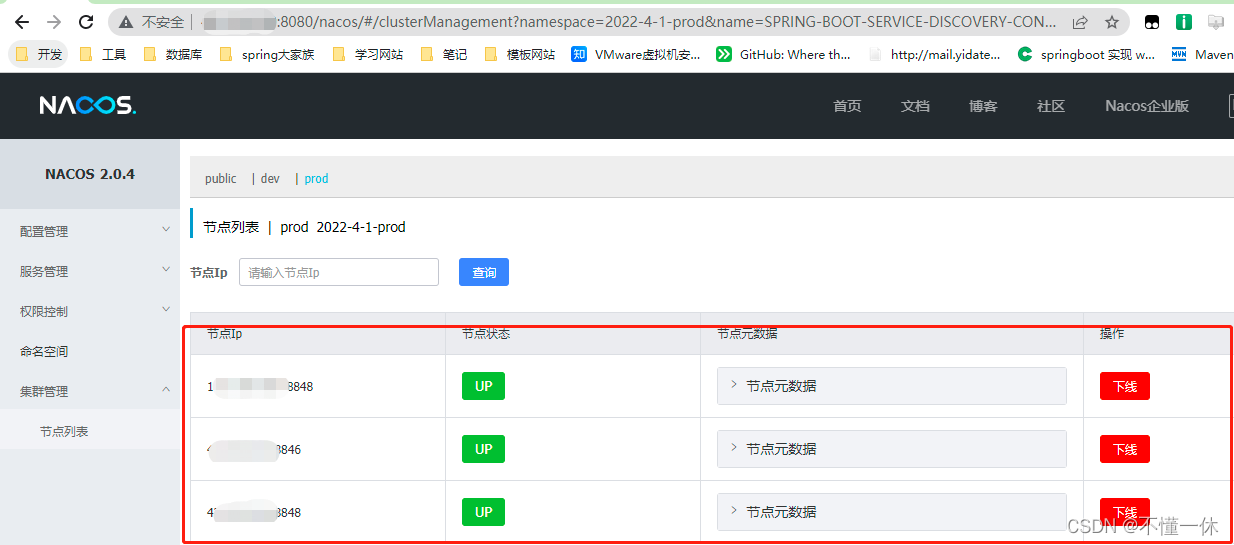
4、 Turn off double write
nacos Documentation shows that turning off double write can save performance overhead 
PUT : http://192.168.1.1:8848/nacos/v1/ns/operator/switches?entry=doubleWriteEnabled&value=false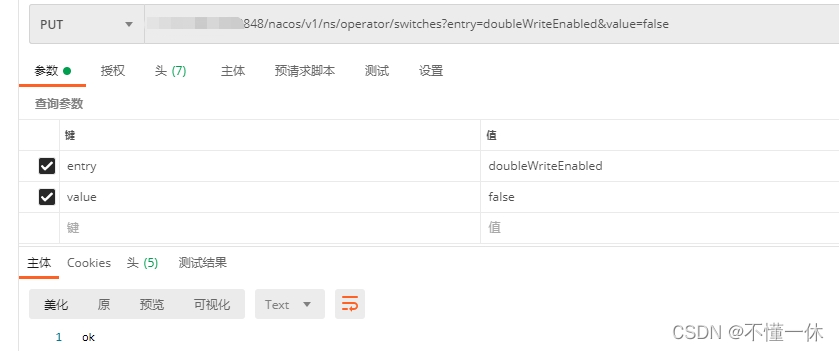
logs/naming-server.log It was observed in the log that Disable Double write, stop and clean v1.x cache and features word , Note double write is turned off .
5、 Service up and down line
nacos The service registered on the console can go online and offline normally 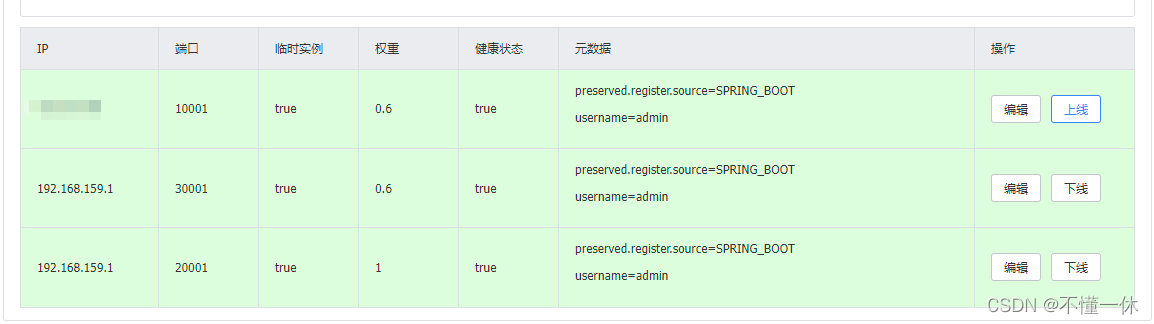
边栏推荐
- Web security -- core defense mechanism
- k8s入门:Helm 构建 MySQL
- Use the kaggle training model and download your own training model
- STM32-新建工程(参考正点原子)
- Use of opencv3 6.2 low pass filter
- Jz-061-serialized binary tree
- Carsim-問題Failed to start Solver: PATH_ID_OBJ(X) was set to Y; no corresponding value of XXXXX?
- The best blog to explain the basics of compilation (share)
- St-link connection error invalid ROM table of STM32 difficult and miscellaneous diseases
- KubeSphere 虚拟化 KSV 安装体验
猜你喜欢

Hcia - Application Layer

2022 Heilongjiang latest construction eight members (materialman) simulated examination questions and answers

Jumping | Blue Bridge Cup

ICMP Protocol

Minecraft模组服开服
OpenShift 部署应用

Valin cable: BI application promotes enterprise digital transformation

W10 is upgraded to W11 system, but the screen is black, but the mouse and desktop shortcuts can be used. How to solve it
Sqli labs Level 2

Web security -- Logical ultra vires
随机推荐
W10 is upgraded to W11 system, but the screen is black, but the mouse and desktop shortcuts can be used. How to solve it
Rotating linked list (illustration)
Application of kotlin - higher order function
Global and Chinese market of electric cheese grinder 2022-2028: Research Report on technology, participants, trends, market size and share
[blackmail virus data recovery] suffix Rook3 blackmail virus
Matlab other
Causes of laptop jam
ARP及ARP欺骗
Dip1000 runaway
Sqli labs level 1
OpenShift 容器平台社区版 OKD 4.10.0部署
HackTheBox-Gunship
Carsim-問題Failed to start Solver: PATH_ID_OBJ(X) was set to Y; no corresponding value of XXXXX?
IP protocol and IP address
Sqli labs (post type injection)
Pclpy projection filter -- projection of point cloud to cylinder
Classes and objects (instantiation of classes and classes, this, static keyword, encapsulation)
[blackmail virus data recovery] suffix Crylock blackmail virus
Common shortcut keys of Jupiter notebook (you can also view it by pressing h in command mode)
idea中注释代码取消代码的快捷键