当前位置:网站首页>HAL库笔记——通过按键来控制LED(基于正点原子STM32F103ZET6精英板)
HAL库笔记——通过按键来控制LED(基于正点原子STM32F103ZET6精英板)
2022-08-02 03:33:00 【@C#&】
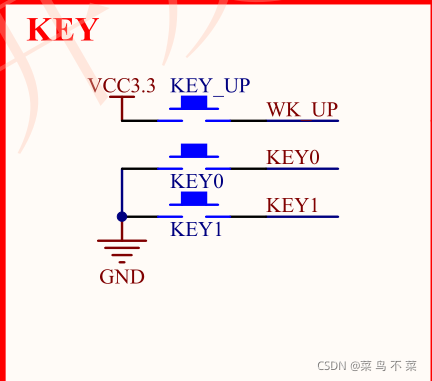
首先我们来看看控制LED灯和按键的IO口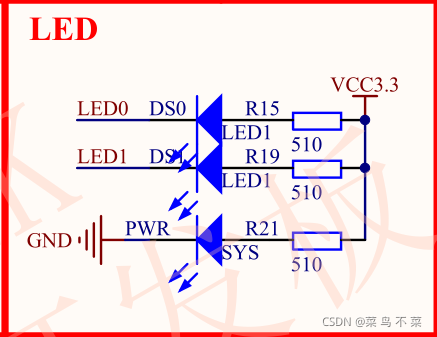
LED初始化
#include "bsp_led.h"

void LED_GPIO_Init(void)
{

	GPIO_InitTypeDef      GPIO_InitStructure;

	__HAL_RCC_GPIOB_CLK_ENABLE();

	GPIO_InitStructure.Pin = GPIO_PIN_5;
	GPIO_InitStructure.Mode = GPIO_MODE_OUTPUT_PP;
	GPIO_InitStructure.Pull = GPIO_NOPULL;
	GPIO_InitStructure.Speed = GPIO_SPEED_FREQ_LOW;

	HAL_GPIO_Init(GPIOB, &GPIO_InitStructure);


}
KEY初始化
void KEY_GPIO_Init(void)
{

	GPIO_InitTypeDef      GPIO_InitStructure;

	__HAL_RCC_GPIOE_CLK_ENABLE();

	GPIO_InitStructure.Pin = GPIO_PIN_3 | GPIO_PIN_4;
	GPIO_InitStructure.Mode = GPIO_MODE_INPUT;  //读取电平需要输入模式
	GPIO_InitStructure.Pull = GPIO_NOPULL;
	GPIO_InitStructure.Speed = GPIO_SPEED_FREQ_LOW;


	HAL_GPIO_Init(GPIOE, &GPIO_InitStructure);

}
main函数
#include "main.h"
#include "gpio.h"
#include "bsp_led.h"
#include "bsp_key.h"

/* Private includes ----------------------------------------------------------*/
/* USER CODE BEGIN Includes */

/* USER CODE END Includes */

/* Private typedef -----------------------------------------------------------*/
/* USER CODE BEGIN PTD */

/* USER CODE END PTD */

/* Private define ------------------------------------------------------------*/
/* USER CODE BEGIN PD */
/* USER CODE END PD */

/* Private macro -------------------------------------------------------------*/
/* USER CODE BEGIN PM */

/* USER CODE END PM */

/* Private variables ---------------------------------------------------------*/

/* USER CODE BEGIN PV */

/* USER CODE END PV */

/* Private function prototypes -----------------------------------------------*/
void SystemClock_Config(void);
/* USER CODE BEGIN PFP */

/* USER CODE END PFP */

/* Private user code ---------------------------------------------------------*/
/* USER CODE BEGIN 0 */

/* USER CODE END 0 */

/** * @brief The application entry point. * @retval int */
int main(void)
{


  /* USER CODE BEGIN 1 */

  /* USER CODE END 1 */

  /* MCU Configuration--------------------------------------------------------*/

  /* Reset of all peripherals, Initializes the Flash interface and the Systick. */
  HAL_Init();

  /* USER CODE BEGIN Init */

  /* USER CODE END Init */

  /* Configure the system clock */
  SystemClock_Config();

  /* USER CODE BEGIN SysInit */

  /* USER CODE END SysInit */

  /* Initialize all configured peripherals */
  LED_GPIO_Init();
	KEY_GPIO_Init();
  /* USER CODE BEGIN 2 */

  /* USER CODE END 2 */

  /* Infinite loop */
  /* USER CODE BEGIN WHILE */


  while (1)
  {

		if(Key_Scan(GPIOE,GPIO_PIN_3) == KEY_ON)
		{

			LED_RED_ON;
		}
		if(Key_Scan(GPIOE,GPIO_PIN_4) == KEY_ON)
		{

			while(1)
			{

				LED_RED_ON;
				HAL_Delay(500);     //500 ms
				LED_RED_OFF;
				HAL_Delay(500);     //500 ms
				if(Key_Scan(GPIOE,GPIO_PIN_4) == KEY_ON)
					break;
			}


		}


	}


}
边栏推荐
- 2019 - ICCV - 图像修复 Image Inpainting 论文导读《StructureFlow: Image Inpainting via Structure-aware ~~》
- Comparison between Boda Industrial Cloud and Alibaba Cloud
- IDEA2021.2安装与配置(持续更新)
- install 命令
- 字符串匹配(蛮力法+KMP)
- GM8284DD,GM8285C,GM8913,GM8914,GM8905C,GM8906C,国腾振芯LVDS类芯片
- Anaconda(Jupyter)里发现不能识别自己的GPU该怎么办?
- 【Arduino connects DHT11 humidity and temperature sensor】
- C语言教程 - 制作单位转换器
- USB3.0一致性测试方法
猜你喜欢






随机推荐
D类音频功放NS4110B电路设计
向龙芯2K1000板子上烧写中标麒麟系统
How to remotely debug PLC?
【plang 1.4.6】Plang高级编程语言(发布)
远程调试PLC,到底如何操作?
GM8284DD,GM8285C,GM8913,GM8914,GM8905C,GM8906C,国腾振芯LVDS类芯片
如何使用 PHP 实现网页交互
【plang 1.4.5】编写坦克(双人)游戏脚本
[Popular Science Post] I2C Communication Protocol Detailed Explanation - Partial Software Analysis and Logic Analyzer Example Analysis
I2C无法访问ATEC508A加密芯片问题
[DS3231 RTC real-time clock module and Arduino interface to build a digital clock]
GM7150,振芯科技,视频解码器,CVBS转BT656/601,QFN32,替换TVP5150/CJC5150
PCB设计思路
bluez5.50蓝牙文件传输
振芯科技GM8285C:功能TTL转LVDS芯片简介
Comparative analysis of mobile cloud IoT pre-research and Alibaba Cloud development
NSIS来自己设定快捷方式的图标
【LeetCode】合并
GM8775C MIPI转LVDS调试心得分享
关于IIC SDA毛刺的那些事