当前位置:网站首页>How to remotely debug PLC?
How to remotely debug PLC?
2022-08-02 04:32:00 【Hewo IoT】
At present, most automation equipments are equipped with PLCs. When equipment problems occur, maintenance engineers usually bring laptops to the field to debug PLCs.This process will not only lead to low customer satisfaction due to long downtime, but also consume a lot of personnel resources and travel expenses.So how to use a remote way to debug PLC?
Using the HiWoo Box industrial IoT gateway to collect relevant data to understand the current status of the equipment, and to make judgments on faults.Then, by remotely updating the variable parameters and logic programs of the equipment, the fault can be repaired, so that the on-site equipment can resume normal operation.Remote debugging and updating of PLC not only effectively solves problems, but also saves manpower and improves customer satisfaction.
HiWoo Box is an industrial IoT gateway independently developed by Hewo IoT. It has hundreds of built-in protocols and supports access to various mainstream PLCs on the market such as smart200, s7-1200, fx5u, and fx3u. It has powerful data acquisition andThe reverse control function can realize remote debugging of PLC and remote update of PLC.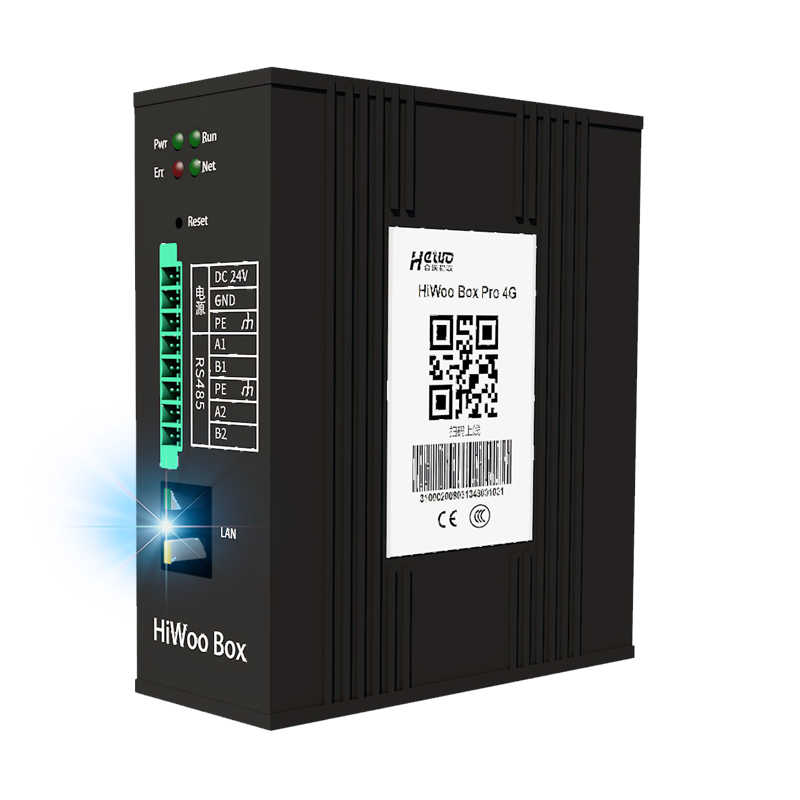
On-site equipment, each device has a PLC, which is connected to the HiWoo Box. The PLC will collect on-site data, and the HiWoo Box will read the PLC data and transmit it to the IoT cloud platform.In the cloud platform, the data collected on site can be previewed and controlled in reverse.
Specific operations:
The wiring is powered up.HiWoo Box is connected to PLC equipment, and the connection mode supports RS485, RS232 and Ethernet ports.
Platform configuration template, add the data to be collected.
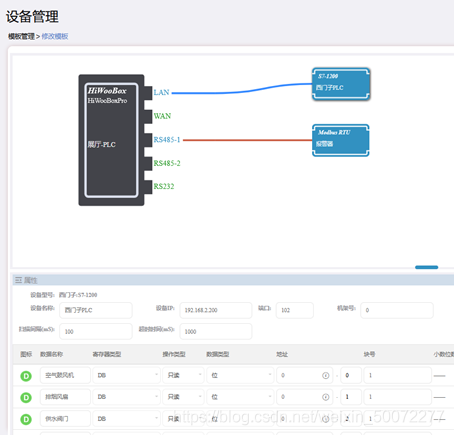
Add box, add HiWoo Box number, select configuration template.
The box is connected to the Internet, HiWoo Box has two ways of networking, wired and wireless, wireless supports 2G/3G/4G/WiFi.
At this point, you can see the collected data in the preview interface.
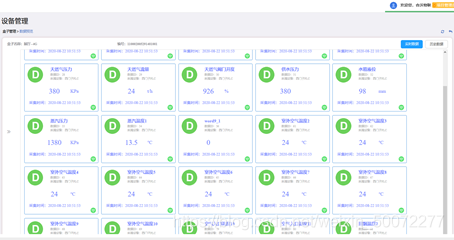
The above steps have realized data collection and remote monitoring.On this basis, the following will mainly explain the specific operation of PLC program remote download.Take FX3U as an example.
- Configure PLC communication first
1.1 Use a network cable to connect the PLC to the local computer to ensure that the IP link can communicate.
1.2 Open GXWorks2 to read PLC program to programming software
Configure Ethernet port settings in 1.3PLC parameters, add TCP protocol in "Open Setting Item", select "MC Protocol" for open method.
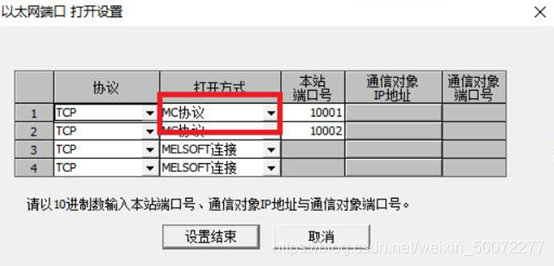
2. Start transparent transmission through the HiWoo Box management tool.
3. Open GXWorks2, click "Online" > "PLC Read", the PLC series will pop up, select FXCPU, and click OK.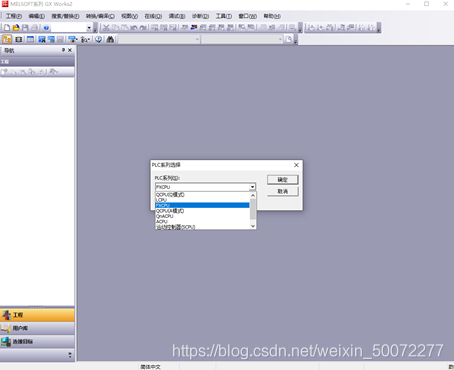
4. Transparent transmission
4.1 Network port transparent transmission:
Select “Ethernet Board” on the computer side, select “Ethernet Module” on the PLC side, double-click “Ethernet Module” to open the detailed configuration page, enter PLCIP address, and then OK to submit.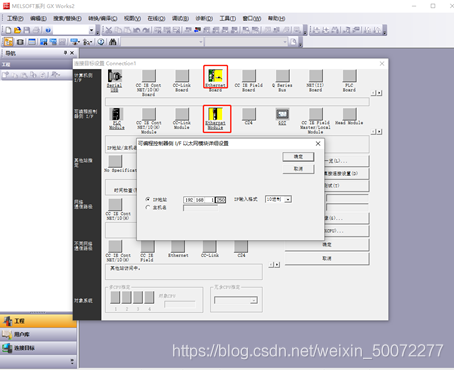
4.2 Serial port transparent transmission:
Select "Serial USB" on the computer side, "PLC Module" on the programmable controller side, and select the port number of the virtual serial port for the COM port.
5. Click the communication test, and the prompt "Successfully connected to FX3U/FX3UCCPU" indicates that the transparent transmission is successful.After the transparent transmission connection is successful, the PLC program can be uploaded and downloaded.
Advantages of HiWoo Box
- Support smart200, s7-1200, fx3u, fx5u and other mainstream PLCs on the market.
- HiWoo Box collects data in real time 24 hours a day, and there is no need for personnel to be on duty at the equipment site.
- 9~36V wide voltage power supply, industrial-grade safety protection.
- HiWoo Box can support the collection of thousands of pieces of data, and can connect to hundreds of devices at the same time.
- Multiple ways to connect, easy to connect.
- If the network is disconnected under extreme conditions, data will not be lost. When the network is restored, it will be automatically replenished.
- The HiWoo Box is small in size and can be installed on 35mm Din rails or by screws, which is very convenient.
- HiWoo Box opens its interface to the outside world and seamlessly connects to third-party IoT platforms such as Alibaba Cloud, Huawei Cloud, and Baidu Tiangong.
边栏推荐
- [DS3231 RTC real-time clock module and Arduino interface to build a digital clock]
- 目标检测(一):R-CNN系列
- Kotlin - 标准函数(with、run和apply)
- [Spark]-LSH局部敏感哈希
- [Arduino connected to GPS module (NEO-6M) to read positioning data]
- Two-Stream Convolutional Networks for Action Recognition in Videos双流网络论文精读
- RecyclerView使用和原理解析
- ArrayList LinkList效率对比
- 使用Vercel托管自己的网站
- 单火线开关设计详解
猜你喜欢
Quo Vadis, Action Recognition? A New Model and the Kinetics Dataset I3D论文精读
Nest 的实现原理?理解了 reflect metadata 就懂了
BSN:Boundary-Sensitive Network for Temporal Action Proposal Generation论文阅读笔记
Vision Transformer(ViT)论文精读和Pytorch实现代码解析

3D建模作品
【Arduino连接GPS 模块 (NEO-6M)读取定位数据】

【NTC 热敏电阻与 Arduino 读取温度】
张量乘积—实验作业

分布式消息队列平滑迁移技术实战

【霍尔效应传感器模块与 Arduino】
随机推荐
属性动画的使用和原理解析
TimeSformer视频理解框架:视频理解中的Transformer
Transformer结构解析及常见问题
【使用树莓派时碰到的一些问题】
MPU6050 加速度计和陀螺仪传感器与 Arduino 连接
功能强大的黑科技网站--10连
单火线开关设计详解
PCB Design Ideas
OneNET Studio与IoT Studio对比分析
《scala 编程(第3版)》学习笔记4
深度学习理论:测试集与验证集的区别及各自用途
Go 程序太大了,能要个延迟初始化不?
Two-Stream Convolutional Networks for Action Recognition in Videos双流网络论文精读
[Popular Science Post] I2C Communication Protocol Detailed Explanation - Partial Software Analysis and Logic Analyzer Example Analysis
【NTC 热敏电阻与 Arduino 读取温度】
PCB设计思路
【Arduino连接时钟模块在LCD1602上显示时间】
uniCloud address book combat
【opencv】error: (-215:Assertion failed) ssize.empty() in function ‘cv::resize‘报错原因
openmv学习 2022.5.9