当前位置:网站首页>File class byte input and output stream
File class byte input and output stream
2022-07-27 16:58:00 【Not very [email protected]】
Catalog
1、 Byte output stream :FileOutputStream
2、 Byte input stream :FileIntputStream
3、 Byte output stream is used in conjunction with byte input stream :
2. Create a FileOutputStream object :
3、 The serialization result is :
1、 Byte output stream :FileOutputStream
 @Test
    public void test() throws Exception {
        FileOutputStream fileOutputStream = new FileOutputStream("F:\\111\\1.txt");
        String str="lwh";
        byte[] bytes = str.getBytes();
        fileOutputStream.write(bytes);
        fileOutputStream.close();
    }
Running results :

2、 Byte input stream :FileIntputStream
 @Test
    public void test2() throws Exception{
        FileInputStream os = new FileInputStream("F:\\111\\1.txt");
        byte[] bytes = new byte[3];
        int c=0;
        while ((c=os.read(bytes))!=-1){
            String str = new String(bytes,0,c);
            System.out.println(str);
        }
Running results :

3、 Byte output stream is used in conjunction with byte input stream :
package demo420.demo02;

import org.junit.Test;

import java.io.*;

/**
 * @ founder  xiaoliu
 * @ Creation time  2022/4/20
 * @ describe
 */
public class Demo01 {
    @Test
    public void test() throws IOException {
        FileInputStream fos = new FileInputStream("C:\\Users\\Administrator\\Desktop\\1.jpg");
        FileOutputStream os = new FileOutputStream("C:\\Users\\Administrator\\Desktop\\2.jpg");
        byte[] bytes = new byte[5];
        int len;
        while ((len=fos.read(bytes))!=-1) {
            os.write(bytes,0,len);

        }
        fos.close();
        os.close();
    }
}
result :

4、 Cache stream :
BufferedInputStream and BufferedOutputStream These two classes are InputStream and OutputStream Subclasses of , As a subclass of decorator , Use them to prevent every read / Actual write operation when sending data , Represents the use of buffers .
package demo420.demo04;

import org.junit.Test;

import java.io.BufferedInputStream;
import java.io.BufferedOutputStream;
import java.io.FileInputStream;
import java.io.FileOutputStream;

/**
 * @ founder  xiaoliu
 * @ Creation time  2022/4/21
 * @ describe
 */
public class DemoBuffer {
    @Test
    public void test() throws Exception{
        FileInputStream is = new FileInputStream("C:\\Users\\Administrator\\Desktop\\111\\6.txt");
        FileOutputStream fos = new FileOutputStream("C:\\Users\\Administrator\\Desktop\\111\\7.txt");
        BufferedOutputStream bos = new BufferedOutputStream(fos);
       int c=0;
        byte[] bytes = new byte[10];
        while ((c=is.read(bytes))!=-1){
            String str = new String(bytes,0,c);
            bos.write(str.getBytes());// byte[] bytes = str.getBytes(); Convert to byte array
        }


    }
}

add bos.flush or is.close after , The data will be loaded into the file
bos.flush(); is.close();
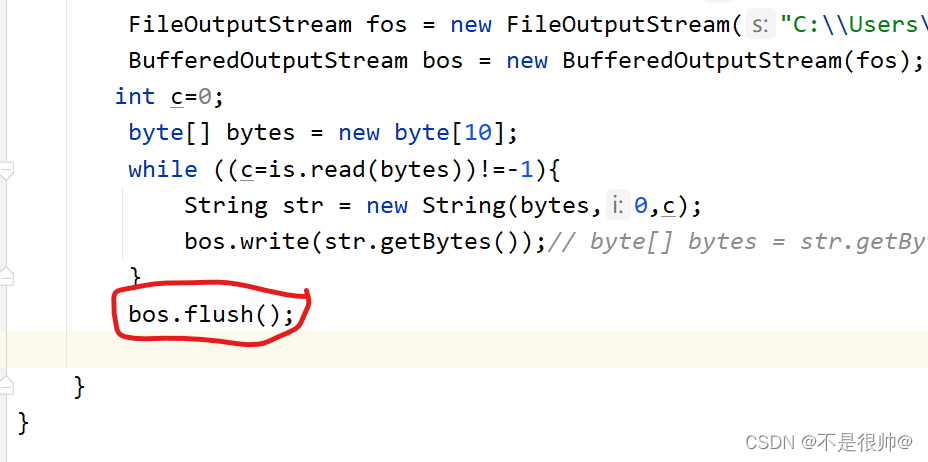

Summary :
Only after the stream refresh operation or the stream close operation , Data will be loaded
5、 Object flow :
java.io.ObjectOutputStream and java.io.ObjectInputStream These two classes can facilitate the serialization of objects (Serialize) And deserialization (Deserialize).
1. Create an object
package demo420.demo03;

import java.io.Serializable;

/**
 * @ founder  xiaoliu
 * @ Creation time  2022/4/20
 * @ describe
 */
public class Hero implements Serializable {
    private String name;
    private int age;
    private String level;

    public Hero(String name, int age, String level) {
        this.name = name;
        this.age = age;
        this.level = level;
    }

    @Override
    public String toString() {
        return "Hero{" +
                "name='" + name + '\'' +
                ", age=" + age +
                ", level='" + level + '\'' +
                '}';
    }
}
2. Create a FileOutputStream object :
  FileOutputStream is = new FileOutputStream("C:\\Users\\Administrator\\Desktop\\demo.txt");
        ObjectOutputStream os = new ObjectOutputStream(is);
        Hero lwh = new Hero("lwh", 2, "3");
        os.writeObject(lwh);
        os.close();
3、 The serialization result is :

4、 Implement deserialization
Class to implement Serializable Interface

  FileInputStream is = new FileInputStream("C:\\Users\\Administrator\\Desktop\\demo.txt");
        ObjectInputStream objectInputStream = new ObjectInputStream(is);
        Object o = objectInputStream.readObject();
        System.out.println(o);
        is.close();
result :

版权声明
本文为[Not very [email protected]]所创,转载请带上原文链接,感谢
https://yzsam.com/2022/208/202207271449228876.html
边栏推荐
- Array analog linked list
- 数据库基础
- If you don't want to step on those holes in SaaS, you must first understand the "SaaS architecture"
- Codeforces Round #100 E. New Year Garland & 2021 CCPC Subpermutation
- C语言之枚举和联合体
- UML diagram introduction
- C语言之指针初级
- Life game, universe 25 and striver
- Bean: the difference between model and entity
- md 中超链接的解析问题:解析`this.$set()`,`$`前要加空格或转义符 `\`
猜你喜欢

内置对象(下)
As changes the background theme and background picture
Opencv (I) -- basic knowledge of image

codis集群部署

OpenCV(三)——图像分割

Build a cloud native file system for media assets
Automatic classification of e-commerce UGC pictures using Baidu PaddlePaddle easydl

Dynamic memory allocation in C language
File类字节输入、输出流

Pointer elementary of C language
随机推荐
mvc和mvp和mvvm的区别
合工大苍穹战队视觉组培训Day8——视觉,目标识别
【pytorch】|transforms.FiveCrop
牛客题目——链表的奇偶重排、输出二叉树的右视图、括号生成、字符流中第一个不重复的字符
Scala branch control (single branch, double branch, multi branch), return value of branch judgment
字符流读取文件
Duplicate names in molecular class methods
The bill module of freeswitch
牛客题目——二叉搜索树与双向链表
Data collection: skillfully using Bloom filter to extract data summary
Kubesphere multi node installation error
MQ Series 2: technology selection of Message Oriented Middleware
D3.js create a cool arc
C语言之数组
Getting started with nvida CUDA dirverapi
Quadratic programming based on osqp
全局String对象(函数类型)+Math对象
Leader: who uses redis overdue monitoring to close orders and get out of here!
Build a cloud native file system for media assets
(2) Dynamic convolution of dynamic convolution