当前位置:网站首页>File类字节输入、输出流
File类字节输入、输出流
2022-07-27 14:49:00 【不是很帅@】
目录
1、字节输出流:FileOutputStream
 @Test
    public void test() throws Exception {
        FileOutputStream fileOutputStream = new FileOutputStream("F:\\111\\1.txt");
        String str="lwh";
        byte[] bytes = str.getBytes();
        fileOutputStream.write(bytes);
        fileOutputStream.close();
    }
运行结果:

2、 字节输入流:FileIntputStream
 @Test
    public void test2() throws Exception{
        FileInputStream os = new FileInputStream("F:\\111\\1.txt");
        byte[] bytes = new byte[3];
        int c=0;
        while ((c=os.read(bytes))!=-1){
            String str = new String(bytes,0,c);
            System.out.println(str);
        }
运行结果:

3、字节输出流与字节输入流联合使用:
package demo420.demo02;

import org.junit.Test;

import java.io.*;

/**
 * @创建人 xiaoliu
 * @创建时间 2022/4/20
 * @描述
 */
public class Demo01 {
    @Test
    public void test() throws IOException {
        FileInputStream fos = new FileInputStream("C:\\Users\\Administrator\\Desktop\\1.jpg");
        FileOutputStream os = new FileOutputStream("C:\\Users\\Administrator\\Desktop\\2.jpg");
        byte[] bytes = new byte[5];
        int len;
        while ((len=fos.read(bytes))!=-1) {
            os.write(bytes,0,len);

        }
        fos.close();
        os.close();
    }
}
结果:

4、 缓存流:
BufferedInputStream 和BufferedOutputStream 这两个类分别是 InputStream和OutputStream 的子类,作为装饰器子类,使用它们可以防止每次读取/发送数据时进行实际的写操作,代表着使用缓冲区。
package demo420.demo04;

import org.junit.Test;

import java.io.BufferedInputStream;
import java.io.BufferedOutputStream;
import java.io.FileInputStream;
import java.io.FileOutputStream;

/**
 * @创建人 xiaoliu
 * @创建时间 2022/4/21
 * @描述
 */
public class DemoBuffer {
    @Test
    public void test() throws Exception{
        FileInputStream is = new FileInputStream("C:\\Users\\Administrator\\Desktop\\111\\6.txt");
        FileOutputStream fos = new FileOutputStream("C:\\Users\\Administrator\\Desktop\\111\\7.txt");
        BufferedOutputStream bos = new BufferedOutputStream(fos);
       int c=0;
        byte[] bytes = new byte[10];
        while ((c=is.read(bytes))!=-1){
            String str = new String(bytes,0,c);
            bos.write(str.getBytes());// byte[] bytes = str.getBytes();转成字节数组
        }


    }
}

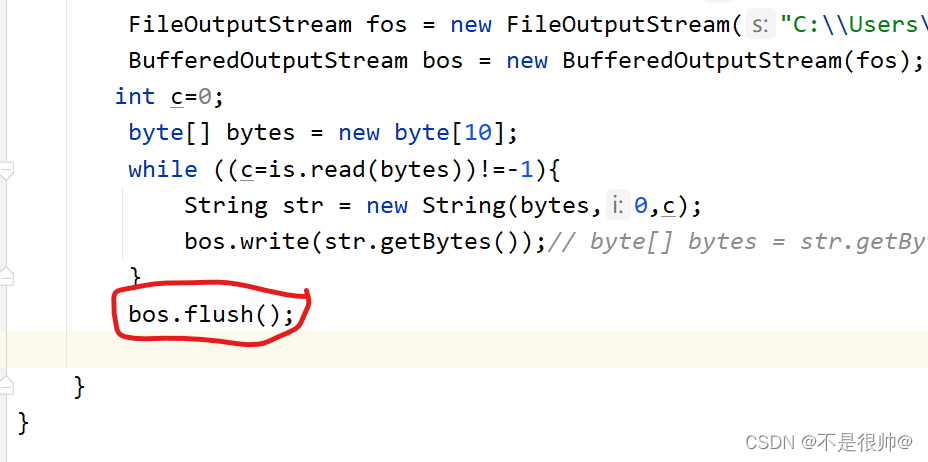
加上 bos.flush 或 is.close 之后,数据才会被加载到文件中
bos.flush(); is.close();

小结:
只有流刷新操作或流关闭操作之后,数据才会被加载
5、对象流:
java.io.ObjectOutputStream和java.io.ObjectInputStream这两个类可以方便的实现对象的序列化(Serialize)和反序列化(Deserialize)。
1.创建一个对象
package demo420.demo03;

import java.io.Serializable;

/**
 * @创建人 xiaoliu
 * @创建时间 2022/4/20
 * @描述
 */
public class Hero implements Serializable {
    private String name;
    private int age;
    private String level;

    public Hero(String name, int age, String level) {
        this.name = name;
        this.age = age;
        this.level = level;
    }

    @Override
    public String toString() {
        return "Hero{" +
                "name='" + name + '\'' +
                ", age=" + age +
                ", level='" + level + '\'' +
                '}';
    }
}
2.创建一个FileOutputStream对象:
  FileOutputStream is = new FileOutputStream("C:\\Users\\Administrator\\Desktop\\demo.txt");
        ObjectOutputStream os = new ObjectOutputStream(is);
        Hero lwh = new Hero("lwh", 2, "3");
        os.writeObject(lwh);
        os.close();
3、序列化结果为:

4、实现反序列化
类要实现Serializable 接口

  FileInputStream is = new FileInputStream("C:\\Users\\Administrator\\Desktop\\demo.txt");
        ObjectInputStream objectInputStream = new ObjectInputStream(is);
        Object o = objectInputStream.readObject();
        System.out.println(o);
        is.close();
结果:

边栏推荐
猜你喜欢

清晰的认识Torchvision(思维导图版)

Kubesphere multi node installation error

The 21st - -- the 30th time

低代码是开发的未来吗?浅谈低代码平台

Boolean value

Supplement - example of integer programming

Implementation of ByteDance service grid based on Hertz framework
As changes the background theme and background picture

(二)动态卷积之Dynamic Convolution

MySQL high version report SQL_ mode=only_ full_ group_ By exception
随机推荐
Implementation of ByteDance service grid based on Hertz framework
training on multiple GPUs pytorch
CCF-201312-1
Rotate string left
Collection! 0 basic open source data visualization platform flyfish large screen development guide
OpenCV(二)——图像基本处理
Clear understanding of torchvision (mind map)
OpenCV(三)——图像分割
The first week of C language learning - the history of C language
201403-1
Implementation of filler creator material editing tool
[paper reading] a CNN transformer hybrid approach for cropclassification using multitemporalmultisensor images
excel skill
Snowflake ID (go Implementation)
Script file ‘D:\programs\anaconda3\Scripts\pip-script.py‘ is not present.
减小PDF文档大小(转载)
AS更换背景主题以及背景图片
google chrome revercecaptcha广告屏蔽
Three level cache of pictures in Android
C语言逆序输出字符串