当前位置:网站首页>Common windbos APIs
Common windbos APIs
2022-06-09 08:31:00 【Tianwen_ Herbert555】
List of articles
Application memory
VirtualAlloc && VirtualAllocEx
#include<iostream>
#include<Windows.h>


int main() {

    //  Minimum allocation 1000
	LPVOID pp = VirtualAlloc(NULL, 1000, MEM_COMMIT, PAGE_EXECUTE_READWRITE);

	// GetCurrentProcess: Get the handle of the current process
	LPVOID pp1 = VirtualAllocEx(GetCurrentProcess(), NULL, 1000, MEM_COMMIT, PAGE_EXECUTE_READWRITE);

    //  Check the error report
	DWORD D = GetLastError();

	return 0;
}
HeapAlloc
#include<iostream>
#include<Windows.h>


int main() {

	// 1. Only allocated 0x10, Mechanism to prevent overflow
	// 2. Generally, there is no executable permission , Modify the permission api To modify heap permissions ,VirtualProtect
	LPVOID p = HeapAlloc(GetProcessHeap(), HEAP_ZERO_MEMORY, 0x10);
	return 0;
}
GlobalAlloc
https://docs.microsoft.com/en-us/windows/win32/api/winbase/nf-winbase-globalalloc
#include<iostream>
#include<Windows.h>


int main() {

	//  The default is GMEM_FIXED, Allocate fixed memory .
	LPVOID p = GlobalAlloc(0, 0x1000);
	return 0;
}
CoTaskMemAlloc
https://docs.microsoft.com/en-us/windows/win32/api/combaseapi/nf-combaseapi-cotaskmemalloc
#include<iostream>
#include<Windows.h>


int main() {

	LPVOID p = CoTaskMemAlloc(0x100);
	return 0;
}
HeapCreate Create a heap
#include<Windows.h>

int main(void) {

	unsigned char buf[] = "\xfc";

	// Create a heap
	HANDLE myHeap = HeapCreate(HEAP_CREATE_ENABLE_EXECUTE, 0, 0);
   	return 0;
}
Move memory
memcpy
Copy bytes between buffers .
#include<iostream>
#include<Windows.h>


int main() {

	char name[256] = "qwertyuiop";
	char name1[256] = "";
	memcpy(name1, name, strlen(name) + 1);
	printf("%s", &name1);
	return 0;
}
copymemory
#include<iostream>
#include<Windows.h>


int main() {

	char name[256] = "qwertyuiop";
	char name1[256] = "";
	CopyMemory(name1, name, strlen(name) + 1);
	printf("%s", &name1);
	return 0;
}
RtlCopyMemory
#include<iostream>
#include<Windows.h>


int main() {

	char name[256] = "qwertyuiop";
	char name1[256] = "";
	RtlCopyMemory(name1, name, strlen(name) + 1);
	printf("%s", &name1);
	return 0;
}
RtlMoveMemory
Copy the contents of the source memory block to the target memory block , It also supports overlapping source memory blocks and target memory blocks .
#include<iostream>
#include<Windows.h>


int main() {

	char name[256] = "qwertyuiop";
	char name1[256] = "";
	RtlMoveMemory(name1, name, strlen(name) + 1);
	printf("%s", &name1);
	return 0;
}
Process thread correlation
Create thread CreateThread
Official documents :https://docs.microsoft.com/en-us/windows/win32/api/processthreadsapi/nf-processthreadsapi-createthread
Create a thread to execute in the virtual address space of the calling process .CreateThread It's a kind of Microsoft in Windows API The function to create a new thread is provided in , This function creates a new thread based on the main thread . After the thread terminates , The thread object is still in the system , Must pass CloseHandle Function to close the thread object .
#include<iostream>
#include<Windows.h>

LPVOID WINAPI test(LPVOID lpThreadParameter) {

	printf("%s", " I'm a child thread !\n");
	return 0;
};

int main() {

	HANDLE hThread;
	DWORD  threadId;
	hThread = CreateThread(NULL, 0, (LPTHREAD_START_ROUTINE)test, 0, 0, &threadId);
	std::cout << " I'm the main thread !\n";
}

Threads can be declared in two ways
// 1.DWORD WINAPI  Function name  (LPVOID lpParam); // A standard format
DWORD WINAPI  Function name  (LPVOID lpParam)
{

    return 0;
}
CreateThread(NULL, 0,  Function name , 0, 0, 0);
// 2.void  Function name ();
//  Use void  Function name () This thread declaration method ,lpStartAddress Need to add LPTHREAD_START_ROUTINE transformation , Such as
void  Function name ()
{

    return;
}
CreateThread(NULL, 0, (LPTHREAD_START_ROUTINE) Function name , 0, 0, 0);
LPTHREAD_START_ROUTINE It's a function , This function points to a function , Notifies the host that a thread has started executing . LPTHREAD_START_ROUTINE Type defines a pointer
WaitForSingleObject
Wait until the specified object is in the signal state or the timeout interval passes .
The main thread waits for the child thread to execute
#include<iostream>
#include<Windows.h>

LPVOID WINAPI test(LPVOID lpThreadParameter) {

	printf("%s", " I'm a child thread !\n");
	return 0;
};

int main() {

	DWORD  threadId;
	HANDLE hThread = CreateThread(NULL, 0, (LPTHREAD_START_ROUTINE)test, 0, 0, &threadId);
	WaitForSingleObject(hThread, WAIT_FAILED);
	std::cout << " I'm the main thread !\n";
}

CreateRemoteThread
Official documents :https://docs.microsoft.com/en-us/windows/win32/api/processthreadsapi/nf-processthreadsapi-createremotethread
#include<iostream>
#include<Windows.h>

LPVOID WINAPI test(LPVOID lpThreadParameter) {

	printf("%s", " I'm a child thread !\n");
	return 0;
};

int main() {

	DWORD  threadId;
	HANDLE hThread = CreateRemoteThread(GetCurrentProcess(), NULL, 0, (LPTHREAD_START_ROUTINE)test, (LPVOID)1, 0, &threadId);
	WaitForSingleObject(hThread, WAIT_FAILED);
	std::cout << " I'm the main thread !\n";
}
OpenProcess
Official documents :https://docs.microsoft.com/en-us/windows/win32/api/processthreadsapi/nf-processthreadsapi-openprocess
Open the existing local process object .
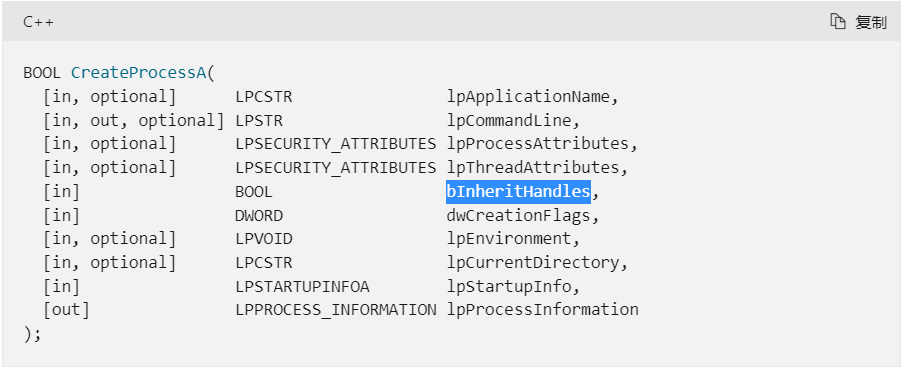
CreateProcessA Allow to inherit , The main process creates the process , Subprocesses can be reused OpenProcess obtain
边栏推荐
- 办公软件系列 之excel应用4
- Boot1.62.0 compilation static library FPIC link problem
- RedLock红锁安全性争论(上)
- 2022-2028 global Supplementary Cementitious Materials (SCM) industry research and trend analysis report
- Differences between belongsto and hasone
- Market Research - current market situation and future development trend of aloe leaf powder in the world and China
- Twitter's latest feature lets businesses preview upcoming products and remind customers to go shopping
- 【TeXstudio】【3】较为完整的论文排版模板与bib文件引用方法
- Market Research - current situation and future development trend of global and Chinese wall mounted extraction arm Market
- SQL: 重新格式化部门表 (行转列问题:Group by + 聚合函数)
猜你喜欢

EDA开源仿真工具verilator入门1:安装和测试

Go questions / knowledge gathering - 2

Self made compiler learning 2: compilation process

【天线】【2】一些名词和简单概念的解释,仍然

Openinfra summit 2022 𞓜 Android cloud users stand out and are shortlisted for the super user Award

85.(leaflet之家)leaflet军事标绘-直线箭头绘制

Quarkus实战学习一

Open source EDA software yosys for integrated circuit design 1: tool installation

84.1% of the parents surveyed felt that there were more parents around who liked to coax their children with electronic products
![[reading point paper] ghostnet: more features from cheapoperations convolution operation is still expensive, and feature graph redundancy can be obtained by linear transformation](/img/9c/24efb72fadf0b3b69f2bb3908e6521.png)
[reading point paper] ghostnet: more features from cheapoperations convolution operation is still expensive, and feature graph redundancy can be obtained by linear transformation
随机推荐
Kibana: introduction to kibana (I)
Elk+filebeat deployment and installation
MySQL查询数据库所有表名及其注释
Leetcode: find the number of recent palindromes
Implementation of WTM based on NETCORE framework
配置RMAN备份的环境_配置备份优化(BACKUP OPTIMIZATION)
Alibaba cloud ack pull free enterprise ACR image
Lambda表达式
阿里云ack免密拉取企业版acr镜像
Market Research - current situation and future development trend of global and Chinese sunfish feed market
ELK+Filebeat 部署安装
P3954 [noip2017 popularization group] results
2022-2028 global Supplementary Cementitious Materials (SCM) industry research and trend analysis report
Boot1.62.0 compilation static library FPIC link problem
About Eigendecomposition
RMAN备份概念_一致的和不一致的RMAN备份
SQL: 重新格式化部门表 (行转列问题:Group by + 聚合函数)
OpenInfra Summit 2022 | 华云数据用户再度入围超级用户大奖
RMAN备份概念_关于RMAN备份的多个拷贝
Understand the difference between left join, right join and join