当前位置:网站首页>Istio1.12: installation and quick start
Istio1.12: installation and quick start
2022-07-24 15:18:00 【InfoQ】
Preface

download Istio
0. Istio Support status of version
1. download Istio Installation package
$ curl -L https://istio.io/downloadIstio | sh -
curl -L https://istio.io/downloadIstio | ISTIO_VERSION=1.12.0 TARGET_ARCH=x86_64 sh -

#  perhaps

wget https://github.com/istio/istio/releases/download/1.12.0/istio-1.12.0-linux-amd64.tar.gz
tar zxvf istio-1.12.0-linux-amd64.tar.gz -C /usr/local/
2. Get into Istio The installation directory
istio-1.12.0$ cd /usr/local/istio-1.12.0/
samples/Sample applications in the directory
bin/In the catalogistioctlClient binaries .
3. Add environment variables PATH
istioctl$ export PATH=$PWD/bin:$PATH
# Or set environment variables
echo 'export ISTIO_HOME=/usr/local/istio-1.14.1' >> /etc/profile
echo 'export PATH=$PATH:$ISTIO_HOME/bin' >> /etc/profile
# Load variables
source /etc/profile
4. Verification effect ( View version )
istioctl version

* istio-1.12.0 istioctl version
no running Istio pods in "istio-system"
1.12.0
You have new mail.
install Istio
- For this installation , We use
demoConfiguration combination. It was chosen because it contains a set of features designed for testing , There are also configuration combinations for production or performance testing .
- If your platform has a configuration combination provided by the supplier , such as :Openshift, Replace... In the following command
demoConfiguration item . For more details, please refer to yourPlatform description
 istioctl install --set profile=demo -y
  Istio core installed
  Istiod installed
  Egress gateways installed
  Ingress gateways installed
  Installation complete
 Making this installation the default for injection and validation.

 Thank you for installing Istio 1.12. Please take a few minutes to tell us about your install/upgrade experience! https://forms.gle/FegQbc9UvePd4Z9z7
 You have new mail.
- Label the namespace , instructions Istio When deploying applications , Automatic injection Envoy Side car agent :
 $ kubectl label namespace default istio-injection=enabled
 namespace/default labeled
Deploy the sample application
- Deploy
BookinfoThe sample application:
 $ kubectl apply -f samples/bookinfo/platform/kube/bookinfo.yaml
 service/details created
 serviceaccount/bookinfo-details created
 deployment.apps/details-v1 created
 service/ratings created
 serviceaccount/bookinfo-ratings created
 deployment.apps/ratings-v1 created
 service/reviews created
 serviceaccount/bookinfo-reviews created
 deployment.apps/reviews-v1 created
 deployment.apps/reviews-v2 created
 deployment.apps/reviews-v3 created
 service/productpage created
 serviceaccount/bookinfo-productpage created
 deployment.apps/productpage-v1 created
- The application will start soon . When each Pod When ready ,Istio Side car agents will be deployed with them .
 $ kubectl get services
 NAME TYPE CLUSTER-IP EXTERNAL-IP PORT(S) AGE
 details ClusterIP 10.0.0.212 <none> 9080/TCP 29s
 kubernetes ClusterIP 10.0.0.1 <none> 443/TCP 25m
 productpage ClusterIP 10.0.0.57 <none> 9080/TCP 28s
 ratings ClusterIP 10.0.0.33 <none> 9080/TCP 29s
 reviews ClusterIP 10.0.0.28 <none> 9080/TCP 29s
 $ kubectl get pods
 NAME READY STATUS RESTARTS AGE
 details-v1-558b8b4b76-2llld 2/2 Running 0 2m41s
 productpage-v1-6987489c74-lpkgl 2/2 Running 0 2m40s
 ratings-v1-7dc98c7588-vzftc 2/2 Running 0 2m41s
 reviews-v1-7f99cc4496-gdxfn 2/2 Running 0 2m41s
 reviews-v2-7d79d5bd5d-8zzqd 2/2 Running 0 2m41s
 reviews-v3-7dbcdcbc56-m8dph 2/2 Running 0 2m41s
2/2Running- Verify that all aspects work correctly . Run the following command , By checking the page title returned , To verify that the application is running in the cluster , And has provided web services :
$ kubectl exec "$(kubectl get pod -l app=ratings -o jsonpath='{.items[0].metadata.name}')" -c ratings -- curl -s productpage:9080/productpage | grep -o "<title>.*</title>"
<title>Simple Bookstore App</title>
Open up applications
- Associate an application to Istio gateway :
 $ kubectl apply -f samples/bookinfo/networking/bookinfo-gateway.yaml
 gateway.networking.istio.io/bookinfo-gateway created
 virtualservice.networking.istio.io/bookinfo created
- Make sure there is no problem with the configuration file :
 $ istioctl analyze
  No validation issues found when analyzing namespace: default.
Confirm inbound IP And port
INGRESS_HOSTINGRESS_PORT$ export INGRESS_PORT=$(kubectl -n istio-system get service istio-ingressgateway -o jsonpath='{.spec.ports[?(@.name=="http2")].nodePort}')
$ export SECURE_INGRESS_PORT=$(kubectl -n istio-system get service istio-ingressgateway -o jsonpath='{.spec.ports[?(@.name=="https")].nodePort}')
$ echo "$INGRESS_PORT"
32194
$ echo "$SECURE_INGRESS_PORT"
31632
$ export INGRESS_HOST=$(minikube ip)
$ echo "$INGRESS_HOST"
192.168.4.102
$ minikube tunnel
- Set the environment variable
GATEWAY_URL:
$ export GATEWAY_URL=$INGRESS_HOST:$INGRESS_PORT
- Make sure IP The address and port are successfully assigned to the environment variable :
 $ echo "$GATEWAY_URL"
 192.168.99.100:32194
Verify external access
- Run the following command , obtain Bookinfo The external access address of the application .
$ echo "http://$GATEWAY_URL/productpage"
- Copy and paste the output address of the above command into the browser and visit , confirm Bookinfo Whether the product page of the application can be opened .
Look at the dashboard
- installKiali And other plug-ins, Wait for the deployment to complete .
 $ kubectl apply -f samples/addons
 $ kubectl rollout status deployment/kiali -n istio-system
 Waiting for deployment "kiali" rollout to finish: 0 of 1 updated replicas are available...
 deployment "kiali" successfully rolled out
- visit Kiali instrument panel .
$ istioctl dashboard kiali
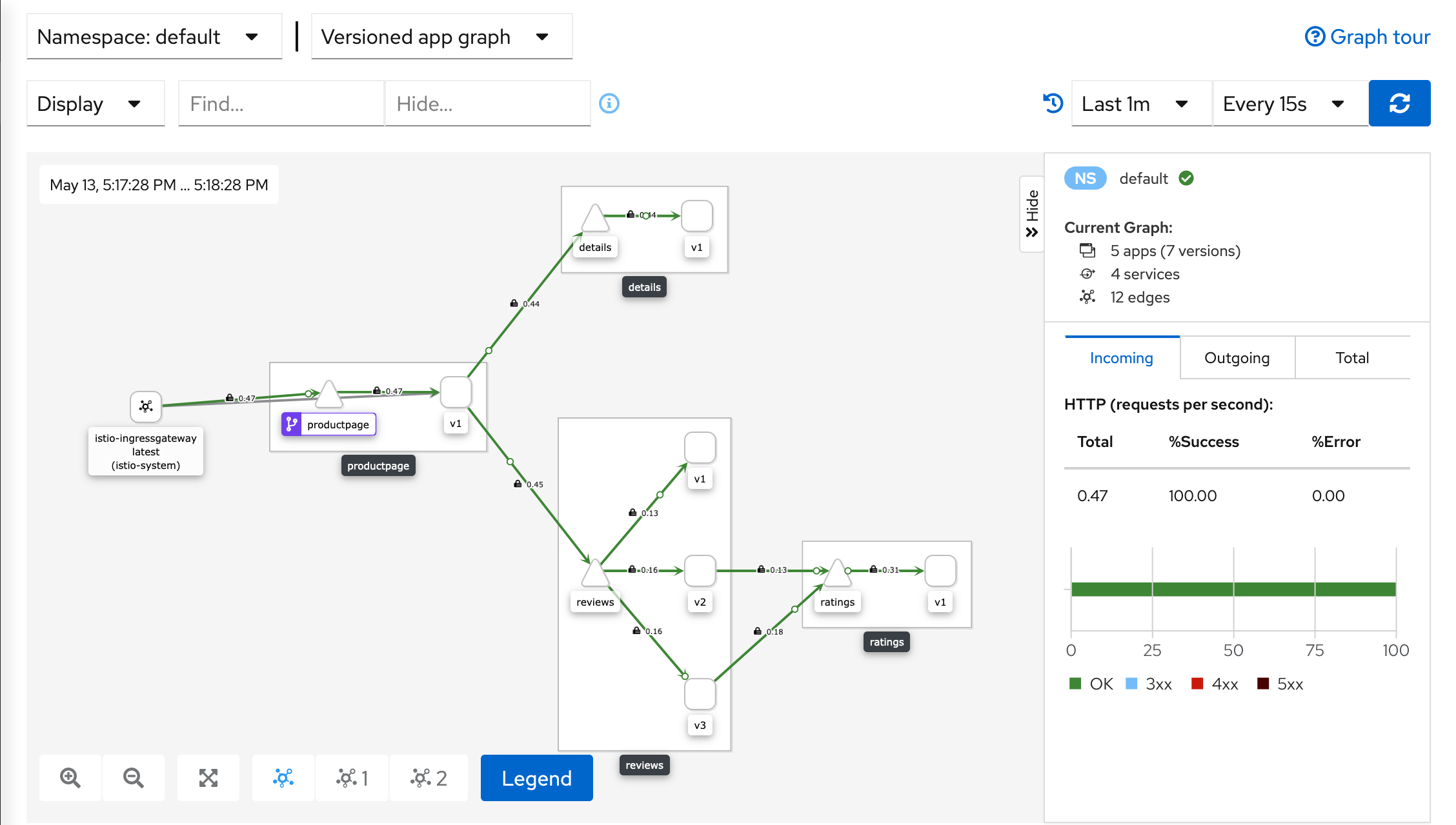
- On the left side of the navigation menu , choiceGraph, And then inNamespaceIn the drop-down list , choicedefault.
- Kiali The dashboard shows an overview of the grid 、 as well as
BookinfoThe relationship between the various services of the sample application . It also provides filters to visualize the flow of traffic .
- Kiali Dashboard
uninstall Istio
$ istioctl x uninstall --purge
--purge$ istioctl x uninstall <your original installation options>
$ istioctl manifest generate <your original installation options> | kubectl delete -f -
istio-system$ kubectl delete namespace istio-system
Reference link
边栏推荐
- Various searches (⊙▽⊙) consolidate the chapter of promotion
- Explain the edge cloud in simple terms | 2. architecture
- DS binary tree - parent and child nodes of binary tree
- Conflict resolution of onblur and onchange
- 《Route planning method for UAV in unknown environment based on improved SAS algorithm》翻译
- Intelligent operation and maintenance scenario analysis: how to detect abnormal business system status through exception detection
- Property datasource is required exception handling [idea]
- dataframe 分组后排序的前n行 nlargest argmax idmax tail !!!!
- 【Flutter -- 布局】流式布局(Flow和Wrap)
- [bug solution] error in installing pycocotools in win10
猜你喜欢

zabbix管理员忘记登录密码

Problem handling of repeated restart during Siemens botu installation
26. Code implementation of file using disk

Kotlin class and inheritance

Vector introduction and underlying principle

Isprs2018/ cloud detection: cloud/shadow detection based on spectral indexes for multi/hyp multi / hyperspectral optical remote sensing imager cloud / shadow detection

Spark Learning Notes (III) -- basic knowledge of spark core

Outlook tutorial, how to create tasks and to DOS in outlook?
Istio1.12:安装和快速入门

Leetcode high frequency question 56. merge intervals, merge overlapping intervals into one interval, including all intervals
随机推荐
Performance test - Test Execution
Spark: get the access volume of each time period in the log (entry level - simple implementation)
Which securities company is good at opening an account with flush? Excuse me, is it safe to open an account with mobile phone or stock?
Outlook tutorial, how to set rules in outlook?
Rest style
[bug solution] error in installing pycocotools in win10
云开发单机版图片九宫格流量主源码
Strongly connected component
Sword finger offer II 001. integer division
kubernetes多网卡方案之Multus_CNI部署和基本使用
Performance test - analyze requirements
Decrypt "sea Lotus" organization (domain control detection and defense)
2022 robocom world robot developer competition - undergraduate group (provincial competition) -- fifth question tree and bipartite diagram (completed)
Kotlin类与继承
Spark: specify the date and output the log of the corresponding date (entry level - simple implementation)
Under multi data source configuration, solve org.apache.ibatis.binding Bindingexception: invalid bound statement (not found) problem
打假Yolov7的精度,不是所有的论文都是真实可信
新手第一次怎么买股票 哪家证券公司开户最好最安全
[tkinter美化] 脱离系统样式的窗口(三系统通用)
[USENIX atc'22] an efficient distributed training framework whale that supports the super large-scale model of heterogeneous GPU clusters