当前位置:网站首页>【深入理解TcaplusDB技术】一键安装Tmonitor后台
【深入理解TcaplusDB技术】一键安装Tmonitor后台
2022-06-21 20:28:00 【数据库大师】
一键安装脚本修改
Tmonitor一键安装脚本默认是为TcaplusDB业务编写的,对于其他业务,安装步骤同"Tmonitor单机安装指引",安装前要对以下脚本进行修改:
1.修改init_some_tables.sql。

\2. 修改脚本的gen_dcsvr_conf()函数。
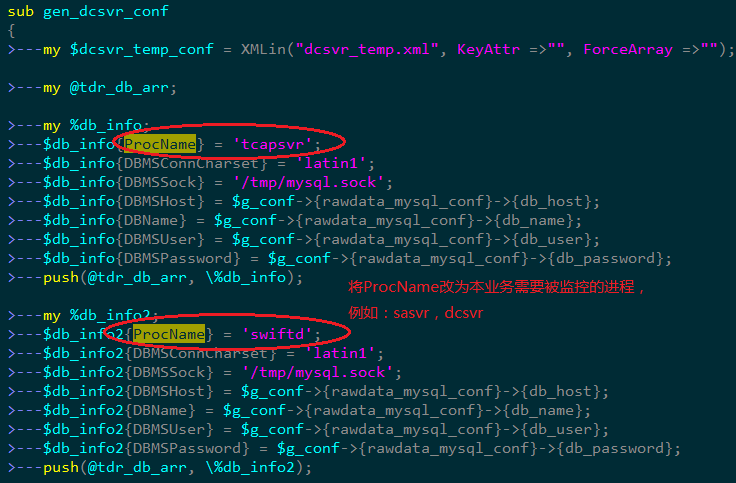
两个Tmonitor互相监控的配置实例:

第二个监控Tmonitor2安装配置
A.修改sql语句、配置文件和执行安装脚本
- scp tmonitor_install_2.2.5sp3_130243.tar.gz /data
- tar xf tmonitor_install_2.2.5sp3_130243.tar.gz
- Vim init_some_tables.sql

- mysql -h10.59.41.57 -uroot -ptcaplus#2003
- create database tmonitor2_db;use tmonitor2_db;
- source create_tables.sql
- source init_some_tables.sql
- Vim tmonitor_install.pl

- 修改tmonitor_conf.xml配置文件,为执行脚本安装做准备


- 最后执行以下命令安装tmonitor2,有可能出现错误,解决方法如下
$ ./tmonitor_install.pl install
Can’t locate XML/Simple.pm in @INC (@INC contains: /usr/local/lib64/perl5 /usr/local/share/perl5 /usr/lib64/perl5/vendor_perl /usr/share/perl5/vendor_perl /usr/lib64/perl5 /usr/share/perl5 .) at ./tmonitor_install.pl line 10.
BEGIN failed–compilation aborted at ./tmonitor_install.pl line 10.
| Transaction Check Error:file /usr/share/man/man3/XML::SAX::Base.3pm.gz conflicts between attempted installs of perl-XML-SAX-0.96-7.el6.noarch and perl-XML-SAX-Base-1.04-1.el6.rf.noarchfile /usr/share/man/man3/XML::SAX::Exception.3pm.gz conflicts between attempted installs of perl-XML-SAX-0.96-7.el6.noarch and perl-XML-SAX-Base-1.04-1.el6.rf.noarchError Summary------------- | |
|---|---|
把rpmforge的关闭(enabled=0,位于/etc/yum.repos.d/rpmforge.repo),
再次安装,成功!搞定!
yum install -y perl-XML*
B.将Tmonitor2注册为一个监控服务器


C.将Tmonitor2也注册为一个业务,可以被Tmonitor1监控,实现互相监控

**D.**脚本安装后的手工起进程步骤
- ./tmonitor_install.pl install 脚本安装后需要手动启动tagent、tcenterd、tcmcenter、dc_tconnd、dcsvr、sasvr等进程(由于一些配置需要改动)
- Tagent:
 修改后重启
修改后重启 - Tcenterd:
 修改后重启
修改后重启 - Tcmcenter: 需要先修改host.xml里的准确IP地址,然后重启
- Dc_tconnd:在以上几个进程启动成功后,进入tcmconsole里start
- Dcsvr:使用以下命令修改dcsvr.xml的配置,然后启动进程
sed -i ‘/DBMSHost/c 10.59.41.57’ dcsvr.xml
sed -i ‘/DBMSPassword/c XXXXX’ dcsvr.xml
sed -i ‘/DBName/c tmonitor2_db’ dcsvr.xml <----------填写A-5建立的库名
sed -i ‘/DBMSUser/c tmonitor’ dcsvr.xml
7. Sasvr:需要修改sasvr.xml里面连的db(修改为前端页面使用的db,即tmonitor_center_db)和weburl
E. Tmonitor2安装完毕
第一个监控Tmonitor1安装配置
负责监控Tcaplus集群的Tmonitor1需要为自己添加dc_tconnd和dcsvr进程上报自身的状态,方能给tmonitor2监控。以下是配置步骤:
A. 准备工作
cd ~/tmonitor_install
cp -rp dc_tconnd_1 dc_tconnd_9
cp -rp dcsvr_1 dcsvr_9
B.为Tmonitor1建库建表
Vim init_some_tables.sql
mysql -h10.59.41.57 -uroot -ptcaplus#2003
create database tmonitor1_db;
Use tmonitor1_db;
source create_tables.sql
source init_some_tables.sql
C.配置dc_tconnd
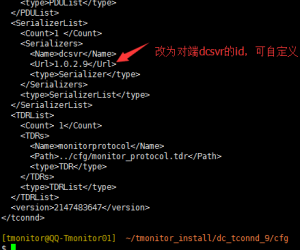
1.修改dc_tconnd_9的配置文件xml

2.修改dc_tconnd_9的日志配置文件tconnd_log.xml

3.修改dc_tconnd_9的进程启动、停止脚本里的id

**D.**配置dcsvr_9
1.修改dcsvr_9的配置文件xml,确保存在sasvr和dcsvr两个进程项(可修改其他的进程项,因为这里只需要用到sasvr和dcsvr)

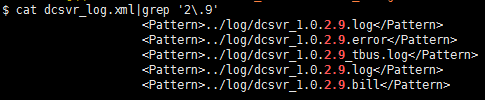
2.修改dcsvr_9的日志配置文件dcsvr_log.xml(此处进程ID得和C-1的修改值一致)
3.修改dcsvr_9的进程启动、停止脚本里的id(此处进程ID得和C-1的修改值一致)

**E.**将dc_tconnd_9和dcsvr_9添加到tcm管理,并为他们下发tbus通道,最后启动dc_tconnd_9和dcsvr_9
1.添加进程信息到proc_deploy.xml
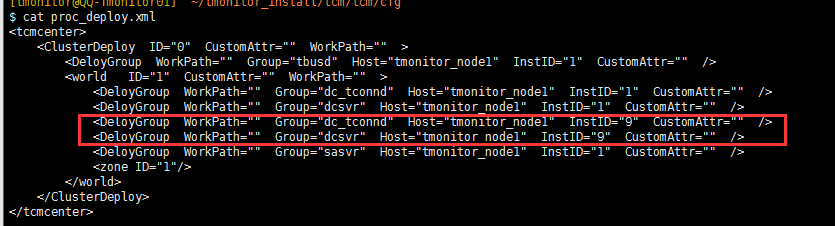
2.重启tcmcenter
3.从tcmconsole里下发tbus通道:refreshbuscfg ...
4.到各自的bin目录下启动进程:./start_tconnd.sh; ./start_dcsvr.sh
**F.**为受控Tmonitor1进程做配置、采集策略下发、告警策略配置
1.Tmonitor1的web基础配置

2.采集策略下发

3.采集策略下发后观察几分钟,如下图为正常

4.添加默认告警接收者和配置告警策略
TcaplusDB是腾讯出品的分布式NoSQL数据库,存储和调度的代码完全自研。具备缓存+落地融合架构、PB级存储、毫秒级时延、无损水平扩展和复杂数据结构等特性。同时具备丰富的生态、便捷的迁移、极低的运维成本和五个九高可用等特点。客户覆盖游戏、互联网、政务、金融、制造和物联网等领域。

边栏推荐
- 从-1开始实现一个中间件
- 挖财赠送的证券账户安全吗?可以开户吗?
- How C # aboutbox displays its defined interface
- opencvsharp阈值分割threshold函数的ThresholdTypes
- Enterprise data leakage prevention solution sharing
- I2C [2] - why does IIC need to use open drain output and pull-up resistor bug
- Supplier management system of digital commerce cloud Paper Group: promote enterprise information construction and comprehensively improve supplier management efficiency
- Pal2Nal|如何在命令行下运行Pal2Nal
- 技术分享 | MySQL:caching_sha2_password 快速问答
- Fu · new life, chain · future! The conference on enabling innovation and development of urban chain technology industry was held grandly
猜你喜欢
Using streamapi assertion combination and local cache for fuzzy query (nearly 1000 times more efficient than MySQL)

New energy industry commercial procurement collaboration system: enable new energy industry procurement business and enhance industrial collaboration

How to uninstall a package installed with the CONDA command
如何卸载用conda命令安装的包

Guangdong CDC reminds: the summer vacation is coming, so the returned college students can "return home" safely

Paml| Shengxin software for calculating dn/ds value
秒懂微服务

leetcode刷题:顺丰科技智慧物流校园技术挑战赛

先进封装,一个大周期的开始——“迎风国潮”半导体设备研讨会

阿里云容器服务负责人易立:云原生如何解企业降本提效难题?
随机推荐
基于OpenCVSharp的001新建工程项目
Prototype extension: implementing object inheritance
棋牌类游戏
小程序怎样关联微信小程序二维码,实现二码合一聚合
线粒体基因组常见缩写与术语
mafft|多序列比对工具
高项-立项管理
文件I/O
RTX3090 与pytorch版本对应关系
Pal2Nal|如何在命令行下运行Pal2Nal
一文彻底搞懂MySQL基础:B树和B+树的区别
Implement a middleware from -1
ADT Spec RI AF CheckRep Safety from Rep Exposure
GDB调试实战(8)给程序传递启动参数
博图仿真HMI与真实1200PLC通讯失败
Worthington木瓜蛋白酶特异性和应用
传承百年经典的瑞吉管家静待您的优雅旅程再次开启
Ruiji housekeeper, a century old classic, is waiting for your elegant journey to start again
Does the whole house smart home brand "zhiting technology" have an experience center?
利用tRNAscan-SE做tRNA分析