当前位置:网站首页>.net中,日志组件 Nlog,SerialLog, Log4Net的用法
.net中,日志组件 Nlog,SerialLog, Log4Net的用法
2022-06-26 10:13:00 【罗迪尼亚的熔岩】
源码:https://download.csdn.net/download/helldoger/85778816
以.NET6 Winform为例
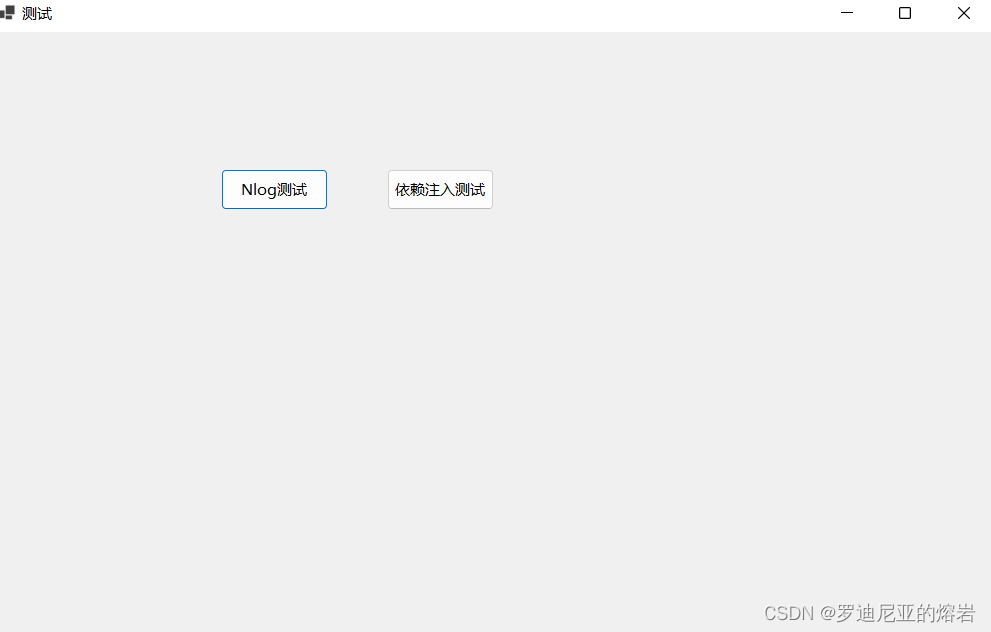
<Project Sdk="Microsoft.NET.Sdk">

  <PropertyGroup>
    <OutputType>WinExe</OutputType>
    <TargetFramework>net6.0-windows</TargetFramework>
    <Nullable>enable</Nullable>
    <UseWindowsForms>true</UseWindowsForms>
    <ImplicitUsings>enable</ImplicitUsings>
  </PropertyGroup>

    <ItemGroup>
	    <PackageReference Include="Microsoft.Extensions.Logging" Version="6.0.0" />
	    <PackageReference Include="Microsoft.Extensions.Logging.Console" Version="6.0.0" />
	    <PackageReference Include="Microsoft.Extensions.Logging.EventLog" Version="6.0.0" />
	    <PackageReference Include="NLog.Extensions.Logging" Version="5.0.1" />
    </ItemGroup>

		<ItemGroup>
		<PackageReference Include="Microsoft.EntityFrameworkCore" Version="6.0.3" />
		<PackageReference Include="Microsoft.EntityFrameworkCore.Abstractions" Version="6.0.3" />
		<PackageReference Include="Microsoft.EntityFrameworkCore.Design" Version="6.0.3">
			<PrivateAssets>all</PrivateAssets>
			<IncludeAssets>runtime; build; native; contentfiles; analyzers; buildtransitive</IncludeAssets>
		</PackageReference>
		<PackageReference Include="Microsoft.EntityFrameworkCore.Relational" Version="6.0.3" />
		<PackageReference Include="Microsoft.EntityFrameworkCore.Tools" Version="6.0.3">
			<PrivateAssets>all</PrivateAssets>
			<IncludeAssets>runtime; build; native; contentfiles; analyzers; buildtransitive</IncludeAssets>
		</PackageReference>
		<PackageReference Include="Microsoft.Extensions.Configuration" Version="6.0.1" />
		<PackageReference Include="Microsoft.Extensions.Configuration.Binder" Version="6.0.0" />
		<PackageReference Include="Microsoft.Extensions.Configuration.Json" Version="6.0.0" />
		<PackageReference Include="Microsoft.Extensions.Options" Version="6.0.0" />
		<PackageReference Include="Newtonsoft.Json" Version="13.0.1" />
		<PackageReference Include="NModbus4.NetCore" Version="2.0.1" />
		<PackageReference Include="Microsoft.EntityFrameworkCore.Sqlite" Version="6.0.3" />
		<PackageReference Include="Microsoft.EntityFrameworkCore.SqlServer" Version="6.0.3" />
		<PackageReference Include="Pomelo.EntityFrameworkCore.MySql" Version="6.0.1" />
	</ItemGroup>

    <ItemGroup>
      <None Update="DbCfg.json">
        <CopyToOutputDirectory>PreserveNewest</CopyToOutputDirectory>
      </None>
      <None Update="nlog.config">
        <CopyToOutputDirectory>PreserveNewest</CopyToOutputDirectory>
      </None>
    </ItemGroup>

</Project>
<?xml version="1.0" encoding="utf-8" ?>
<nlog xmlns="http://www.nlog-project.org/schemas/NLog.xsd" xmlns:xsi="http://www.w3.org/2001/XMLSchema-instance" autoReload="true">

	<targets>
		<target xsi:type="File" name="defaultFile" fileName="logs/log-${shortdate}.log" layout="${date}|${level:uppercase=true}|${logger}|${message} ${exception:format=Tostring}" />
		<target xsi:type="File" name="sysServicesFile" archiveAboveSize="1000000" maxArchiveFiles="3" fileName="logs/sysServices-${shortdate}.log" layout="${date}|${level:uppercase=true}|${logger}|${message} ${exception:format=Tostring}" />
		<target xsi:type="ColoredConsole" name="targetConsole" layout="${date}|${level:uppercase=true}|${logger}|${message} ${exception:format=Tostring}" />
	</targets>

	<rules>
		<logger name="*" minlevel="Warn" maxlevel="Fatal" writeTo="targetConsole" />
		<logger name="SystemServices.*" minlevel="Trace" writeTo="sysServicesFile" final="true" />
		<logger name="*" minlevel="Trace" writeTo="defaultFile" />
	</rules>
</nlog>
{

  "ConnectionStrings": {

    "MSSQConnectionString": "Data Source=(localdb)\\ProjectModels;Initial Catalog=LogDemon;Integrated Security=True;Connect Timeout=30;Encrypt=False;TrustServerCertificate=False;ApplicationIntent=ReadWrite;MultiSubnetFailover=False",
    "SqliteConnectionString": "Data Source=D:\\Db\\database.db",
    "MySQLConnectionString": "server=127.0.0.1; database=OneToMany; uid=root; pwd=123456;"
  }
}
实体类:
using System;
using System.Collections.Generic;
using System.Linq;
using System.Text;
using System.Threading.Tasks;

namespace NlogFromDemon.Entities
{

    public class ActualData
    {

        public int Id {
     get; set; }
        public string? Name {
     get; set; }
        public string? Value {
     get; set; }
        public DateTime? InsertTime {
     get; set; }
    }
}
using System;
using System.Collections.Generic;
using System.Linq;
using System.Text;
using System.Threading.Tasks;

namespace NlogFromDemon.Entities
{

    public class Users
    {

        public int Id {
     get; set; }
        public string? Name {
     get; set; }
        public string? Password {
     get; set; }
        public string? ClientId {
     get; set; }
    }
}
using System;
using System.Collections.Generic;
using System.Linq;
using System.Text;
using System.Threading.Tasks;

namespace NlogFromDemon.Entities
{

    public class Logs
    {

        public int Id {
     get; set; }
        public string? MachineName {
     get; set; }
        public DateTime? Logged {
     get; set; }
        public string? Level {
     get; set; }
        public string? Message {
     get; set; }
        public string? Logger {
     get; set; }
        public string? Properties {
     get; set; }
        public string? Callsite {
     get; set; }
        public string? Exception {
     get; set; }
    }
}
using Microsoft.EntityFrameworkCore;
using Microsoft.Extensions.Configuration;

namespace NlogFromDemon.Entities
{

    public class MyDbContext : DbContext
    {

        public DbSet<ActualData> ActualDatas {
     get; set; }
        public DbSet<Logs> Logs {
     get; set; }
        public DbSet<Users> Users {
     get; set; }

        //private ConfigurationBuilder cfgBuilder = new ConfigurationBuilder();

        //依赖注入必须
        public MyDbContext(DbContextOptions<MyDbContext> options) : base(options)
        {

        }
        public MyDbContext()
        {


        }

        //protected override void OnConfiguring(DbContextOptionsBuilder optionsBuilder)
        //{

        // base.OnConfiguring(optionsBuilder);
        // cfgBuilder.AddJsonFile("DbCfg.json", optional: true, reloadOnChange: true);
        // IConfigurationRoot configRoot = cfgBuilder.Build();
        // //string connString = configRoot.GetSection("ConnectionStrings:SqliteConnectionString").Value;
        // //optionsBuilder.UseSqlite(connString);
        // string connString = configRoot.GetSection("ConnectionStrings:SqliteConnectionString").Value;
        // optionsBuilder.UseSqlite(connString);
        //}

        protected override void OnModelCreating(ModelBuilder modelBuilder)
        {

            base.OnModelCreating(modelBuilder);
            modelBuilder.ApplyConfigurationsFromAssembly(this.GetType().Assembly);
        }
    }

}
using Microsoft.EntityFrameworkCore;
using Microsoft.EntityFrameworkCore.Design;
using Microsoft.Extensions.Configuration;

namespace NlogFromDemon.Entities
{

	class MyDesignTimeDbContextFactory : IDesignTimeDbContextFactory<MyDbContext>
	{

		private ConfigurationBuilder cfgBuilder = new ConfigurationBuilder();
		public MyDbContext CreateDbContext(string[] args)
		{

			DbContextOptionsBuilder<MyDbContext> builder = new();

			cfgBuilder.AddJsonFile("DbCfg.json", optional: true, reloadOnChange: true);
			IConfigurationRoot configRoot = cfgBuilder.Build();
			string connString = configRoot.GetSection("ConnectionStrings:SqliteConnectionString").Value;
			builder.UseSqlite(connString);
			return new MyDbContext(builder.Options);
		}
	}
}
using System;
using System.Collections.Generic;
using System.Linq;
using System.Text;
using System.Threading.Tasks;

namespace NlogFromDemon.Entities.Respository
{

    public class Respository : IRespository
    {

        private MyDbContext db;

        public Respository(MyDbContext db)
        {

            this.db = db;
        }

        public void InsertActualData(ActualData actualData)
        {

            db.ActualDatas.Add(actualData);
            db.SaveChanges();
        }


    }
}
using System;
using System.Collections.Generic;
using System.Linq;
using System.Text;
using System.Threading.Tasks;

namespace NlogFromDemon.Entities.Respository
{

    public interface IRespository
    {

        void InsertActualData(ActualData actualData);
    }
}
测试日志:
using System;
using System.Collections.Generic;
using System.Linq;
using System.Text;
using System.Threading.Tasks;

namespace NlogFromDemon
{

    public class Test1
    {

        private readonly ILogger<Test1> logger;
        public Test1(ILogger<Test1> logger) //ILogger<Test1> 的参数类型用当前类的类名
        {

            this.logger = logger;
        }

        public void Test()
        {

            logger.LogDebug("开始执行数据库同步"); //级别太低
            logger.LogDebug("连接数据库成功");
            logger.LogWarning("查找数失败,重试1");
            logger.LogWarning("查找数失败,重试2");
            logger.LogError("最终查找数失败");
            try
            {

                File.ReadAllText("A:/1.txt");
                logger.LogDebug("读取文件成功!");
            }
            catch (Exception ex)
            {

                logger.LogError(ex.ToString(), "读取文件失败");
            }
        }
    }
}
using System;
using System.Collections.Generic;
using System.Linq;
using System.Text;
using System.Threading.Tasks;

namespace SystemServices
{

    public class Test2
    {

        private readonly ILogger<Test2> logger;
        public Test2(ILogger<Test2> logger) //ILogger<Test1> 的参数类型用当前类的类名
        {

            this.logger = logger;
        }

        public void Test()
        {

            logger.LogDebug("开始执行FTP同步"); //级别太低
            logger.LogDebug("连接FTP成功");
            logger.LogWarning("查找数失败,重试1");
            logger.LogWarning("查找数失败,重试2");
            logger.LogError("最终查找数失败");
        }
    }
}
依赖注入:
global using Microsoft.Extensions.DependencyInjection;
global using Microsoft.Extensions.Logging;
global using NLog.Extensions.Logging;
using Microsoft.EntityFrameworkCore;
using Microsoft.Extensions.Configuration;
using NlogFromDemon.Entities;
using NlogFromDemon.Entities.Respository;
using SystemServices;

namespace NlogFromDemon
{

    internal static class Program
    {

        /// <summary>
        /// The main entry point for the application.
        /// </summary>
        [STAThread]
        static void Main()
        {

            // To customize application configuration such as set high DPI settings or default font,
            // see https://aka.ms/applicationconfiguration.
            ApplicationConfiguration.Initialize();

            ServiceCollection services = new ServiceCollection();
            ConfigureServices(services);

            //先用DI容器生成 serviceProvider, 然后通过 serviceProvider
            //获取Main Form的注册实例
            var sp = services.BuildServiceProvider();
            //Test1 test1 = sp.GetRequiredService<Test1>();
            //test1.Test();//Test1类中Test方法
            //Test2 test2 = sp.GetRequiredService<Test2>();

            var frmMain = sp.GetRequiredService<FrmMain>();

            Application.Run(frmMain);
            //Application.Run(new FrmMain());


        }

        private static void ConfigureServices(ServiceCollection services)
        {

            ConfigurationBuilder cfgBuilder = new ConfigurationBuilder();
            services.AddLogging(logBuilder =>
            {

                //logBuilder.AddConsole();
                //logBuilder.AddEventLog();//windows系统日志
                logBuilder.AddNLog();
                logBuilder.SetMinimumLevel(LogLevel.Trace); //LogLevel.Trace最低级别
            });
            services.AddScoped<Test1>();
            services.AddScoped<Test2>();
            services.AddScoped<FrmMain>();
            services.AddDbContext<MyDbContext>(opt =>
            {

                cfgBuilder.AddJsonFile("DbCfg.json", optional: true, reloadOnChange: true);
                IConfigurationRoot configRoot = cfgBuilder.Build();
                string connString = configRoot.GetSection("ConnectionStrings:SqliteConnectionString").Value;
                opt.UseSqlite(connString);
            });
            services.AddScoped<IRespository, Respository>();

            /* AddTransient:每次请求,都获取一个新的实例。即使同一个请求获取多次也会是不同的实例 AddScoped:每次请求,都获取一个新的实例。同一个请求获取多次会得到相同的实例 AddSingleton:每次都获取同一个实例 */
        }
    }
}
页面 :
using NlogFromDemon.Entities;
using NlogFromDemon.Entities.Respository;
using SystemServices;

namespace NlogFromDemon
{

    public partial class FrmMain : Form
    {

        public FrmMain(ILogger<FrmMain> logger, Test1 test1 = null, Test2 test2 = null, IRespository respository = null)
        {

            InitializeComponent();
            this.logger = logger;
            this.test1 = test1;
            this.test2 = test2;
            this.respository = respository;
        }


        private readonly ILogger logger;
        private readonly Test1 test1;
        private readonly Test2 test2;
        private readonly IRespository respository;

        CancellationTokenSource cts = new CancellationTokenSource();

        private void btnTestLog_Click(object sender, EventArgs e)
        {

            Task.Run(() =>
            {

                for (int i = 0; i < 1000; i++)
                {

                    test1.Test();
                    test2.Test();
                }
            });
        }

        private void btnIocTest_Click(object sender, EventArgs e)
        {

            respository.InsertActualData(new ActualData {
     InsertTime = DateTime.Now, Name = "测试", Value = "测试Value" });
        }
    }
}
SerialLog结构化文本输出:
global using Microsoft.Extensions.DependencyInjection;
global using Microsoft.Extensions.Logging;
using SerialLogDemon;
using Serilog;
using Serilog.Formatting.Json;

ServiceCollection services = new ServiceCollection();
services.AddLogging(logBuilder =>
{

    //logBuilder.AddConsole();
    //logBuilder.AddEventLog();//windows系统日志
    string logPath = @"D:\CsharpCode\NlogDemon\SerialLogDemon\bin\Debug\net6.0\logs\log.txt";
    Log.Logger = new LoggerConfiguration()
    .MinimumLevel.Debug()
    .Enrich.FromLogContext() //json 配置
    .WriteTo.File(new JsonFormatter(), logPath) //输出到TXT
    //.WriteTo.Console(new JsonFormatter()) //json 配置
    //.ReadFrom.AppSettings()
    .CreateLogger();

    logBuilder.AddSerilog();

});
services.AddScoped<Test1>();
services.AddScoped<Test2>();

using (var sp = services.BuildServiceProvider())
{

    var test1 = sp.GetRequiredService<Test1>();
    var test2 = sp.GetRequiredService<Test2>();

    for (int i = 0; i < 10; i++)
    {

        test1.Test();
        test2.Test();
    }
    Microsoft.Extensions.Logging.ILogger logger = null;
    logger.LogWarning("dsdsdsdsdff");
}
Log4Net, .netFramework:
<?xml version="1.0" encoding="utf-8" ?>
<configuration>
<configSections>
<section name="log4net" type="log4net.Config.Log4NetConfigurationSectionHandler, log4net"/>
</configSections>
<log4net>
<root>
</root>
<appender name="InfoAppender" type="log4net.Appender.RollingFileAppender,log4net" >
<param name="File" type="" value="Log/Error/" />
<param name="AppendToFile" value="true" />
<param name="RollingStyle" value="Date" />
<param name="DatePattern" value="yyyyMMdd".ini"" />
<param name="StaticLogFileName" value="false" />
<layout type="log4net.Layout.PatternLayout,log4net">
<param name="ConversionPattern" value="[%d]%n%m%n" />
</layout>
</appender>
<appender name="AdoNetAppender" type="log4net.Appender.AdoNetAppender">
<bufferSize value="1" />
<connectionType value="System.Data.SQLite.SQLiteConnection,System.Data.SQLite" />
<connectionString value="Data Source=SysCfg\\MyDatabase.db;Version=3;" />
<commandText value="INSERT INTO Log (Date, Level, Logger, Message) VALUES (@Date, @Level, @Logger, @Message)" />
<parameter>
<parameterName value="@Date" />
<dbType value="DateTime" />
<layout type="log4net.Layout.RawTimeStampLayout" />
</parameter>
<parameter>
<parameterName value="@Level" />
<dbType value="String" />
<layout type="log4net.Layout.PatternLayout">
<conversionPattern value="%level" />
</layout>
</parameter>
<parameter>
<parameterName value="@Logger" />
<dbType value="String" />
<layout type="log4net.Layout.PatternLayout">
<conversionPattern value="%logger" />
</layout>
</parameter>
<parameter>
<parameterName value="@Message" />
<dbType value="String" />
<layout type="log4net.Layout.PatternLayout">
<conversionPattern value="%message" />
</layout>
</parameter>
</appender>
<logger name="Error">
<level value="ERROR" />
<appender-ref ref="InfoAppender" />
</logger>
<logger name="Info">
<level value="INFO" />
<appender-ref ref="AdoNetAppender" />
</logger>
</log4net>
</configuration>
{

  "ConnectionStrings": {

    "MSSQConnectionString": "Data Source=(localdb)\\ProjectModels;Initial Catalog=LogDemon;Integrated Security=True;Connect Timeout=30;Encrypt=False;TrustServerCertificate=False;ApplicationIntent=ReadWrite;MultiSubnetFailover=False",
    "SqliteConnectionString": "\\SysCfg\\MyDatabase.db",
    "MySQLConnectionString": "server=127.0.0.1; database=OneToMany; uid=root; pwd=123456;"
  }
}
AssemblyInfo:
using System.Reflection;
using System.Runtime.CompilerServices;
using System.Runtime.InteropServices;

// 有关程序集的一般信息由以下
// 控制。更改这些特性值可修改
// 与程序集关联的信息。
[assembly: AssemblyTitle("Log4NetFrmDemon")]
[assembly: AssemblyDescription("")]
[assembly: AssemblyConfiguration("")]
[assembly: AssemblyCompany("")]
[assembly: AssemblyProduct("Log4NetFrmDemon")]
[assembly: AssemblyCopyright("Copyright  2022")]
[assembly: AssemblyTrademark("")]
[assembly: AssemblyCulture("")]
[assembly: log4net.Config.XmlConfigurator(ConfigFile = "log4net.config", ConfigFileExtension = "config", Watch = true)]

// 将 ComVisible 设置为 false 会使此程序集中的类型
//对 COM 组件不可见。如果需要从 COM 访问此程序集中的类型
//请将此类型的 ComVisible 特性设置为 true。
[assembly: ComVisible(false)]

// 如果此项目向 COM 公开,则下列 GUID 用于类型库的 ID
[assembly: Guid("4535e4c7-e348-4de0-873a-49c0548815d9")]

// 程序集的版本信息由下列四个值组成:
//
// 主版本
// 次版本
// 生成号
// 修订号
//
//可以指定所有这些值,也可以使用“生成号”和“修订号”的默认值
//通过使用 "*",如下所示:
// [assembly: AssemblyVersion("1.0.*")]
[assembly: AssemblyVersion("1.0.0.0")]
[assembly: AssemblyFileVersion("1.0.0.0")]
实体类:
using SqlSugar;
using System;

namespace Log4NetFrmDemon.Entities
{

    public class Log
    {

        [SugarColumn(IsPrimaryKey = true, IsIdentity = true)]
        public int Id {
     get; set; }
        public DateTime Date {
     get; set; }
        public string Level {
     get; set; }
        public string Logger {
     get; set; }
        public string Message {
     get; set; }
    }
}
帮助类:
using System;
using log4net;

namespace Log4NetFrmDemon
{

    public class LogHelper
    {

        /// <summary>
        /// 普通日志
        /// </summary>
        /// <param name="message">日志内容</param>
        public static void Info(string message)
        {

            ILog log = LogManager.GetLogger("Info");
            if (log.IsInfoEnabled)
            {

                log.Info(message);
            }
        }
        /// <summary>
        /// 错误日志带异常
        /// </summary>
        /// <param name="message">错误日志</param>
        public static void Error(string message, Exception ex)
        {

            ILog log = LogManager.GetLogger("Error");
            if (log.IsErrorEnabled)
            {

                log.Error(message, ex);
            }
        }

        /// <summary>
        /// 错误日志不带异常
        /// </summary>
        /// <param name="message">错误日志</param>
        public static void Error(string message)
        {

            ILog log = LogManager.GetLogger("Error");
            if (log.IsErrorEnabled)
            {

                log.Error(message);
            }
        }
    }
}
using SqlSugar;

namespace Log4NetFrmDemon
{

    public class SqlSugarHelper
    {

        public static string ConnectionString = string.Empty; //必填, 数据库连接字符串
        public static SqlSugarClient db
        {

            get => new SqlSugarClient(new ConnectionConfig()
            {

                ConnectionString = ConnectionString,
                DbType = DbType.Sqlite,         //必填, 数据库类型
                IsAutoCloseConnection = true,       //默认false, 时候知道关闭数据库连接, 设置为true无需使用using或者Close操作
                InitKeyType = InitKeyType.Attribute    //默认SystemTable, codefist需要使用Attribute
            });
        }
    }
}
using System;
using System.Collections.Generic;
using System.Linq;
using System.Text;
using System.Threading.Tasks;

namespace Log4NetFrmDemon
{

    public class SqlSugarService
    {

        /// <summary>
        /// 设置连接字符串
        /// </summary>
        /// <param name="ConnectionStr"></param>
        public static void SetConnectionStr(string ConnectionStr)
        {

            SqlSugarHelper.ConnectionString = ConnectionStr;
        }
    }
}
界面:
using Log4NetFrmDemon.Entities;
using Microsoft.Extensions.Configuration;
using SqlSugar;
using System;
using System.Collections.Generic;
using System.ComponentModel;
using System.Data;
using System.Drawing;
using System.IO;
using System.Linq;
using System.Text;
using System.Threading.Tasks;
using System.Windows.Forms;

namespace Log4NetFrmDemon
{

    public partial class FrmMain : Form
    {

        public FrmMain()
        {

            InitializeComponent();
            this.Load += FrmMain_Load;
        }

        private ConfigurationBuilder cfgBuilder = new ConfigurationBuilder();
        string str = string.Empty;
        private void FrmMain_Load(object sender, EventArgs e)
        {

            cfgBuilder.AddJsonFile("SysCfg.json", optional: true, reloadOnChange: true);
            IConfigurationRoot configRoot = cfgBuilder.Build();
            str = configRoot.GetSection("ConnectionStrings:SqliteConnectionString").Value;
            SqlSugarService.SetConnectionStr("Data Source=" + Application.StartupPath + str);
        }

        private void btnDatabase_Click(object sender, EventArgs e)
        {

            //CodeFist
            SqlSugarClient Db = SqlSugarHelper.db;
            Db.CodeFirst.SetStringDefaultLength(200).InitTables(typeof(ActualData));
            Db.CodeFirst.SetStringDefaultLength(200).InitTables(typeof(Log));
            Db.CodeFirst.SetStringDefaultLength(200).InitTables(typeof(Users));

            bool t = File.Exists(Application.StartupPath + str);
            if (t) //File.Exists, 文件, Directory.Exists 文件夹
            {

                MessageBox.Show("数据库生成成功!");
            }
            else
            {

                MessageBox.Show("数据库生成失败!");
            }

        }

        private void btnTestLog_Click(object sender, EventArgs e)
        {

            LogHelper.Info("dddddTest");
        }
    }
}
边栏推荐
- MySQL performance monitoring and SQL statements
- Grain Mall - distributed Foundation
- Linux下安裝Mysql【詳細】
- 【北邮果园微处理器设计】10 Serial Communication 串口通信笔记
- Unity使用SteamVRPlugin时如何不让其他Camera位置和旋转收到SteamVRPlugin控制
- Openresty overview
- Jasperreports - print PDF (project tool)
- PC QQ大厅 上传更新 修改versionInfo
- 一键部署属于自己的社区论坛
- Work report (2)
猜你喜欢

JWT (SSO scheme) + three ways of identity authentication
(Typora图床)阿里云oss搭建图床+Picgo上传图片详细教程

Using reflection to export entity data to excel
Machine learning linear regression - Experimental Report

redux相关用法

C language -- operators and expressions

DataBinding使用与原理分析

Hazelnut cloud - SMS (tool)

代码规范 & 详细解释 husky、prettier、eslint、lint-staged 的作用和使用
【软件项目管理】期末复习知识点整理
随机推荐
4、 Stacks and queues
Machine learning deep neural network -- Experimental Report
Work report (3)
nacos2.x.x启动报错信息Error creating bean with name ‘grpcClusterServer‘;
Origin of b+ tree index
Reasons for "unresolved external symbols" during vs or QT compilation link:
使用‘百家饭’自动生成API调用:JS部分进展(二)
Vscode environment setup: synchronous configuration
Easyexcel - Excel read / write tool
Jasperreports - print PDF (project tool)
即构「畅直播」上线!提供全链路升级的一站式直播服务
Concise course of probability theory and statistics in engineering mathematics second edition review outline
laravel 安装报错 Uncaught ReflectionException: Class view does not exist
PC qq Hall upload Update Modifying versioninfo
[deep learning theory] (7) long and short term memory network LSTM
[Beiyou orchard microprocessor design] 10 serial communication serial communication notes
Mysql 30条军规
Using reflection to export entity data to excel
Installer MySQL sous Linux [détails]
机器学习LDA——实验报告