当前位置:网站首页>解决方案:Win10如何使用bash批处理命令
解决方案:Win10如何使用bash批处理命令
2022-07-26 22:46:00 【中杯可乐多加冰】
问题描述
Bash 是大多数 Linux 发行版上的默认 shell。
在Windows下复现新版DFGAN时,因为DFGAN将命令和参数打包成了.sh的批处理文件,有时候要用到bash命令,而在输入bash命令时: bash scripts/train.sh ./cfg/coco.yml,可能会出现以下报错:
bash : 无法将“bash”项识别为 cmdlet、函数、脚本文件或可运行程序的名称。请检查名称的拼写,如果包括路径,请确保路径正确,然后再试一次。
所在位置 行:1 字符: 1
‘bash’ 不是内部或外部命令,也不是可运行的程序或批处理文件。
显示乱码:‘bash’ �����ڲ����ⲿ���Ҳ���ǿ����еij��� ���������ļ���
问题原因
Windows未能支持bash指令
解决方案
1、使用旧版控制台
打开cmd控制台,右键点击,打开属性,然后点击使用旧版控制台,然后再次打开cmd进行bash指令的输入

2、使用git-bash
git bash是一个适用于Microsoft Windows环境的应用程序,它为Git命令行体验提供了一个仿真层;相当于在window上通过git bash这个模拟的Unix命令行的终端。
打开git安装目录,打开git-bash.exe
然后通过cd 进入目录,进行bash命令的输入
3、开启linux子系统使用bash
打开 程序和功能,点击启用或关闭Windows功能
打开适用于Linux的Windows子系统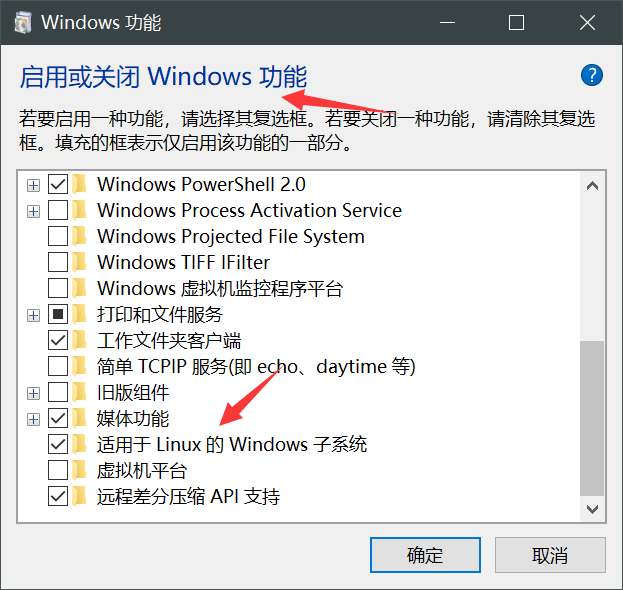
然后重启计算机,再次输入bash命令
4、使用os.system
创建一个py文件,使用os.system执行sh文件
import os
os.system('train.sh ./cfg/coco.yml')
5、安装WSL
安装WSL,配置适用于 Linux 的 Windows 子系统GNU/Linux 环境 - 包括大多数命令行工具、实用工具和应用程序 - 且不会产生传统虚拟机或双启动设置开销。
然后打开WSL,将项目挪进子系统的文件夹中运行。
边栏推荐
猜你喜欢
You can understand the detailed introduction and understanding of inheritance

Proxmox VE安装与初始化

shell课程总结

Transport layer --------- TCP (II)

Atcoder D - increment of coins (probability DP)

shell课程总结

小项目——开机自连校园网
网络与VPC之动手实验

Codeforce problem 908 D. new year and arbitrary arrangement (probability DP)

mysql存储引擎及其区别
随机推荐
Source code compilation and installation lamp
Shell course summary
MySQL index
Share 29 chrome plug-ins, and there is always one for you
三范式,约束,部分关键字区别,
How can smart people leave without offending others?
mysql优化概论
MySQL主从复制与读写分离
Harmonyos image processing application development live broadcast notes
Makefile
Shell (10) array and bubble sort
MVCC及其原理详解
The bottom implementation of vector container
introduction
LAMP.
Codeforce problem 908 D. new year and arbitrary arrangement (probability DP)
数字图像处理重点总结复习
MySQL view
引用的通俗讲解
MySQL stored procedure function