当前位置:网站首页>自定义日期组件,左右按钮控制向前或向后翻年、翻月、翻周、翻日
自定义日期组件,左右按钮控制向前或向后翻年、翻月、翻周、翻日
2022-06-10 19:32:00 【Rulyc】
遇到这样一个需求,为了方便用户操作,使用左右按钮进行查看上一年或者下一年数据、上一月或者下一月数据、上一周或者下一周数据、前一天,或者后一天数据。
如上图所示,点击左右按钮,时间往前或往后变更,按钮也会出现禁用状态。
具体实现代码如下:
<template>
  <div class="c-date">
    <button type="text"
            class="btn-prev"
            :disabled="disabledPrevCurrent"
            @click.stop="leftClick"
    >
      <i class="el-icon " :class="[iconType=='yearIcon'? 'el-icon-d-arrow-left': 'el-icon-arrow-left', disabledPrevCurrent == false ? 'fontColor': '']"></i>
    </button>
    <span v-if="isWeek">
      <span>{
    {
     getWeek[0] }}</span> <span style="margin:0 10px;">至</span> <span>{
    {
     getWeek[1] }}</span>
    </span>
    <span class="dateFont" v-else>{
    {
     getDate }}<slot></slot></span>
    <button type="text"
            class="btn-next"
            :disabled="disabledNextCurrent"
            @click.stop="rightClick"
    >
      <i class="el-icon" :class="[iconType=='yearIcon'? 'el-icon-d-arrow-right': 'el-icon-arrow-right',disabledNextCurrent == false ? 'fontColor': '']"></i>
    </button>

  </div>
</template>

<script>

  import moment from 'moment'
  export default {

    name: 'myDate',
    props:{

      isWeek:{
     // 是否是周范围
        type:Boolean,
        required: false,
        default: false
      },
      week:{
     // 周范围时间
        type:Array,
        required:false,
        default:function(){

          const startDate = moment().week(moment().week()).startOf('week').format('YYYY-MM-DD');   //这样是年月日的格式
          const endDate = moment().week(moment().week()).endOf('week').format('YYYY-MM-DD'); //这样是时间戳的格式
          return [startDate,endDate]
        }
      },
      date:{
     // 日期
        type: [String,Object,Date],
        required: false,
        default: function(){

          return new Date()
        }
      },
      disabledPrev:{
     // 左边按钮是否禁用
        type:Boolean,
        required: false,
        default: false
      },
      disabledNext:{
     // 右边按钮是否禁用
        type:Boolean,
        required: false,
        default: false
      },
      type:{
     // 日期格式类型, eg: 2020年5月 2020-05-11
        type: String,
        required: false,
        default: "YYYY-MM-DD"  // YYYY-MM-DD eg:2020年-5-30 words eg: 2020年5月 year eg: 2020年
      },
      iconType:{
     // 图标类型
        type: String,
        required: false,
        default: "icon"  // icon------<> yearIcon ----------《》
      }
    },
    data(){

      return{

        getDate: this.type==='YYYY-MM-DD'? moment(this.date).format("YYYY-MM-DD"):this.type==='year'?  moment(this.date).format("YYYY年"): moment(this.date).format("YYYY年M月") ,
        disabledPrevCurrent: this.disabledPrev,
        disabledNextCurrent: this.disabledNext,
        getWeek: this.week
      }
    },
    watch:{

      week: {

        handler (n) {

          if (n) {

           console.log(n,'fffffffffff')
            this.getWeek = n
          }
        },
        deep: true,
        immediate: true
      },
      date: {

        handler (n) {

          if (n) {

            this.getDate =this.type==='YYYY-MM-DD'? moment(n).format("YYYY-MM-DD"):this.type==='year'?  moment(n).format("YYYY年"): moment(n).format("YYYY年M月")
          }
        },
        deep: true,
        immediate: true
      },
      disabledPrev: {

        handler (n) {

          console.log(n)
          this.disabledPrevCurrent = n
        },
        deep: true,
        immediate: true
      },
      disabledNext: {

        handler (n) {

          this.disabledNextCurrent = n
        },
        deep: true,
        immediate: true
      }
    },
    methods:{

      /** 年 月 日期转换方法 */
      dateChange(val){

        const str = val.substr(0,val.length-1)
        const year = str.substr(0,4)
        let nowDate = ''
        if(str.length>4){

          var month = str.substr(5,str.length-1)
          if(month.length<2){

            month = '0'+month
          }
          nowDate = year + '-' + month
          // console.log(nowDate,'g333ggg')
          return nowDate
        }else{

          nowDate = year
          return nowDate
        }
      },
      /** 日期向前翻 */
      leftClick(){

        if(this.isWeek){

          let arr = [],sendArr=[]
          const start = moment(moment(this.getWeek[0]).subtract(7, 'd')).format('YYYY-MM-DD')
          const end =  moment(moment(this.getWeek[1]).subtract(7, 'd')).format('YYYY-MM-DD')
          arr.push(start)
          arr.push(end)
          this.getWeek = [...arr]
          const sendStart = moment(start).format()
          const sendEnd = moment(end).format()
          sendArr.push(sendStart)
          sendArr.push(sendEnd)
          this.$emit("leftClick", sendArr)
        }
        if(this.type==='YYYY-MM-DD'){

          this.getDate = moment(this.getDate).subtract(1, 'days').format('YYYY-MM-DD') // 获取前一天
          this.$emit("leftClick", moment(this.getDate).format())
        }else if(this.type==='year'){

          const date = this.dateChange(this.getDate)
          this.getDate = moment(date).subtract(1, 'year').format("YYYY年") // 获取后一天
          this.$emit("leftClick", moment(this.dateChange(this.getDate)).format())
        } else{

          const date = this.dateChange(this.getDate)
          this.getDate = moment(date).subtract(1, 'months').format("YYYY年M月") // 获取后一天
          this.$emit("leftClick", moment(this.dateChange(this.getDate)).format())
        }
      },
      /** 日期向后翻 */
      rightClick(){

        if(this.isWeek){

          let arr = [],sendArr=[]
          const start = moment(moment(this.getWeek[0]).add(7, 'd')).format('YYYY-MM-DD')
          const end =  moment(moment(this.getWeek[1]).add(7, 'd')).format('YYYY-MM-DD')
          arr.push(start)
          arr.push(end)
          this.getWeek = [...arr]
          const sendStart = moment(start).format()
          const sendEnd = moment(end).format()
          sendArr.push(sendStart)
          sendArr.push(sendEnd)
          this.$emit("rightClick", sendArr)
        }
        if(this.type==='YYYY-MM-DD') {

          this.getDate = moment(this.getDate).add(1, 'days').format('YYYY-MM-DD') // 获取后一月
          this.$emit("rightClick", moment(this.getDate).format())
        }else if(this.type==='year'){

          const date = this.dateChange(this.getDate)
          this.getDate = moment(date).add(1, 'year').format("YYYY年") // 获取后一天
          this.$emit("rightClick", moment(this.dateChange(this.getDate)).format())
        }else{

          const date = this.dateChange(this.getDate)
          this.getDate = moment(date).add(1, 'months').format("YYYY年M月") // 获取后一月
          this.$emit("rightClick", moment(this.dateChange(this.getDate)).format())
        }
      }
    }
  }
</script>

<style lang="scss" scoped>
.c-date{

  button{

    border: none;
    padding: 0 6px;
    cursor: pointer;
    background: transparent;
    &:hover {

      color: #4096FF;
    }
    &:disabled{

      color: #C0C4CC;
      background-color: #fff;
      cursor: not-allowed;
    }
  }
  .btn-prev,.btn-next{

    background-color: #fff;
    margin: 0;
    color: #303133;
    outline: none;
  }
  .btn-prev{

    padding-right: 12px;
  }
  .btn-next{

    padding-left:12px;
  }

  .ai-icon{

    font-size:18px;
    &:hover{

      //color:blue;
    }
  }
  .fontColor{

    color: #4096FF;
  }
  .dateFont{

    moz-user-select: -moz-none;
    -moz-user-select: none;
    -o-user-select:none;
    -khtml-user-select:none;
    -webkit-user-select:none;
    -ms-user-select:none;
    user-select:none;
  }
}
</style>
属性归纳:
| 属性 | 说明 | 默认值 | 数据类型 | 可选值 |
|---|---|---|---|---|
| date | 显示的时间,非范围类型 | 当前系统时间new Date() | String,Object,Date | 传入格式可以是date类型,或者字符串类型"2018-06-18" |
| type | 日期格式eg:2020年-5-30或eg: 2020年5月 | YYYY-MM-DD | String | YYYY-MM-DD 或 words |
| iconType | 图标类型<>或《》 | icon | String | icon或 yearIcon (年翻页) |
| disabledPrev | 左边按钮是否禁用 | false | Boolean | true或false |
| disabledNext | 右边按钮是否禁用 | false | Boolean | true或false |
| isWeek | 是否是周范围 | false | Boolean | true或false |
| week | 周范围时间 | 当前周的范围 | Array | 自定义一周范围,传入格式可以是date类型,或者字符串类型[“2020-06-15”,“2020-06-21”] |
事件说明:
| 事件名 | 说明 |
|---|---|
| leftClick | 点击左侧按钮触发事件 |
| rightClick | 点击右侧按钮触发事件 |
去具体界面使用:
<!-- 日期组件   -->
    <h3>xx年xx月</h3>
    <div style="padding:0 20px 20px;">
      <myDate type="words"></myDate>
      左边禁用
      <myDate disabledPrev type="words"></myDate>
      右边禁用
      <myDate disabledNext type="words"></myDate>
    </div>

    <h3>xx年xx月考核</h3>
    <div style="padding:0 20px 20px;">
      <myDate date="2010-09" type="words"><slot><span>考核</span></slot></myDate>
    </div>

    <h3>xxxx-xx-xx</h3>
    <div style="padding:0 20px 20px;">
      <myDate date="2020-09-18"></myDate>
    </div>

    <h3>xxxx年</h3>
    <div style="padding:0 20px 20px;">
      <myDate type="year" date="2024" iconType="yearIcon"></myDate>
    </div>

    <h3>xxxx-xx-xx 至 xxxx-xx-xx</h3>
    <div style="padding:0 20px 20px;">
      当前周
      <myDate isWeek @leftClick = "leftClick"></myDate>
      传任意周一至周末整周
      <myDate :week="week" isWeek ></myDate>
    </div>
 import myDate from '@/components/myDate'
data(){

      return{

        week:['2020-06-15','2020-06-21'] // 传周一开始到周日结束的周期范围
      }
    },
    methods:{

      leftClick(val){

        console.log(val,'ggeeeeeeeeeee')
      },
   }
边栏推荐
猜你喜欢

Zabbix_ Principle Architecture - installation and deployment - Custom monitoring
![[FAQ] summary of common problems and solutions during the use of rest API interface of sports health service](/img/9e/9ce804d84fb8ec9221b7c10bbd6c36.jpg)
[FAQ] summary of common problems and solutions during the use of rest API interface of sports health service

玩艺术也得学数学?

Spark ShuffleManager

解决idea超过5个相同包的时候自动变成*的问题

It took 2 years, 442 authors and 132 institutions! Google released the new benchmark big bench for language model evaluation. 204 tasks comprehensively evaluated the language model ability, with paper
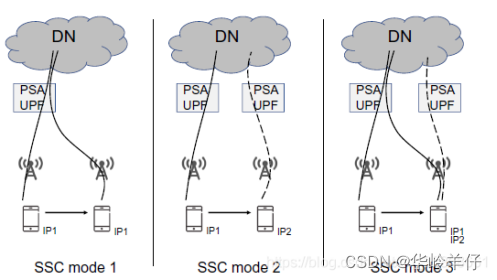
PDU session flow

Zabbix_ Monitoring ssh/crond Service - wechat alarm

Mysql database foundation

Microsoft Word 教程「5」,如何在 Word 中更改頁邊距、創建新聞稿欄?
随机推荐
Fs4060a is a 4.2v/3a charging IC
Zabbix_原理架构-安装部署-自定义监控
8.4v dual lithium battery professional charging IC (fs4062a)
The most common habits from more than 200 English papers written by gradua
利用阿里云国际购买的服务器搭建个人网站步骤
4.35V锂电充电IC
为什么网页样式属性,有的需要加冒号“:”,有的不用?
RT-Thread Smart Win10 64位下编译环境的搭建
江波龙 FORESEE XP2000 PCIe 4.0 SSD 多重加密功能,锁定数据安全
如何使用物联网低代码平台进行工作表管理?
Why do some web page style attributes need a colon ":" and some do not?
Jiangbolong forestee xp2000 PCIe 4.0 SSD multi encryption function, locking data security
玩艺术也得学数学?
解决idea超过5个相同包的时候自动变成*的问题
Mysql database foundation
2022 Devops roadmap | medium
Fs2117 boost IC output 5v2.4a synchronous rectification
ResourceNotFoundException : Unable to find resource
割舍绳子/整数分割
腾讯云数据库TDSQL-大咖论道 | 基础软件的过去、现在、未来