当前位置:网站首页>Data extraction 1
Data extraction 1
2022-07-27 07:59:00 【Horse sailing】
Data extraction Overview
In a nutshell , Data extraction is the process of getting the data we want from the response
1. Classification of response content
After sending a request for a response , There may be many different types of response content ; And a lot of times , We only need to respond to part of the data in the content
Structured response content
json character string
- have access to re、json And other modules to extract specific data
- json An example of a string is shown below

xml character string
have access to re、lxml And other modules to extract specific data
xml Examples of strings are as follows
<bookstore>
<book category="COOKING">
  <title lang="en">Everyday Italian</title>
  <author>Giada De Laurentiis</author>
  <year>2005</year>
  <price>30.00</price>
</book>
<book category="CHILDREN">
  <title lang="en">Harry Potter</title>
  <author>J K. Rowling</author>
  <year>2005</year>
  <price>29.99</price>
</book>
<book category="WEB">
  <title lang="en">Learning XML</title>
  <author>Erik T. Ray</author>
  <year>2003</year>
  <price>39.95</price>
</book>
</bookstore>
Unstructured response content
html character string
- have access to re、lxml And other modules to extract specific data
- html An example of a string is shown below
![[ Failed to transfer the external chain picture , The origin station may have anti-theft chain mechanism , It is suggested to save the pictures and upload them directly (img-FlGbTxcO-1658849811585)(../img/ Unstructured response content html.png)]](/img/2b/324c4c94aa029051f2455ca3f5ee3a.png)
2. know xml And the html The difference between
Make it clear html and xml The difference between , First of all, we need to know xml
know xml
xml It's an extensible markup language , Look and feel html It's like , The function is more focused on the transmission and storage of data
<bookstore>
<book category="COOKING">
  <title lang="en">Everyday Italian</title>
  <author>Giada De Laurentiis</author>
  <year>2005</year>
  <price>30.00</price>
</book>
<book category="CHILDREN">
  <title lang="en">Harry Potter</title>
  <author>J K. Rowling</author>
  <year>2005</year>
  <price>29.99</price>
</book>
<book category="WEB">
  <title lang="en">Learning XML</title>
  <author>Erik T. Ray</author>
  <year>2003</year>
  <price>39.95</price>
</book>
</bookstore>
above xml The content can be represented as the following tree structure :
![[ Failed to transfer the external chain picture , The origin station may have anti-theft chain mechanism , It is suggested to save the pictures and upload them directly (img-oBR59snJ-1658849811586)(../img/xml Tree structure .gif)]](/img/10/6dbc3a268b9a5e345537a3753f058b.png)
xml and html The difference between
The difference between the two is shown in the figure below
![[ Failed to transfer the external chain picture , The origin station may have anti-theft chain mechanism , It is suggested to save the pictures and upload them directly (img-D4YsK7tj-1658849811587)(../img/xml and html The difference between .png)]](/img/ac/75158e53c999fa165256fd4cb9b60a.png)
- html:
- Hypertext markup language
- In order to better display the data , The focus is to show
- xml:
- Extensible markup language
- In order to transmit and store data , The focus is on the data content itself
Common data analysis methods
![[ Failed to transfer the external chain picture , The origin station may have anti-theft chain mechanism , It is suggested to save the pictures and upload them directly (img-FplUx2O6-1658849811588)(../img/ Data analysis .png)]](/img/d6/657a2dadd6b322894bfa76e971483e.png)
Data extraction json
The goal is : understand json The concept of
Learn about reptiles ,json Position of appearance
master json Related methods
1. What is? json, Where can I find json
json Is a lightweight data exchange format , It makes it easy for people to read and write , Colleagues also facilitate the machine to parse and generate , It is suitable for data interaction scenarios , such as web Data interaction between foreground and background
As for where to find and return json Data url, Take Douban movie for example , The next one url Is to return to json Data url
https://movie.douban.com/j/search_subjects?type=movie&tag=%E7%83%AD%E9%97%A8&page_limit=50&page_start=0

stay url Search for keywords in the response corresponding to the address
But notice :url Address response , Chinese is often the encoded content , So I recommend you to search English and numbers ; Another way is to perview Mid search , The class content is transcoded
There's another way , Is to switch the browser to the mobile version to find json
2. json Formatting Data
stay preview To observe

among :
A square box indicates json Health in
The oval box represents the value corresponding to the key , It's a list , After the list expands , The numbers below represent the corresponding values in the list
Online parsing tool for parsing
json.cn( On-line json Data analysis , Make the data intuitive and readable )
pycharm Conduct reformat code
stay pycharm Create a new one in json file , After saving the data , Click on code Below reformat code, But Chinese often shows unicode Format
json Other sources of data :
Grab the bag app,app The way of capturing bags will be learned later , But a lot of times app The data in is encrypted , But it's still worth trying
3. json Learning methods in modules

json.dumps
dump Its function is to Python object encode by json object , A coding process . Be careful json The module provides json.dumps and json.dump Method , The difference is that dump Go directly to the file , and dumps To a string , there s It can be understood as string.
import json
data = [ {
     'a':'A', 'b':(2, 4), 'c':3.0 } ]
print('DATA:', repr(data))

data_string = json.dumps(data)
print('JSON:', data_string)
# give the result as follows
DATA: [{
    'a': 'A', 'c': 3.0, 'b': (2, 4)}]
JSON: [{
    "a": "A", "c": 3.0, "b": [2, 4]}]
print type(data)
print type(data_string)
<type 'list'>
<type 'str'>
json.dump
Not only can you put Python Object code is string, You can also write to files . Because we can't put Python Object is written directly to the file , This will give you an error TypeError: expected a string or other character buffer object, We need to serialize it before
import json
data = [ {
     'a':'A', 'b':(2, 4), 'c':3.0 } ]
with open('output.json','w') as fp:
    json.dump(data,fp)
#  result
[{
    “a”: “A”, “c”: 3.0, “b”: [2, 4]}]
json.loads
from Python Built-in objects dump by json Object we know how to operate , Then how to json object decode Decoding for Python Recognizable objects ? Yes, it does json.loads Method , Of course, this is based on string Of , If it's a file , We can use json.load Method .
decoded_json = json.loads(data_string)
#  Same as before , still list
print type(decoded_json)
<type 'list'>
#  Like visiting  data = [ { 'a':'A', 'b':(2, 4), 'c':3.0 } ] equally
print decoded_json[0]['a']
# give the result as follows
A
json.load
Can directly load file
with open('output.json') as fp:
    print type(fp)
    loaded_json = json.load(fp)

<type 'file'>
#  Same as before , still list
print type(decoded_json)
<type 'list'>
#  Like visiting  data = [ { 'a':'A', 'b':(2, 4), 'c':3.0 } ] equally
print decoded_json[0]['a']

# give the result as follows
A
4. json.dumps Common parameters
Some of the parameters , It allows us to better control the output . Common examples are sort_keys,indent,separators,skipkeys etc. .
sort_keys The name is very clear , When outputting, the dictionary is sorted by key values , Not random .
import json
data = [ {
     'a':'A',  'c':3.0 ,'b':(2, 4)} ]
print('DATA:', repr(data))

unsorted = json.dumps(data)
print('JSON:', json.dumps(data))
print('SORT:', json.dumps(data, sort_keys=True))
# give the result as follows
DATA: [{
    'a': 'A', 'c': 3.0, 'b': (2, 4)}]
JSON: [{
    "a": "A", "c": 3.0, "b": [2, 4]}]
SORT: [{
    "a": "A", "b": [2, 4], "c": 3.0}]1234567891011
indent Just an indentation , Let's see the structure better .
import json
data = [ {
     'a':'A', 'b':(2, 4), 'c':3.0 } ]
print('DATA:', repr(data))

print('NORMAL:', json.dumps(data, sort_keys=True))
print('INDENT:', json.dumps(data, sort_keys=True, indent=2))

# give the result as follows
DATA: [{
    'a': 'A', 'b': (2, 4), 'c': 3.0}]
NORMAL: [{
    "a": "A", "b": [2, 4], "c": 3.0}]
INDENT: [
  {

    "a": "A",
    "b": [
      2,
      4
    ],
    "c": 3.0
  }
1234567891011121314151617181920
separators Is to provide separator , You can go out in white space , More compact output , Smaller data . The default separator is (‘, ‘, ‘: ‘), With white space . Different dumps Parameters , The corresponding file size is clear at a glance .
import json
data = [ {
     'a':'A', 'b':(2, 4), 'c':3.0 } ]
print('DATA:', repr(data))
print('repr(data) :', len(repr(data)))
print('dumps(data) :', len(json.dumps(data)))
print('dumps(data, indent=2) :', len(json.dumps(data, indent=2)))
print('dumps(data, separators):', len(json.dumps(data, separators=(',',':'))))

# give the result as follows
DATA: [{
    'a': 'A', 'c': 3.0, 'b': (2, 4)}]
repr(data)             : 35
dumps(data)            : 35
dumps(data, indent=2)  : 76
dumps(data, separators): 291234567891011121314
json The key that needs a dictionary is a string , Otherwise it will throw ValueError.
import json
data = [ {
     'a':'A', 'b':(2, 4), 'c':3.0, ('d',):'D tuple' } ]

print('First attempt')
try:
    print(json.dumps(data))
except (TypeError, ValueError) as err:
    print('ERROR:', err)

print()
print('Second attempt')
print(json.dumps(data, skipkeys=True))

# give the result as follows
First attempt
ERROR: keys must be a string

Second attempt
[{
    "a": "A", "c": 3.0, "b": [2, 4]}]
5. Case study
Crawl the data of English and American dramas of Douban TV series , And classification , Address :https://m.douban.com/tv/
class Douban(object):
    def __init__(self, tv_name):
        self.start_url = 'https://movie.douban.com/j/search_subjects?type=tv&tag={}&sort=recommend&page_limit=20&page_start={}'
        self.referer = 'https://m.douban.com/movie/subject/{}/'
        self.tv_msg = 'https://m.douban.com/rexxar/api/v2/tv/{}?ck=&for_mobile=1'
        self.tv_name = tv_name

    def run(self):
        """  Splicing url, Get page turning information  :return: """
        for i in range(5):
            #  Splicing url, Get page turning information
            url = self.start_url.format(self.tv_name, i)
            #  obtain url Responsive json data , And convert it into a dictionary
            tv_list_json = json.loads(session.get(url).content.decode())
            self.parse_json_data(tv_list_json)

    def parse_json_data(self, json_data):
        """ json Data analysis  :param json_data: json_data :return: """
        #  Ergodic dictionary , Get the data you need
        for tv in json_data['subjects']:
            #  TV Series Title
            tv_title = tv['title']
            #  TV series url
            tv_url = tv['url']
            #  The picture address of the TV series
            tv_img = tv['cover']
            #  TV series id
            tv_id = tv['id']
            self.parse_tv(tv_id, tv_title, tv_url, tv_img)

    def parse_tv(self, tv_id, tv_title, tv_url, tv_img):
        """ :param tv_id: :return: """
        #  Splicing TV series details url
        url = self.tv_msg.format(tv_id)
        #  Anti creep , Splicing referer
        headers = {
    "User-Agent": "Mozilla/5.0 (Windows NT 10.0; Win64; x64) Appl\
                            eWebKit/537.36 (KHTML, like Gecko) Chrome/83.0.4103.116 Safari/537.36",
                   'referer': self.referer.format(tv_id)}
        #  obtain json data , Turn it into a dictionary
        tv_json_data = json.loads(session.get(url, headers=headers).content.decode('utf-8'))
        #  Get TV series introduction
        intro = tv_json_data['intro']
        self.actor_msg(tv_json_data, tv_title, tv_url, tv_img, intro)

    def actor_msg(self, tv_json_data, tv_title, tv_url, tv_img, intro):
        name = []
        #  Actors are in the dictionary , Loop out the actor's name
        for actor in tv_json_data['actors']:
            name.append(actor)
        self.save(name, tv_title, tv_url, tv_img, intro)

    def save(self, name, tv_title, tv_url, tv_img, intro):
        with open('tv.txt', 'a+', encoding='utf-8')as f:
            #  Construction context
            content = {

                ' Category ': self.tv_name,
                ' title ': tv_title,
                ' Play link ': tv_url,
                ' Cover link ': tv_img,
                ' Content abstract ': intro,
                ' actor ': name
            }
            f.write(str(content) + '\r\n')
        print('{}{} Save complete '.format(self.tv_name, tv_title))


if __name__ == '__main__':
    print("1: ' American TV Series ', 2: ' English Drama '")
    while True:
        num = input(' Please enter the corresponding number ,  Press enter to finish ')
        if num == '1' or num == '2':
            data = {
    1: ' American TV Series ', 2: ' English Drama '}
            douban = Douban(data[int(num)])
            douban.run()
            continue
        if num == '0':
            break
        else:
            print(' Incorrect input ')
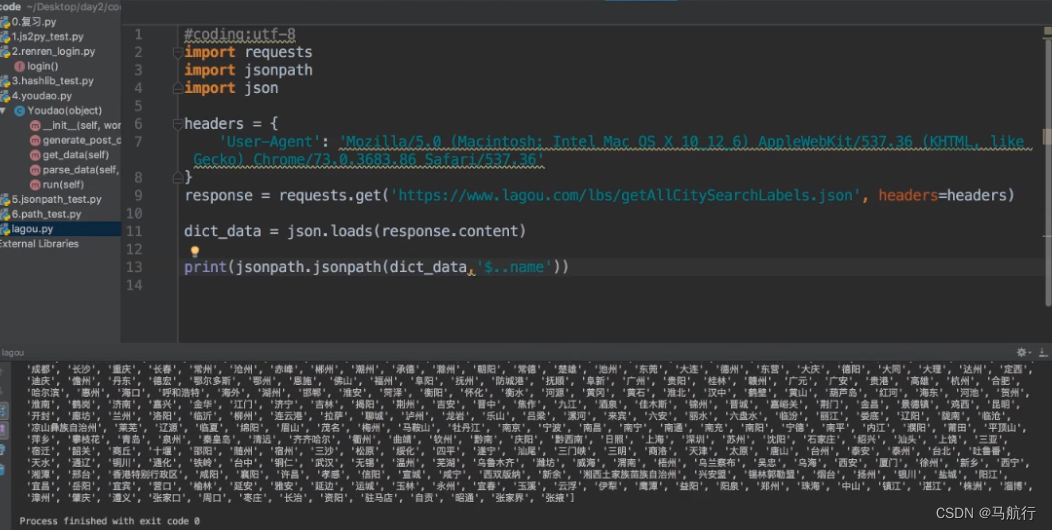
Data extraction jsonpath modular ( I haven't used it yet )
pip install jsonpath
Use scenarios : Multi nested complex dictionary , Extracting data directly
Method :
ret = jsonpath(a, ‘jsonpath Syntax rule string ’) #a It is the target dictionary that needs to extract data
Common node :
$ The root node ( The outermost brace )
. Byte point ()
… Any position inside , Descendants node

Example 1:

Example 2:
边栏推荐
- 瑞芯微RK3399-I2C4挂载EEPROM的修改案例
- Day111. Shangyitong: integrate nuxt framework, front page data, hospital details page
- 2020 International Machine Translation Competition: Volcano translation won five championships
- Applet payment management - new payment docking process
- C language: optimized Hill sort
- [applet] the upload of the wechat applet issued by uniapp failed error: error: {'errcode': -10008,'errmsg':'Invalid IP
- Primary key in MySQL secondary index - MySQL has a large number of same data paging query optimization
- MySQL table name area in Linux is not case sensitive
- DASCTF2022.07赋能赛密码wp
- Stored procedures and functions
猜你喜欢
![[applet] the upload of the wechat applet issued by uniapp failed error: error: {'errcode': -10008,'errmsg':'Invalid IP](/img/0c/da2ffc00834793c7abc0f7ebe6321b.png)
[applet] the upload of the wechat applet issued by uniapp failed error: error: {'errcode': -10008,'errmsg':'Invalid IP

How to update PIP3? And running PIP as the 'root' user can result in broken permissions and conflicting behavior

What are the software tuning methods? Let's see what Feiteng technology experts say about dragon lizard technology

如何在 60 秒内去分析和定位问题?
自动化测试的使用场景

物联网工业级UART串口转WiFi转有线网口转以太网网关WiFi模块选型

浅谈数据安全
10000 word parsing MySQL index principle -- InnoDB index structure and reading

Stored procedures and functions
The dragon lizard exhibition area plays a new trick this time. Let's see whose DNA moved?
随机推荐
企业架构驱动的数字化转型!
模仿大佬制作的宿舍门禁系统(三)
[applet] the upload of the wechat applet issued by uniapp failed error: error: {'errcode': -10008,'errmsg':'Invalid IP
Comprehensive analysis of ADC noise-02-adc noise measurement method and related parameters
【Golang】golang开发微信公众号网页授权功能
SQL labs SQL injection platform - level 1 less-1 get - error based - Single Quotes - string (get single quote character injection based on errors)
2020国际机器翻译大赛:火山翻译力夺五项冠军
2020 International Machine Translation Competition: Volcano translation won five championships
CommonTitleBar hide left right
什么是真正的HTAP?(一)背景篇
C commissioned use cases
C event usage case subscription event+=
Combined use of C WinForm form form event and delegate
Shell scripts related
数据提取2
Installation and use of apifox
Install tensorflow
[day42 literature intensive reading] a Bayesian model of perfect head centered velocity during smooth pursuit eye movement
End of year summary
C# 事件用法案例 订阅事件+=