当前位置:网站首页>Implementation of gray-scale publishing scheme for microservice architecture based on gateway and Nacos
Implementation of gray-scale publishing scheme for microservice architecture based on gateway and Nacos
2022-06-11 14:47:00 【Xiao bichao】
One 、 Grayscale Publishing
Grayscale Publishing ( Also known as the Canary release ) Between black and white , A publishing method that can smooth the transition . On it can be carried out A/B testing, Let some users continue to use product features A, Some users start to use product features B, If the user is right B There is no objection , Then gradually expand the scope , Move all users to B Up here . Gray level release can guarantee the stability of the whole system , It can be found in the initial grayscale 、 Adjustment issues , In order to ensure its impact .
The period from the beginning to the end of grayscale Publishing , It's called grayscale . Grayscale publishing can get users' feedback as early as possible , Perfect product function , Improve product quality , Let users participate in product testing , Enhance interaction with users , Reduce the range of users affected by product upgrades .
Based on GateWay and Nacos Realize the gray-scale publishing scheme of micro service architecture , First, the production services and gray environment services are registered to Nacos in , But the version is different , For example, the production environment version is 1.0 , The grayscale environment version is 2.0 , After the request passes through the gateway , Determine whether the carried user is a grayscale user , If so, forward the request to 2.0 In the service of , Otherwise forward to 1.0 In the service of .
Two 、 Start implementing
First set up two web Service simulation production and gray environment , Register to nacos in , Pay attention to the service here ID Should agree :
Production environment configuration :
spring:
  application:
    name: web
  cloud:
    nacos:
      discovery:
        server-addr: 127.0.0.1:8848
        metadata:
          version: 1.0 #  Specified version number
Grayscale environment configuration :
spring:
  application:
    name: web
  cloud:
    nacos:
      discovery:
        server-addr: 127.0.0.1:8848
        metadata:
          version: 2.0 #  Specified version number
After starting two services , Can be in nacos See details in :


In order to simulate the difference between the two services , Create the same interface , Different returns :
@RestController
public class TestController {

    @GetMapping("/getTest")
    public String getTest(){
        return " The current in the - Production environment !";
    }
}
@RestController
public class TestController {

    @GetMapping("/getTest")
    public String getTest(){
        return " The current in the - Gray scale environment !";
    }
}
Let's start building GateWay gateway , You also need to register to nacos in , But what's different from before is , Here we want to implement a load balancer , Determine which version of service to use in the load balancer , Here's to demonstrate the effect , stay nacos Create a new profile , Configure the grayscale user in this configuration file , In the project, we should start from db or noSQL Intermediate acquisition .

Data ID: env-config.yaml
Group: DEFAULT_GROUP
env:
  gray:
    version: 2.0
    users: abc,ii,ss,kk,bb,pp
  pro:
    version: 1.0
Add another GateWay Routing configuration :
Data ID:gateway.yaml
Group: DEFAULT_GROUP
spring:
  cloud:
    gateway:
      httpclient:
        connect-timeout: 2000
        response-timeout: 10s
      routes:
        - id: web
          uri: lb://web/
          order: 0
          predicates:
            - Path=/web/**
          filters:
            - StripPrefix=1 #  Remove the prefix from the request address
Here we build gateway Gateway service , Sign up to nacos in , And load the configuration file created above :
spring:
  application:
    name: gateway
  cloud:
    nacos:
      discovery:
        server-addr: 127.0.0.1:8848
      config:
        server-addr: 127.0.0.1:8848
        file-extension: yaml
        refresh-enabled: true
        extension-configs[0]:
          data-id: env-config.yaml
          group: DEFAULT_GROUP
          refresh: true
After starting , Check whether you have registered to nacos It's in :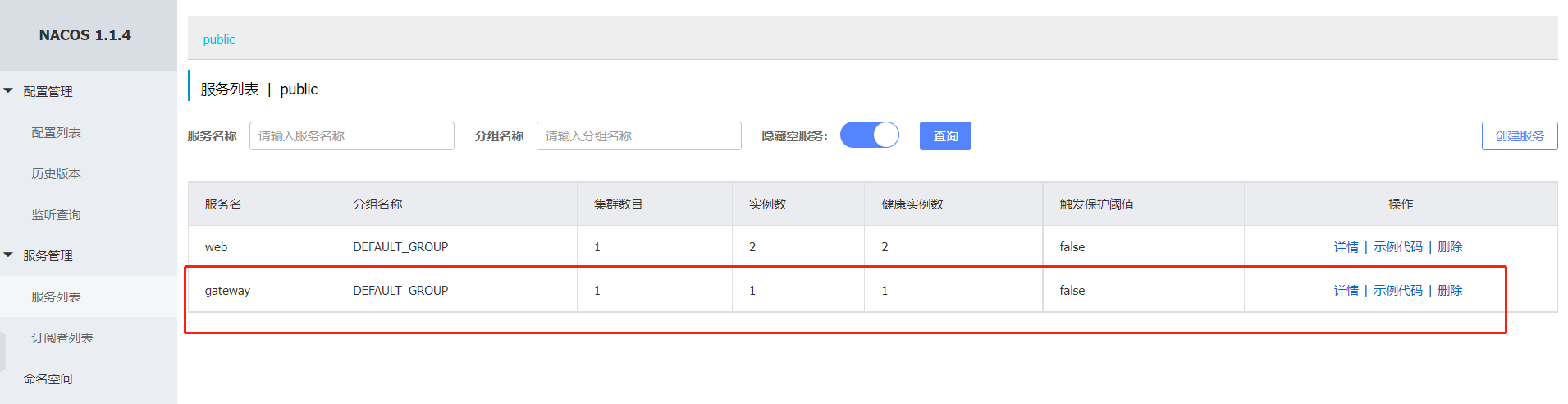
Test whether load forwarding can be performed :


The load effect has been achieved , But it has not achieved the desired effect , So let's start with gateway The gateway is modified .
First, let's create a new one EnvProperties To receive env-config.yaml Configuration in , Be sure to add @RefreshScope annotation , Only in this way can the corresponding service be notified after the configuration is modified :
@Data
@Configuration
@RefreshScope
public class EnvProperties {
    @Value("${env.pro.version}")
    private String proVersion;

    @Value("${env.gray.users}")
    private List<String> grayUsers;

    @Value("${env.gray.version}")
    private String grayVersion;
}
Creating a ThreadLocal , Store the current version information , Let's write it down here , Then we will know what the function is :
public class GrayscaleThreadLocalEnvironment {
    private static ThreadLocal<String> threadLocal = new ThreadLocal<String>();

    public static void setCurrentEnvironment(String currentEnvironmentVsersion) {
        threadLocal.set(currentEnvironmentVsersion);
    }

    public static String getCurrentEnvironment() {
        return threadLocal.get();
    }
}
Create below filter Intercept request , Then get the user information , Here is the default user ID stay header in ,key by userId, After getting it, judge whether it is in Grayscale user list , If it exists, put the current ThreadLocal( It is stated above ThreadLocal ) The version number of the grayscale stored in ,, Otherwise, it is the production version number :
@Component
@RefreshScope
public class GrayscaleGlobalFilter implements GlobalFilter, Ordered {

    @Autowired
    EnvProperties envProperties;

    @Override
    public Mono<Void> filter(ServerWebExchange exchange, GatewayFilterChain chain) {
        ServerHttpRequest request = exchange.getRequest();
        ServerHttpResponse response = exchange.getResponse();
        HttpHeaders header = response.getHeaders();
        header.add("Content-Type", "application/json; charset=UTF-8");

        List<String> list = request.getHeaders().get("userId");
        if (Objects.isNull(list) || list.isEmpty()) {
            return resultErrorMsg(response,"  The lack of userId!");
        }
        String userId = list.get(0);
        if (StringUtils.isBlank(userId)) {
            return resultErrorMsg(response,"  The lack of userId!");
        }
        if (envProperties.getGrayUsers().contains(userId)) {
            // Specify grayscale version
            GrayscaleThreadLocalEnvironment.setCurrentEnvironment(envProperties.getGrayVersion());
        } else {
            // Specify production version
            GrayscaleThreadLocalEnvironment.setCurrentEnvironment(envProperties.getProVersion());
        }
        return chain.filter(exchange.mutate().request(request).build());
    }

    public int getOrder() {
        return -1;
    }

    private Mono<Void> resultErrorMsg(ServerHttpResponse response, String msg) {
        JSONObject jsonObject = new JSONObject();
        jsonObject.put("code", "403");
        jsonObject.put("message", msg);
        DataBuffer buffer = response.bufferFactory().wrap(jsonObject.toJSONString().getBytes());
        return response.writeWith(Mono.just(buffer));
    }
}
The above filter has identified whether the current request belongs to grayscale or production , Now we need to rewrite Ribbon Load Balancer , It's rewritten here RoundRobinRule , stay choose In the method , Based on the current ThreadLocal Version in , A service with an equivalent version in a convenience service , As a forwarding service , To prevent service acquisition failure , The retry policy has been added here , retry 10 Time or failure , I.e. abort retry :
@Component
@Slf4j
public class EnvRoundRobinRule extends RoundRobinRule {

    private AtomicInteger nextServerCyclicCounter;

    public EnvRoundRobinRule() {
        nextServerCyclicCounter = new AtomicInteger(0);
    }

    public Server choose(ILoadBalancer lb, Object key) {
        if (lb == null) {
            log.warn("no load balancer");
            return null;
        }
        Server server = null;
        int count = 0;
        //  If you fail , retry  10  Time
        while (Objects.isNull(server) && count++ < 10) {
            List<Server> reachableServers = lb.getReachableServers();
            List<Server> allServers = lb.getAllServers();
            int upCount = reachableServers.size();
            int serverCount = allServers.size();

            if ((upCount == 0) || (serverCount == 0)) {
                log.warn("No up servers available from load balancer: " + lb);
                return null;
            }
            List<NacosServer> filterServers = new ArrayList<>();
            String currentEnvironmentVersion = GrayscaleThreadLocalEnvironment.getCurrentEnvironment();

            for (Server serverInfo : reachableServers) {
                NacosServer nacosServer = (NacosServer) serverInfo;
                String version = nacosServer.getMetadata().get("version");
                if (version.equals(currentEnvironmentVersion)) {
                    filterServers.add(nacosServer);
                }
            }

            int filterServerCount = filterServers.size();
            int nextServerIndex = incrementAndGetModulo(filterServerCount);
            server = filterServers.get(nextServerIndex);

            if (server == null) {
                Thread.yield();
                continue;
            }
            if (server.isAlive() && (server.isReadyToServe())) {
                return (server);
            }
            server = null;
        }

        if (count >= 10) {
            log.warn("No available alive servers after 10 tries from load balancer: "
                    + lb);
        }
        return server;
    }

    private int incrementAndGetModulo(int modulo) {
        for (; ; ) {
            int current = nextServerCyclicCounter.get();
            int next = (current + 1) % modulo;
            if (nextServerCyclicCounter.compareAndSet(current, next))
                return next;
        }
    }
}
Here we are The process is almost over , The following is header add userId by abc, Then visit more times , You can see that they have been forwarded to Gray scale environment :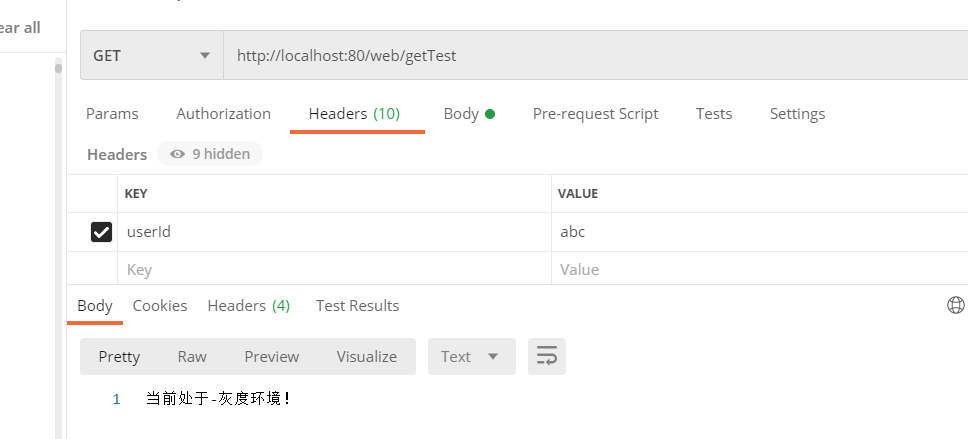
The following is header add userId by 110, Then visit more times , You can see that they have been forwarded to Production environment :
边栏推荐
- 2022质量员-市政方向-岗位技能(质量员)考试模拟100题及模拟考试
- uniapp设置页面跳转效果 - navigateTo切换效果 - 全局animationType动画
- In depth research and analysis report on global and Chinese sanitary safety product market
- Flutter 3.0 was officially released: it stably supports 6 platforms, and byte jitter is the main user
- 02 Tekton Pipeline
- Summary of some classic embedded C interview questions
- Avenue to Jane | Comment concevoir un vit pour configurer l'auto - attraction est - il le plus raisonnable?
- Current situation and future development trend of precision air conditioning market in the world and China
- Lake Shore HR series sensors
- Current situation and future development trend of global and Chinese metalworking fluid market from 2022 to 2028
猜你喜欢

高数_第6章无穷级数__马克劳林级数

深度剖析「圈组」关系系统设计 | 「圈组」技术系列文章

Raspberry school literacy

【Try to Hack】URL

Is bone conduction earphone good for bone? Is bone conduction earphone harmful to the body?

Live800:智能客服提升客户体验的几种方式

uniapp设置页面跳转效果 - navigateTo切换效果 - 全局animationType动画

. Net C Foundation (6): namespace - scope with name

大道至簡 | 設計 ViT 到底怎麼配置Self-Attention才是最合理的?

Qualcomm WLAN framework learning (29) -- 6GHz overview
随机推荐
Nexus configuration Yum repository for repository manager
基于STM32F1的开源小项目
Taking log4j as an example, how to evaluate and classify security risks
Lake Shore HR series sensors
Leetcode 1968. Construct an array whose elements are not equal to the average value of two adjacent elements (yes, finally solved)
Nexus of repository manager
In depth research and analysis report on global and Chinese high purity molybdenum market
Extracting storage is the best memory method
[team learning] task06:for, if, and while
Summary of some classic embedded C interview questions
Analyse approfondie de la conception du système relationnel du Groupe de cercles
In depth research and analysis report on global and Chinese sanitary safety product market
百度某离职员工跳槽字节被判赔107万元;苹果谷歌微软拟“干掉”密码;传吉利已收购魅族|Q资讯
Hashicopy之nomad应用编排方案02
Simple C language address book
Anaconda delete virtual environment
2022-2028 China metal products market status research analysis and development prospect forecast report
思科瑞递交科创板注册:拟募资6亿 年营收2.22亿
PowerShell主架构师:我用业余时间开发项目,表现优秀反而被微软降级了
Online "comment explicit" function, TME's wave point music cultivates music "private plots"