当前位置:网站首页>基于PaddleOCR开发uni-app离线身份证识别插件
基于PaddleOCR开发uni-app离线身份证识别插件
2022-07-25 14:13:00 【番茄小能手】
目录
1、在android sudio创建一个项目,并创建一个Module
2、将ocr插件和uniapp-v8-release.aar引入libs目录下
目的
之前做了基于PaddleOCR的DBNet多分类文本检测网络之身份证识别,可以得到一个不超过3M大小的模型,通过了解PaddleOCR的端侧部署,我们也可以将身份证检测模型移植到手机中,做成一款uni-app手机端离线身份证识别的应用。
准备工作
为了不占用过多篇幅,这里不讲解Android studio如何下载和SDK配置,请自行查找资料。
1、HbuilderX
2、Android Studio 并配置 NDK
请根据 Android Studio 用户指南中的安装及配置 NDK 和 CMake 内容,预先配置好 NDK 。
3、下载基于PaddleOCR的离线身份证识别插件
插件包结构:


开始
1、在android sudio创建一个项目,并创建一个Module
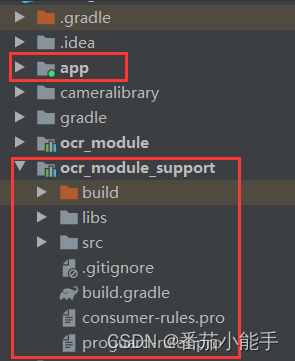
2、将ocr插件和uniapp-v8-release.aar引入libs目录下

3、修改module包下的build.gradle
apply plugin: 'com.android.library'

android {
    compileSdkVersion 32

    defaultConfig {
        minSdkVersion 21
        targetSdkVersion 32
        versionCode 1
        versionName "1.0"

        testInstrumentationRunner "androidx.test.runner.AndroidJUnitRunner"
        consumerProguardFiles "consumer-rules.pro"
    }

    buildTypes {
        release {
            minifyEnabled false
            proguardFiles getDefaultProguardFile('proguard-android-optimize.txt'), 'proguard-rules.pro'
        }
    }

    sourceSets {
        main {
            jniLibs.srcDirs = ['libs']
        }
    }

    repositories {
        flatDir {
            dirs('libs')
        }
    }

    compileOptions {
        sourceCompatibility JavaVersion.VERSION_1_8
        targetCompatibility JavaVersion.VERSION_1_8
    }
}

dependencies {
    implementation fileTree(dir: "libs", include: ["*.jar"])
    implementation 'androidx.appcompat:appcompat:1.2.0'
    testImplementation 'junit:junit:4.12'
    androidTestImplementation 'androidx.test.ext:junit:1.1.3'
    androidTestImplementation 'androidx.test.espresso:espresso-core:3.4.0'

    compileOnly(name: 'uniapp-v8-release', ext: 'aar')
    compileOnly 'com.alibaba:fastjson:1.1.46.android'

    implementation(name: 'ocr', ext: 'aar')
}
4、添加OCRModule.java文件
public class OCRModule extends UniModule {
    private final String TYPE_IDCARD = "idcard";

    public OCRPredictor ocrPredictor = null;
    public UniJSCallback callback = null;

    @UniJSMethod(uiThread = true)
    public void ocrAsyncFunc(JSONObject options, final UniJSCallback callback) {
        Log.d("OCRModule", "ocrAsyncFunc--" + options);
        this.callback = callback;
        ocrPredictor = OCRPredictor.getInstance(mUniSDKInstance.getContext());
        if (TYPE_IDCARD.equals(options.getString("type"))) {
            idcard();
        } else {
            if (options.containsKey("filePath")) {
                String filePath = options.getString("filePath");
                if (!TextUtils.isEmpty(filePath) && filePath.contains("file://")) {
                    filePath = filePath.replace("file://", "");
                }
                ocrPredictor.predictor(filePath, new OnImagePredictorListener() {
                    @Override
                    public void success(String result, ArrayList<OCRResultModel> ocrResultModelList, Bitmap bitmap) {
                        JSONArray jsonArray = new JSONArray();
                        for (OCRResultModel ocrResultModel : ocrResultModelList) {
                            JSONObject jsonObject = new JSONObject();
                            if (!TextUtils.isEmpty(ocrResultModel.getLabel())) {
                                jsonObject.put("words", ocrResultModel.getLabel());

                                JSONArray objects = new JSONArray();
                                for (Point point : ocrResultModel.getPoints()) {
                                    JSONArray points = new JSONArray();
                                    points.add(point.x);
                                    points.add(point.y);
                                    objects.add(points);
                                }
                                jsonObject.put("location", objects);
                                jsonObject.put("score", ocrResultModel.getConfidence());
                                jsonArray.add(jsonObject);
                            }
                        }

                        String jsonString = jsonArray.toJSONString();
                        Log.d("OCRModule", "ocrResult--" + result);
                        Log.d("OCRModule", "ocrResult--" + jsonString);
                        callback.invoke(jsonString);
                    }
                });
            } else if (options.containsKey("base64")) {
                String base64 = options.getString("base64");
                ocrPredictor.predictorBase64(base64, new OnImagePredictorListener() {
                    @Override
                    public void success(String result, ArrayList<OCRResultModel> ocrResultModelList, Bitmap bitmap) {
                        JSONArray jsonArray = new JSONArray();
                        for (OCRResultModel ocrResultModel : ocrResultModelList) {
                            JSONObject jsonObject = new JSONObject();
                            if (!TextUtils.isEmpty(ocrResultModel.getLabel())) {
                                jsonObject.put("words", ocrResultModel.getLabel());

                                JSONArray objects = new JSONArray();
                                for (Point point : ocrResultModel.getPoints()) {
                                    JSONArray points = new JSONArray();
                                    points.add(point.x);
                                    points.add(point.y);
                                    objects.add(points);
                                }
                                jsonObject.put("location", objects);
                                jsonObject.put("score", ocrResultModel.getConfidence());
                                jsonArray.add(jsonObject);
                            }
                        }

                        String jsonString = jsonArray.toJSONString();
                        Log.d("OCRModule", "ocrResult--" + result);
                        Log.d("OCRModule", "ocrResult--" + jsonString);
                        callback.invoke(jsonString);
                    }
                });
            } else {
                this.callback.invoke("");
            }
        }
    }

    private static final int REQUEST_CODE_PICK_IMAGE = 200;
    private static final int REQUEST_CODE_PICK_IMAGE_FRONT = 201;
    private static final int REQUEST_CODE_PICK_IMAGE_BACK = 202;
    private static final int REQUEST_CODE_CAMERA = 102;

    private void idcard() {
        Intent intent = new Intent(mUniSDKInstance.getContext(), CameraActivity.class);
        intent.putExtra(CameraActivity.KEY_CONTENT_TYPE, CameraActivity.CONTENT_TYPE_ID_CARD);
        ((Activity) mUniSDKInstance.getContext()).startActivityForResult(intent, REQUEST_CODE_PICK_IMAGE);
    }

    @Override
    public void onActivityResult(int requestCode, int resultCode, Intent data) {
        if (REQUEST_CODE_PICK_IMAGE == requestCode) {
            if (data != null) {
                String result = data.getStringExtra(CameraActivity.KEY_CONTENT_RESULT);
                Log.d("OCRModule", "ocrResult--" + result);
                this.callback.invoke(result);
            } else {
                this.callback.invoke("");
            }
        } else {
            super.onActivityResult(requestCode, resultCode, data);
        }
    }
}
5、将module打包aar包


6、打开Hbuilder新建一个uni-app项目
将插件包和我们打的aar包如下放置:
注:这里ocr_module_support-release.aar改名为TomatoOCR.aar,改不改名无所谓。

7、修改package.json中的配置
注意:name名是我们的插件名,class是我们编写的识别入口的类
"plugins": [
{
"type": "module",
"name": "YY-TomatoOCR",
"class": "com.tomato.ocr.OCRModule"
}
],
{
	"name": "YY-TomatoOCR",
	"id": "YY-TomatoOCR",
	"version": "1.0.3",
	"description": "离线版文字识别",
	"_dp_type": "nativeplugin",
	"_dp_nativeplugin": {
		"android": {
			"plugins": [
				{
					"type": "module",
					"name": "YY-TomatoOCR",
					"class": "com.tomato.ocr.OCRModule"
				}
			],
			"hooksClass": "",
			"integrateType": "aar",
			"dependencies": [
			],
			"excludeDependencies": [],
			"compileOptions": {
				"sourceCompatibility": "1.8",
				"targetCompatibility": "1.8"
			},
			"abis": [
				"armeabi-v7a",
				"arm64-v8a"
			],
			"minSdkVersion": "21",
			"useAndroidX": true,
			"permissions": [
				"android.permission.CAMERA",
				"android.permission.READ_EXTERNAL_STORAGE",
				"android.permission.WRITE_EXTERNAL_STORAGE"
			]
		}
	}
}
8、在mainifest.json配置中引入我们的原生插件

9、编写uni-app页面代码
<template>
	<div>
		<button type="primary" @click="takePhoto">拍照OCR识别</button>
		<button type="primary" @click="idcard">身份证识别</button>
	</div>
</template>

<script>
	var ocrModule = uni.requireNativePlugin("YY-TomatoOCR")
	// var ocrModule = uni.requireNativePlugin("OCRModule")
	const modal = uni.requireNativePlugin('modal');
	export default {
		onLoad() {},
		methods: {
			takePhoto() {
				uni.chooseImage({
					count: 6, //默认9
					sizeType: ['original', 'compressed'], //可以指定是原图还是压缩图,默认二者都有
					sourceType: ['camera'], //从相册选择
					success: function(res) {
						console.log(JSON.stringify(res.tempFilePaths));

						uni.getImageInfo({
							src: res.tempFilePaths[0],
							success: function(image) {
								// 调用异步方法
								ocrModule.ocrAsyncFunc({
										'filePath': image.path
									},
									(ret) => {
										modal.toast({
											message: ret,
											duration: 30
										});
									})
							}
						});
					}
				});
			},
			idcard() {
				ocrModule.ocrAsyncFunc({
						'type': 'idcard'
					},
					(ret) => {
						modal.toast({
							message: ret,
							duration: 30
						});
					})
			}
		}
	}
</script>
10、制作自定义基座打包并运行到手机上


完毕!!!
总结
以上就是制作uni-app离线文字识别和身份证识别全流程步骤,当然如果你不会Android开发也没关系,在uni-app的插件市场中已经发布了本插件。
边栏推荐
- Bond0 script
- Brush questions - Luogu -p1075 prime factor decomposition
- Application engineering safety monitoring of wireless vibrating wire acquisition instrument
- R语言如何将大型Excel文件转为dta格式详解
- What you must know about data engineering in mlops
- [original] nine point calibration tool for robot head camera calibration
- 2271. Maximum number of white bricks covered by blanket ●●
- Okaleido ecological core equity Oka, all in fusion mining mode
- Deep understanding of pytorch distributed parallel processing tool DDP -- starting from bugs in engineering practice
- Mongodb source code deployment and configuration
猜你喜欢

A small part is exposed on one or both sides of the swiper

PHP website design ideas

Feiwo technology IPO meeting: annual revenue of 1.13 billion Hunan Cultural Tourism and Yuanli investment are shareholders

Okaleido生态核心权益OKA,尽在聚变Mining模式

Brush questions - Luogu -p1035 series summation
知名手写笔记软件 招 CTO·坐标深圳

Word set paste to retain only text
![[原创]九点标定工具之机械手头部相机标定](/img/de/5ea86a01f1a714462b52496e2869d6.png)
[原创]九点标定工具之机械手头部相机标定

Setting of parameter configuration tool for wireless vibrating wire collector

Common problems of wireless relay acquisition instrument

随机推荐
Cologne new energy IPO was terminated: the advanced manufacturing and Zhanxin fund to be raised is the shareholder
在线问题反馈模块实战(十三):实现多参数分页查询列表
Tensorflow2 installation quick pit avoidance summary
Practice of online problem feedback module (13): realize multi parameter paging query list
Idea settings ignore file configuration when submitting SVN
Business analysis report and data visualization report of CDA level1 knowledge point summary
Emergency science | put away this summer safety guide and let children spend the summer vacation safely!
Write an esp32 Watchdog with Arduino
Four methods of importing CSV text files into Excel
Brush questions - Luogu -p1085 unhappy Jinjin
pytorch训练代码编写技巧、DataLoader、爱因斯坦标示
Construction and practice of yolov7 in hands-on teaching
2271. 毯子覆盖的最多白色砖块数 ●●
pt100测温电路图(ad590典型的测温电路)
Acquisition data transmission mode and online monitoring system of wireless acquisition instrument for vibrating wire sensor of engineering instrument
Comprehensive sorting and summary of maskrcnn code structure process of target detection and segmentation
wangeditor 富文本编辑器
关于左值和右值的一些问题总结[通俗易懂]
Use of Bluetooth function of vs wireless vibrating wire acquisition instrument
PHP website design ideas