当前位置:网站首页>R language foundation
R language foundation
2022-07-26 08:02:00 【Little thief [email&#】
The first 1 Chapter R Installation 、 help 、 Workspace management
One 、R An introduction to the
R Definition : A language and environment that can be freely and effectively used for statistical calculation and drawing , It provides a wide range of statistical analysis and mapping techniques .
R advantage :
- R It's free open source software
- Comprehensive statistical research platform , Provides a variety of data analysis techniques
- R Is a programming language , User defined functions can be used to extend
R resources :
- R Home page :http://www.r-project.org
- CRAN(Comprehensive R Archive Network):http://cran.r-project.org
- R The blog of :http://www.r-bloggers.com
- R Books :《 Data mining and R Language 》、《R Language practice 》、《R Language programming art 》
x<-rnorm(5) # produce 5 A random number following the standard normal distribution
x
[1] -0.198391303 0.170254626 0.456807851 0.006009944 -0.156965558
x=5 # Assign value with equal sign
ls() # Always look at the current variable
[1] “x”
age<-c(1,3,5,2,11,9,3,9,12,3) # use c
age
[1] 1 3 5 2 11 9 3 9 12 3
weight<-c(4.4,5.3,7.2,5.2,8.5,7.3,6.0,10.4,10.2,6.1)
weight
[1] 4.4 5.3 7.2 5.2 8.5 7.3 6.0 10.4 10.2 6.1
mean(weight) # Calculating mean
[1] 7.06
sd(weight) # Find standard deviation
[1] 2.077498
cor(age,weight) # Find the correlation coefficient
[1] 0.9075655
plot(age,weight) # drawing

demo() # drawing
demo(graphics)

Two 、 help
help.start() # Find help documentation
help(mean) # About mean Parameter description of
?mean # ditto
3、 ... and 、 Workspace management
getwd() # Current work order
[1] “D:/ Things installed by default ”
setwd("E:/R-code") # Change current path
getwd()
[1]“E:/R-code”
history() # Check the previous code

The first 2 Chapter R How to use the package 、 Reuse of results 、R How to deal with big data sets
One 、R My bag (Package)
- There are currently more than 7000 One is called a package (Package) User contribution module available , It can be downloaded from http://cran.r-project.org/web/packages download
- R It comes with a series of default packages ( Include base、datasets、graphics、methods wait ), They provide a wide variety of default functions and data sets
- Installation and use of packages
library() # Packages available for the current working environment

help(package="base") # see base How to use the package
install.packages("car") # install car package
install.packages("car") # see car How to use the package
library(car) # take car Import package into current workspace
update.packages("car") # to update car package
update.packages() # Update all packages
Two 、R Reuse of results
head(mtcars) #mtcars Data set of

wt: The weight of the car body
mpg: The number of miles a car can drive per gallon
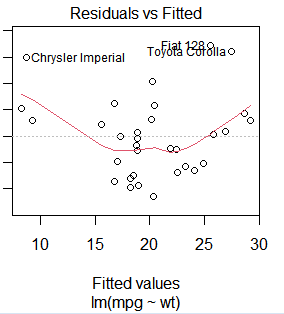
lm(mpg~wt,data=mtcars) #mpg~wt The linear relationship of

result<-lm(mpg~wt,data=mtcars) # Save the results to result in
summary(result) # see result The data result of
plot(result) # mapping
predict(result,mynewdata) # value wt forecast mpg,wt That is mynewdata
3、 ... and 、R Dealing with big data sets
Special analysis package for big data , Such as lm() Is a function of linear fitting , and biglim() The linear model fitting of large data can be realized in a funny way in memory
R Combination with big data processing platform , Such as RHadoop、RHive、RHipe etc.

The first 3 Chapter R The concept of datasets 、 vector 、 Matrices and arrays
One 、R Data set ofCreate a dataset in a format , Is the first step of any data analysis
- Choose a data structure to store
- Input or import data into this data structuretowards R There are many convenient ways to import data in , You can enter data manually , You can also import data from external sources , The data source can be a spreadsheet (Excel)、 text file (txt)、 statistical software (SAS) And various databases (MySQL) etc.
A dataset is usually a rectangular array of data , Lines represent records , List properties ( Field )

Two 、R Data structure ofR There are many object types for storing data , Include vector 、 matrix 、 Array 、 Data frames and lists
These data structures store the types of data 、 How it was created 、 The methods of locating and accessing individual elements are different

3、 ... and 、 vector
a<-c(1,3,5,7,2,-4)  # Create a one-dimensional vector of numeric type
a
[1] 1 3 5 7 2 -4
b<-c("one","two","three")  # Create a one-dimensional vector of string type
b
[1] “one” “two” “three”
c<-c(TRUE,TRUE,FALSE,FALSE,TRUE)  # Create a one-dimensional vector of boolean type
c
[1] TRUE TRUE FALSE FALSE TRUE
a<-c(1,3,5,"one")  # Create a vector , The type will be the same
a
[1] “1” “3” “5” “one”
a[3] # take a No 3 It's worth
[1] “5”
a[c(1,3,4)] # take a No 1,3,4 Value
[1] “1” “5” “one”
a[1:3] # take a No 1-3 Value
[1] “1” “3” “5”
Four 、 matrix
?matrix  # lookup matrix Help document for
y<-matrix(5:24,nrow=4,ncol=5) # Create a 5 That's ok 4 Columns of the matrix , Fill in columns by default
y
 [,1]  [,2]  [,3]  [,4]  [,5]
 [1,]    5    9   13   17   21
 [2,]    6   10   14   18   22
 [3,]    7   11   15   19   23
 [4,]    8   12   16   20   24
x<-c(2,45,68,94)
rname<-c("R1","R2")
rnames<-c("R1","R2")
cnames<-c("C1","C2")
newMatrix<-matrix(x,nrow=2,ncol=2,byrow=TRUE,dimnames=list(rnames,cnames)) # Create a matrix filled by rows
newMatrix
C1 C2
R1 2 45
R2 68 94
newMatrix<-matrix(x,nrow=2,ncol=2,dimnames=list(rnames,cnames))  # Create a matrix filled by columns
newMatrix
C1 C2
R1 2 68
R2 45 94
x<-matrix(1:20,nrow=4)  # Create a 4 That's ok 5 Columns of the matrix
x
 [,1]   [,2]  [,3]  [,4]  [,5]
 [1,]    1    5    9   13   17
 [2,]    2    6   10   14   18
 [3,]    3    7   11   15   19
 [4,]    4    8   12   16   20
x[3,] # Find the first 3 Number of columns
[1] 3 7 11 15 19
x[2,5] # lookup 2 That's ok 5 Number of columns
[1] 18
?array
dim1<-c("A1","A2","A3")
dim2<-c("B1","B2")
dim3<-c("C1","C2","C3","C4")
d<-array(1:24,c(3,2,4),dimnames=list(dim1,dim2,dim3)) # Generate 4 individual 3 That's ok 4 Columns of the matrix
d
, , C1
B1 B2
A1 1 4
A2 2 5
A3 3 6
, , C2
B1 B2
A1 7 10
A2 8 11
A3 9 12
, , C3
B1 B2
A1 13 16
A2 14 17
A3 15 18
, , C4
B1 B2
A1 19 22
A2 20 23
A3 21 24
d[1,2,3] # Elements 16 The positioning of : In the 1 Xing di 2 Column number 1 3 individual
[1] 16
The first 4 Chapter R Data frame 、 factor 、 list
One 、 Data frame
patientID<-c(1,2,3,4)  # Patient ID
age<-c(25,34,28,52)  # Age
diabetes<-c("Type1","Type2","Type1","Type2")  # type
status<-c("poor","Improved","Excellent","poor")  # condition
patientsData<-data.frame(patientID,age,diabetes,status)  # Patient data , Integrate into data frame
patientsData
patientID age diabetes status
1 1 25 Type1 poor
2 2 34 Type2 Improved
3 3 28 Type1 Excellent
4 4 52 Type2 poor
patientsData[1:2] # take 1-2 Columns of data
patientID age
1 1 25
2 2 34
3 3 28
4 4 52
patientsData[c("diabetes","status")] # take diabetes and status The data of
diabetes status
1 Type1 poor
2 Type2 Improved
3 Type1 Excellent
4 Type2 poor
patientsData$age # take age Data set of
[1] 25 34 28 52
head(mtcars) # selection mtcars The first six rows of the dataset
mpg cyl disp hp drat wt qsec vs am gear carb
Mazda RX4 21.0 6 160 110 3.90 2.620 16.46 0 1 4 4
Mazda RX4 Wag 21.0 6 160 110 3.90 2.875 17.02 0 1 4 4
Datsun 710 22.8 4 108 93 3.85 2.320 18.61 1 1 4 1
Hornet 4 Drive 21.4 6 258 110 3.08 3.215 19.44 1 0 3 1
Hornet Sportabout 18.7 8 360 175 3.15 3.440 17.02 0 0 3 2
Valiant 18.1 6 225 105 2.76 3.460 20.22 1 0 3 1
mtcars$mpg # use $ Symbol selection mpg Data sets
[1] 21.0 21.0 22.8 21.4 18.7 18.1 14.3 24.4 22.8 19.2 17.8 16.4 17.3 15.2
[15] 10.4 10.4 14.7 32.4 30.4 33.9 21.5 15.5 15.2 13.3 19.2 27.3 26.0 30.4
[29] 15.8 19.7 15.0 21.4
attach(mtcars)  # use attach take mtcars Add data frame to R In the search path of
mpg
[1] 21.0 21.0 22.8 21.4 18.7 18.1 14.3 24.4 22.8 19.2 17.8 16.4 17.3 15.2
[15] 10.4 10.4 14.7 32.4 30.4 33.9 21.5 15.5 15.2 13.3 19.2 27.3 26.0 30.4
[29] 15.8 19.7 15.0 21.4
detach(mtcars)  # use detach take mtcars Data frame from to R Removed from the search path of , But it won't change mtcars In itself
mpg  # After removal in R Is not found in the search path of mtcars Data set of
error : Can't find object ’mpg’
 with(mtcars,{

+l<-mpg
+l}
+)  # take mpg Assign a value to l, stay with Medium output l
[1] 21.0 21.0 22.8 21.4 18.7 18.1 14.3 24.4 22.8 19.2 17.8 16.4 17.3 15.2
[15] 10.4 10.4 14.7 32.4 30.4 33.9 21.5 15.5 15.2 13.3 19.2 27.3 26.0 30.4
[29] 15.8 19.7 15.0 21.4
l # stay with Cannot be found outside l
error : Can't find object ’l’
Two 、 factor
diabetes
[1] “Type1” “Type2” “Type1” “Type2”
diabetes<-factor(diabetes)  # take diabetes Convert to a factor
]diabetes
[1] Type1 Type2 Type1 Type2
Levels: Type1 Type2
3、 ... and 、 list
g<-"My first list"
h<-c(12,45,43,90)
j<-matrix(1:10,nrow=2)
k<-c("one","two","three")
mylist<-list(g,h,j,k)  # Create a list , There can be many data structures in the list
mylist
[[1]]
[1] “My first list”
[[2]]
[1] 12 45 43 90
[[3]]
[,1] [,2] [,3] [,4] [,5]
[1,] 1 3 5 7 9
[2,] 2 4 6 8 10
[[4]]
[1] “one” “two” “three”
mylist[[2]] # Double square brackets access the elements of the second column of the list
[1] 12 45 43 90
The first 5 Chapter R Common commands
ls() # Enumerate the working objects of the current memory , There is no object at this time
character(0)
data<-c(1,2,4,5)  # Create a vector data
strings<-"I like R"  # Create a character data
ls()  # There are two objects in the current workspace :data and strings
[1] “data” “strings”
rm(data) # Remove object data
ls() # There are only objects in the current workspace strings
[1] “strings”
a<-1
A<-1
ls() # Case sensitive
[1] “a” “A” “strings”
v<-c(4,7,23,56,32)  # Create a vector v
length(v)  # Calculation v The length of the vector
[1] 5
mode(v) # see v Data type of
[1] “numeric”
c<-c(1,2,3,"r") # Create a vector c
mode(c) #c The data type of is string
[1] “character”
> c
[1] “1” “2” “3” “r”
c[2]<-"test"  # take c The second data of is changed to ”test”
c   # data c Changed
[1] “1” “test” “3” “r”
x<-c(4,8,9,15,24)
y<-sqrt(x)  # Yes x Find the square root and assign it to y
y
[1] 2.000000 2.828427 3.000000 3.872983 4.898979
z<-x+y  # Add two vectors
z
[1] 6.00000 10.82843 12.00000 18.87298 28.89898
x<-c(1,2,3,1,2,3)  #x Yes 6 Elements
y<-c(2,3,4)  #y Yes 3 Elements
z<-x+y  #x and y In multiples , Can be added , Repeat the short column to add
z
[1] 3 5 7 3 5 7
x<-1:1000  # take 1~1000 Number of numbers
length(x)
[1] 1000
x<-seq(1,10,2)  # Produce in sequence x,[1,10] Number of numbers , In steps of 2
x
[1] 1 3 5 7 9
x<-rep(5,10)  # Cycle generation 10 individual 5 Vector
x
[1] 5 5 5 5 5 5 5 5 5 5
rep(1:3,3) #1~3 Data cycle 3 Time
[1] 1 2 3 1 2 3 1 2 3
rnorm(10) # Generate 10 A number that obeys the standard normal distribution
[1] -0.8033261 -0.4699996 -1.0905840 0.8166522 -1.2559955 1.7089862
[7] 1.5937450 -0.2006823 0.3404796 -0.7786696
rnorm(6,mean=6,sd=2) Generate 6 The mean value of each subject is 6, The variance of 2 The number of normal distribution of
[1] 7.933261 5.111293 8.689779 7.044589 6.256306 10.605670
x<-c(0,-3,4,-1,45,98,-12)
x[x>0]  # Take out x>0 Number of numbers
[1] 4 45 98
x[-5] # Take non second 5 Number of numbers
[1] 0 -3 4 -1 98 -12
x[-(1:3)] # Take the 1~3 Number of numbers
[1] -1 45 98 -12
The first 6 Chapter R Of list Detailed list
mylist<-list(stud.id=1234,
+stud.name="Tom",
+stud.marks=c(12,3,14,25,19)
+)
mylist$stud.id
[1] 1234
$stud.name
[1] “Tom”
$stud.marks
[1] 12 3 14 25 19
mylist[[1]] # Take the first place 1 Number of columns
[1] 1234
mylist[[3]] # Take the first place 3 Number of columns
[1] 12 3 14 25 19
mylist[1]  # Take the first place 1 Column
$stud.id
[1] 1234
mode(mylist[[1]]) # The first 1 The value of the column is numeric
[1] “numeric”
mode(mylist[1]) # The first 1 Make a list
[1] “list”
mylist$stud.id # adopt $ take stud.id Value
[1] 1234
names(mylist) # see mylist Column name of
[1] “stud.id” “stud.name” “stud.marks”
names(mylist)<-c("id","name","marks")  # change mylist Column name of
names(mylist)  #mylist Column name changed successfully
[1] “id” “name” “marks”
mylist$parents<-c("Mna","Jutice")  # stay mylist Add... To the list parents list
mylist$id
[1] 1234
$name
[1] “Tom”
$marks
[1] 12 3 14 25 19
$parents
[1] “Mna” “Jutice”
length(mylist) # here mylist The length of
[1] 4
mylist<-mylist[-4]  # Take non second 4 Columns of data
mylist$id
[1] 1234
$name
[1] “Tom”
$marks
[1] 12 3 14 25 19
other<-list(age=19,sex="male")
other$age
[1] 19
$sex
[1] “male”
lst<-c(mylist,other)  # Merge two lists
lst$id
[1] 1234
$name
[1] “Tom”
$marks
[1] 12 3 14 25 19
$age
[1] 19
$sex
[1] “male”
unlist(lst) # Convert the list into vector form , But the element type should be consistent
id name marks1 marks2 marks3 marks4 marks5 age sex
“1234” “Tom” “12” “3” “14” “25” “19” “19” “male”
The first 7 Chapter R Data source import method
One 、R Importable data sources
- Keyboard entry
- Import from a text file
- Import Excel data

Two 、 Keyboard entry
mydata<-data.frame(age=numeric(0),
+gender=character(0),
+weight=numeric(0))  # Create an empty data frame
mydata<-edit(mydata)  # Edit the empty data frame , Input data from the keyboard
mydata

age gender weight isteacher
1 25 m 120 y
2 30 f 140 n
3 18 f 98 n
fix(mydata)  # modify mydata The data of , But there is no need to assign a value to mydata
mydata  # Data modified successfully

age gender weight isteacher
1 25 m 120 y
2 30 f 140 y
3 18 f 98 y
3、 ... and 、 Import from a text file
data<-read.table("E:/R-code/accident1.txt",header=TRUE,sep=",")
head(data)
id SGBH DMSM1 SGDD SGFSSJ
1 1 3.101176e+15 Injuries Si Chen highway is about to the east of Yubei highway 3 rice 2014-8-29 18:30:00
2 2 3.101182e+15 Fatalities Jiasong middle road leaves Hualong Road South about 3000 rice 2014-8-12 22:55:00
Four 、 Import Excel data
data<-read.csv("E:/R-code/data.csv",header=TRUE,sep=",")
head(data)
                            Time                 Number of entrants      Number of outbound   The total number of
             1 2015-08-01-06.00.00.000000       45        0     45
             2 2015-08-01-06.10.00.000000       33        0     33
             3 2015-08-01-06.20.00.000000       34        3     37
             4 2015-08-01-06.30.00.000000       47        1     48
             5 2015-08-01-06.40.00.000000       61        0     61
             6 2015-08-01-06.50.00.000000       66       57    123
The first 8 Chapter R User defined functions for
R Format of user-defined function in :
One 、 Time function
mydate<-function(type){

+switch(type,
+long=format(Sys.time(),"%A %B %d %Y"),
+short=format(Sys.time(),"%m-%d-%y"),
+cat(type,"is not recognized type\n")
+)
+}
mydate("long")
[1] “ Sunday December 26 2021”
> mydate("short")
[1] “12-26-21”
mydate("medium")
medium is not recognized type
Two 、 Sum function
sum<-function(num){

+for (i in 1:num){

+x<-x+i
+}}
fix(sum)

sum(3)
[1] 6
The first 9 Chapter R visit MySQL database
R visit MySQL database
1. install RODBC package
2. stay http://dev.mysql.com/downloads/connector/odbc download connectorsODBC
3.windows: Control panel -> Management tools -> data source (ODBC)-> double-click -> add to -> Choose mysql ODBC driver
install.packages("RODBC")  # install RODBC package
library(RODBC)  # install RODBC
myconn<-odbcConnect("Rdata",uid="root",pwd="123456")  # Connect to database
data1<-sqlFetch(myconn,"movie")  # Read the data of the database table
head(data1)
id title
1 1 Shawshank redemption
2 2 Farewell my concubine
3 3 Forrest gump
4 4 Léon
5 5 Titanic
6 6 Beautiful life
data2<-sqlQuery(myconn,"select id,title,context from movie")  # Another way to read database table data
head(data2)
id title context
1 1 Shawshank redemption Hope makes people free .
2 2 Farewell my concubine be really a most unusual and quite individual beauty .
3 3 Forrest gump A modern American history .
4 4 Léon Strange story that millet and little Lori had to tell .
5 5 Titanic What is lost is eternal .
6 6 Beautiful life The most beautiful lie .
The first 10 Chapter R Integrated development environment (IDE)–Rstudio
R Language integrated development environment (IDE)-Rstudio, be based on C++ Development . In window based R It is widely used in programming , be relative to R Self contained GUI Interface , It has a more friendly interface , Better project management function 、package management function 、 Picture preview function .
http://www.rstudio.com/
版权声明
本文为[Little thief [email protected]]所创,转载请带上原文链接,感谢
https://yzsam.com/2022/201/202207181754401567.html
边栏推荐
- Reading and writing properties file
- Shardingsphere data slicing
- Excel file reading and writing (creation and parsing)
- The difference between FileInputStream and bufferedinputstream
- 20220209 create a basic Servlet
- ARIMA model for time series analysis and prediction
- Audio and video learning (10) -- PS streaming
- Common methods of string: construction method, other methods
- 通用 DAO 接口设计
- JMeter performance test saves the results of each interface request to a file
猜你喜欢





随机推荐
Matlab-二/三维图上绘制黑点
Rewriting and overloading
2022-07-08 group 5 Gu Xiangquan's learning notes day01
OVSDB
Lnmp+wordpress to quickly build a personal website
Excel file reading and writing (creation and parsing)
2022.7.22DAY612
1.MySQL架构篇【mysql高级】
Summary of traversal methods of list, set, map, queue, deque and stack
Network ()
Crawler - > tpimgspider
Strtus2历史漏洞复现
一点一点理解微服务
FTP service
MySQL之执行计划
NFS service and Samba service deployment
What is message subscription and publishing?
Common templates for web development
The difference between equals() and = =
If the thread crashes, why doesn't it cause the JVM to crash? What about the main thread?