当前位置:网站首页>Excel file reading and writing (creation and parsing)
Excel file reading and writing (creation and parsing)
2022-07-26 07:56:00 【Why can't I eat mango】
Can be done Excel The mainstream technologies of document processing include :
① Apache POI ( be based on DOM The way to analyze , Load the file directly into memory , Faster , fit Excel Application scenarios with a small amount of file data )
② JXL ( fit Excel Application scenarios with a small amount of file data )
③ Alibaba EasyExcel ( Adopt the parsing mode of line by line reading , Notify the processing of the parsing result of each line in the observer mode (AnalysisEventListener), Therefore, it is more suitable for those with a large amount of data Excel File parsing )
( One of the most common is Apache POI,Alibaba EasyExcel.)
One .Apache POI
POI Provides parsing of files in different formats :
HSSF Used to parse the old version Excel file (.xls), Because of the old version of Excel Files can only exist 65535 Row data , So it's not often used , It is commonly used at present XSSF analysis Excel file (.xlsx).
First add jjar Packet dependency :
1. Workbook
Workbook The interface represents a Excel file , Usually create its implementation class object to create (/ load )Excel file , Common implementation classes are XSSFWorkbook.
(1). establish Excel file
try (Workbook workbook = new XSSFWorkbook();
				FileOutputStream out =
						new FileOutputStream("E:\\ The ape \\demo.xlsx")) {

			//  take  workbook  The data contained in the object , Through output stream , Write to Excel file
			workbook.write(out);
			} catch (IOException e) {
			e.printStackTrace();
		}
(2). load ( analysis )Excel file
        //  Through the input stream , Read excel file
		FileInputStream in = new FileInputStream("E:\\ achievement .xlsx");
		//  Pass the input stream into Workbook
		Workbook workbook = new XSSFWorkbook(in);
Note that the input stream is also closed , You can call in.close(), We usually use try catch Block to automatically close :
try (Workbook workbook = new XSSFWorkbook();
				FileOutputStream out =
						new FileOutputStream("E:\\demo.xlsx")) {
			//  take  workbook  The data contained in the object , Through output stream , Write to Excel file
			workbook.write(out);
		} catch (IOException e) {
			e.printStackTrace();
		}
(3)sheet ( workbook )
adopt Workbook To carry out the workbook sheet Creation and acquisition of
①.sheet The creation of
//  Create Workbook with default name
Sheet sheet1 = workbook.createSheet();

//  Create a workbook with a custom name
Sheet sheet2 = workbook.createSheet(" Customize Workbook ");
②.sheet Acquisition
//  Get by workbook subscript Sheet
Sheet sheet01 = workbook.getSheetAt(0);

//  Get by workbook name Sheet
Sheet sheet02 = workbook.getSheet("Sheet0");
③. Number of workbooks
int sheetNum = workbook.getNumberOfSheets();
System.out.println(" Number of workbooks :" + sheetNum);
④. Data row of workbook
System.out.println(" workbook 0 The data line :" + sheet0.getLastRowNum());
(3).Row( data row )
①. Create data rows
Row row0 = sheet0.createSheet(0);
②. Get first / Last line subscript
int first = sheet.getFirstRowNum();
int last = sheet.getLastRowNum();
③. Get the specified line according to the subscript
Row row = sheet.getRow(0); // first line
④. Traverse the specified area row
//  Traverse all lines
for (int i = 1; i <= sheet.getLastRowNum(); i++) {
    Row row = sheet.getRow(i);
    System.out.println(row);
}
(4).Cell( Cell )
①. Creation and acquisition of cells
Cell cell0 = Row.createCell(0); // cell The creation of
Cell cell = Row.getCell(0); // cell Acquisition
②. Set column header ( The first line of the form ) The content of
cellHead.setCellValue(" Serial number ");
cellHead1.setCellValue(" full name ");
cellHead2.setCellValue(" Gender ");
cellHead3.setCellValue(" Date of creation ");
②. Get cell contents
System.out.println(" Serial number :" + cell0.getNumericCellValue());
System.out.println(" full name :" + cell1.getStringCellValue());
③. Set cell contents
cell0.setCellValue(Math.random()*1000);
④. Get cell type
CellType type = cell.getCellType();
⑤. Format cell
     //  Create cell format
     //  Get format encoding
      DataFormat dataFormat = workbook.createDataFormat();
      short formatCode = dataFormat.getFormat("yyyy-MM-dd HH:mm:ss");
	  System.out.println(" Cell format encoding :" + formatCode);

	 //  establish cellStyle Cell format object
	  CellStyle cellStyle = workbook.createCellStyle();
	  cellStyle.setDataFormat(formatCode); //  Set cell format encoding
      ...
     //  By setting cellStyle Cell format object , To display the date normally
      Cell cell0 = Row.createCell();
	  cell0.setCellStyle(cellStyle); //  Format cell
	  cell0.setCellValue(new Date());	 //  Save date to this cell
Two . Super large Excel Reading and writing of documents
1. Use POI write in ===> SXXSFWorkbook
It can write a very large amount of data , Such as 100w Even more , Write data fast , Less memory .
It will generate temporary files during writing , The default is 100 Pieces of data are saved to memory , If the default data amount is exceeded , The previous data will be written to the temporary file , By setting SXSSFWorkbook To set the number of rows held in memory each time , When this value is reached , I'll take the data flush To disk , In this way, there will not be insufficient memory .
SXSSFWorkbook write in 10w Row data ( Because of the time problem, use 10w Line data to test )
The implementation code is as follows :
//  Workbook Implementation class of  SXSSFWorkbook:
		try (Workbook workbook = new SXSSFWorkbook();
				FileOutputStream out = new FileOutputStream("E:\\10w.xlsx")) {
			long begin = System.currentTimeMillis();
			Sheet sheet = workbook.createSheet();

			//  Create column header
			Row headRow = sheet.createRow(0);
		    //  Set column header cell content
			Cell cellVal0 = headRow.createCell(0);
			cellVal0.setCellValue(" Serial number ");

			//  Create data rows
			for(int i = 0;i < 100000;i++) {
				String name = "A"  + i;
				//  Create lines
				Row row = sheet.createRow(i+1);

				//  Create cells
				Cell cell0 = row.createCell(0); //  Serial number
				cell0.setCellValue(String.valueOf(i+1));
			}
		workbook.write(out);
		long after = System.currentTimeMillis();
System.out.println("SXSSFWorkbook write in 10w Time consuming for row data :" + (after-begin) + "ms");

		} catch (IOException e) {
			// TODO Auto-generated catch block
			e.printStackTrace();
		}
The operation results are as follows :
CPU Use as follows 
2. Use Alibaba EasyExcel write in
First download Alibaba EasyExcel relevant jar package 
Use EasyExcel write in 10w Order data
// easyExcel: It is fast to read large files , Memory usage is small
//  write in 10w Order data
		long begin = System.currentTimeMillis();
		// 10w
		EasyExcel.write("E:\\easy10w.xlsx",Order.class).sheet(" Order list ").doWrite(data());

		long after = System.currentTimeMillis();
		System.out.println(" Total time consuming " + (after-begin) + "ms");

	}
	//  establish 100w Order data
	private static List<Order> data(){
		List<Order> list = new ArrayList<Order>();

		for(int i = 0;i < 100000;i++) {
			list.add(new Order());
			}
		return list;
		}
The operation results are as follows :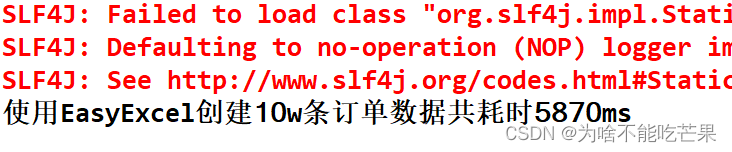
CPU The usage rate is as follows :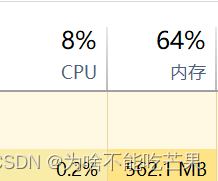
thus it can be seen ,10w The data of , by comparison ,SXSSFWorkbook The fastest ,CPU The highest occupancy rate ;EasyExcel Low running speed ,CPU The lowest occupancy . because poi Memory consumption is very high ,EasyExcel It can greatly reduce the occupation of memory ( as a result of EasyExcel Adopt the parsing mode of line by line reading , Not all file data is loaded into memory at one time , Is to read data line by line on the disk ), Therefore, it is recommended to use EasyExcel.
边栏推荐
- The bigger the project is, the bigger it is. This is how I split it
- [classic thesis of recommendation system (10)] Alibaba SDM model
- Jmeter性能测试之将每次接口请求的结果保存到文件中
- VScode无法启动问题解决思路
- OVSDB
- How to ensure the double write consistency between cache and database?
- AQS implementation principle
- Summary of API method
- PHP environment deployment
- 「论文笔记」Next-item Recommendations in Short Sessions
猜你喜欢
NFS service and Samba service deployment

Summary of distributed related interview questions

一文掌握mysql数据库审计特点、实现方案及审计插件部署教程

Web page basic label
Lnmp+wordpress to quickly build a personal website

DCN (deep cross network) Trilogy

Pycharm common shortcut keys

Anaconda 中安装 百度飞浆Paddle 深度学习框架 教程

如何关闭高位端口

Master slave database deployment
随机推荐
1.MySQL架构篇【mysql高级】
Introduction to C language (8)
utils 连接池
2022.7.22DAY612
The difference between ArrayList and LinkedList
Using ordered dictionary to copy pcap files
《门锁》引爆独居安全热议 全新海报画面令人窒息
ShardingSphere数据分片
元宇宙基础设施:WEB 3.0 chain33 优势分析
2022.7.22DAY612
Jmeter性能测试之使用存储响应内容到文件监听器
NFS service and Samba service deployment
PostgreSQL UUID fuzzy search UUID string type conversion SQL error [42883] explicit type casts
Shardingsphere data slicing
Summary of traversal methods of list, set, map, queue, deque and stack
20220209 create a basic Servlet
Leetcode 206. reverse chain list (2022.07.25)
Yaml language-01 (data type, array, object)
Machine learning related competition website
IDEA settings设置快捷键实现字符串中的英文字母转大小写