当前位置:网站首页>Pywebio to quickly build web applications
Pywebio to quickly build web applications
2022-06-23 01:54:00 【web15085547941】
If you are little white , This set of information can help you become a big bull , If you have rich development experience , This set of information can help you break through the bottleneck
2022web Full set of video tutorial front-end architecture H5 vue node Applet video + Information + Code + Interview questions .
Part1 What is? PyWebIo
PyWebIO It provides a series of command interactive functions to obtain user input and output on the browser , Turn the browser into a “ Rich text terminal ”, Can be used to build simple Web Application or browser based GUI application . Use PyWebIO, Developers can write terminal scripts ( be based on input and print Interact ) To write apps , Not required HTML and JS Knowledge about ;PyWebIO It can also be easily integrated into existing Web service . Ideal for quickly building pairs of UI Less demanding applications .
Part2PyWebIo Characteristics
Get input using synchronization rather than callback based methods , Coding logic is more natural
Non declarative layout , The layout is simple and efficient
The code is less intrusive , The old script code can be transformed into
WebserviceSupport integration into existing
Webservice , At present, we supportFlask、Django、Tornado、aiohttp、FastAPI(Starlette)Framework for the integrationBoth thread based execution model and co process based execution model are supported
Support data visualization in combination with third-party libraries
Part3 install
pip3?install?-U?pywebio
Part4 Introduction example
Let's use this example , To achieve the submission and inspection of data .
from?pywebio.input?import?*
from?pywebio.output?import?*
from?pywebio.pin?import?*
from?pywebio?import?start_server

def?input_input():
????#?input The validity check of
????#? Custom check function

????def?check_age(n):
????????if?n<1:
????????????return?"[email protected]"
????????if?n>100:
????????????return?"[email protected]"
????????else:
????????????pass

????myAge?=?input('please?input?your?age:',type=NUMBER,validate=check_age,help_text='must?in?1,100')
????print('myAge?is:',myAge)

if?__name__?==?'__main__':
????start_server(
????????applications=[input_input,],
????????debug=True,
????????auto_open_webbrowser=True,
????????remote_access=True,
????????)

design sketch
Part5 More usage
1input
#? Input box
input_res?=?input("please?input?your?name:")
print('browser?input?is:',?input_res)

#? Password box
pwd_res?=?input("please?input?your?password:",type=PASSWORD)
print('password:',?pwd_res)

#? A drop-down box
select_res?=?select("please?select?your?city:",[' Beijing ',' Xi'an ',' Chengdu '])
print('your?city?is:',select_res)

#?checkbox
checkbox_res?=?checkbox("please?confirm?the?checkbox:",options=['agree','disagree'])
print('checkbox:',?checkbox_res)

#? The text box
text_res?=?textarea("please?input?what?you?want?to?say:",rows=3,placeholder='...')
print('what?you?said?is:',text_res)

#? Upload files
upload_res?=?file_upload("please?upload?what?you?want?to?upload:",accept="image/*")

with?open(upload_res.get('filename'),mode='wb')?as?f:?#? Because the image content read is binary , So we should use wb Mode on
????f.write(upload_res.get('content'))
print('what?you?uploaded?is:',upload_res.get('filename'))

#? Slider bar

sld?=?slider(' This is the slider ',help_text=' Please slide to select ')??#? The disadvantage is that the current sliding value cannot be displayed
toast(' Submit successfully ')
print(sld)

#? Radio options

radio_res?=?radio(
????' This is a single choice ',
????options=[' Xi'an ',' Beijing ',' Chengdu ']
????)
print(radio_res)

#? Update input

Country2City={
????'China':[' Xi'an ',' Beijing ',' Chengdu '],
????'USA':?[' New York ',?' Chicago ',?' Florida '],
}

countries?=?list(Country2City.keys())

update_res?=?input_group(
????" National and urban linkage ",
????[
????????#? When the country changes ,onchange Trigger input_update Methods to update name=city The option to , Update to Country2City[c],c The option value representing the country
????????select(' Country ',options=countries,name='country',onchange=lambda?c:?input_update('city',options=Country2City[c])),
????????select(' City ',options=Country2City[countries[0]],name='city')
????]
)

print(update_res)

Input box

Password box

Selection box

Check the box

The text box

Upload files

Slider bar

Radio buttons

The input box is linked -1

The input box is linked -2
2output
#? Text output
put_text(' This is the output ')

#? Form the output
put_table(
????tdata=[
????????[' Serial number ',' name '],
????????[1,' China '],
????????[2,' The United States ']
????]
)

#?MarkDown Output
put_markdown('~~ Delete line ~~')

#? File output
put_file(' Secret book .txt',' Eighteen dragon subduing palms ')

#? Button output
put_buttons(
????buttons=['A','B'],
????onclick=toast
)
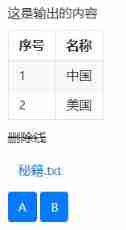
effect
3 Advanced usage
#?==========================?1- Enter the parameters of the box ?==============================

#?input More parameters of
ipt?=?input(
????'This?is?label',
????type=TEXT,
????placeholder='This?is?placeholder',??#? placeholder
????help_text='This?is?help?text',??#? Tips
????required=True,??????????????????#? Required
????datalist=['a1',?'b2',?'c3'])????#? Resident input Lenovo
print('what?you?input?is:',ipt)

#?===========================?2- Input box custom verification ?=============================

#?input The validity check of
#? Custom check function

def?check_age(n):
????if?n<1:
????????return?"[email protected]"
????if?n>100:
????????return?"[email protected]"
????else:
????????pass

myAge?=?input('please?input?your?age:',type=NUMBER,validate=check_age,help_text='must?in?1,100')
print('myAge?is:',myAge)

#?============================?3- Code editing ?============================

#?textare Code pattern

code?=?textarea(
????label=' This is the code pattern ',
????code={
????????'mode':'python',
????????'theme':'darcula',
????},
????value='import?time

time.sleep(2)'
????)
print('code?is:',code)

#?==============================?4- Input group ?==========================

def?check_age(n):
????if?n<1:
????????return?"[email protected]"
????if?n>100:
????????return?"[email protected]"
????else:
????????pass

def?check_form(datas):
????print(datas)
????if?datas.get("age")==1:
????????#return?'you?are?only?one?years?old!'
????????return?('age','you?are?only?one?years?old!')
????if?len(datas.get("name"))<=3:
????????return?('name','Name?Too?short!!!')

#? Input group
datas?=?input_group(
????"It's?input?groups...",
????inputs=[
????????input('please?input?name',name='name'),
????????input('please?input?age',name='age',type=NUMBER,validate=check_age)
????],
????validate=check_form
????)

#?======================================?5- Input box action?=========================================

import?time

def?set_today(set_value):
????set_value(time.time())
????print(time.time())

tt?=?input(' Selection time ',action=('Today',set_today),readonly=True)
print(tt)

#?======================================?5- Pop up window of input box ?=========================================

def?set_some(set_value):??#? This method can convert the selected English into Chinese
????with?popup('It?is?popup'):????#?popup? yes ?output? Method in module
????????put_buttons(['Today','Tomorrow'],onclick=[lambda:?set_value(' today ','Today1'),lambda:set_value(' Tomorrow, ','Tomorrow2')])???# set_value(' today ','Today')? Press Today Button input Today1, Actual correspondence : today
????????put_buttons(['Exit'],onclick=lambda?_:?close_popup())

pp?=?input('go?popup',type=TEXT,action=(' Button pop up ',set_some))
print(pp)

Associative words reside in +help_text

Code editing mode

Input group

Input box action

Pop up window of input box

Button on the onclick
In code
Part6 Reference resources
- https://pywebio.readthedocs.io/zh_CN/latest/
That's all for today , Thank you for reading , We'll see you next .
End
Previous recommendation
Gevent | Use it asynchronously !
5 Minutes to get to know Scrum
5 Minutes learn local Pypi Source building
jenkinsclient | Easy to use jenkins client
PySimpleGUI Classic practice : How to read this Chinese character ?
Jmeter test TCP Million connections
Light up to see !
边栏推荐
- C language games: sanziqi (simple version) implementation explanation
- JS to paste pictures into web pages
- [CodeWars] Convert Decimal Degrees to Degrees, Minutes, Seconds
- You can be what you want to be
- Using WordPress to create a MySQL based education website (learning notes 2) (technical notes 1) xampp error1045 solution
- [luogu] p1083 [noip2012 improvement group] borrow classroom (line segment tree)
- Unique in Pimpl_ PTR compilation errors and Solutions
- Cmake simple usage
- Detailed explanation of makefile usage
- Nuxt - auto generate dynamic route bug
猜你喜欢

7.new, delete, OOP, this pointer
Function part

Array part

There are animation characters interacting with each other when the mouse slides in the web page

JS prototype and prototype chain Paramecium can understand

Garbled code of SecureCRT, double lines, double characters, unable to input (personal detection)

Vs Code inadvertently disable error waveform curve

How to type Redux actions and Redux reducers in TypeScript?

The devil cold rice # 099 the devil said to travel to the West; The nature of the boss; Answer the midlife crisis again; Specialty selection

1. Mx6u bare metal program (1) - Lighting master
随机推荐
Freshman C language summary post (hold change) Part 2 formatted monthly calendar
Do you know the memory components of MySQL InnoDB?
Autumn move script C
8. destruct, construct, deep copy, shallow copy, assignment operator overload
A blog allows you to understand the use of material design
Analysis of current mainstream video coding technology | community essay solicitation
SQL programming task05 job -sql advanced processing
SQL programming task06 assignment - Autumn recruit secret script ABC
Day575: divide candy
Hello
//1.8 char character variable assignment integer
1. Mx6u bare metal program (4) - GPIO module
//1.10 initial value of variable
1. Mx6u bare metal program (1) - Lighting master
Arm assembly syntax
Download and compile ROS source code
1. Mx6u startup mode and equipment
An interesting example of relaxed memory models
//1.11 basic operators
Google benchmark user manual and examples