当前位置:网站首页>Salted fish esp32 instance - mqtt lit LED
Salted fish esp32 instance - mqtt lit LED
2022-07-28 09:28:00 【Salted fish shell】
Salted fish ESP32 example —MQTT Lighten up LED
Please call me lamplighter QAQ
Materials and wiring
ESP32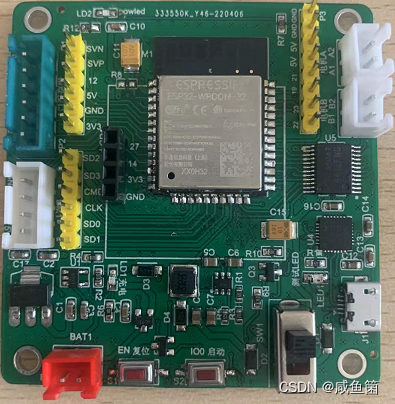
** Communication cat debugging software **
( Get yourself a server ) It's easy to see with a cat , Make a web page for yourself later . In addition, please download Baidu by yourself. Thank you .

Constructors
| Constructors |
|---|
| client=simple. MQTTClient (client_id, server, port) |
| structure MQTT Client object . |
| client_id: client ID, Have uniqueness ;server: Server address , It can be IP Or the website ;port: Server port .( The port usually used by the server , You can customize .) |
| Usage method |
| client.connect() |
| Connect to the server . |
| client.publish(TOPIC,message) |
| Release .TOPIC: Subject number ;message: information content , example :‘Hello~’ |
| client.subscribe(TOPIC) |
| subscribe .TOPIC: Subject number . |
| client.set_callback(callback) |
| Set the callback function .callback: If you receive information after subscription , Execute the callback function of the phase name . |
| client.check_msg() |
| Check subscription information . If you receive the message, execute the set callback function callback. |
| Constructors |
|---|
| client=simple. MQTTClient (client_id, server, port) |
| structure MQTT Client object . |
| client_id: client ID, Have uniqueness ;server: Server address , It can be IP Or the website ;port: Server port .( The port usually used by the server , You can customize .) |
| Usage method |
| client.connect() |
| Connect to the server . |
| client.publish(TOPIC,message) |
| Release .TOPIC: Subject number ;message: information content , example :‘Hello~’ |
| client.subscribe(TOPIC) |
| subscribe .TOPIC: Subject number . |
| client.set_callback(callback) |
| Set the callback function .callback: If you receive information after subscription , Execute the callback function of the phase name . |
| client.check_msg() |
| Check subscription information . If you receive the message, execute the set callback function callback. |
Sample code
MQTT After connection , Control by sending and publishing messages ESP32 Development board LED.
Throw a brick and attract jade , Several libraries in it are in firmware and cannot be displayed . Interested friends can simplify the code by themselves . This is just a reference , After all, I can't write too much without releasing the board .
Tips :MQTT Search the Library github,ztcomm Before Library 3.5 Inch screen should have been sent . No more writing , If you write too much, the official will come to me (QAQ)
main.py
from machine import Pin
import socket
import network
import struct
import time
import json
import ztcomm

from mqttclient import MQTTClient
import _thread

# wifi Account password of
SSID="XXX"
PASSWORD="XXX"
# LED Pin
led=Pin(2, Pin.OUT, value=0)
#  initialization
wlan=None
mymac=None
zt=None
config=None
wifilist=None
# MQTT Information
SERVER = '0,0,0,0'  #IP Address
CLIENT_ID = 'esp32client' #  name
TOPIC = 'xx'        #  Subject number
username='xx'      #  account number
password='xx'  #  password
state = 0
c=None

#  open json File read content ( Namely wifi and MQTT The information of )

def zt_config():
  global SSID,PASSWORD,SERVER,CLIENT_ID,TOPIC,username,password,config
  with open('ztconfig.json','r') as f:
    config = json.loads(f.read())
  SSID=config['SSID']
  PASSWORD=config['PASSWORD']
  SERVER=config['SERVER']
  CLIENT_ID=config['CLIENT_ID']
  TOPIC=config['TOPIC']
  username=config['username']
  password=config['password']
  f.close()


#  link wifi
def connectWifi(ssid,passwd):
  global wlan,mymac,zt
  restr='0'
  nn=0
  try:
    wlan=network.WLAN(network.STA_IF)         # establish wlan object
    wlan.active(True)                         # Activate
    wlan.disconnect()                         # Disconnect the last wifi Connect
    wlan.connect(ssid,passwd)                 # Connect wifi
    time.sleep(8)
    while(wlan.ifconfig()[0]=='0.0.0.0'):
      time.sleep(1)
      nn+=1
      print('network config err ap:%s|num:%d' % (ssid,nn))
      if(nn>5):
        wlan.active(False)
        return False
        break

    s=wlan.config('mac')
    mymac=('%02x-%02x-%02x-%02x-%02x-%02x') %(s[0],s[1],s[2],s[3],s[4],s[5])  #  obtain mac Address
    time.sleep(4)
    ptstr='ip:%s,mask:%s\r\ngateway:%s,dns:%s\r\nmac:%s' %(wlan.ifconfig()[0],wlan.ifconfig()[1],wlan.ifconfig()[2],wlan.ifconfig()[3],mymac.upper())
    print(ptstr)    #  Output ip mask gateway dns mac
    return True

  except Exception as e:
    print(Exception,'BBB:',e,type(Exception),type(e))
    wlan.active(False)

def disconnect():
  global wlan
  wlan.disconnect()
  wlan.active(False)

#  Lighting function , Others can be ignored , Just look at this ~
def sub_cb(topic, msg):
  global state
  print((topic, msg))
  if msg == b"on":
    led.value(1)
    state = 0
    print("1")
  elif msg == b"off":
    led.value(0)
    state = 1
    print("0")
  elif msg == b"toggle":
    led.value(state)
    state = 1 - state


def waitmqmsg(c):
  while True:
    c.wait_msg()
    time.sleep(1)


def main():
  global wlan,zt,c,config,wifilist

  shunum=-1

  zt=ztcomm.ztcomm()
  try:
    zt_config()
    time.sleep(1)


    # Return after successful connection IP、MAC Etc
    if connectWifi(SSID,PASSWORD):
      led.value(1)

      server=SERVER
      c = MQTTClient(CLIENT_ID, server,0,username,password)     # Connect
      c.set_callback(sub_cb)                    # Execute callback function
      c.connect()                               # Connect to server
      c.subscribe(TOPIC)                        # Subscribe to topics
      tpstr="Connected to %s, subscribed to %s topic" % (server, TOPIC)
      print(tpstr)

      #  Sending data
      headstr=('(%s,%s,%s,%s,%s)') %(wlan.ifconfig()[0],wlan.ifconfig()[1],wlan.ifconfig()[2],wlan.ifconfig()[3],mymac.upper())
      #  Group character
      a="xxx"
      pubstr='%s-%s-%s' %(TOPIC,headstr,a)
      c.publish(TOPIC,pubstr)
      #  Receive data ( Open a thread to accept data )
      _thread.start_new_thread(waitmqmsg(c), ())
      led.value(0)


#  Anti stop operation
    while True:
      time.sleep(1)

  except Exception as e:

    print(Exception,':AAAA:',e,type(Exception),type(e))
  finally:
    if(c is not None):
      c.disconnect()
    disconnect()

if __name__ == '__main__':
    main()
ztconfig
{
    "SSID": "wifi account number ", "PASSWORD": "wifi password ", "CLIENT_ID": "x", "username": "x", "SERVER": "ip Address ", "TOPIC": " name ", "password": " password "}
Effect display

After successful connection, the communication cat will display various information of the development board (IP dns mac), Test development board LED For open state , Enter toggle Flip LED state 
You can also type ‘on’ and ‘off’ To control the switch light . At this time, the serial port will return data 
边栏推荐
- GBase 8a如何使用使用预处理快速插入数据?
- v-bind指令的详细介绍
- [package deployment]
- IT行业数据与应用关系的变迁
- Openshift 4 - use verticalpodautoscaler to optimize application resource request and limit
- 快速上手Flask(一) 认识框架Flask、项目结构、开发环境
- Activiti startup error: cannot create poolableconnectionfactory (could not create connection to database server
- 2022年起重机司机(限桥式起重机)考试题库及模拟考试
- 【C语言】详解顺序表(SeqList)
- 技术分享| 快对讲综合调度系统
猜你喜欢

2022年安全员-B证考试模拟100题及答案
![【解决】ERROR in [eslint] ESLint is not a constructor](/img/58/2ce1243d0085462af3ba6d3da0817d.png)
【解决】ERROR in [eslint] ESLint is not a constructor
![Rgb-t tracking: [multimodal fusion] visible thermal UAV tracking: a large scale benchmark and new baseline](/img/9b/b8b1148406e8e521f12ddd5c12bf89.png)
Rgb-t tracking: [multimodal fusion] visible thermal UAV tracking: a large scale benchmark and new baseline

5 operators, expressions, and statements

IP protocol of network layer

Promise学习笔记
![[Download] several tools for brute force cracking and dictionary generation are recommended](/img/c6/f4a9c566ff21a8e133a8a991108201.png)
[Download] several tools for brute force cracking and dictionary generation are recommended

2022高压电工考试模拟100题及模拟考试

DN-DETR 论文精度,并解析其模型结构 & 2022年CVPR论文

MQTT.js 入门教程:学习笔记
随机推荐
7 C控制语句:分支和跳转
5 运算符、表达式和语句
2022年危险化学品经营单位安全管理人员上岗证题目及答案
【SwinTransformer源码阅读二】Window Attention和Shifted Window Attention部分
阿里云服务器搭建和宝塔面板连接
【C语言】详解顺序表(SeqList)
1.5 merge\rebase\revert\stash\branch
2022年起重机司机(限桥式起重机)考试题库及模拟考试
[multithreading] the underlying principle of println method
Title and answer of work permit for safety management personnel of hazardous chemical business units in 2022
《数据库系统内 幕》分布式系统
1.5 merge\rebase\revert\stash\branch
[multithreading] non atomic agreement of long and double
树上启发式合并
51单片机存储篇:EEPROM(I2C)
Technology sharing | quick intercom integrated dispatching system
opencv4.60版本安装和配置
Deconstruction assignment of ES6 variables
对话MySQL之父:代码一次性完成才是优秀程序员
【AUTOSAR-RTE】-3-Runnable及其Task Mapping映射