当前位置:网站首页>DOM series of touch screen events
DOM series of touch screen events
2022-08-01 16:02:00 【Old __L】
Directory
1. Overview of touch screen events
The compatibility of mobile browsers is good. We don't need to consider the compatibility of previous JS, and we can use native JS writing effects with confidence, but the mobile terminal also has its own unique features.For example, the touch screen event touch (also called touch event), both Android and IOS have.
Thetouch object represents a touch point.The touch point may be a finger or a stylus.Touch events respond to user finger (or stylus) operations on the screen or trackpad.
2. Common touch screen events
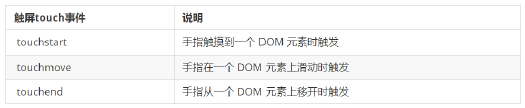
3. TouchEvent Object (TouchEvent)
TouchEvent is a class of events that describe the state change of a finger on a touch plane (touch screen, touchpad, etc.).This type of event is used to describe one or more touchpoints, allowing developers to detect movement of touchpoints, increase and decrease of touchpoints, etc.
The three events touchstart, touchmove, and touchend will have their own event objects.
Touch Event Objects Focus on a list of three common objects:

Because we usually register touch events for elements, so focus on remembering targetTocuhes
4. Drag elements on the mobile side
- touchstart, touchmove, touchend can drag elements;
- But dragging the element needs the coordinate value of the current finger, we can use pageX and pageY in targetTouches[0];
- Principle of dragging on the mobile terminal: When the finger is moving, the distance the finger moves is calculated.Then use the original position of the box + the distance moved by the finger;
- The distance the finger moves: the position in the slide of the finger minus the position where the finger just started to touch;
4.1. Triad of dragging elements
(1), touch element touchstart: get the initial coordinates of the finger, and at the same time get the original position of the box;
(2) move the finger touchmove: calculate the sliding distance of the finger, and move the box;
(3) leaveFinger touchend:
Note: finger movement will also trigger scrolling, so here to prevent the default screen scrolling
e.preventDefault();
Afterword
If you feel that the article is not good
//(ㄒoㄒ)//, leave a message in the comments, the author will continue to improve;o_O???
If you think the article is a little useful, you can give the author a like;\\*^o^*//
If you want to make progress with the author, you can Scan the QR code on WeChat and follow the front-end old L;~~~///(^v^)\\\~~~
Thank you readers(^_^)∠※!!!

边栏推荐
猜你喜欢





随机推荐
链滴的几个 Markdown 语法没有渲染
重庆银河证券股票开户安全吗,是正规的证券公司吗
测试工程师进阶必读书目
LeetCode50天刷题计划(Day 6—— 整数反转 14.20-15.20)
DOM系列之触屏事件
what is tail tooth feast
如何防止重复下单?
信息录入率百分百上海强化施工现场建筑工人实名制管理
华盛顿大学、Allen AI 等联合 | RealTime QA: What's the Answer Right Now?(实时 QA:现在的答案是什么?)
Eslint syntax error is solved
hzero-resource秒退
js判断是pc端还是移动端(包括ipad)
兆骑科创平台招才引智,海内外高层次人才引进平台
Inflation continues, Kenya's food security a concern
珠海市生物安全P3实验室主体结构封顶
Stock Strategy 02 | Technology Timing + Industry Factors + Market Value Rotation
HashCode technology insider interview must ask
Break the limit of file locks and use storage power to help enterprises grow new momentum
Stored procedures in MySQL (detailed)
2022年7月最热的10篇AI论文