当前位置:网站首页>03_ Spingboot core profile
03_ Spingboot core profile
2022-06-24 23:06:00 【Book opens autumn maple】
Spring Boot The core configuration file is used to configure Spring Boot Program , The name must be application Start
1. Core configuration format
(1).properties file ( This file is used by default )
By modifying the application.properties The configuration file , After modifying the default tomcat Port number and file root of the project ( Site )

SpringBootController
import org.springframework.stereotype.Controller;
import org.springframework.web.bind.annotation.RequestMapping;
import org.springframework.web.bind.annotation.ResponseBody;

@Controller
public class SpringBootController {
    @RequestMapping(value = "/springBoot/say")
    @ResponseBody
    public String say() {
        return "Hello,springBoot!";
    }
}
application.properties
Key value pairs properties Property file configuration mode
# configure port
server.port=9001

# Configure site name
server.servlet.context-path=/001-springboot-first
Start the test --》 Page display results localhost:9001/001-springboot-first/springBoot/say

(2).yml file
yml Document and properties There is no difference between files , It's just different configurations .
yml It's a kind of yaml Format of the configuration file , It mainly adopts certain Space 、 Line feed and other formatting configuration .
yaml It is an intuitive data serialization format that can be recognized by computer , It's easy for people to read ,yaml Be similar to xml, But grammar is better than xml Concise and many , Value must have a space with the previous colon configuration item , yml Suffixes can also be used yaml suffix
SpringBootController
import org.springframework.stereotype.Controller;
import org.springframework.web.bind.annotation.RequestMapping;
import org.springframework.web.bind.annotation.ResponseBody;

@Controller
public class SpringBootController {
    @RequestMapping(value = "/springBoot/say")
    @ResponseBody
    public String say() {
        return "Hello,springBoot!";
    }
}
application.yml
server:
  port: 8001
  servlet:
    context-path: /001-springboot-first
Be careful : When two format configuration files exist at the same time , It uses .properties The configuration file , To demonstrate yml, You can rename it first , Rerun Application, Check the startup port and context root

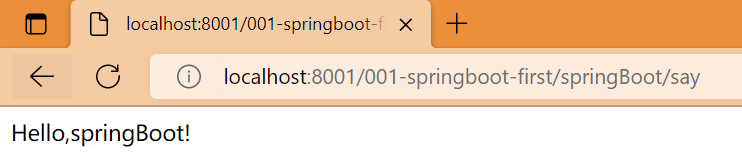
Start the test --》 Page display results localhost:8001/001-springboot-first/springBoot/say
2. Multi environment configuration
In the process of actual development , Our project will go through many stages ( Development --> test --> go online ), The configuration of each phase will also be different , for example : port 、 Up and down Wengen 、 Database etc. , At this time, in order to facilitate switching between different environments ,SpringBoot Provides multiple environment configurations , The specific steps are as follows

SpringBootController
import org.springframework.stereotype.Controller;
import org.springframework.web.bind.annotation.RequestMapping;
import org.springframework.web.bind.annotation.ResponseBody;

@Controller
public class SpringBootController {
    @RequestMapping(value = "/springBoot/say")
    @ResponseBody
    public String say() {
        return "Hello,springBoot!";
    }
}
application.properties
The value to the right of the equal sign is consistent with the environment ID name of the configuration file , You can change the configuration of the master configuration file , Rerun Application, View the boot port and context root directory
# Activate the environment configuration
spring.profiles.active=dev
application-dev.properties
# Development environment core configuration file
server.port=7001
server.servlet.context-path=/001-springboot-first
application-product.properties
# Production environment core configuration file
server.port=6001
server.servlet.context-path=/001-springboot-first
application-test.properties
# Test environment core configuration file
server.port=5001
server.servlet.context-path=/001-springboot-first
Start the test --》 Page display results localhost:7001/001-springboot-first/springBoot/say

3. Spring Boot Custom configuration
stay SpringBoot In the core configuration file of , In addition to using built-in configuration items , We can also customize the configuration , Then use the following annotation to read the configured attribute value
(1)@Value annotation
In the core configuration file applicatin.properties in , Add two custom configuration items school.name and school.webSite. stay IDEA You can't see these two properties SpringBoot distinguish , The background is orange
stay SpringBootController Define properties in , And use @Value Annotations or custom configuration values , And test the method

SpringBootController
@Controller
public class SpringBootController {

    @Value("${school.name}")
    private String schoolName;

    @Value("${school.webSite}")
    private String schoolWebsite;

    @RequestMapping(value = "/springBoot/say")
    @ResponseBody
    public String say() {
        return "Hello,springBoot!--->" + schoolName + "-->" + schoolWebsite;
    }
}
application.properties
The value to the right of the equal sign is consistent with the environment ID name of the configuration file , You can change the configuration of the master configuration file , Rerun Application, View the boot port and context root directory
# Activate the environment configuration
spring.profiles.active=dev
application-dev.properties
# Development environment core configuration file
server.port=7001
server.servlet.context-path=/001-springboot-first
Start the test --》 Page display results localhost:7001/001-springboot-first/springBoot/say

(2)@ConfigurationProperties

ConfigInfo
import org.springframework.boot.context.properties.ConfigurationProperties;
import org.springframework.stereotype.Component;

@ConfigurationProperties(prefix = "school")
@Component
public class ConfigInfo {
    private String name;
    private String website;

    public ConfigInfo() {
    }

    public String getName() {
        return name;
    }

    public void setName(String name) {
        this.name = name;
    }

    public String getWebsite() {
        return website;
    }

    public void setWebsite(String website) {
        this.website = website;
    }

    @Override
    public String toString() {
        return "ConfigInfo{" +
                "name='" + name + '\'' +
                ", website='" + website + '\'' +
                '}';
    }
}
SpringBootController
@Controller
public class SpringBootController {

    @Autowired
    ConfigInfo configInfo;

    @Value("${school.name}")
    private String schoolName;

    @Value("${school.webSite}")
    private String schoolWebsite;

    @RequestMapping(value = "/springBoot/say")
    @ResponseBody
    public String say() {
        return "Hello,springBoot!--->" + schoolName + "-->" + schoolWebsite + "-->" + configInfo;
    }
}
application.properties
The value to the right of the equal sign is consistent with the environment ID name of the configuration file , You can change the configuration of the master configuration file , Rerun Application, View the boot port and context root directory
# Activate the environment configuration
spring.profiles.active=dev
application-dev.properties
# Development environment core configuration file
server.port=7001
server.servlet.context-path=/001-springboot-first
Start the test --》 Page display results localhost:7001/001-springboot-first/springBoot/say

ConfigInfo Red explosion problem solve
<dependency>
    <groupId>org.springframework.boot</groupId>
    <artifactId>spring-boot-configuration-processor</artifactId>
    <optional>true</optional>
</dependency>

边栏推荐
- 机器学习编译入门课程学习笔记第一讲 机器学习编译概述
- 【WSL】SSH 远程连接及宿主机端口转发配置
- China Sky Lantern market trend report, technical dynamic innovation and market forecast
- 「ARM 架构」是一种怎样的处理器架构?
- Feign project construction
- 剑指 Offer 13. 机器人的运动范围
- EPICS record Reference 3 - - field available for all Records
- EPICS记录参考4--所有输入记录都有的字段和所有输出记录都有的字段
- Database transaction Transanction
- Docker installation redis- simple without pit
猜你喜欢

2022年安全员-A证考题及答案

Epics record reference 4 -- fields for all input records and fields for all output records

大厂面试必问:如何解决TCP可靠传输问题?8张图带你详细学习

推送Markdown格式信息到釘釘機器人

结构体的内存对齐

加分利器 不负所托 | 知道创宇获攻防演练防守方感谢信!

Win10 or win11 printer cannot print

双亲委派机制

23研考生注意啦!备考期间最容易中招的骗局,居然是它们?!
Pousser l'information au format markdown vers le robot nail
随机推荐
详细了解Redis的八种数据类型及应用场景分析
Development specification - parameter verification exception, exception return prompt section
面试害怕被问MySQL相关问题 ?这份三万字精华总结 + 面试100 问,吊打面试官完全够了
Attention, postgraduate candidates! They are the easiest scams to get caught during the preparation period?!
High level application of SQL statements in MySQL database (I)
JMM 最最最核心的概念:Happens-before 原则
2022年高压电工考试模拟100题及在线模拟考试
02_SpingBoot 入门案例
【武汉大学】考研初试复试资料分享
Introduction to machine learning compilation course learning notes lesson 1 overview of machine learning compilation
What kind of processor architecture is ARM architecture?
Vulnhub Vegeta: 1
canvas 实现图片新增水印
Some updates about a hand slider (6-18, JS reverse)
EPICS记录参考3 -- 所有记录都有的字段
推送Markdown格式信息到釘釘機器人
Talk about GC mechanism often asked in interview
Leetcode algorithm The first common node of two linked lists
是否需要提高代码阅读能力?这有技巧
docker安装mysql-简单无坑