当前位置:网站首页>How to download wechat payment certificate (API certificate)
How to download wechat payment certificate (API certificate)
2022-07-02 17:53:00 【Famine~】
One 、 Log in to wechat merchant platform
1、 Merchant platform login website : Wechat payment - China's leading third-party payment platform | Wechat payment provides a safe and fast payment method  http://pay.weixin.qq.com/
2、 Login mode : Scan code login login , As shown in the figure below :

Two 、 Enter wechat merchant platform to download certificate
1、 Click on the account center – Account settings –API Security – Apply for a certificate , As shown in the figure below :

2、 Click on “ Download certificate tools ”, Download and save to the desktop ( Pay attention to the saved path , Create a desktop “ certificate ” Folder )

Click the downloaded certificate tool to install

3、 After installation , There will be a green icon program , Click to open the certificate tool and start downloading the certificate .
4、 Click to apply for certificate

5、 Fill in the merchant information – Click on “ Paste ”( If you can't paste it , Just go to the account center – Merchant information see < Here's the picture )
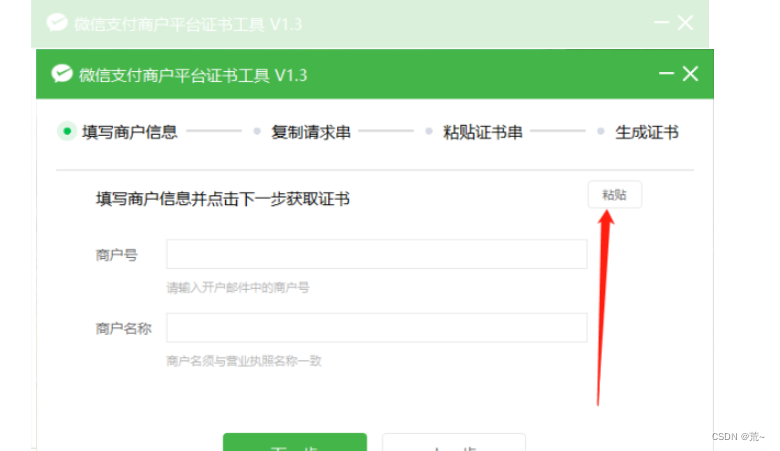

6、 Copy the request string of the certificate tool and paste it into the merchant platform


7、 Set the operation password ,( If set , Just fill in the password )


8、 Fill in the operation password – Copy certificate string

9、 Paste certificate string , Click next

10、 Successfully applied for certificate , Click to view the certificate folder

11、 After the certificate is downloaded successfully , The default save path is :WXCertUtil–cert, Find the compressed package and decompress – file name apiclient_cert.p12

边栏推荐
- 【历史上的今天】7 月 2 日:BitTorrent 问世;商业系统 Linspire 被收购;索尼部署 PlayStation Now
- VirtualLab基础实验教程-7.偏振(2)
- POJ - 1458 common subsequence (longest common subsequence)
- 台风来袭,多景区暂时关闭,省文旅厅提醒注意安全!
- freemarker+poi实现动态生成excel文件及解析excel文件
- Bluetooth technology | new working mode of wearable devices of the Internet of things, and Bluetooth ble helps the new working mode
- Platform management background and business menu resource management: business permissions and menu resource management design
- 嵌入式开发板 ~ 说明
- USB interface powered Bluetooth color light strip controller
- 义隆EM78P153K DIP14单片机 MCU
猜你喜欢
Does pytorch support 32 bits?

RK1126平台项目总结
【网络是怎样连接的】第五章 探索服务器
![[how is the network connected] Chapter 4 explores access networks and network operators](/img/50/d16f4dca571a5a5f9b20fada289d45.png)
[how is the network connected] Chapter 4 explores access networks and network operators
easyAI笔记——机器学习

Modbus protocol communication exception
![List summation [dummy+ tail interpolation + function processing list reference common pit]](/img/08/30e8ca2376104d648a82dca8a72c42.png)
List summation [dummy+ tail interpolation + function processing list reference common pit]

Keras深度学习实战——基于VGG19模型实现性别分类
Virtual lab basic experiment tutorial -7 Polarization (1)

Alibaba cloud sub account - Permission Policy - full control permission granted to an account and an OSS bucket
随机推荐
em120.gige.h
PMS132B单片机TWS数码管蓝牙充电仓方案开发
一日2篇Nature!中科大校友段镶锋团队纳米材料新成果,曾是贝尔比奖章第三位华人得主...
uva1169
Five reasons to choose SAP Spartacus as the implementation framework of SAP commerce cloud storefront
The bottom simulation implementation of vector
Does pytorch support 32 bits?
维护万星开源向量数据库是什么体验
Yilong em78p153k dip14 MCU
Easyai notes - machine learning
应广单片机开发案例
深入理解ThreadLocal
每日一题——小乐乐改数字
Wechat applet - arrows floating up and down
From a professional background, I can't get into a small company for interview
[nonlinear control theory]8_ Comparison of three robust controllers
HDU - 1114 Piggy Bank (full backpack)
Longest non repeating subarray
Atcoder beginer contest 237 VP supplement
【Zuul】com.netflix.zuul.exception.ZuulException: Hystrix Readed time out