当前位置:网站首页>ADS,AXD基本使用说明
ADS,AXD基本使用说明
2022-06-10 17:40:00 【黙谷】
首先File -> New 创建一个C文件。


编写C文件,完成后右上角点击保存。

再File -> New,新建一个项目

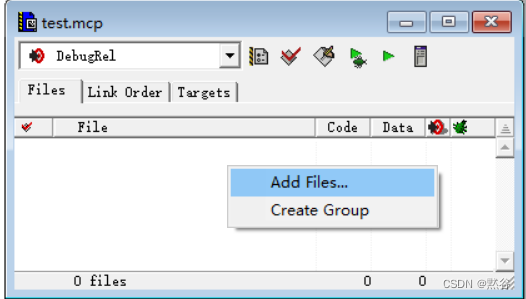
点击右键,选择Add Files将之前写的C文件添加进去。
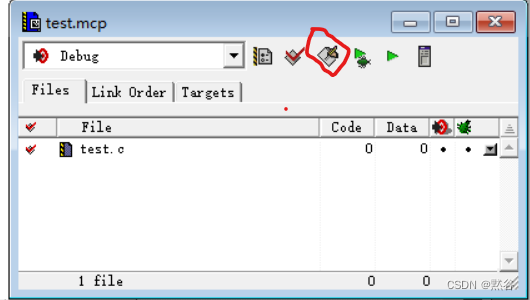
点击画圈图标Make编译。
编译通过,没有错误,右上角关闭。

再次点击画圈图标进行Debug(如果点击Debug报错,进入不了AXD,请看最后的说明)。

点击之后会进入AXD。

点击画圈图标。

再次点击该图标运行。

输出结果,运行成功。

注意:
如果点击Debug,进入不了ADX,则可以在软件根目录/Bin目录下,找到axd.exe文件,以管理员身份运行。
选择Options -> Configure Target

选择ARMUL,点击OK。

然后选择File -> Load Image

找到你创建的项目下的Debug目录下的axf文件,点击打开。

然后连续点击两次画圈的图标运行。

运行成功。

边栏推荐
- What is image search
- 掌握高性能计算前,我们先了解一下它的历史
- 使用DAP-Link单独下载可执行文件到MM32F5微控制器
- C language -- 12 branch statement switch
- [technical analysis] discuss the production process and technology of big world games - preliminary process
- 云计算搭建全部内容总结,保证可以搭建一个完整的云计算服务器,包括节点安装、实例的分配和网络的配置等内容
- c语言---6 初识选择语句、循环语句、函数以及数组
- 2022上半年信息系统项目管理师论文真题
- 搭建在线帮助中心,轻松帮助客户解决问题
- Record of cmake and GCC installation
猜你喜欢


随机推荐
True thesis of information system project manager in the first half of 2022
一文带你了解J.U.C的FutureTask、Fork/Join框架和BlockingQueue
使用IdentityServer出现过SameSite Cookie这个问题吗?
Abbexa丙烯酰胺-PEG-NHS说明书
Abbkine柱式法ExKine Pro动物细胞/组织总蛋白提取试剂盒
CUDA realizes efficient search - failed audit?
盛最多水得容器
.NET 开源的免费午餐结束了?
Summary of vim common commands
MYSQL开窗函数详解
Set up an online help center to easily help customers solve problems
pwnable start
(CVPR 2020) RandLA-Net: Efficient Semantic Segmentation of Large-Scale Point Clouds
Postman interface test tool
Talk about those things about telecommuting, participate in the essay solicitation, receive the contribution fee and win the grand prize!
改变世界的开发者丨玩转“俄罗斯方块”的瑶光少年
LeetCode 255. Verifying preorder traversal sequence binary search tree*
你还在手写TS类型代码吗
LeetCode 321. 拼接最大數***
优惠券的工厂与策略模式实现方案