当前位置:网站首页>一键式文件共享软件Jirafeau
一键式文件共享软件Jirafeau
2022-06-29 21:56:00 【杨浦老苏】

什么是 Jirafeau ?
Jirafeau是一个允许 “一键文件共享” 的开源软件项目,它可以以简单的方式上传文件并提供唯一的链接。
官方提供了演示地址:https://demo.jirafeau.net/
安装
在群晖上以 Docker 方式安装。
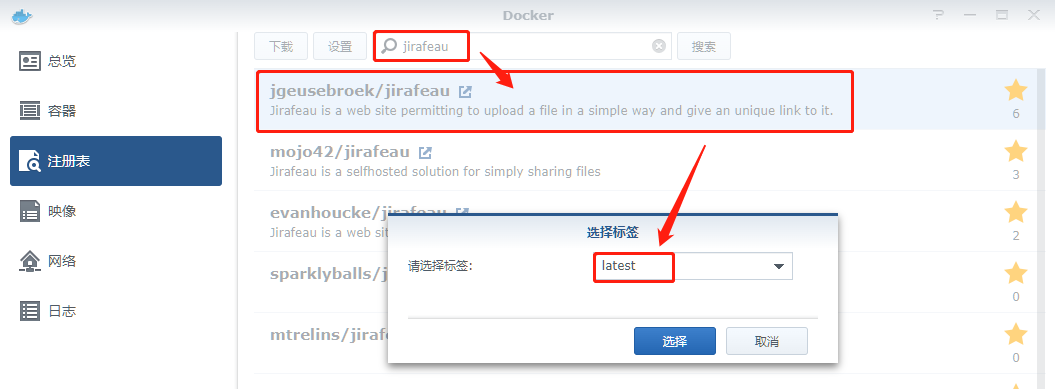
在注册表中搜索 jirafeau ,选择第一个 jgeusebroek/jirafeau,版本选择 latest。
卷
在 docker 文件夹中,创建一个新文件夹,将其命名为 jirafeau,并在其中建两个子文件夹,分别为 data 和 cfg

| 文件夹 | 装载路径 | 说明 |
|---|---|---|
docker/jirafeau/data | /data | 存放数据 |
docker/jirafeau/cfg | /cfg | 存放设置 |

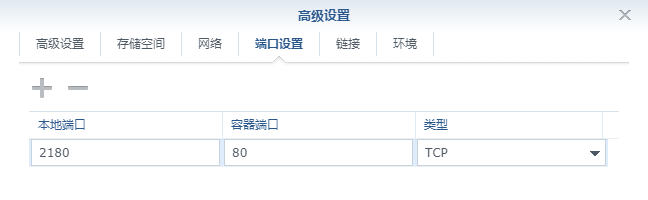
端口
本地端口不冲突就行,不确定的话可以用命令查一下
# 查看端口占用
netstat -tunlp | grep 端口号
| 本地端口 | 容器端口 |
|---|---|
2180 | 80 |
命令行安装
如果你熟悉命令行,可能用 docker cli 更快捷,老苏更喜欢命令行,搭建环境比较快捷
# 新建文件夹 jirafeau 和 子目录
mkdir -p /volume2/docker/jirafeau/{
    data,cfg}

# 进入 jirafeau 目录
cd /volume2/docker/jirafeau

# 运行容器
docker run -d \
   --restart always \
   --name jirafeau \
   -p 2180:80 \
   -v $(pwd)/data:/data \
   -v $(pwd)/cfg:/cfg \
   jgeusebroek/jirafeau

运行
在浏览器中输入 http://群晖IP:2180 就能看到设置界面,第一步设置管理密码

第二步可以不改,只是确认信息

第三步也不用改
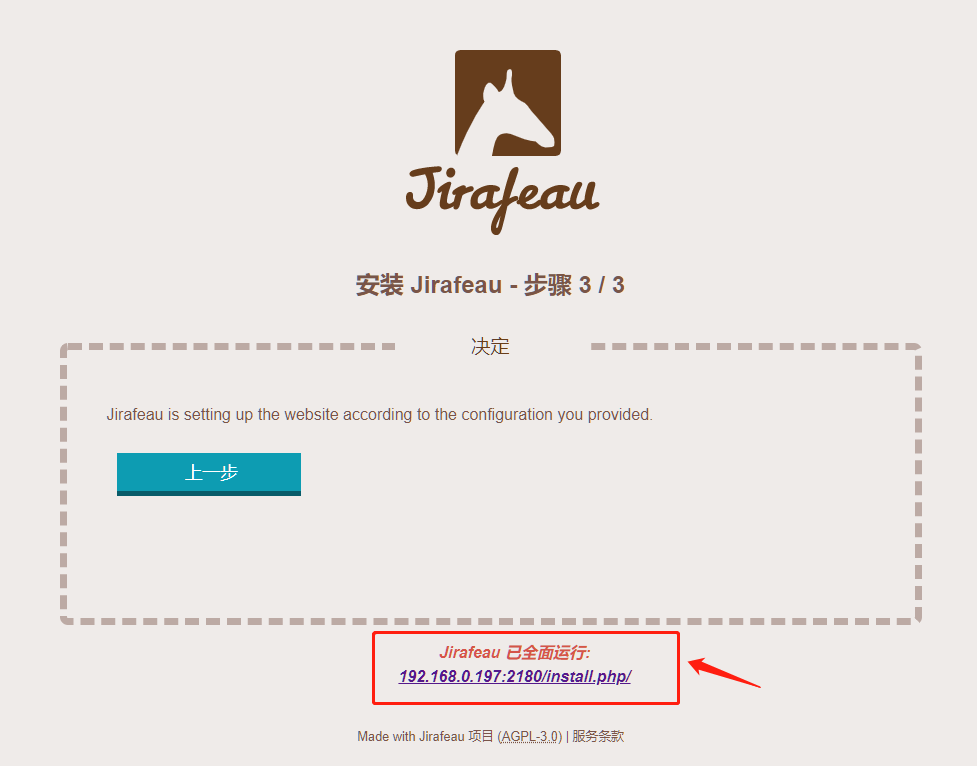
点下面的链接或者直接刷新页面即可看到主界面

选择一个文件,需要设置分享的参数

设置完成后,点 发送 开始上传文件

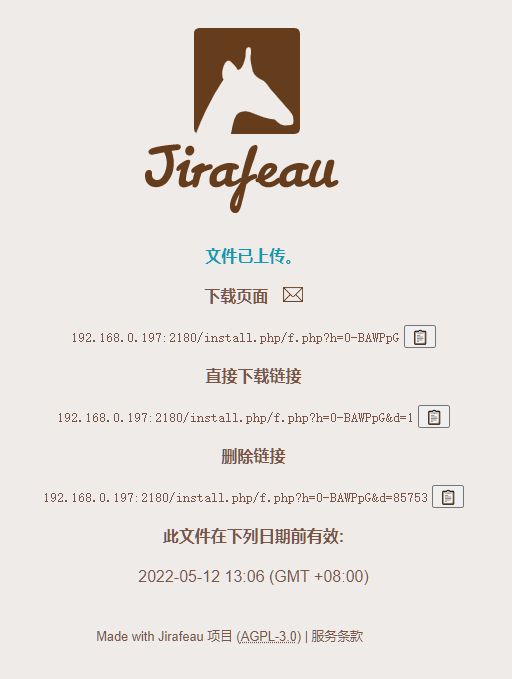
最后生成了分享的链接
反向代理
这种文件共享在家庭局域网中的意义不大,一般都是在互联网上使用,所以需要老苏需要做个反向代理

SSL 部分全勾选了,没发现有什么问题

cloudflared 隧道
测试了也可以正常使用,没有特殊设置,只需要在 config.yaml 中增加下面的示例
  - hostname: share.laosu.ml
    service: http://192.168.0.197:2180
然后去 DNS 中增加一条 CNAME 解析就可以,如果不会还不会的话,可以去看老苏写的『 免费的Cloudflared实现外网访问群晖 』
修改设置
不管你是反代还是 cloudflared 隧道 ,虽然是用域名访问,但是上传成功后的链接还是显示的局域网 IP

需要我们找到 cfg 目录下的 config.local.php 文件

找到 web_root

改为你的域名,如果有端口也要带上

再上传文件就是新的链接了

后台管理
Jirafeau 后台地址为 http://群晖IP:2180/admin.php,用之前设置的管理密码登录

可以列出所有的文件

还可以做删除文件和链接等操作

参考文档
Newlode/jirafeau
地址:https://github.com/Newlode/jirafeau
jgeusebroek/jirafeau - Docker Image | Docker Hub
地址:https://registry.hub.docker.com/r/jgeusebroek/jirafeau/
边栏推荐
- 华为7年经验的软件测试总监,给所有想转行学软件测试的同学的几个建议
- 夏日彩虹来下饭
- Analysis of typical remote sensing tasks
- Detailed description of gaussdb (DWS) complex and diverse resource load management methods
- Golang operation etcd
- 新手必须知道的 Kubernetes 架构
- The database of the server cannot be connected [the service has been started, the firewall has been closed, the port has been opened, and the netlent port is not connected]
- CLI tool foundation of ros2 robot f1tenth
- What are the software testing methods and technical knowledge points?
- R language plot visualization: plot to visualize the normalized histograms of multiple data sets, set different histograms to use different bin sizes, and add edge axis whisker graph rugs at the botto
猜你喜欢

ASP using panel to realize simple registration page

便携式4K音视频会议终端一体机带8倍数字变焦
![The inadvertently discovered [tidb cache table] can solve the read / write hotspot problem](/img/96/b1595b9d2b008b353765caa68fdd3c.png)
The inadvertently discovered [tidb cache table] can solve the read / write hotspot problem

免费将pdf转换成word的软件分享,这几个软件一定要知道!

26岁,0基础转行软件测试,从月薪3k到16k,我整理的超全学习指南

美国隧道法ASTM E84 表面阻燃测试

科大讯飞 AI 学习机暑期新品发布会 AI + 教育深度结合再创产品新高度

软件测试方法和技术知识点有哪些?

Résumé du projet de petite bibliothèque

尚硅谷实时数据仓库项目(阿里云实时数仓)
随机推荐
Use of golang gopsutil Library: process and system resource monitoring (CPU, memory, disk, etc.)
CLI tool foundation of ros2 robot f1tenth
Taro2.* applet configuration sharing wechat circle of friends
jfinal中如何使用过滤器监控Druid监听SQL执行?
Analyze apache SH script
Autodesk Revit 2023 software installation package download and installation tutorial
Grep工具
A. Print a Pedestal (Codeforces logo?)
26 years old, 0 basic career change software test, from 3K to 16K monthly salary, a super complete learning guide compiled by me
2022 openvino DevCon unveils secrets! Intel and many partners deepen the construction of developer ecology and release the innovation potential of AI industry
Taro applet enables wxml code compression
为什么要同时重写hashcode和equals方法之简单理解
如果我在珠海,到哪里开户比较好?究竟网上开户是否安全么?
C. Most Similar Words
ASP动态创建表格 Table
这次跟大家聊聊技术,也聊聊人生
Go learning (IV. interface oriented)
Layer 3 loop brought by route Summary - solution experiment
This time, I will talk about technology and life
Type of radar