当前位置:网站首页>ASP动态创建表格 Table
ASP动态创建表格 Table
2022-06-29 21:33:00 【八十八老】
新建web窗体 Table
添加Table控件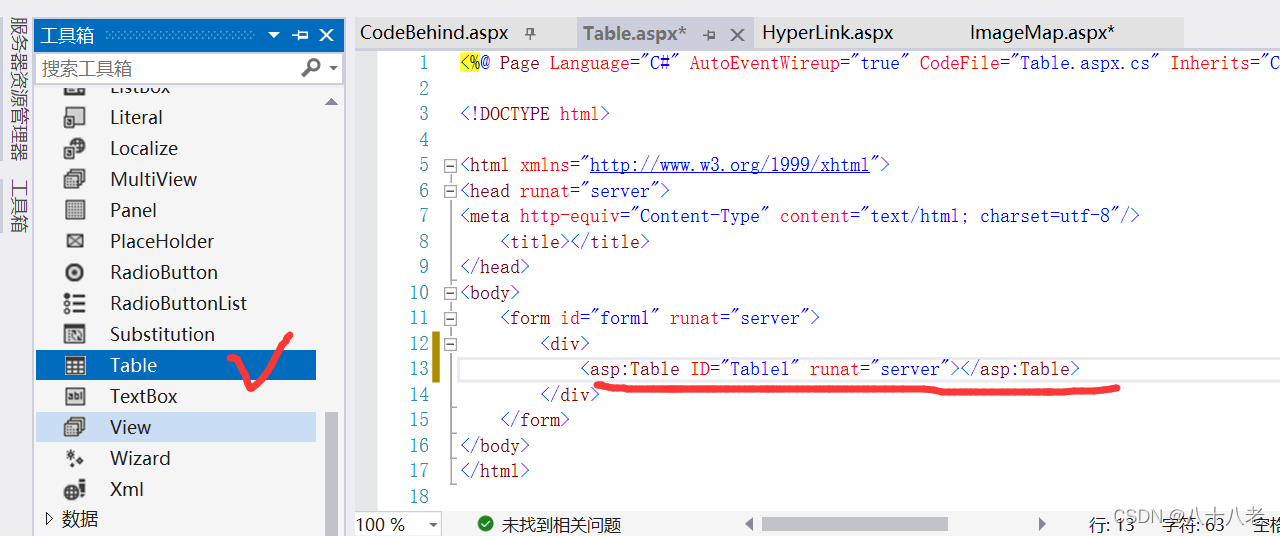
设置Table属性(向Table对象添加行使用Rows属性,向TableRow对象添加单元格使用Cells属性)

在aspx.cs中添加以下代码实现动态创建
protected void Page_Load(object sender, EventArgs e)
    {

        string[] name =  {
    "妹妹","哥哥"};
        string[] number = {
     "201924111", "201924112" };
        for (int i= 1;  i<=2; i++)
        {

            TableRow row = new TableRow();//建立一个行对象
            TableCell cellNumber = new TableCell();  //建立第一个单元格对象
            TableCell cellName = new TableCell();
            TableCell cellInput = new TableCell();
            cellNumber.Text = number[i - 1];
            cellName.Text = name[i - 1];
            TextBox txtInput = new TextBox();//建立一个文本框对象
            cellInput.Controls.Add(txtInput);//添加文本框对象到第三个单元格中
            row.Cells.Add(cellNumber);//添加第一个单元格到行对象
            row.Cells.Add(cellName);
            row.Cells.Add(cellInput);
            tblScore.Rows.Add(row);//添加行对象到表格对象
        }

    }
aspx完整代码
<%@ Page Language="C#" AutoEventWireup="true" CodeFile="Table.aspx.cs" Inherits="Chap2_Table" %>

<!DOCTYPE html>

<html xmlns="http://www.w3.org/1999/xhtml">
<head runat="server">
<meta http-equiv="Content-Type" content="text/html; charset=utf-8"/>
    <title></title>
</head>
<body>
    <form id="form1" runat="server">
        <div>
            <asp:Table ID="tblScore" runat="server">
                <asp:TableRow runat="server">
                    <asp:TableCell runat="server">学号</asp:TableCell>
                    <asp:TableCell runat="server">姓名</asp:TableCell>
                    <asp:TableCell runat="server">成绩</asp:TableCell>
                </asp:TableRow>

            </asp:Table>
        </div>
    </form>
</body>
</html>
aspx.cs完整代码
using System;
using System.Web.UI.WebControls;

public partial class Chap2_Table : System.Web.UI.Page
{

    protected void Page_Load(object sender, EventArgs e)
    {

        string[] name =  {
    "妹妹","哥哥"};
        string[] number = {
     "201924111", "201924112" };
        for (int i= 1;  i<=2; i++)
        {

            TableRow row = new TableRow();//建立一个行对象
            TableCell cellNumber = new TableCell();  //建立第一个单元格对象
            TableCell cellName = new TableCell();
            TableCell cellInput = new TableCell();
            cellNumber.Text = number[i - 1];
            cellName.Text = name[i - 1];
            TextBox txtInput = new TextBox();//建立一个文本框对象
            cellInput.Controls.Add(txtInput);//添加文本框对象到第三个单元格中
            row.Cells.Add(cellNumber);//添加第一个单元格到行对象
            row.Cells.Add(cellName);
            row.Cells.Add(cellInput);
            tblScore.Rows.Add(row);//添加行对象到表格对象


        }


    }
}
边栏推荐
- verilog实现DDS波形发生器模块,可实现频率、相位可调,三种波形
- 亚马逊商品详情API接口-(item_get-获得AMAZON商品详情接口),亚马逊详情API接口
- Houdini graphic notes: VAT (3.0) import ue4/5 setup wizard [official document translation]
- As a developer, you need to know about the codeless development platform IVX
- 阿里巴巴关键字搜索商品API接口(item_search-按关键字搜索商品接口),阿里巴巴搜索API接口
- Shell implementation of Memcache cache cache hit rate monitoring script
- Desai wisdom number - other charts (basic sunrise chart): high frequency words in graduation speech
- Which brokerage commission is the lowest and safest
- [crossbeam series] 5 crossbeam util and crossbeam queue: some practical gadgets
猜你喜欢

verilog实现串口通信发送到数码管

Win10 add SSH public key

leetcode:724. Find the central subscript of the array

A new Polaris has risen!

leetcode:238. Product of arrays other than itself

什么是 SYN 洪水攻击?如何防护?

Desai wisdom number - other charts (basic sunrise chart): high frequency words in graduation speech

Design of VHDL telephone billing system

leetcode:370. 区间加法
Win10添加ssh公钥
随机推荐
尚硅谷实时数据仓库项目(阿里云实时数仓)
Realization of graduation project topic selection system based on JSP
leetcode:724. Find the central subscript of the array
Structure the fifth operation of the actual camp module
[cloud native practice] kubesphere practice - Multi tenant system practice
铝板AS/NZS 1530.1 不燃性材料的阻燃测试
[crossbeam series] 5 crossbeam util and crossbeam queue: some practical gadgets
leetcode:724. 寻找数组的中心下标
CORDIC based Signal Processor desgn
BUAA OO unit 4 HW16 unit 4 Summary and course review
ads131a04 ADC verilog实现及仿真
Digital password lock Verilog design + simulation + on board verification
阿里巴巴商品详情API接口(item_get-获得商品详情接口),阿里巴巴API接口
Reading notes on how to connect the network - Web server request and response (V)
shell 实现Memcache缓存命中率监控脚本
每周招聘|DBA数据工程师,年薪35+ ,梦起九州,星河灿烂!
状态管理 利用Session限制页面访问 只有通过登录验证SessionLogin.aspx才能访问Session.aspx
A. Print a Pedestal (Codeforces logo?)
透过华为军团看科技之变(五):智慧园区
Yolov6 training your own data record +yolov5 comparison test