当前位置:网站首页>【Unity3D】摇杆
【Unity3D】摇杆
2022-07-26 17:12:00 【little_fat_sheep】
1 需求实现
1)需求实现
- 鼠标拖拽摇杆球控制坦克移动;
- 上下左右按键也可以控制坦克移动,并且摇杆球也同步移动;
- 鼠标右键滑动,控制坦克转向;
- 相机在玩家后上方的位置,始终跟随玩家,朝玩家正前方看;
- 单击鼠标左键控制坦克发射炮弹。
2)涉及技术栈
2 游戏对象
1)游戏界面

2)游戏对象层级结构

3)Transform组件参数
1. 玩家 Transform 组件参数
| Name | Type | Position | Rotation | Scale | Color/Texture |
|---|---|---|---|---|---|
| Player | Empty | (0, 0.25, -5) | (0, 0, 0) | (1, 1, 1) | #228439FF |
| Botton | Cube | (0, 0, 0) | (0, 0, 0) | (2, 0.5, 2) | #228439FF |
| Top | Cube | (0, 0.5, 0) | (0, 0, 0) | (1, 0.5, 1) | #228439FF |
| Gun | Cylinder | (0, 0, 1.5) | (90, 0, 0) | (0.2, 1, 0.4) | #228439FF |
| FirePoint | Empty | (0, 1.15, 0) | (0, 0, 0) | (1, 1, 1) | —— |
补充:Player 游戏对象添加了刚体组件。
2. 地面和炮弹 Transform 组件参数
| Name | Type | Position | Rotation | Scale | Color/Texture |
|---|---|---|---|---|---|
| Plane | Plane | (0, 0, 0) | (0, 0, 0) | (10, 10, 10) | GrassRockyAlbedo |
| Bullet | Sphere | (0, 0.5, -5) | (0, 0, 0) | (0.3, 0.3, 0.3) | #228439FF |
补充:炮弹作为预设体拖拽到 Assets/Resources/Prefabs 目录下,并且添加了刚体组件。
3. 摇杆 RectTransform 组件参数
| Name | Type | Width/Height | Pos | Anchors |
|---|---|---|---|---|
| Stick | Canvas | —— | —— | —— |
| Background | Image | (100, 100) | (75, 75, 0) | (0, 0), (0, 0) |
| Ball | Image | (40, 40) | (75, 75, 0) | (0, 0), (0, 0) |
3 脚本组件
1)CameraController
CameraController.cs
using UnityEngine;

public class CameraController : MonoBehaviour {
	private Transform player; // 玩家
	private Vector3 relaPlayerPos; // 相机在玩家坐标系中的位置
	private float targetDistance = 15f; // 相机看向玩家前方的位置

	private void Start() {
		relaPlayerPos = new Vector3(0, 4, -8);
		player = GameObject.Find("Player/Top").transform;
	}

	private void LateUpdate() {
		CompCameraPos();
	}

	private void CompCameraPos() { // 计算相机坐标
		Vector3 target = player.position + player.forward * targetDistance;
		transform.position = transformVecter(relaPlayerPos, player.position, player.right, player.up, player.forward);
		transform.rotation = Quaternion.LookRotation(target - transform.position);
	}

	// 求以origin为原点, locX, locY, locZ 为坐标轴的本地坐标系中的向量 vec 在世界坐标系中对应的向量
	private Vector3 transformVecter(Vector3 vec, Vector3 origin, Vector3 locX,  Vector3 locY,  Vector3 locZ) {
		return vec.x * locX + vec.y * locY + vec.z * locZ + origin;
	}
}
说明: CameraController 脚本组件挂在 MainCamera 游戏对象上。
2)PlayerController
PlayerController.cs
using System;
using UnityEngine;

public class PlayerController : MonoBehaviour {
	private Transform firePoint; // 开火点
	private GameObject bulletPrefab; // 炮弹预设体
	private StickController stick; // 摇杆控制器
	private float tankMoveSpeed = 4f; // 坦克移动速度
	private float tankRotateSpeed = 2f; // 坦克转向速度
	private Vector3 predownMousePoint; // 鼠标按下时的位置
	private Vector3 currMousePoint; // 当前鼠标位置
	private float fireWaitTime = float.MaxValue; // 距离上次开火已等待的时间
	private float bulletCoolTime = 0.15f; // 炮弹冷却时间

 	private void Start() {
		firePoint = transform.Find("Top/Gun/FirePoint");
		bulletPrefab = (GameObject) Resources.Load("Prefabs/Bullet");
		stick = GameObject.Find("Stick/Ball").GetComponent<StickController>();
	}

	private void Update() {
		Move();
		Rotate();
		Fire();
	}

	private void Move() { // 坦克移动
		float hor = Input.GetAxis("Horizontal");
        float ver = Input.GetAxis("Vertical");
		Move(hor, ver);
	}

	public void Move(float hor, float ver) { // 坦克移动
		if (Mathf.Abs(hor) > float.Epsilon || Mathf.Abs(ver) > float.Epsilon) {
			Vector3 vec = transform.forward * ver + transform.right * hor;
			GetComponent<Rigidbody>().velocity = vec * tankMoveSpeed;
			// stick.UpdateStick(new Vector3(hor, 0, ver));
			Vector3 dire = new Vector3(hor, ver, 0);
			dire =  dire.normalized * Mathf.Min(dire.magnitude, 1);
			stick.UpdateStick(dire);
		}
	}

	private void Rotate() { // 坦克旋转
		if (Input.GetMouseButtonDown(1)) {
			predownMousePoint = Input.mousePosition;
		} else if (Input.GetMouseButton(1)) {
			currMousePoint = Input.mousePosition;
			Vector3 vec = currMousePoint - predownMousePoint;
			GetComponent<Rigidbody>().angularVelocity = Vector3.up * tankRotateSpeed * vec.x;
			predownMousePoint = currMousePoint;
		}
	}

	private void Fire() { // 坦克开炮
		fireWaitTime += Time.deltaTime;
		if (Input.GetMouseButtonDown(0) && !IsMouseInUIArea() || Input.GetKeyDown(KeyCode.Space)) {
			if (fireWaitTime > bulletCoolTime) {
				BulletInfo bulletInfo = new BulletInfo("PlayerBullet", Color.red, transform.forward, 10f, 15f);
				GameObject bullet = Instantiate(bulletPrefab, firePoint.position, Quaternion.identity);
				bullet.AddComponent<BulletController>().SetBulletInfo(bulletInfo);
				fireWaitTime = 0f;
			}
		}
	}

	private bool IsMouseInUIArea() { // 鼠标在UI控件区域
		Vector3 pos = Input.mousePosition;
		return pos.x < 150 && pos.y < 150;
	}
}
说明: PlayerController 脚本组件挂在 Player 游戏对象上。
3)StickController
StickController.cs
using UnityEngine;
using UnityEngine.UI;
using UnityEngine.EventSystems;

public class StickController : MonoBehaviour, IDragHandler, IEndDragHandler {
	private Vector3 originPos; // 鼠标开始拖拽时位置
	private Vector3 currPos; // 鼠标当前位置
	private float radius; // 遥杆半径
	private PlayerController player; // 玩家控制器
	private Vector3 dire = Vector3.zero; // 摇杆球的方位

	private void Start () {
		originPos = transform.position;
		radius = 50;
		player = GameObject.Find("Player").GetComponent<PlayerController>();
	}

	private void Update () {
		player.Move(dire.x, dire.y);
	}

	public void OnDrag(PointerEventData eventData) {
		Vector3 vec = Input.mousePosition - originPos;
		dire = vec.normalized * Mathf.Min(vec.magnitude / radius, 1);
		UpdateStick(dire);
	}

	public void OnEndDrag(PointerEventData eventData) {
		transform.position = originPos;
		dire = Vector3.zero;
	}

	public void UpdateStick(Vector3 dire) { // 更新摇杆位置
		transform.position = originPos + dire * radius;
	}
}
说明: StickController 脚本组件挂在 Ball 游戏对象上。
4)BulletController
BulletController.cs
using UnityEngine;
using UnityEngine.UI;

public class BulletController : MonoBehaviour {
	private BulletInfo bulletInfo; // 炮弹信息

	private void Start () {
		gameObject.name = bulletInfo.name;
		GetComponent<MeshRenderer>().material.color = bulletInfo.color;
		float lifeTime = bulletInfo.fireRange / bulletInfo.speed; // 存活时间
		Destroy(gameObject, lifeTime);
	}

	private void Update () {
		transform.GetComponent<Rigidbody>().velocity = bulletInfo.flyDir * bulletInfo.speed;
	}

	public void SetBulletInfo(BulletInfo bulletInfo) {
		this.bulletInfo = bulletInfo;
	}
}
说明: BulletController 脚本组件挂在 Bullet 游戏对象上(代码里动态添加)。
5)BulletInfo
BulletInfo.cs
using UnityEngine;

public class BulletInfo {
	public string name; // 炮弹名
	public Color color; // 炮弹颜色
	public Vector3 flyDir; // 炮弹飞出方向
	public float speed; // 炮弹飞行速度
	public float fireRange; // 炮弹射程

	public BulletInfo(string name, Color color, Vector3 flyDir, float speed, float fireRange) {
		this.name = name;
		this.color = color;
		this.flyDir = flyDir;
		this.speed = speed;
		this.fireRange = fireRange;
	}
}
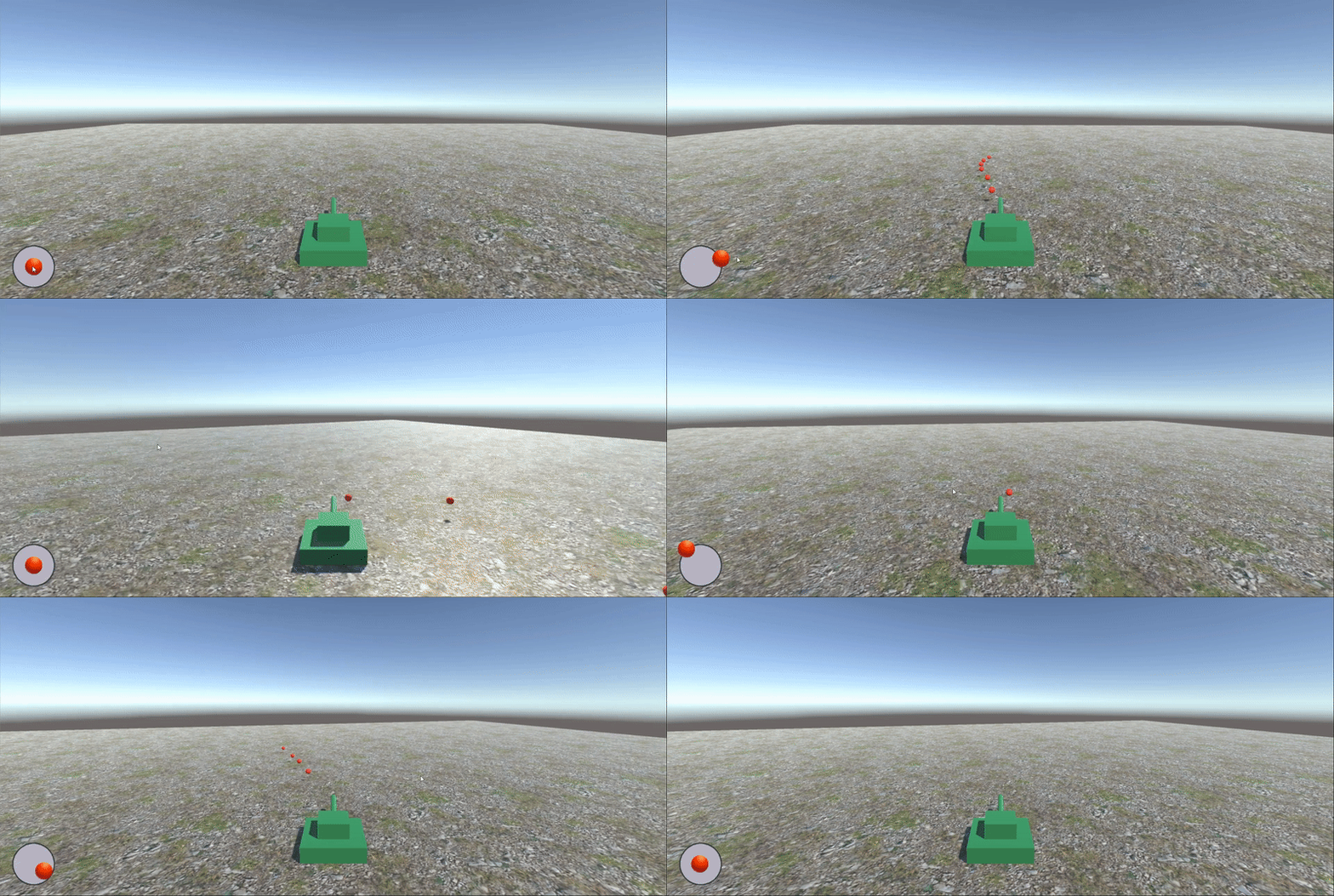
4 运行效果
边栏推荐
猜你喜欢

【集训Day3】Reconstruction of roads
Three ways of de duplication in SQL

JS recursive Fibonacci sequence deep cloning
![[cloud native] IVX low code development was introduced into Tencent map and previewed online](/img/f1/40ca06bf65fbc0097f5b61ec7d2509.png)
[cloud native] IVX low code development was introduced into Tencent map and previewed online
来吧开发者!不只为了 20 万奖金,试试用最好的“积木”来一场头脑风暴吧!

Asemi rectifier bridge kbpc2510, kbpc2510 parameters, kbpc2510 specifications

Coscon'22 city / school / institution producer solicitation order

重磅!《2022中国开源发展蓝皮书》正式发布

JS closure simulates private variable interview questions and immediately executes function Iife

Spark unified memory partition
随机推荐
兆骑科创海外高层次人才引进平台,创业赛事活动路演
【静态代码质量分析工具】上海道宁为您带来SonarSource/SonarQube下载、试用、教程
重磅!《2022中国开源发展蓝皮书》正式发布
DTS is equipped with a new self-developed kernel, which breaks through the key technology of the three center architecture of the two places Tencent cloud database
Win10 连接无线不能输入密码字符,一输入就卡死
我要开中信的证券账户找渠道的经理开安全吗?
CentOS installs docker and MySQL and redis environments
ACL实验演示(Huawei路由器设备配置)
AI zhetianchuan DL regression and classification
Familiarize you with the "phone book" of cloud network: DNS
Just this time! Talk about the technical solutions of distributed system in detail
236. The nearest common ancestor of a binary tree
《敏捷宣言》四大价值观,十二大原则
URL跳转漏洞
[metauniverse OMI theory] analyze Web3 risk challenges and build Web3 ecological security
Common APIs
跨站脚本攻击(XSS)
【集训Day1】 Dwarves line up
【欧米读书会】谈谈元宇宙中的创作者经济:无限次元
JS 递归 斐波那契数列 深克隆